
Introduction
Thank you for choosing the HERTZ DBA 201 Active Subwoofer. This manual provides essential information for the correct installation, operation, and maintenance of your new car audio component. Please read this manual thoroughly before attempting installation or use to ensure optimal performance and safety.
Important Safety Information:
- Always disconnect the vehicle's battery negative terminal before starting any electrical work.
- Ensure all wiring is properly insulated and secured to prevent short circuits and damage.
- Consult a professional installer if you are unsure about any part of the installation process.
- Do not expose the unit to moisture or extreme temperatures.
- Operate the subwoofer within its specified power limits to prevent damage.

Image: The HERTZ DBA 201 active subwoofer.
What's in the Box
Verify that all components are present before beginning installation:
- HERTZ DBA 201 Active Subwoofer Unit
- Remote Level Control
- Wiring Harness (Power, Ground, Remote, High-Level Input)
- RCA Input Cable
- Mounting Hardware
- User Manual (this document)

Image: Included accessories for the DBA 201, showing the remote control and various wiring harnesses.
Key Features
- High Performance: Delivers powerful bass in a compact design.
- Dual Passive Radiators: Enhances bass response and efficiency.
- Built-in Class D Amplifier: Compact, powerful, efficient, and low power consumption.
- HE-LI Technology: Ensures low impedance for optimal performance.
- Remote Level Control: Allows for convenient volume adjustment from the driver's seat.
- Auto Sense Circuit: Automatically turns the unit on and off with the audio signal.
- Universal Compatibility: Designed to work with various car audio systems.
- Plug & Play Installation: Facilitates quick and removable setup.

Image: Internal components of the DBA 201, illustrating the integrated amplifier and passive radiators.
Technical Specifications
| Feature | Detail |
|---|---|
| Model Number | DBA-201 |
| Speaker Maximum Output Power | 440 Watts (Peak) |
| Program Power (RMS) | 220 Watts |
| Subwoofer Diameter | 8 Inches (200 mm) |
| Connectivity Technology | Wired |
| Audio Output Mode | Stereo, Surround |
| Enclosure Material | Wood |
| Controller Type | Remote Control |
| Item Dimensions (D x W x H) | 11.46"D x 10.39"W x 12.42"H (291mm D x 264mm W x 315.5mm H) |
| Power Source | Corded Electric (Vehicle 12V) |

Image: Power specifications for the DBA 201.
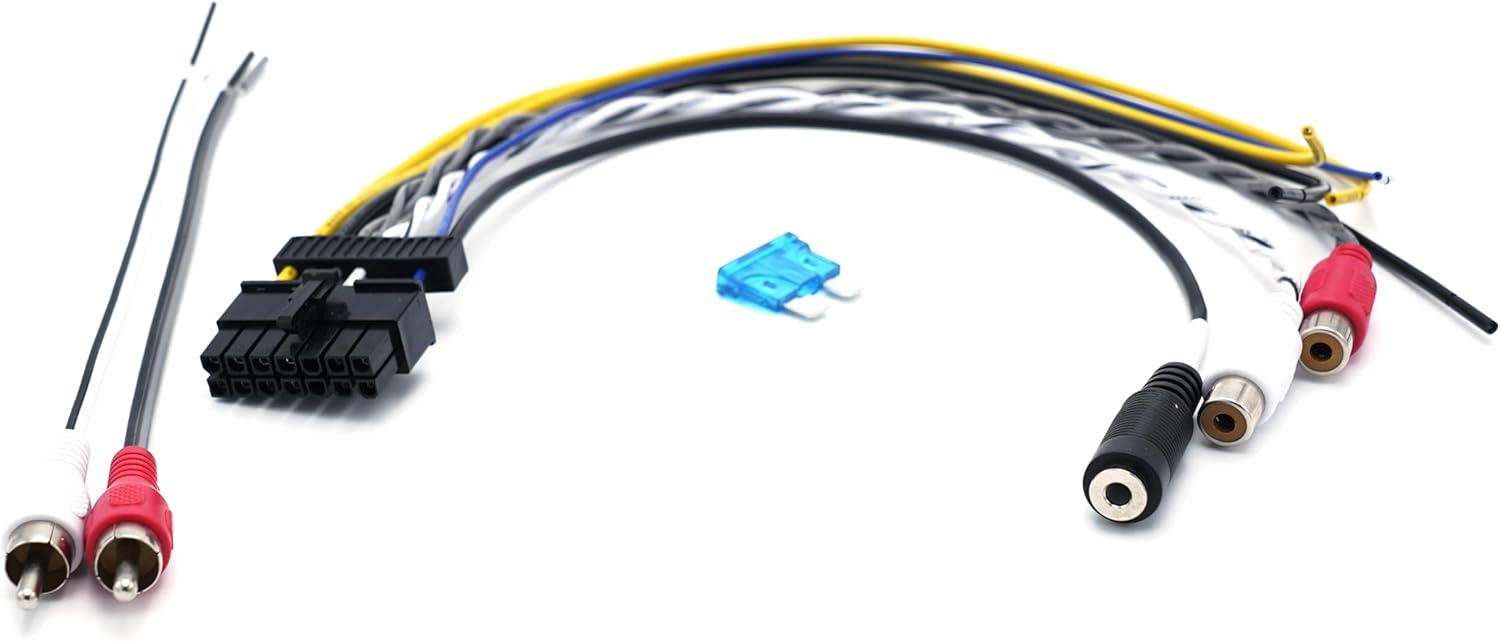
Image: Dimensional drawing of the DBA 201, with measurements A, B, and C.
Installation Guide
Proper installation is crucial for the performance and longevity of your HERTZ DBA 201 subwoofer. Follow these steps carefully:
- Choose a Mounting Location: Select a secure, dry location in your vehicle, such as the trunk or under a seat, that allows for adequate ventilation and does not obstruct vehicle operation. Ensure the subwoofer is firmly mounted to prevent movement during driving.
- Disconnect Battery: Before making any electrical connections, disconnect the negative (-) terminal of your vehicle's battery to prevent short circuits.
- Power Wiring:
- Connect the main power wire (typically red) from the subwoofer's wiring harness to the positive (+) terminal of the vehicle's battery. Use an appropriate fuse holder (included) as close to the battery as possible.
- Connect the ground wire (typically black) from the subwoofer's wiring harness to a clean, unpainted metal surface on the vehicle's chassis. Ensure a good electrical connection.
- Connect the remote turn-on wire (typically blue or yellow) to the remote output of your car stereo. If your stereo does not have a remote output, you can use the "Auto Sense" feature (see Operating section).
- Audio Signal Input:
- RCA (Low-Level) Input: If your car stereo has RCA pre-outs, connect them to the RCA input jacks on the DBA 201 using the provided RCA cable.
- High-Level Input: If your car stereo does not have RCA pre-outs, use the high-level input wires from the wiring harness. Connect these wires directly to your car stereo's speaker outputs (e.g., rear left and right speaker wires). Ensure correct polarity.
- Remote Level Control Installation: Mount the remote level control in a convenient location within reach of the driver. Connect its cable to the "REMOTE CONTROL" port on the subwoofer.
- Secure Wiring: Route all wires safely away from moving parts, sharp edges, and heat sources. Use cable ties or clips to secure them.
- Reconnect Battery: Once all connections are made and secured, reconnect the negative (-) terminal of the vehicle's battery.

Image: Rear panel connections and controls of the DBA 201.
Operation and Adjustments
After installation, fine-tune your DBA 201 for optimal sound performance using the controls located on the rear panel and the remote level control.
- GAIN Control: Adjusts the input sensitivity of the subwoofer. Start with the gain at minimum and slowly increase it until the subwoofer output matches the rest of your audio system without distortion.
- LO-PASS Filter: This control sets the upper frequency limit for the subwoofer. Adjust it to blend smoothly with your main speakers. A common starting point is between 80Hz and 100Hz.
- BASS BOOST: Provides an adjustable bass equalization at a specific frequency. Use sparingly to avoid distortion.
- PHASE (0°/180°): Adjusts the phase of the subwoofer output relative to your main speakers. Experiment with both settings to find the one that provides the most impactful and coherent bass response.
- AUTO TURN ON (REM/DC/AUDIO):
- REM: Uses the remote turn-on wire from your head unit.
- DC: Detects a DC offset on the high-level input to turn on the subwoofer.
- AUDIO: Detects an audio signal on the high-level input to turn on the subwoofer.
- Remote Level Control: This knob allows you to conveniently adjust the subwoofer's output level from your listening position without accessing the main unit.

Image: Remote level control for the DBA 201.
Maintenance
The HERTZ DBA 201 is designed for reliable performance with minimal maintenance. Follow these guidelines to ensure its longevity:
- Cleaning: Use a soft, dry cloth to wipe the exterior of the subwoofer. Do not use harsh chemicals, solvents, or abrasive cleaners.
- Ventilation: Ensure that the subwoofer's ventilation areas are not blocked. Adequate airflow prevents overheating.
- Connections: Periodically check all wiring connections to ensure they are secure and free from corrosion.
- Environment: Avoid exposing the subwoofer to direct sunlight, extreme heat, or moisture for extended periods.
Troubleshooting Guide
If you experience issues with your HERTZ DBA 201, refer to the following common problems and solutions:
| Problem | Possible Cause | Solution |
|---|---|---|
| No Sound from Subwoofer |
|
|
| Distorted Sound |
|
|
| Weak Bass Output |
|
|
| Subwoofer Overheats |
|
|
Warranty Information
The HERTZ DBA 201 Active Subwoofer is covered by a 1-Year Manufacturer Warranty from the date of purchase. This warranty covers defects in materials and workmanship under normal use. It does not cover damage caused by improper installation, accident, misuse, abuse, negligence, unauthorized modification, or normal wear and tear.
To make a warranty claim, please retain your proof of purchase and contact your authorized HERTZ dealer or customer support.
Customer Support
For further assistance, technical support, or service inquiries regarding your HERTZ DBA 201 Active Subwoofer, please contact:
- HERTZ Official Website: www.hertz-audio.com
- Authorized HERTZ Dealer: Refer to your purchase documentation for local dealer contact information.
- Email Support: support@hertz-audio.com
When contacting support, please have your product model (DBA-201) and serial number ready.


