
SONGMICS LSD134B01
SONGMICS Height-Adjustable Electric Desk Instruction Manual
Model: LSD134B01 (ASIN: B0CV4VM2TR)
Brand: SONGMICS
1. Product Overview
The SONGMICS Electric Height-Adjustable Desk is designed to promote a healthier work environment by allowing seamless transitions between sitting and standing positions. This desk features a robust electric motor for smooth height adjustments, a spacious tabletop, and convenient organizational accessories. Its modern design integrates well into various office or home study settings.

Image: The SONGMICS electric height-adjustable desk, showcasing its spacious surface and modern design suitable for a multi-monitor setup.
2. Key Features
- Healthy Posture Promotion: This desk is height-adjustable between 72 cm and 120 cm, facilitating easy transitions between sitting and standing.
- Memory Function: Store up to 4 preferred heights for quick and convenient adjustment.
- Stable and Quiet Operation: Equipped with a high-quality steel frame and motor, ensuring smooth height adjustment even under a load of up to 70 kg. The operating noise level is less than 48 dB.
- Integrated Cable Management: Features two cable holes for organized cable routing.
- Convenient Storage: Includes a stylish fabric organizer for small items and a large hook for bags or headphones.
- Sleek Design: Simple design and clean lines offer a modern aesthetic.
- Ample Workspace: The 140 x 60 cm tabletop provides sufficient space for work or study.
- Easy Assembly: Designed for straightforward assembly with detailed instructions and labeled parts.

Image: Technical diagram illustrating the desk's dimensions (140x60 cm tabletop, 72-120 cm height range) and its maximum static load capacity of 70 kg.
3. Setup and Assembly
The SONGMICS electric desk is designed for easy and efficient assembly. All necessary parts are labeled, and a detailed instruction manual is included in the packaging to guide you through each step. It is recommended to follow the instructions carefully to ensure proper functionality and stability.
Assembly Tips:
- Unpack all components and verify against the parts list provided in the manual.
- Assemble the frame on a soft, clean surface to prevent scratches.
- Do not fully tighten all screws until the entire frame is assembled, then tighten them securely.
- Ensure all electrical connections are made correctly before powering on the desk.
4. Operating Instructions
The desk's control panel allows for easy height adjustment and saving preferred settings.
Height Adjustment:
- Use the Up (▲) and Down (▼) arrows on the control panel to adjust the desk height. The current height will be displayed on the LED screen.
- The desk can be adjusted from a minimum height of 72 cm to a maximum height of 120 cm.
Memory Function:
- To save a preferred height: Adjust the desk to the desired height. Press the "M" button, then press one of the numbered memory buttons (M1, M2, M3, M4) within 3 seconds. The height is now saved to that preset.
- To recall a saved height: Simply press the corresponding memory button (M1, M2, M3, M4). The desk will automatically move to the saved position.
Anti-Collision Feature:
The desk is equipped with an anti-collision mechanism. If the tabletop encounters an obstacle during adjustment, it will stop and retract slightly to prevent damage. This feature is activated when the tabletop meets resistance.
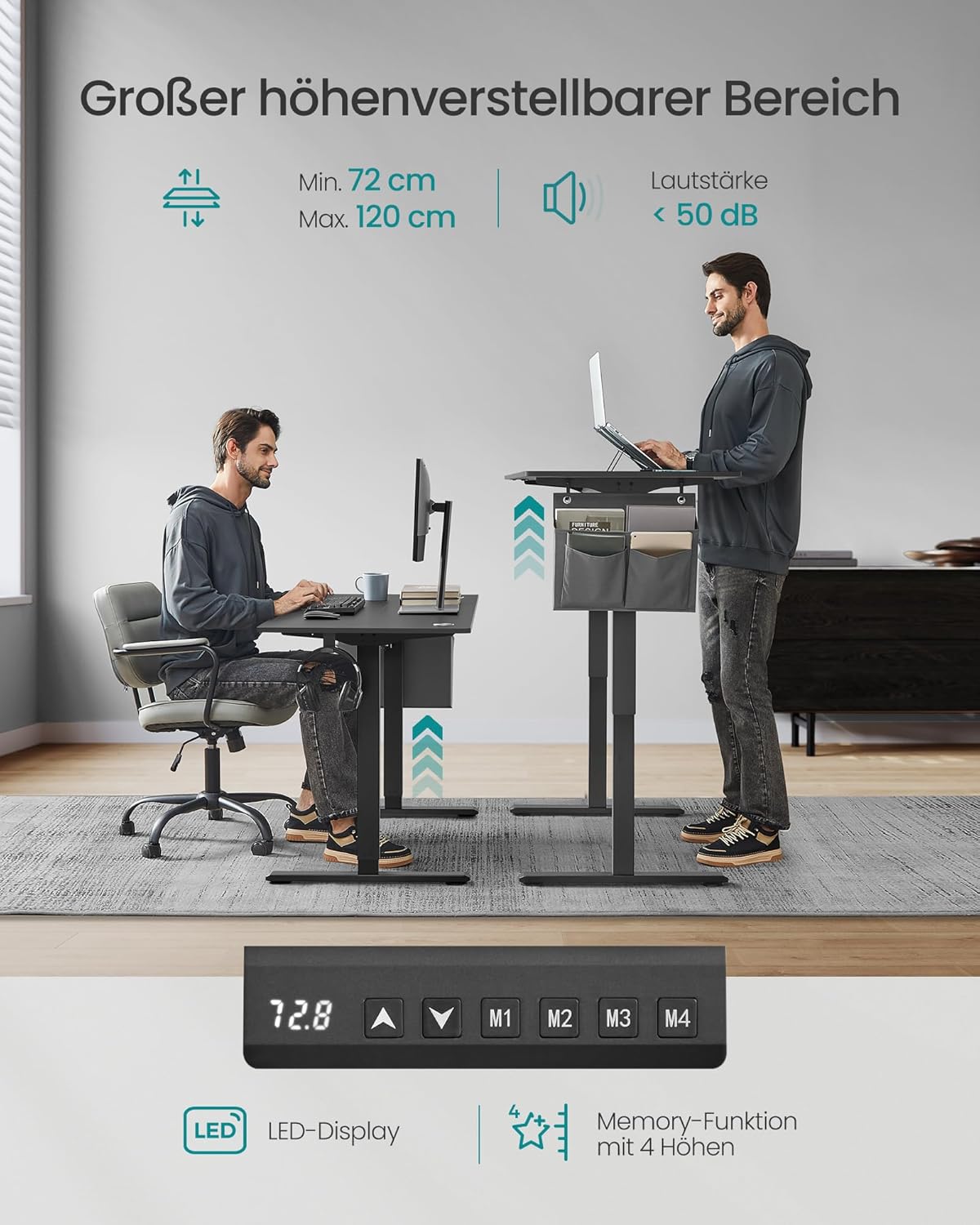
Image: Illustration of the desk's height adjustment range and the control panel with LED display and memory functions.
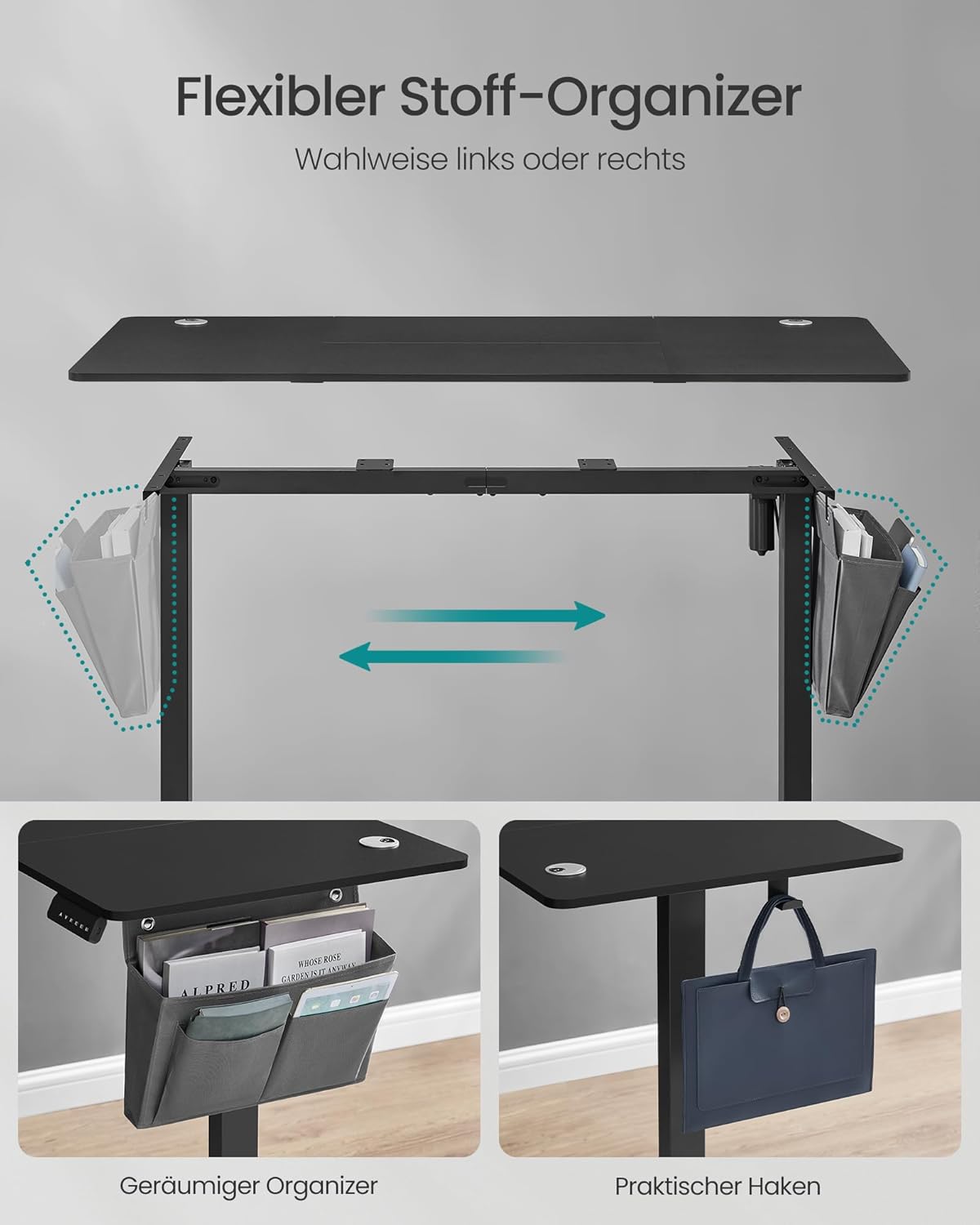
Image: Details of the flexible fabric organizer, which can be attached to either side of the desk, and the practical hook for accessories.

Image: Visual demonstration of the 4-height memory function, allowing users to quickly switch between various comfortable working positions.
5. Maintenance
To ensure the longevity and optimal performance of your SONGMICS electric desk, follow these simple maintenance guidelines:
- Cleaning: Wipe the tabletop and frame with a soft, damp cloth. Avoid using harsh chemicals or abrasive cleaners, which can damage the surface.
- Cable Management: Periodically check that all cables are neatly organized and not pinched or tangled, especially around moving parts.
- Motor Care: The electric motor is designed for maintenance-free operation. Avoid disassembling the motor unit.
- Weight Limit: Do not exceed the maximum static load capacity of 70 kg to prevent damage to the motor and frame.
6. Troubleshooting
If you encounter any issues with your desk, please refer to the following common troubleshooting steps:
| Problem | Possible Cause | Solution |
|---|---|---|
| Desk does not move. | Power cable disconnected; motor overload; control panel issue. | Check power connection. Unplug and replug the power cable. Reduce load on the desk. Contact customer support if the issue persists. |
| Desk moves unevenly or makes unusual noise. | Uneven load; loose connections; obstruction. | Distribute weight evenly. Check all screws and connections for tightness. Ensure no objects are obstructing the lifting mechanism. |
| Memory function not working. | Incorrect saving procedure; temporary glitch. | Re-save the desired height following the instructions in Section 4. Power cycle the desk by unplugging it for 30 seconds and plugging it back in. |
| Anti-collision feature triggers too easily or not at all. | Sensor sensitivity; obstruction. | Ensure no objects are near the desk's path. If sensitivity is an issue, consult the full product manual or contact support. |
If these steps do not resolve the issue, please contact SONGMICS customer support for further assistance.
7. Specifications
| Attribute | Detail |
|---|---|
| Brand | SONGMICS |
| Model Number | LSD134B01 |
| Color | Ink Black |
| Product Dimensions | 140 x 60 x 72-120 cm (L x W x H) |
| Material | Engineered Wood (Tabletop), Alloy Steel (Base) |
| Item Weight | 23.9 Kilograms |
| Max. Static Load Capacity | 70 kg |
| Noise Level | Less than 48 dB |
| Height Adjustment Range | 72 cm to 120 cm |
| Memory Presets | 4 |
8. Warranty and Support
SONGMICS stands behind the quality of its products. For information regarding warranty coverage, returns, or technical support, please refer to the official SONGMICS website or contact their customer service directly. Keep your purchase receipt as proof of purchase for any warranty claims.
For further assistance, you may visit the SONGMICS Store on Amazon.
Ask a question about this manual
Ask about setup, troubleshooting, compatibility, parts, safety, or missing instructions. Manuals+ will review the question and use this page’s manual context to help answer it.