
1. Introduction
Thank you for choosing the LCF 0.01µm Ultra-Filtration Under Sink Water Filter System. This advanced 3-stage system, featuring an alkaline mineral pH+ water purifier and an LED UV-C faucet, is designed to provide safe, clean, and healthy drinking water by reducing a wide range of contaminants. This manual provides detailed instructions for proper installation, operation, and maintenance to ensure optimal performance and longevity of your water filtration system.

Image 1.1: LCF Under Sink Water Filter System with its main unit and UV-C dispensing faucet.
2. Safety Information
- Read all instructions carefully before installation and operation.
- Ensure the water supply is turned off before beginning installation or maintenance.
- Do not use with water that is microbiologically unsafe or of unknown quality without adequate disinfection before or after the system.
- The UV-C LED in the faucet is designed for water sterilization. Do not look directly into the UV-C light when activated.
- This system is designed for cold water use only. Do not connect to a hot water supply.
- Maintain appropriate water pressure (refer to specifications). Exceeding maximum pressure may damage the system.
- Keep the system away from direct sunlight and heat sources.
- Dispose of used filters according to local regulations.
3. Package Contents
Verify that all components are present before starting installation:
- LCF Under Sink Water Filter Main Unit
- LED UV-C Faucet (SUS304)
- PPC Filter Cartridge (Pre-installed or separate)
- CTO Filter Cartridge (Pre-installed or separate)
- UF Filter Cartridge (Pre-installed or separate)
- Water Inlet Adapter (1/2-inch and 3/8-inch compatible)
- Water Tubing
- Faucet Mounting Hardware
- Power Adapter for UV-C Faucet
- 2 AAA Batteries (for filter life reminder)
- User Manual (this document)
- Teflon Tape
- Filter Wrench (if applicable for initial tightening)
4. Product Overview
The LCF Under Sink Water Filter System combines advanced filtration technologies to deliver high-quality drinking water. It features a compact main unit and a dedicated UV-C dispensing faucet.
4.1. Key Features
- 0.01µm Ultra-Filtration: Removes microplastics, bacteria, and other fine particles.
- 3-Stage Filtration: Comprehensive removal of chlorine, PFAS, heavy metals, and odors.
- Alkaline Mineral pH+ Boost: Enriches water with essential minerals like Calcium, Magnesium, and Potassium, and balances pH.
- LED UV-C Faucet: Provides real-time sterilization, eliminating 99.9% of bacteria and viruses.
- Smart Filter Life Reminder: Indicates when filters need replacement for consistent performance.
- Tool-Free Filter Replacement: Simplifies maintenance with a twist-and-pull design.

Image 4.1: Overview of the system's core technologies: pH+ Alkaline Boost, UV-C LED Faucet, and 0.01µm Ultra Filtration.
4.2. Filtration Stages
- PPC Filter (PP Cotton and Activated Carbon Composite Filter): Reduces rust, sediment, microplastics, chlorine, bad taste, and odor.
- CTO Filter (Alkaline Mineralized Activated Carbon Block Filter): Reduces chloramines, lead, mercury, asbestos, cysts, PFOS/PFAS, VOCs, and adds beneficial alkaline minerals.
- UF Filter (Ultra-Filtration Membrane): Removes bacteria, viruses, heavy metals, chlorine, and other harmful contaminants down to 0.01µm.
- UV-C Faucet: The final stage of purification, killing 99.9% of bacteria and viruses in real-time as water flows through the faucet.

Image 4.2: Detailed view of the multi-stage filtration process, including the UV-C faucet.
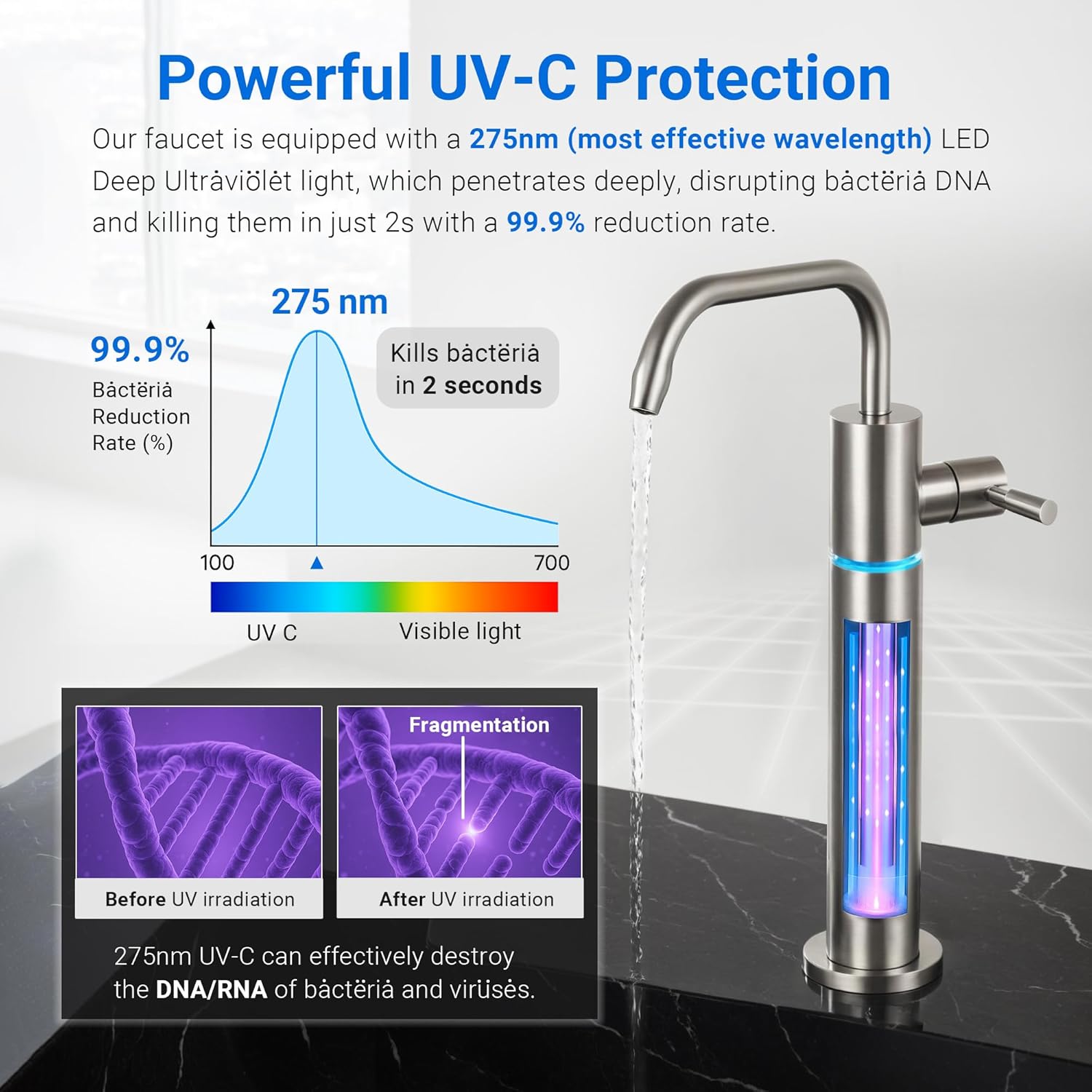
Image 4.3: Illustration of the powerful UV-C protection, demonstrating its effectiveness in disrupting bacterial DNA.
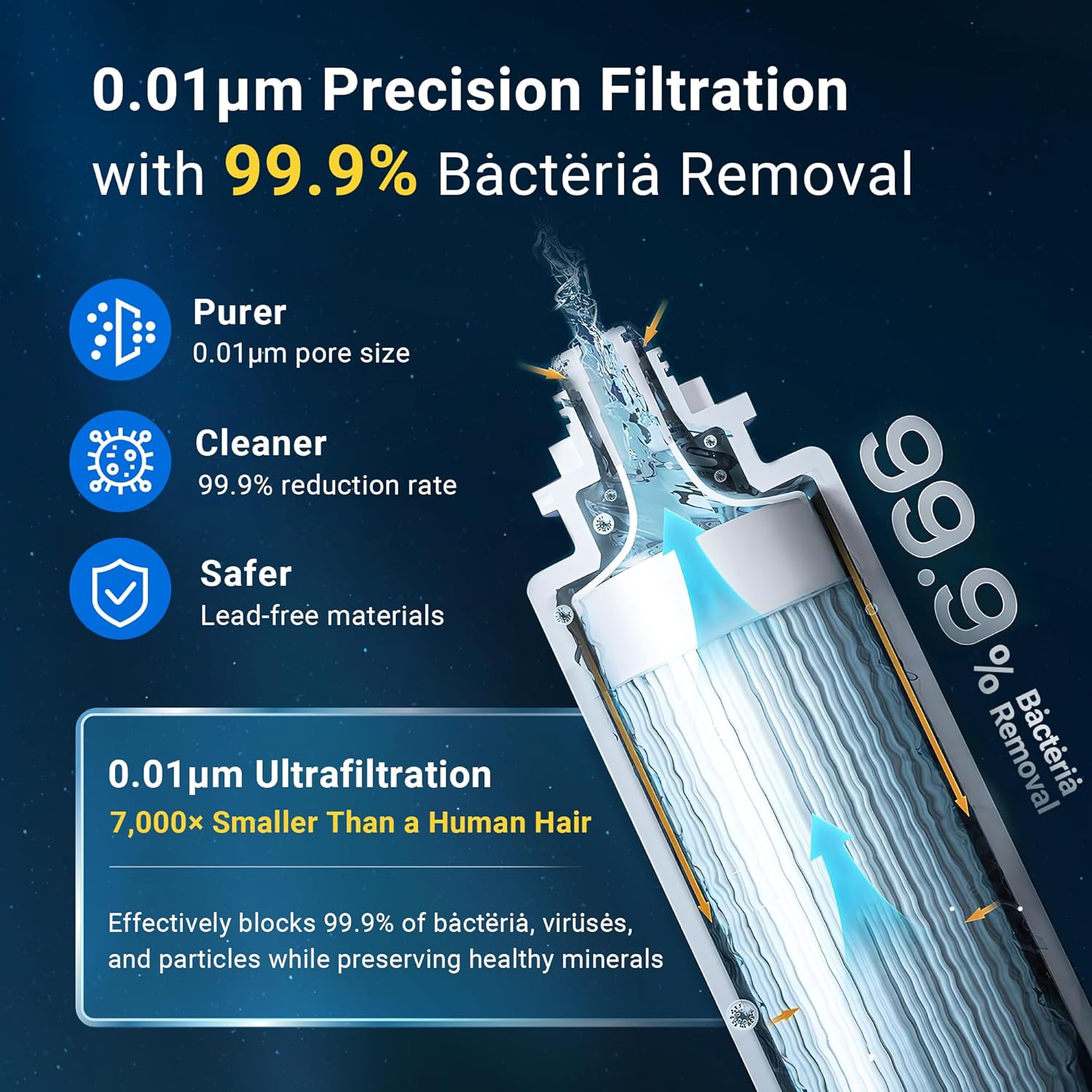
Image 4.4: Visual representation of the 0.01µm precision filtration, showing how it blocks contaminants while preserving minerals.
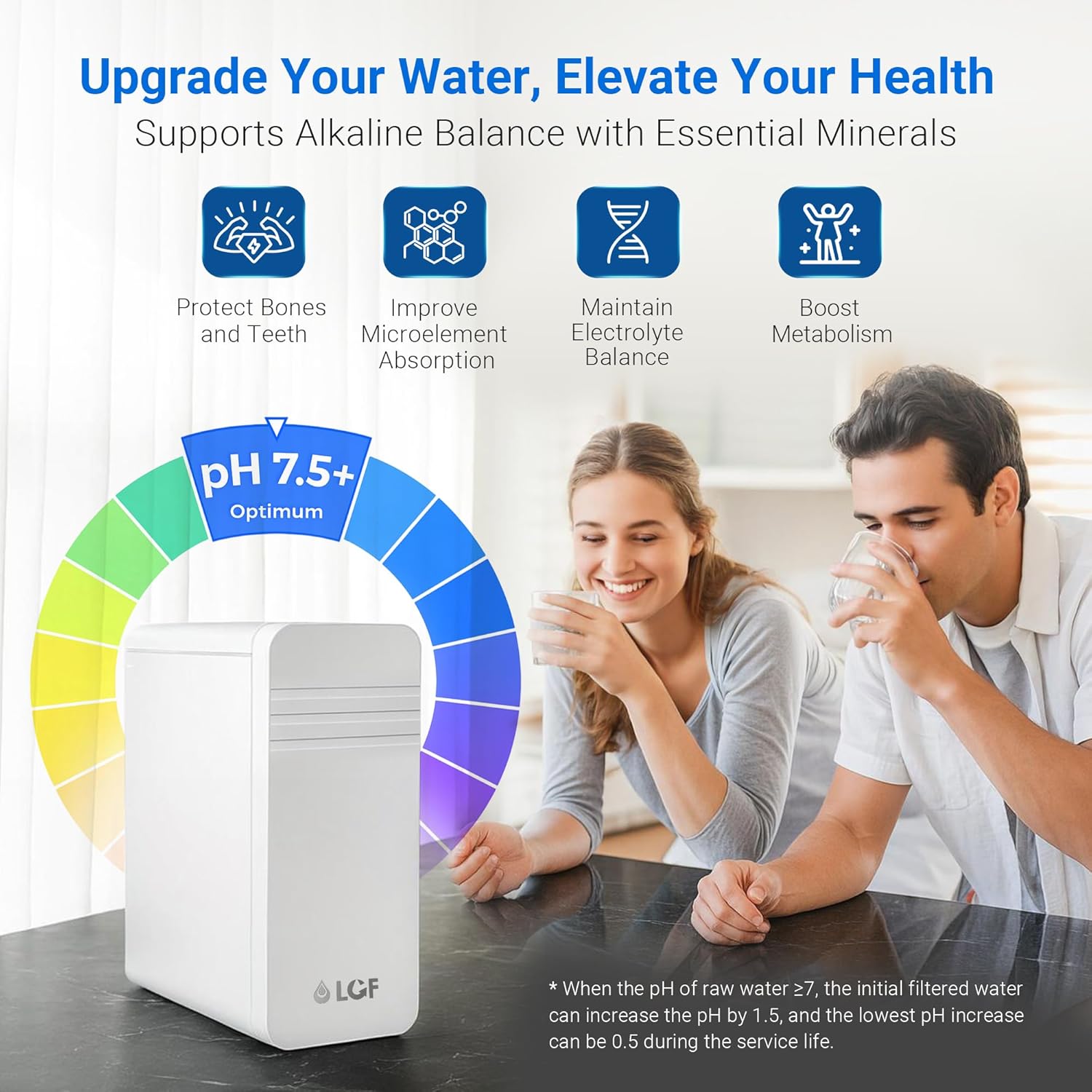
Image 4.5: Benefits of alkaline water with essential minerals, supporting overall health and hydration.
5. Installation Guide
This system is designed for easy under-sink installation. No professional plumber is typically required. Ensure you have basic tools like a drill (if needed), adjustable wrench, and a bucket.
5.1. Pre-Installation Checklist
- Confirm all package contents are present.
- Identify a suitable location under your sink for the main unit, ensuring enough space for filter changes.
- Locate a power outlet for the UV-C faucet.
- Ensure your sink has an existing hole (e.g., for a soap dispenser) or is suitable for drilling a 1-inch hole for the faucet.
5.2. Step-by-Step Installation
- Turn off Water Supply: Locate the cold water shut-off valve under your sink and turn it off. Open your kitchen faucet to relieve pressure.
- Install Faucet:
- If no existing hole, drill a 1-inch (25mm) hole in your countertop or sink.
- Insert the UV-C faucet stem through the hole.
- Secure the faucet from underneath the sink using the provided washer and nut.

Image 5.1: Faucet installation, illustrating the necessary 1-inch hole for mounting.
- Connect Water Inlet:
- Disconnect the cold water line from your existing faucet.
- Install the provided water inlet adapter (T-valve) to the cold water supply line. Use Teflon tape on threaded connections to prevent leaks.
- Reconnect your existing faucet's cold water line to the adapter.
- Connect one end of the water tubing to the adapter's filtered water outlet.
- Connect to Main Unit:
- Connect the other end of the water tubing from the inlet adapter to the "IN" port on the LCF main unit.
- Connect another piece of water tubing from the "OUT" port on the LCF main unit to the inlet on the UV-C faucet.
- Install Filters: Ensure the PPC, CTO, and UF filters are correctly inserted into their respective slots in the main unit. They are typically labeled. Twist and pull to secure or remove.
- Power Connection:
- Insert the 2 AAA batteries into the battery compartment for the filter life reminder.
- Connect the power adapter to the UV-C faucet and plug it into a standard electrical outlet.
- Restore Water Supply & Check for Leaks: Slowly turn on the cold water supply valve. Check all connections for leaks. Tighten any leaking connections.
- Flush the System: Open the LCF UV-C faucet and let water run for at least 10-15 minutes to flush out air and carbon fines. The water may appear cloudy initially; this is normal.
6. Operating Instructions
Using your LCF water filter system is straightforward.
6.1. Dispensing Filtered Water
- To dispense filtered water, simply turn the handle on the UV-C faucet.
- The UV-C LED light will automatically activate when water flows, providing real-time sterilization.
- The system delivers water at a flow rate of up to 2 liters per minute (approximately 800 GPD).

Image 6.1: Real-time UV-C sterilization in action as water is dispensed from the faucet.
6.2. Smart Filter Life Reminder
- The main unit features LED indicators for each filter (PPC, UF, CTO) and a reset button.
- These indicators will alert you when it's time to replace a filter cartridge. Refer to the "Maintenance" section for specific filter lifespans and replacement procedures.
7. Maintenance
Regular maintenance, particularly filter replacement, is crucial for the continued performance and safety of your LCF water filter system.
7.1. Filter Replacement Schedule
| Filter Type | Recommended Replacement Interval |
|---|---|
| PPC Filter | Every 6 months |
| CTO Filter | Every 12 months |
| UF Filter | Every 12 months |
Note: Filter lifespan may vary based on local water quality and usage. The smart filter reminder will provide timely alerts.
7.2. Tool-Free Filter Replacement Procedure
The LCF system features a convenient twist-and-pull design for easy filter changes without tools or shutting off the main water supply.
- Identify Filter: Observe the LED indicators on the main unit to determine which filter needs replacement.
- Remove Old Filter: Gently twist the old filter cartridge counter-clockwise and pull it downwards to remove. A small amount of water may drip; this is normal.
- Install New Filter: Align the new filter cartridge with the corresponding slot. Push it upwards and twist clockwise until it clicks securely into place.
- Reset Filter Reminder: After replacing a filter, press and hold the "RESET" button on the main unit until the corresponding filter indicator light turns off or resets.
- Flush New Filter: Open the UV-C faucet and let water run for 5 minutes to flush the new filter.
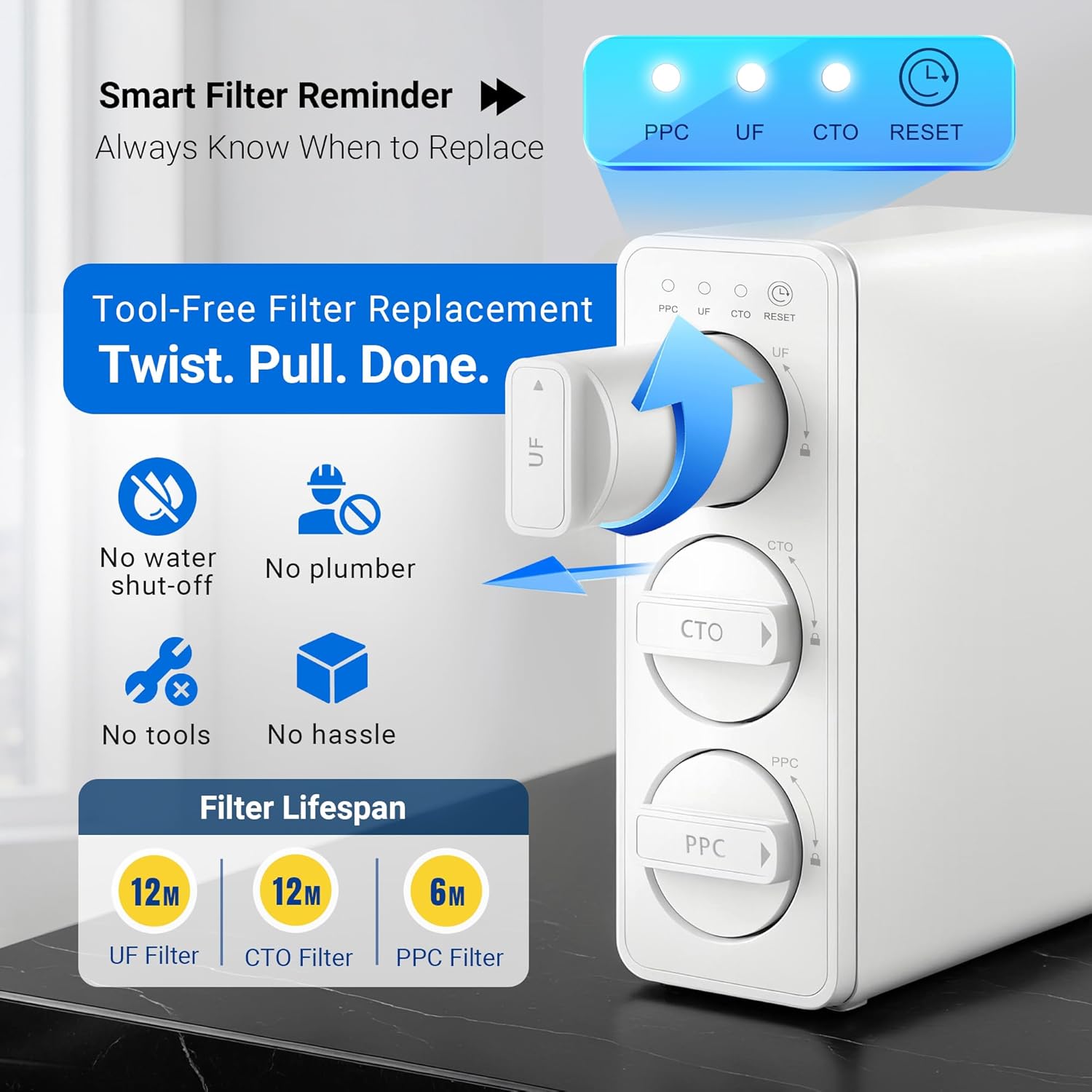
Image 7.1: Visual guide for tool-free filter replacement and filter lifespan information.


Image 7.2: Individual filter cartridges (PPC, CTO, UF) for replacement.
7.3. Faucet Cleaning
Periodically wipe the exterior of the UV-C faucet with a soft, damp cloth. Do not use abrasive cleaners or solvents.
8. Troubleshooting
| Problem | Possible Cause | Solution |
|---|---|---|
| Slow Water Flow | Clogged filter cartridges. Low incoming water pressure. Air in the system. | Replace indicated filter(s). Check household water pressure. Flush the system to remove air. |
| Water Leaks | Loose connections. Improperly installed filters. Damaged O-rings or tubing. | Check and tighten all connections. Ensure filters are correctly seated. Inspect O-rings and tubing for damage; replace if necessary. |
| Bad Taste/Odor in Water | Expired filter cartridges. Incomplete initial flush. | Replace indicated filter(s). Flush the system for a longer duration (e.g., 20-30 minutes). |
| UV-C Light Not Activating | No power to the faucet. Faulty UV-C LED. | Check power adapter connection and outlet. Ensure batteries for the reminder are installed. If problem persists, contact customer support. |
| Filter Reminder Not Working | Dead AAA batteries. Reminder not reset after filter change. | Replace AAA batteries. Press and hold the "RESET" button after filter replacement. |
9. Specifications
| Model Name | LCF-UF-ST |
| Filtration Stages | 3-Stage (PPC, CTO, UF) + UV-C Faucet |
| Filtration Precision | 0.01µm (Ultra-Filtration) |
| UV-C Wavelength | 275nm LED |
| Flow Rate | Up to 2 L/min (approx. 800 GPD) |
| Product Dimensions (Main Unit) | 12.2" L x 4.34" W x 11.6" H |
| Weight | Approx. 11.55 Pounds |
| Power Source (UV-C Faucet) | Corded Electric |
| Batteries (Filter Reminder) | 2 AAA batteries (included) |
| Installation Type | Under Sink |
| Supported Water TDS Level Maximum | 1000 PPM |
| Faucet Material | SUS304 Stainless Steel (Lead-Free) |

Image 9.1: Compact design of the LCF filter system, illustrating its space-saving footprint under the sink.
10. Warranty & Support
LCF is committed to providing high-quality products and customer satisfaction. For warranty information, technical support, or any questions regarding your LCF water filter system, please contact our customer service team.
Please refer to the contact information provided with your purchase or visit the official LCF website for assistance.