
1. Introduction
This user manual provides comprehensive instructions for the installation, operation, and maintenance of the DGFJY DDM18SD Single Phase Din RS485 Modbus-RTU Power Energy Meter. This device is designed for accurate measurement of electricity usage in household and industrial settings. Please read this manual thoroughly before installation and operation to ensure safe and efficient use.
2. Safety Information
Always observe the following safety precautions to prevent personal injury or damage to the meter:
- Installation must be performed by qualified personnel only.
- Ensure power is disconnected before any installation, wiring, or maintenance work.
- Do not operate the meter if it is damaged or malfunctioning.
- Do not expose the meter to moisture, extreme temperatures, or corrosive environments.
- Use appropriate personal protective equipment (PPE) during installation.
3. Product Features
The DDM18SD energy meter offers a range of features for reliable performance:
- Compact Design: Small size, light weight, and aesthetically pleasing appearance.
- Easy Installation: Good reliability and simple installation process, compatible with 35mm standard DIN mounting (in accordance with DIN EN50022).
- Standardized Dimensions: Single width (18mm) in accordance with DIN43880.
- LCD Display: Standard configuration 5+1 backlight LCD display for energy readings (up to 99999.1 KWh).
- Communication: RS485 (Modbus-RTU) remote meter reading function for data acquisition.
- Measurement Parameters: Displays and reads electricity (kWh), current (A), voltage (V), frequency (Hz), and power factor (PF).
- Pulse Output: Standard configuration output passive (polarity), with an option for remote output passive (non-polar). Easily integrates with various AMR systems, conforming to IEC 62053-31 and DIN43864 standards.
- LED Indicators: LED indicates power (green) and energy consumption.
- Automatic Flow Detection: Automatically detects the flow direction and command of the load current.
- Measurement Type: One-way measurement of single-phase two-wire active power.
- Connection Type: Direct S type connection.
- Terminal Protection: Extendable cover to protect terminal connections.
4. Setup and Installation
The DDM18SD meter is designed for 35mm DIN rail mounting. Follow these steps for proper installation:
- Power Disconnection: Ensure that the main power supply to the circuit where the meter will be installed is completely disconnected. Verify with a voltage tester.
- Mounting: Snap the meter onto a standard 35mm DIN rail in your electrical panel. Ensure it is securely fastened.
- Wiring: Connect the power lines according to the wiring diagram provided on the meter and below. The meter supports direct S-type connection for single-phase two-wire systems.
- Connect the incoming live wire to terminal 1.
- Connect the outgoing live wire to terminal 3.
- Connect the incoming neutral wire to terminal 7.
- Connect the outgoing neutral wire to terminal 9.
- For RS485 communication, connect A to terminal 4 and B to terminal 5.
- For pulse output, connect to terminals 6 and 8.
- Terminal Protection: Once wiring is complete, ensure the terminal cover is properly extended and secured to protect the connections.
- Power Restoration: After verifying all connections are correct and secure, restore power to the circuit. The meter's green power LED should illuminate.

Figure 1: Various angles of the DDM18SD meter, highlighting its compact design and terminal block for wiring.
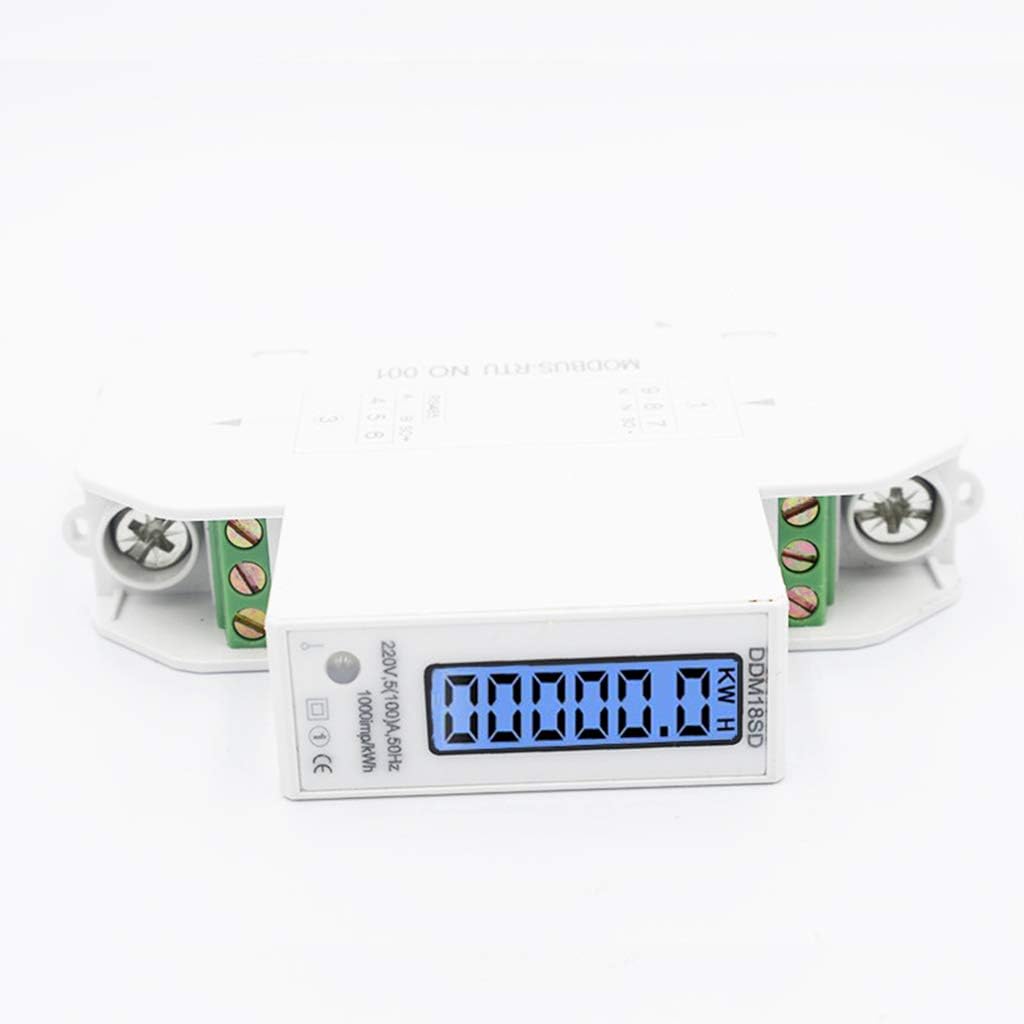
Figure 2: Close-up of the meter's bottom, detailing the input/output and communication terminals.
5. Operating Instructions
Once installed and powered, the DDM18SD meter will automatically begin measuring and displaying electrical parameters.
5.1 LCD Display Readings
The 5+1 backlight LCD display cycles through various measurement parameters. The primary reading is energy consumption in kilowatt-hours (KWh). Other parameters include:
- Electricity (KWh): Total active energy consumed.
- Voltage (V): Instantaneous line voltage.
- Current (A): Instantaneous load current.
- Power (W): Instantaneous active power.
- Power Factor (PF): The ratio of active power to apparent power.
- Frequency (Hz): The frequency of the AC power supply.

Figure 3: Illustration of the DDM18SD display showing different measurable parameters.
5.2 LED Indicators
- Green LED: Indicates that the meter is powered on and functioning.
- Red LED (Pulse): Flashes to indicate energy consumption. The flash rate corresponds to the energy constant (e.g., 1000 imp/kWh).
5.3 RS485 Modbus-RTU Communication
The meter supports RS485 communication using the Modbus-RTU protocol for remote data acquisition. Refer to the Modbus communication protocol documentation for detailed register addresses and commands for reading data such as KWh, voltage, current, and power factor from the meter.
6. Maintenance
The DDM18SD energy meter requires minimal maintenance. Follow these guidelines to ensure its longevity:
- Cleaning: Periodically wipe the meter's exterior with a soft, dry cloth. Do not use abrasive cleaners or solvents.
- Inspection: Regularly inspect the wiring connections to ensure they are secure and free from corrosion.
- Environment: Ensure the operating environment remains within the specified temperature and humidity ranges to prevent damage.
- No User Serviceable Parts: Do not attempt to open or repair the meter yourself. Refer all servicing to qualified technicians.
7. Troubleshooting
If you encounter issues with your DDM18SD energy meter, refer to the following common problems and solutions:
| Problem | Possible Cause | Solution |
|---|---|---|
| Meter display is blank. | No power supply; incorrect wiring; internal fault. | Check power supply to the circuit. Verify wiring connections. If problem persists, contact support. |
| Energy reading (KWh) not increasing. | No load connected; incorrect wiring; meter malfunction. | Ensure a load is connected and drawing power. Re-check wiring according to diagram. |
| RS485 communication failure. | Incorrect wiring (A/B reversed); incorrect Modbus settings (address, baud rate); cable issue. | Verify RS485 wiring (A to A, B to B). Check Modbus parameters in your master device. Inspect communication cable. |
| LED indicator not flashing. | No power consumption; LED malfunction. | Ensure there is an active load. If power is consumed but LED doesn't flash, meter may be faulty. |
For issues not listed above or if troubleshooting steps do not resolve the problem, please contact DGFJY customer support.
8. Specifications
Detailed technical specifications for the DDM18SD Single Phase Din RS485 Modbus-RTU Power Energy Meter:
| Parameter | Value |
|---|---|
| Model | DDM18SD |
| Voltage Specification | 220V/230V AC |
| Frequency | 50/60Hz |
| Current Specifications | 5(80)A, 5(100)A (selectable/model dependent) |
| Display | 5+1 Backlight LCD (99999.1 KWh) |
| Communication | RS485 (Modbus-RTU) |
| Mounting | 35mm DIN Rail (EN50022) |
| Width | 18mm (DIN43880) |
| Pulse Output | Standard passive (polarity), optional remote passive (non-polar) |
| Energy Constant | 1000 imp/kWh (indicated on meter) |
| Connection Type | Direct S type connection |
9. Warranty and Support
For warranty information or technical support, please contact your retailer or the manufacturer, DGFJY. Keep your purchase receipt as proof of purchase. Do not attempt to repair the device yourself, as this may void the warranty.
For further assistance, please visit the official DGFJY website or contact their customer service department.