1. Introduction
This manual provides instructions for the installation and use of the Generic Mounting Bracket Clip, designed to securely attach your Govee PRO Permanent Outdoor LED Lights (models H706 and H806 series) to various surfaces. These brackets offer a robust alternative or supplement to the factory adhesive, ensuring a stable and long-lasting installation.
1.1. Compatibility
These brackets are specifically designed for Govee PRO models H706 (H706A, H706B, H706C) and H806 (H806A, H806B, H806C) Permanent Outdoor LED Lights.
Important:
- These brackets are NOT compatible with Govee H705 lights (non-PRO/original), H805 Elite, or any other brand of LED lights.

Figure 1: Compatibility Chart. This chart visually confirms compatibility with Govee Permanent Outdoor Lights Pro (H706 and H806 series) and explicitly states incompatibility with H705, H805 Elite, and other brands.
2. Package Contents
Each package contains the specified quantity of Generic Mounting Bracket Clips.
2.1. Items Not Included (Required for Installation)
- Govee PRO Permanent Outdoor LED Lights (H706/H806 series)
- Screws: #8 diameter (or smaller) screws are recommended. A minimum length of 1/2 inch is suggested due to the 1/8 inch thickness of the mounting tabs. Examples include "gutter screws," "zip screws," or "TEK screws."
- Driver Bit (appropriate for chosen screws)
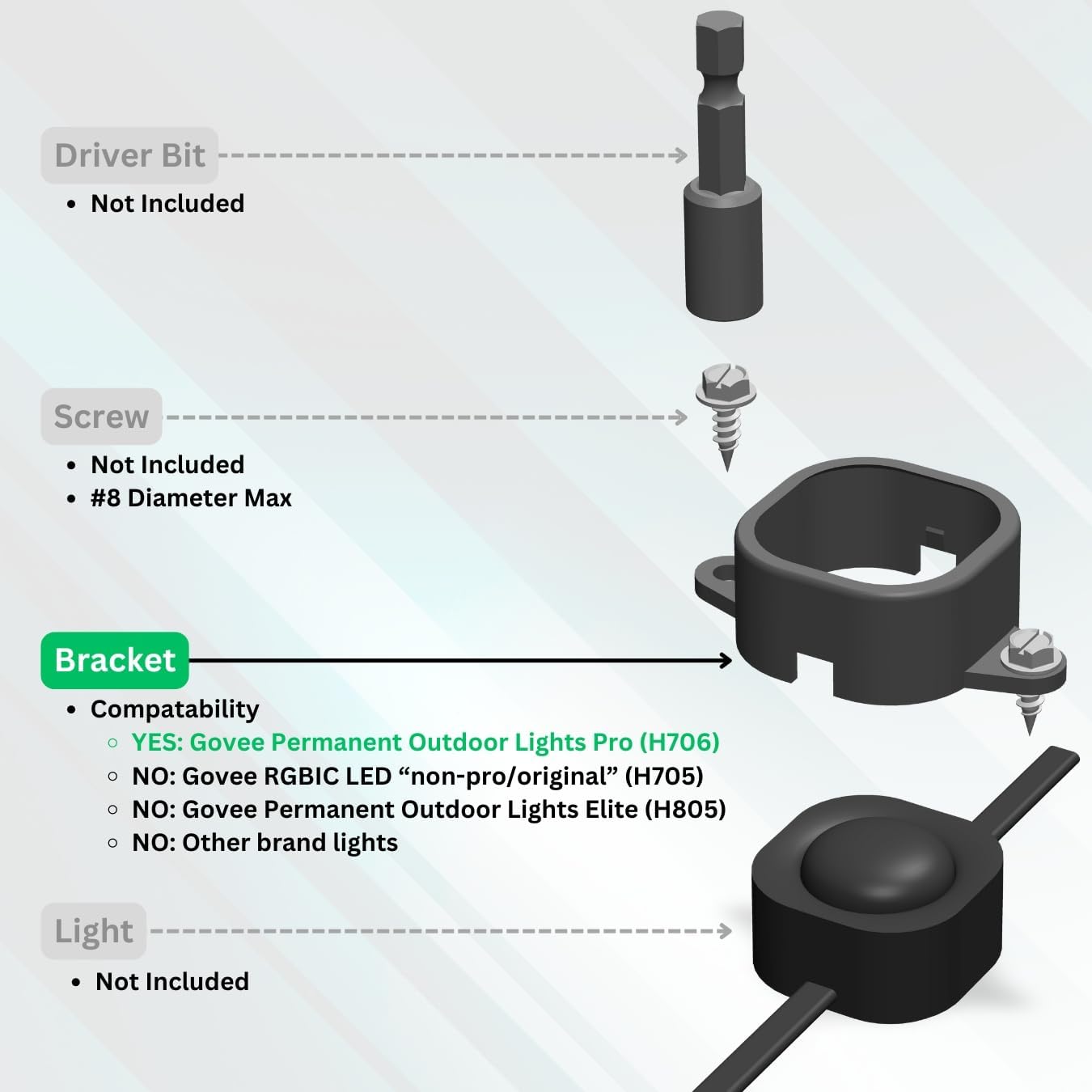
Figure 2: Components Diagram. This diagram illustrates the components involved in the installation: the driver bit and screw (not included), the mounting bracket, and the Govee light module (not included).
3. Installation Instructions
These brackets are designed for easy installation, even over lights already taped to your house. No removal of existing lights is required.
- Position the Bracket: Align the mounting bracket with a Govee PRO LED light module. The bracket is designed to clip onto the light, wrapping around the module.
- Secure the Light: Gently press the bracket onto the light module until it clips securely into place. The design ensures the bracket captures the light from the top, clamping it to the mounting surface.
- Prepare for Screwing: Position the light module with the attached bracket against your desired mounting surface. Ensure the wire direction is correct as indicated in the technical drawing.
- Install Screws: Using appropriate #8 diameter (or smaller) screws (not included) and a driver bit (not included), secure the bracket to the surface through the two mounting tabs.
Caution:
- When installing screws, ensure they are driven straight. Overtightening or driving screws at an angle can cause the bracket to crack.
- Repeat: Continue this process for all light modules requiring secure mounting.

Figure 3: Bracket Installed. This image demonstrates a Govee LED light module with the black mounting bracket installed, showing how it securely holds the light against a surface.

Figure 4: Bracket and Light Module. This image displays the black mounting bracket clip alongside a Govee PRO LED light, highlighting the bracket's design and how it integrates with the light module.
4. Usage
The Generic Mounting Bracket Clips provide a secure and durable method for installing your Govee PRO Permanent Outdoor LED Lights. They are ideal for situations where the factory VHB double-stick tape may not adhere effectively or for installations requiring enhanced stability.
4.1. Key Benefits:
- Enhanced Security: The brackets wrap around the entire light module, clamping it firmly to the mounting surface, preventing movement or detachment.
- Versatile Mounting: Compatible with various surfaces where screws can be installed, such as wood, aluminum/vinyl soffit, or steel siding.
- Easy Installation: Designed to clip onto lights, simplifying the installation process. Can be installed over existing taped lights.
- Durable Material: Constructed from weather-resistant PETG plastic for long-term outdoor use.
5. Maintenance
The Generic Mounting Bracket Clips are designed for durability and require minimal maintenance.
- Periodic Inspection: Periodically check the brackets and screws for any signs of loosening or damage, especially after severe weather conditions.
- Cleaning: If necessary, clean the brackets with a soft cloth and mild soap and water. Avoid abrasive cleaners or harsh chemicals.
- Replacement: If a bracket becomes damaged or cracked, replace it promptly to maintain the secure mounting of your lights.
6. Troubleshooting
6.1. Lights Not Securely Mounted:
- Check Screw Tightness: Ensure screws are adequately tightened. Avoid overtightening, which can damage the bracket.
- Verify Bracket Clip: Confirm that the bracket is fully clipped onto the light module and is not loose.
- Inspect for Damage: Check the bracket for any cracks or damage that might compromise its holding strength. Replace if damaged.
6.2. Bracket Cracks During Installation:
- Screw Alignment: Ensure screws are driven straight into the mounting surface. Angled screws can exert uneven pressure and cause cracking.
- Overtightening: Avoid excessive force when tightening screws. Tighten until snug, but do not overtighten.
- Correct Screw Size: Use #8 diameter or smaller screws. Larger screws may not fit correctly and can cause stress.
7. Specifications
| Feature | Detail |
|---|---|
| Model Number | G706-PO |
| Compatibility | Govee PRO Permanent Outdoor LED Lights H706 & H806 series |
| Material | Durable, weather-resistant PETG Plastic |
| Color | Black |
| Mounting Type | Wall Mount (screw-based) |
| Product Dimensions (L x W x H) | 2.4 x 1.5 x 0.7 inches (61.2 x 37.7 x 18.2 mm) |
| Mounting Tab Thickness | 1/8 inch (3.175 mm) |
| Screw Hole Diameter | 0.19 inches (4.9 mm) - for #8 diameter or smaller screws |
| Manufacturer | Ansgar Labs |
| Country of Origin | USA (with globally-sourced material) |

Figure 5: Technical Drawing. This technical drawing provides precise measurements of the mounting bracket, including its overall dimensions and the diameter of the screw holes, crucial for proper installation planning.
8. Warranty and Support
For specific warranty information or product support, please refer to the manufacturer's official website or contact their customer service directly. As this is a Generic branded product, warranty terms may vary.
Manufacturer: Ansgar Labs.


