
1. Safety Information
No specific safety warnings are applicable beyond general toy safety guidelines. Ensure all small parts are kept away from children under the recommended age to prevent choking hazards. Adult supervision is recommended during play.
2. Package Contents
The LEGO DUPLO Town Interactive Adventure Train Set 10427 includes 57 pieces designed for toddlers aged 2 and up. Key components are:
- Interactive Train with lights and sounds
- One trailer car
- 14 track pieces to form an oval layout
- 3 destination builds (e.g., house, park, beach elements)
- 4 DUPLO figures
- Various accessory bricks and elements
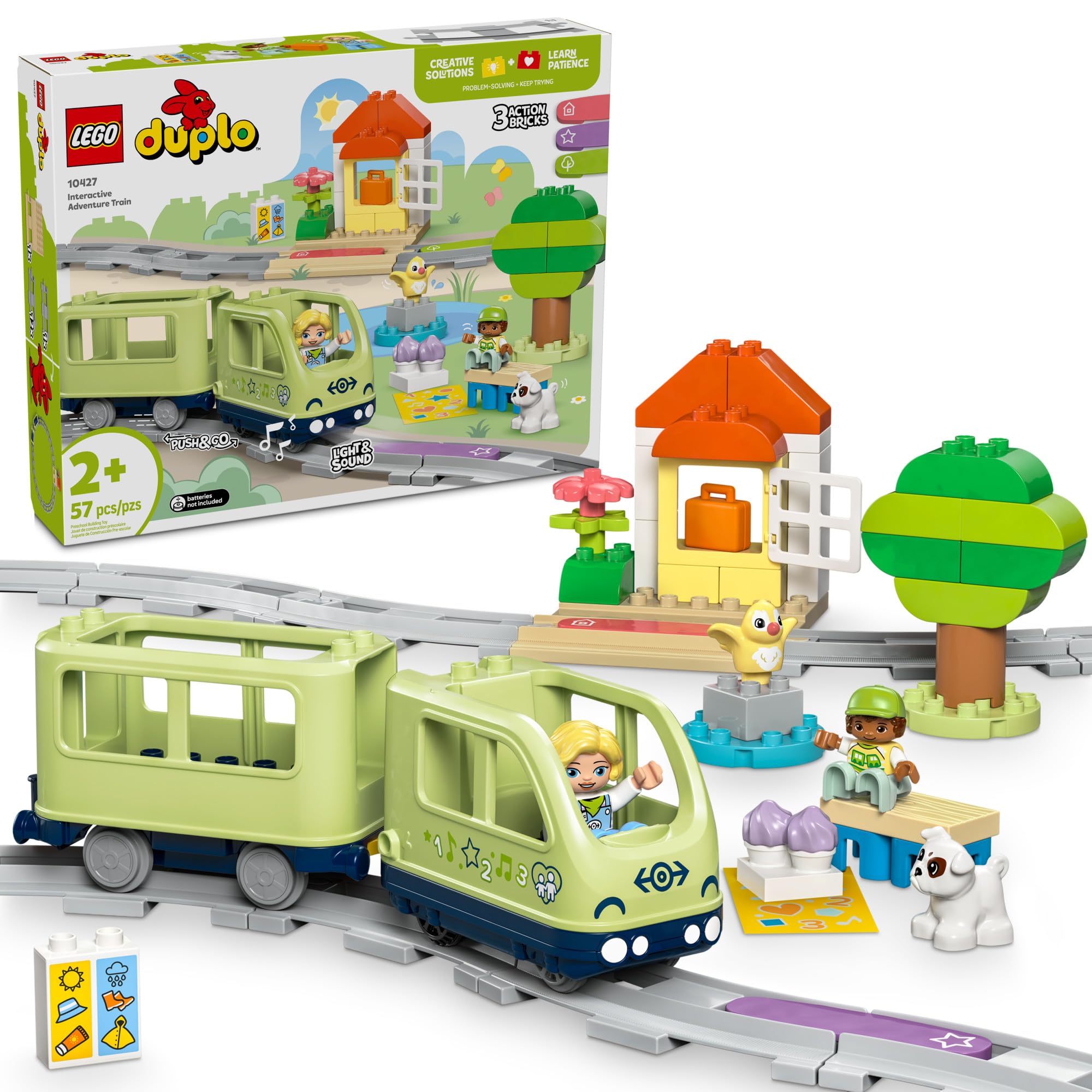
Figure 1: An overview of the LEGO DUPLO Town Interactive Adventure Train Set 10427, showing the train, track, figures, and various destination builds including a house, tree, and small animal figures.

Figure 2: A close-up of the LEGO DUPLO figures and various accessory elements included in the set, such as a bench, a dog, and a bird.
3. Setup
3.1 Assembling the Track
Connect the 14 track pieces to form an oval layout. The DUPLO track pieces are designed for easy connection and offer some flexibility in arrangement. Ensure all connections are secure.
3.2 Inserting Batteries
The interactive train requires 4x 1.5V AAA alkaline batteries or 1.2V AAA rechargeable batteries (not included). Locate the battery compartment on the underside of the train engine, open it with a small screwdriver, insert the batteries according to polarity markings, and secure the cover.
3.3 Connecting Train Cars
Attach the trailer car to the train engine using the yellow hook connectors. Ensure they are firmly linked.
3.4 Placing Figures and Destination Builds
Place the DUPLO figures into the train cars or around the track. Arrange the destination builds (house, tree, etc.) and other accessory bricks around the track to create your desired play scene.
4. Operating Instructions
4.1 Turning On the Train
To turn on the train, locate the small button on the underside of the engine and press and hold it for a few seconds until the lights illuminate and sounds activate.
4.2 Push & Go Function
Once turned on, gently push the train forward or backward to activate its 'Push & Go' motor. The train will then move independently along the track.
4.3 Interactive Action Bricks
The set includes special action bricks that trigger different responses from the train when it passes over them. Place these bricks directly onto the track pieces. The train's sensor on its underside will detect the brick and activate a specific function (e.g., change speed, play a sound, or stop).

Figure 3: The interactive train engine with a figure inside, passing over an action brick on the track, demonstrating the trigger mechanism for lights and sounds.
4.4 Using the LEGO DUPLO Interactive Trains App
Enhance play by downloading the free LEGO DUPLO Interactive Trains app. This app allows for remote control of the train, sound recording, and additional interactive experiences. Follow the in-app instructions for connecting and using the train with your smart device.

Figure 4: An illustration showing the LEGO DUPLO Interactive Trains app interface on a tablet, demonstrating how it can be used to control the train and interact with the set.
4.5 Official Product Videos
Video 1: Official overview of the LEGO DUPLO Town Interactive Adventure Train Set 10427, demonstrating key features and play patterns.
Video 2: A 360-degree view of the LEGO DUPLO Town Interactive Adventure Train Set 10427, showcasing the assembled product from all angles.
Video 3: Demonstration of the LEGO DUPLO Interactive Adventure Train's movement, lights, and sound features, including interaction with action bricks.
5. Interactive Features
The LEGO DUPLO Interactive Adventure Train offers several interactive elements to enhance play and learning:
- Lights and Sounds: The train engine features integrated lights and sounds that activate during movement and when interacting with action bricks.
- Action Bricks: Three distinct action bricks are included, each triggering a unique response from the train:
- Green Action Brick: Often associated with nature sounds or speed changes.
- Purple Action Brick: Allows for sound recording and playback.
- Red Action Brick: Typically triggers a stop or change in direction.
- LEGO DUPLO Interactive Trains App: Connect the train to the dedicated app for expanded control, additional sounds, and creative play scenarios.
6. Maintenance
6.1 Cleaning
Clean LEGO DUPLO bricks and the train with a damp cloth and mild soap. Do not submerge the train engine in water due to electronic components. Air dry thoroughly before reassembly or use.
6.2 Battery Replacement
When the train's lights dim or sounds become faint, it's time to replace the batteries. Follow the instructions in Section 3.2 for safe battery replacement.
7. Troubleshooting
7.1 Train Not Moving or Lights/Sounds Not Working
- Check Batteries: Ensure batteries are correctly inserted and not depleted. Replace if necessary.
- Power On: Confirm the train engine is powered on by pressing and holding the button on its underside.
- Track Connection: Verify all track pieces are securely connected and form a continuous path.
- Obstructions: Check for any debris or obstructions on the track or under the train's wheels.
- Action Brick Placement: Ensure action bricks are correctly placed on the track for the train's sensor to detect them.
7.2 App Connectivity Issues
- Bluetooth: Ensure Bluetooth is enabled on your smart device and the train is within range.
- App Version: Update the LEGO DUPLO Interactive Trains app to the latest version.
- Restart: Try restarting both the train and your smart device.
8. Specifications
| Product Dimensions | 18.9 x 14.88 x 3.7 inches |
| Item Weight | 3.12 pounds |
| Model Number | 10427 (also 6470494) |
| Manufacturer Recommended Age | 24 months and up |
| Number of Pieces | 57 |
| Batteries Required | 4x 1.5V AAA alkaline or 1.2V AAA rechargeable (not included) |
9. Warranty and Support
For warranty information, product support, or to purchase replacement parts, please visit the official LEGO website or contact LEGO customer service directly. Keep your proof of purchase for warranty claims.
LEGO Customer Service: Refer to the contact information provided in the product packaging or on the official LEGO website.


