
1. Introduction
This manual provides essential information for the proper setup, operation, and maintenance of your NEEWER CM5 2-Pack Lavalier Lapel Microphones. These omnidirectional condenser microphones are designed for clear voice recording across various applications.

Image: Two NEEWER CM5 lavalier microphones, each with a 3.5mm TRS plug, foam windscreen, and lapel clip. The product box is also shown.
2. What's in the Box
- 2 x Wired Lavalier Lapel Microphone
- 2 x Tie Clip
- 2 x Windscreen Foam
3. Product Overview
Familiarize yourself with the components of your NEEWER CM5 lavalier microphone:
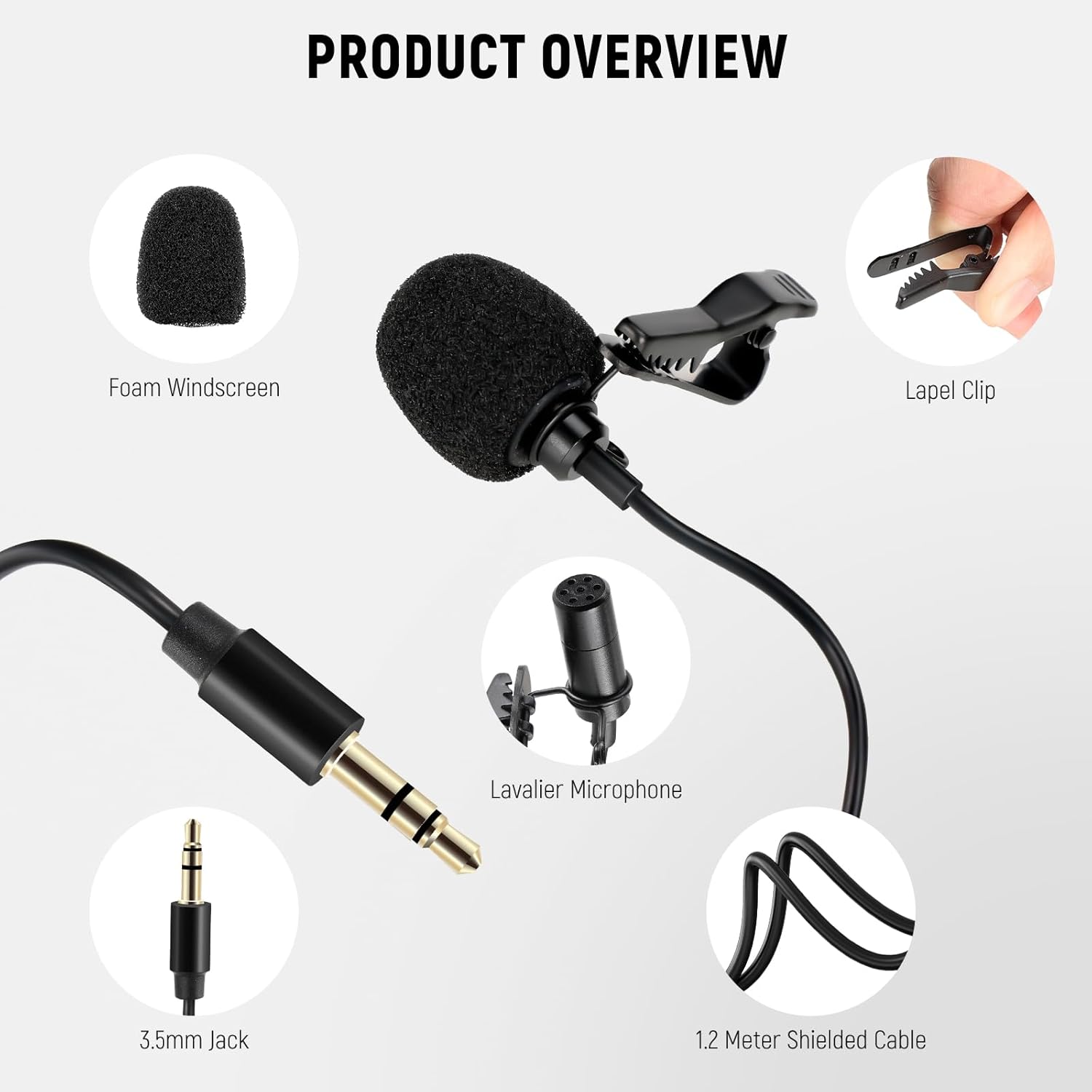
Image: A detailed diagram labeling the key parts of the lavalier microphone, including the foam windscreen, lapel clip, microphone capsule, 3.5mm jack, and the 1.2-meter shielded cable.
4. Key Features
- Omnidirectional Condenser: Captures voices 360° for high-definition, uncompressed audio quality.
- Lapel Clip-On Design: Features a 3.9ft (1.2m) cord and a high-quality metal mic clip for secure, hands-free operation.
- Plug & Play: Equipped with a gold-plated 3.5mm TRS connector for direct connection to compatible devices without additional drivers or software.
- Shielded Cable: Adopts industry-standard shielding cable to reduce external signal interference, ensuring sound purity.
5. Compatibility
The NEEWER CM5 microphones offer broad compatibility with various audio recording devices:
- Smartphones, cameras, camcorders, and audio recorders with a 3.5mm TRS jack.
- Rode Wireless GO II systems.
- DJI Wireless Mic Transmitters.
- NEEWER CM28/CM31 wireless microphone systems.
Note: Not compatible with Sony microphone systems.
For devices with a 3.5mm jack, ensure the device provides "Plugin Power" if required by the microphone. For devices without a 3.5mm jack (e.g., some smartphones with USB-C or Lightning ports), a separate adapter (e.g., 3.5mm female to USB Type-C or Lightning) is required and not included.

Image: Visual representation of the microphone's compatibility with various wireless transmitters, including Rode Wireless Go II, DJI Wireless Mic Transmitters, and NEEWER CM28.

Image: Illustration of wide compatibility with devices such as DSLR cameras, video cameras, computers, and Apple devices (requiring a separate adapter).
6. Setup and Placement
- Attach Windscreen: Gently place the foam windscreen over the microphone capsule to reduce plosives and wind noise.
- Secure Lapel Clip: Use the included metal lapel clip to attach the microphone securely to clothing, such as a shirt collar or lapel. Ensure the microphone is positioned to capture your voice clearly.
- Connect to Device: Insert the gold-plated 3.5mm TRS connector into the microphone input jack of your recording device (smartphone, camera, audio recorder, or compatible wireless transmitter).
- Cable Management: The 3.9ft (1.2m) shielded cable provides sufficient length for most applications. Route the cable discreetly to avoid interference or accidental disconnections.

Image: A person demonstrating how to securely attach the lavalier microphone to a shirt lapel using the clip.

Image: A visual comparison highlighting the discreet and lightweight nature of the lavalier microphone when clipped onto clothing or hidden under a collar or tie, contrasting with bulkier wireless microphones.
7. Operating Instructions
The NEEWER CM5 microphones are designed for straightforward operation:
- Audio Capture: The omnidirectional condenser design ensures 360° voice pickup, delivering clear and crisp recordings. Position the microphone appropriately for optimal sound.
- Hands-Free Use: Once clipped on and connected, the microphones allow for comfortable, hands-free recording, ideal for presentations, vlogging, interviews, and stage performances.
- Plug & Play: No batteries or complex software installations are required. Simply connect the microphone to your device's 3.5mm TRS input to begin recording.

Image: A graphic demonstrating the 360° omnidirectional recording capability of the microphone, showing sound waves being captured from all directions.

Image: A detailed view of the 1.2-meter (3.9ft) shielded cable, emphasizing its role in reducing external signal interference for pure sound.

Image: Examples of applicable scenes, including a couple vlogging, a musician performing, and a lecturer presenting, all utilizing the lavalier microphone.
8. Maintenance
- Cleaning: Use a soft, dry cloth to clean the microphone and cable. Do not use liquid cleaners or solvents.
- Storage: Store the microphones in a cool, dry place away from direct sunlight and extreme temperatures. Avoid tangling the cables.
- Windscreen Care: The foam windscreens can be gently washed with mild soap and water if they become dirty. Ensure they are completely dry before reattaching.
9. Troubleshooting
- No Audio/Low Volume:
- Ensure the 3.5mm TRS connector is fully inserted into the device's microphone input.
- Verify that your recording device's microphone input is enabled and the volume is set appropriately.
- Some devices (especially older cameras or audio recorders) may require "Plugin Power" for condenser microphones. Check your device's settings or manual to enable this feature if available.
- If using an adapter (e.g., for USB-C/Lightning ports), ensure the adapter is compatible and functioning correctly.
- Poor Audio Quality/Noise:
- Ensure the foam windscreen is properly attached to minimize wind noise and plosives.
- Check for any damage to the cable or connector.
- Keep the microphone away from strong electromagnetic interference sources.
- Ensure the microphone is securely clipped and not rubbing against clothing, which can cause rustling sounds.
- Compatibility Issues:
- Confirm your device has a 3.5mm TRS input. If it has a TRRS input (common on some smartphones), you may need a TRS to TRRS adapter (not included).
- Remember, these microphones are not compatible with Sony microphone systems.
10. Specifications
| Specification | Detail |
|---|---|
| Microphone Form Factor | Lavalier |
| Polar Pattern | Omnidirectional |
| Connectivity Technology | Auxiliary |
| Connector Type | 3.5 mm Jack (TRS) |
| Cable Length | 3.9ft (1.2m) |
| Power Source | Corded Electric (via device) |
| Material | Plastic |
| Item Weight | 1.59 ounces |
| Model Name | CM5 |
| Manufacturer | NEEWER |
11. Warranty and Support
For warranty information, technical support, or customer service inquiries, please refer to the official NEEWER website or contact their customer support directly. Keep your purchase receipt for warranty claims.