
Product Overview
The HOMEFITNESSCODE Q2 Walking Pad Treadmill is a compact and versatile fitness device designed for home and office use. It features a powerful brushless motor, a wide running surface, and multiple shock absorption points for a comfortable and quiet exercise experience. Its slim design allows for easy storage under furniture, making it suitable for spaces where traditional treadmills might be too large.
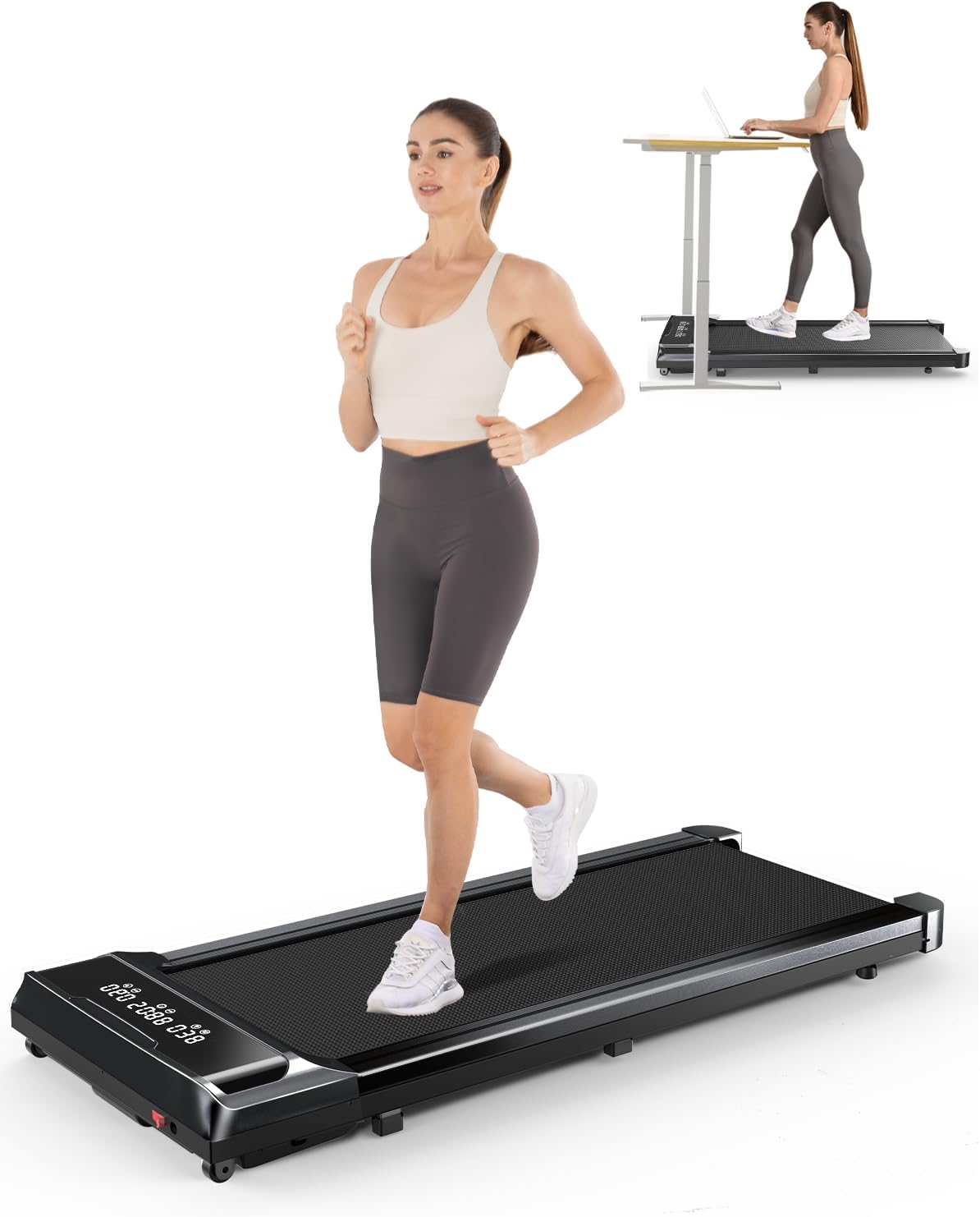
Image Description: This image displays the HOMEFITNESSCODE Q2 Walking Pad Treadmill. In the foreground, a person is actively running on the treadmill, highlighting its use for jogging. In the background, a smaller inset image shows the treadmill positioned under a standing desk, with a person walking while working on a laptop, demonstrating its suitability for office environments and under-desk use. The treadmill itself is black with an integrated LED display.

Image Description: This graphic illustrates the three primary usage modes of the treadmill. The "Office Mode" shows a person walking slowly (1-3 Km/h) while working at a standing desk. The "Walking Mode" depicts a person walking at a moderate pace (1-5 Km/h) while looking at a tablet. The "Jogging Mode" shows a person running at a faster speed (6-10 Km/h). Each mode is accompanied by its typical speed range.
Safety Instructions
To ensure safe operation and prevent injury, please read and adhere to the following safety guidelines:
- Always place the treadmill on a flat, stable surface.
- Ensure adequate clear space around the treadmill (at least 2 feet on sides and rear).
- Do not allow children or pets near the treadmill during operation.
- Wear appropriate athletic footwear. Do not operate barefoot or in socks.
- Do not exceed the maximum weight capacity of 300 lbs (136 kg).
- If you feel dizzy, nauseous, or experience pain, stop exercising immediately.
- Unplug the treadmill from the power outlet when not in use or before cleaning/maintenance.
- Keep hands and feet clear of the running belt and moving parts.
- Use only the provided power cord and ensure it is not damaged or tangled.

Image Description: This diagram highlights the treadmill's intelligent shock absorption system. It shows the internal structure with eight distinct shock-absorbing points distributed beneath the running deck. An exploded view illustrates the five layers of the running belt, emphasizing its multi-layered construction designed for impact reduction and user comfort. The image also includes text indicating "Good anti-slip properties" and "8 shock-absorbing points" and "5-layer running belt".
Setup and Assembly
The HOMEFITNESSCODE Q2 Walking Pad Treadmill comes fully assembled, requiring minimal setup before first use.
- Unpacking: Carefully remove the treadmill from its packaging. Retain packaging materials for future storage or transport.
- Placement: Place the treadmill on a firm, level surface. Ensure there is sufficient space around the unit for safe operation and to prevent obstruction of air vents.
- Power Connection: Connect the power cord to the treadmill's power input port, then plug the other end into a grounded electrical outlet.
- Remote Control: Insert 2 AAA batteries (not included) into the remote control.

Image Description: This image showcases the compact and easy-to-store design of the treadmill. One treadmill is shown neatly tucked away under a sofa, illustrating its ability to fit into small spaces. Another treadmill is visible on the floor next to the sofa, highlighting its portability and readiness for use. The image emphasizes the product's space-saving features.
Operating Instructions
Powering On/Off
- To power on, press the power button on the treadmill or the remote control. The LED display will illuminate.
- To power off, press and hold the power button on the remote control or the treadmill until the display turns off.
Using the Remote Control
The remote control allows you to adjust speed and start/stop the treadmill.
- Start/Stop: Press the Play/Pause button to start or stop the treadmill.
- Speed Adjustment: Use the + and - buttons to increase or decrease the speed. The speed range is 0.6 MPH to 6.2 MPH (1-10 Km/h).
Understanding the LED Display
The integrated LED display provides real-time workout data.

Image Description: This close-up image focuses on the treadmill's LED display panel. The display shows various workout metrics, including time, current speed, distance covered, and calories burned. The numbers are clearly visible, indicating the digital nature of the display. Icons representing each metric are also present.
- Time: Displays the duration of your workout.
- Speed: Shows the current speed of the running belt.
- Distance: Indicates the total distance covered during the session.
- Calories: Estimates the calories burned during your workout.

Image Description: This image emphasizes the "Super Large Display" feature of the treadmill. It shows a close-up of the LED screen, which simultaneously tracks and displays multiple sports data points: Time, Speed, Distance, and Calories. Each metric is accompanied by a clear icon, making the data easy to read and understand at a glance.
Maintenance
Regular maintenance ensures the longevity and optimal performance of your treadmill.
Lubrication
The running belt requires periodic lubrication to reduce friction and wear. Use only silicone-based treadmill lubricant.
- Unplug the treadmill from the power outlet.
- Lift the edge of the running belt on one side.
- Apply a small amount of lubricant in a Z-pattern directly onto the deck under the belt.
- Repeat on the other side.
- Plug in the treadmill and run it at a low speed (e.g., 1 MPH) for 2-3 minutes to distribute the lubricant evenly.
Frequency: Lubricate every 3-6 months, or after every 50-100 hours of use, depending on usage frequency.

Image Description: This image demonstrates the process of lubricating the treadmill belt. A hand is shown lifting the edge of the running belt and applying a bottle of lubricant directly onto the deck underneath. The accompanying text emphasizes that regular lubrication can improve training efficiency and extend the lifespan of the treadmill.
Cleaning
- Wipe down the treadmill surface with a damp cloth after each use to remove sweat and dust.
- Do not use abrasive cleaners or solvents.
- Periodically vacuum around and under the treadmill to prevent dust buildup in the motor area.
Belt Adjustment
If the running belt becomes off-center or slips, it may need adjustment. Refer to the detailed instructions in the full user manual for precise adjustment procedures, typically involving adjusting screws at the rear of the treadmill.
Troubleshooting
This section addresses common issues you might encounter. For more complex problems, contact customer support.
| Problem | Possible Cause | Solution |
|---|---|---|
| Treadmill does not power on. | Power cord not connected; outlet issue; power switch off. | Ensure power cord is securely plugged in. Check if the outlet is working. Verify the main power switch on the treadmill is ON. |
| Running belt slips or hesitates. | Belt too loose; insufficient lubrication. | Adjust belt tension (refer to full manual). Apply silicone lubricant to the running deck. |
| Unusual noise during operation. | Lack of lubrication; loose components; foreign object. | Lubricate the belt. Check for loose screws or parts. Inspect for any foreign objects under the belt. |
| Remote control not working. | Dead batteries; remote out of range; interference. | Replace batteries (AAA). Ensure you are within range and pointing the remote at the treadmill's sensor. Remove any obstructions. |

Image Description: This illustration depicts a two-story house. On the lower floor, a person is walking on the treadmill in a living room, indicating quiet operation. On the upper floor, a person is sleeping peacefully in a bedroom, with text highlighting "35dB" noise level, signifying that the treadmill provides a quiet and comfortable sports environment without disturbing others.
Specifications
| Feature | Detail |
|---|---|
| Brand | HOMEFITNESSCODE |
| Model Name | Q2 |
| Product Dimensions | 45.3"D x 20.9"W x 5.1"H (115cm D x 53cm W x 13cm H) |
| Item Weight | 39.4 Pounds (17.87 kg) |
| Material | Alloy Steel |
| Maximum Speed | 6.2 Miles per Hour (10 Km/h) |
| Minimum Speed | 0.6 Miles per Hour (1 Km/h) |
| Maximum Horsepower | 2.5 HP |
| Maximum Weight Recommendation | 300 Pounds (136 kg) |
| Deck Length | 38.2 Inches (97 cm) |
| Deck Width | 15.5 Inches (40 cm) |
| Noise Level | <35dB |
| Display Type | LED |
| Included Components | Treadmill, User Manual, Lubricant, Power Cord, Remote Control |
| Assembly Required | No (Fully Assembled) |

Image Description: This image provides a visual representation of the treadmill's running surface dimensions, showing a length of 97cm and a width of 40cm. Below the treadmill, key specifications are listed with icons: 2.5 HP motor power, 1-10 km/h speed, 18kg net weight, and a maximum load capacity of 120kg (approximately 264 lbs). This visually summarizes the core physical and performance attributes.

Image Description: This detailed diagram illustrates the internal structure of the 2.5HP Brushless Motor used in the treadmill. It visually compares the motor's lifetime (Our: >3500 Hours vs. Other: <900 Hours) and noise level (Our: <35 dB vs. Other: <55 dB), emphasizing the superior performance and quiet operation of the brushless technology. The intricate components of the motor are clearly depicted.

Image Description: This graphic presents a side-by-side comparison of a Brushless Motor and a Brushed Motor. For the Brushless Motor, it highlights advantages such as a noise level of less than 35 dB, a lifespan of 3500 hours, fast heat dissipation, and low power consumption. In contrast, the Brushed Motor is shown with a noise level of less than 55 dB, a lifespan of 900 hours, poor heat dissipation, and high power consumption, visually reinforcing the benefits of the brushless technology.
Warranty and Support
The HOMEFITNESSCODE Q2 Walking Pad Treadmill comes with a 2-year warranty from the date of purchase, covering manufacturing defects and major component failures under normal use.
For warranty claims, technical support, or any inquiries, please contact HOMEFITNESSCODE customer service. Details can typically be found on the product packaging or the official brand website.
Customer Service: For assistance, please refer to the contact information provided with your product or visit the HOMEFITNESSCODE official support page.