1. Introduction
Thank you for purchasing the Generic KA-8506 Waterproof Portable Bluetooth Speaker. This speaker is designed for portability and durability, offering quality sound in various environments. It features Bluetooth 4.2 connectivity, multiple input options (USB, SD card, auxiliary), and a long-lasting rechargeable battery. Please read this manual carefully before use to ensure proper operation and to maximize the lifespan of your device.
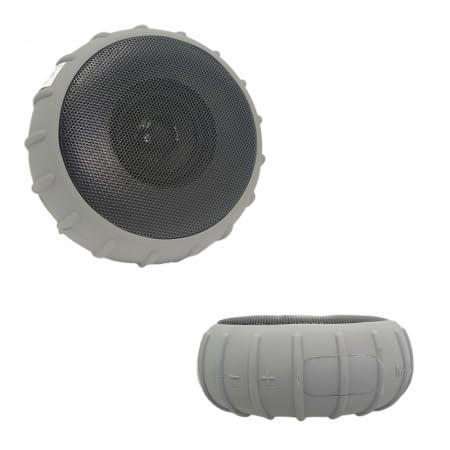
Image 1.1: The KA-8506 Portable Bluetooth Speaker. This image shows the speaker's compact design and gray color.
2. Safety Information
- Do not expose the speaker to extreme temperatures or direct sunlight for extended periods.
- This speaker is IP66 water-resistant, meaning it is protected against powerful water jets. It is not designed for submersion in water. Do not immerse the speaker in water.
- Keep the speaker away from flammable materials.
- Do not attempt to disassemble, repair, or modify the speaker yourself. Contact qualified service personnel for any repairs.
- Use only the provided charging cable and a compatible power adapter (DC5V/1.5A) for charging.
- Keep out of reach of children.
- Avoid listening at high volume levels for prolonged periods to prevent hearing damage.
3. Package Contents
Please check the package contents upon opening. If any items are missing or damaged, contact your retailer.
- KA-8506 Portable Bluetooth Speaker
- USB Charging Cable
- Auxiliary Audio Cable (P2-P2)
- User Manual (this document)
4. Product Overview
4.1. Features
- Portable and compact design with a carrying strap.
- IP66 water resistance (splash and jet proof, not submersible).
- Bluetooth 4.2 for wireless audio streaming.
- Multiple playback options: Bluetooth, USB drive, Micro SD card, Auxiliary input.
- Built-in microphone for hands-free calling.
- 5W audio output with enhanced bass.
- 1200mAh rechargeable battery providing up to 12 hours of playback.
4.2. Controls and Ports
Image 4.1: Illustrative diagram of the KA-8506 speaker's control panel and port locations. (Note: Actual image not provided, using main product image as placeholder.)
- Power Button: Press and hold to power on/off. Short press to play/pause.
- Mode Button (M): Short press to switch between Bluetooth, USB, SD card, and Auxiliary modes.
- Volume Down / Previous Track: Short press for previous track. Press and hold to decrease volume.
- Volume Up / Next Track: Short press for next track. Press and hold to increase volume.
- USB Port: For USB drive playback.
- Micro SD Card Slot: For Micro SD card playback.
- AUX Input: For connecting external audio devices via 3.5mm auxiliary cable.
- Charging Port (Micro USB): For charging the speaker.
- LED Indicator: Shows charging status and connection mode.
- Microphone: For hands-free calls.
5. Setup
5.1. Charging the Speaker
Before first use, fully charge the speaker. The battery takes approximately 2 hours to fully charge and provides up to 12 hours of playback.
- Connect the small end of the provided USB charging cable to the charging port on the speaker.
- Connect the large end of the USB cable to a USB power adapter (DC5V/1.5A, not included) or a computer's USB port.
- The LED indicator will illuminate during charging and turn off or change color when fully charged (refer to specific model behavior if different).
Image 5.1: The speaker connected to a power source via its charging cable. (Note: Actual image not provided, using main product image as placeholder.)
5.2. Powering On/Off
- To power on, press and hold the Power Button for approximately 3 seconds until you hear an audible prompt or see the LED indicator light up.
- To power off, press and hold the Power Button for approximately 3 seconds until you hear an audible prompt or the LED indicator turns off.
6. Operating Instructions
6.1. Bluetooth Pairing
- Ensure the speaker is powered on and in Bluetooth mode. If not, short press the Mode Button (M) until you hear the Bluetooth mode prompt. The LED indicator will flash, indicating it's ready for pairing.
- On your mobile device (smartphone, tablet, etc.), enable Bluetooth and search for available devices.
- Select "KA-8506" from the list of devices.
- Once paired, the speaker will emit a confirmation sound, and the LED indicator will stop flashing and remain solid.
- You can now play audio from your device through the speaker.
Note: The speaker will automatically attempt to reconnect to the last paired device when powered on.
6.2. USB Drive Playback
- Insert a USB drive (formatted to FAT32, with supported audio files) into the USB Port.
- The speaker will automatically switch to USB mode and begin playing audio. If not, short press the Mode Button (M) to select USB mode.
- Use the Volume Up/Down and Previous/Next Track buttons to control playback.
6.3. Micro SD Card Playback
- Insert a Micro SD card (formatted to FAT32, with supported audio files) into the Micro SD Card Slot.
- The speaker will automatically switch to SD card mode and begin playing audio. If not, short press the Mode Button (M) to select SD card mode.
- Use the Volume Up/Down and Previous/Next Track buttons to control playback.
6.4. Auxiliary Input (AUX)
- Connect one end of the provided 3.5mm auxiliary cable to the AUX Input on the speaker.
- Connect the other end of the cable to the headphone jack or auxiliary output of your audio device.
- The speaker will automatically switch to AUX mode. If not, short press the Mode Button (M) to select AUX mode.
- Control playback and volume from your connected audio device.
6.5. Hands-Free Calling
When connected via Bluetooth to your smartphone:
- Answer Call: Short press the Power Button.
- End Call: Short press the Power Button during a call.
- Reject Call: Press and hold the Power Button for 2 seconds when an incoming call rings.
7. Maintenance
- Clean the speaker with a soft, dry cloth. Do not use abrasive cleaners or solvents.
- Ensure the port cover (if present) is securely closed when using the speaker near water to maintain its IP66 rating.
- Store the speaker in a cool, dry place when not in use for extended periods.
- Recharge the battery at least once every three months to prolong its lifespan, even if not in regular use.
8. Troubleshooting
| Problem | Possible Cause | Solution |
|---|---|---|
| Speaker does not power on. | Battery is depleted. | Charge the speaker fully. |
| Cannot pair via Bluetooth. | Speaker is not in pairing mode; Bluetooth is off on device; device is too far. | Ensure speaker is in Bluetooth pairing mode (flashing LED). Turn on Bluetooth on your device. Move device closer to speaker (within 10 meters). |
| No sound from speaker. | Volume is too low; incorrect mode selected; device not playing. | Increase speaker and device volume. Ensure correct input mode (Bluetooth, USB, SD, AUX) is selected. Check if the audio source is playing. |
| USB/SD card not playing. | Incorrect file format; card/drive not inserted correctly; corrupted files. | Ensure files are supported audio formats. Reinsert the USB drive/SD card. Try a different USB drive/SD card. |
| Poor audio quality. | Low battery; interference; source audio quality. | Charge the speaker. Move away from other wireless devices. Use a higher quality audio source. |
9. Specifications
| Model Name | KA-8506 |
| Speaker Type | Subwoofer |
| Output Power | 5W |
| Frequency Response | 60 Hz - 20 KHz (based on product description) |
| Bluetooth Version | 4.2 |
| Wireless Communication Technology | Bluetooth |
| Battery Capacity | 1200mAh |
| Battery Life | Up to 12 hours |
| Charging Time | Approximately 2 hours |
| Power Input | DC5V/1.5A |
| Water Resistance Rating | IP66 (Resistant to powerful water jets, not submersion) |
| Compatible Devices | Notebook, Smartphone, Tablet |
| Dimensions (Product) | 11P x 11L x 5A cm (approx. 4.3 x 4.3 x 2 inches) |
| Weight | 450g (approx. 0.99 lbs) |
| Material | Plastic |
| Special Features | Noise cancellation, Integrated microphone, Water resistant |
10. Warranty and Support
10.1. Manufacturer's Warranty
This product comes with a 3-month warranty provided by the seller, covering manufacturing defects from the date of purchase. This warranty does not cover damage caused by misuse, accidents, unauthorized modifications, or normal wear and tear.
To claim warranty service, please retain your proof of purchase and contact the retailer from whom you purchased the product.
10.2. Customer Support
For any questions, technical assistance, or issues not covered in this manual, please contact your retailer or the manufacturer's customer support channels. Refer to your purchase documentation for contact details.