
1. Introduction and Overview
The eazpower 3-in-1 Wireless Charging Dock is designed to provide a convenient and efficient charging solution for your Apple devices, including MagSafe-compatible iPhones (12-16 series), Apple Watch, and AirPods. This compact station helps declutter your space by charging multiple devices simultaneously with magnetic alignment and fast charging capabilities.

Figure 1: The eazpower 3-in-1 Wireless Charging Dock, showcasing its ability to charge an iPhone, Apple Watch, and AirPods simultaneously.
2. Safety Information
- Do not expose the device to water, moisture, or extreme temperatures.
- Avoid disassembling, repairing, or modifying the product.
- Use only the provided or recommended power adapter to prevent damage.
- Keep out of reach of children and pets.
- Ensure proper ventilation during use to prevent overheating.
3. Package Contents
Please check the package for the following items:
- eazpower 3-in-1 Wireless Charging Dock
- USB-C Charging Cable
- User Manual
- Random Adapter (as included with purchase)
4. Product Features
- 3-in-1 Charging: Simultaneously charges iPhone (MagSafe compatible), Apple Watch, and AirPods.
- Magnetic Alignment: Strong magnets ensure precise alignment for efficient charging of MagSafe-compatible iPhones.
- 15W Fast Charging: Supports up to 15W wireless charging for compatible devices.
- 360° Rotation: The iPhone charging pad allows for 360-degree rotation, enabling both vertical and horizontal viewing modes.
- Case Friendly: Compatible with MagSafe/magnetic cases. For non-magnetic phones/cases, a metal ring (not included) may be required.
- Charging Indicator: LED indicators show charging status.

Figure 2: The charging dock supports 360-degree rotation for flexible viewing of your iPhone in either portrait or landscape orientation.
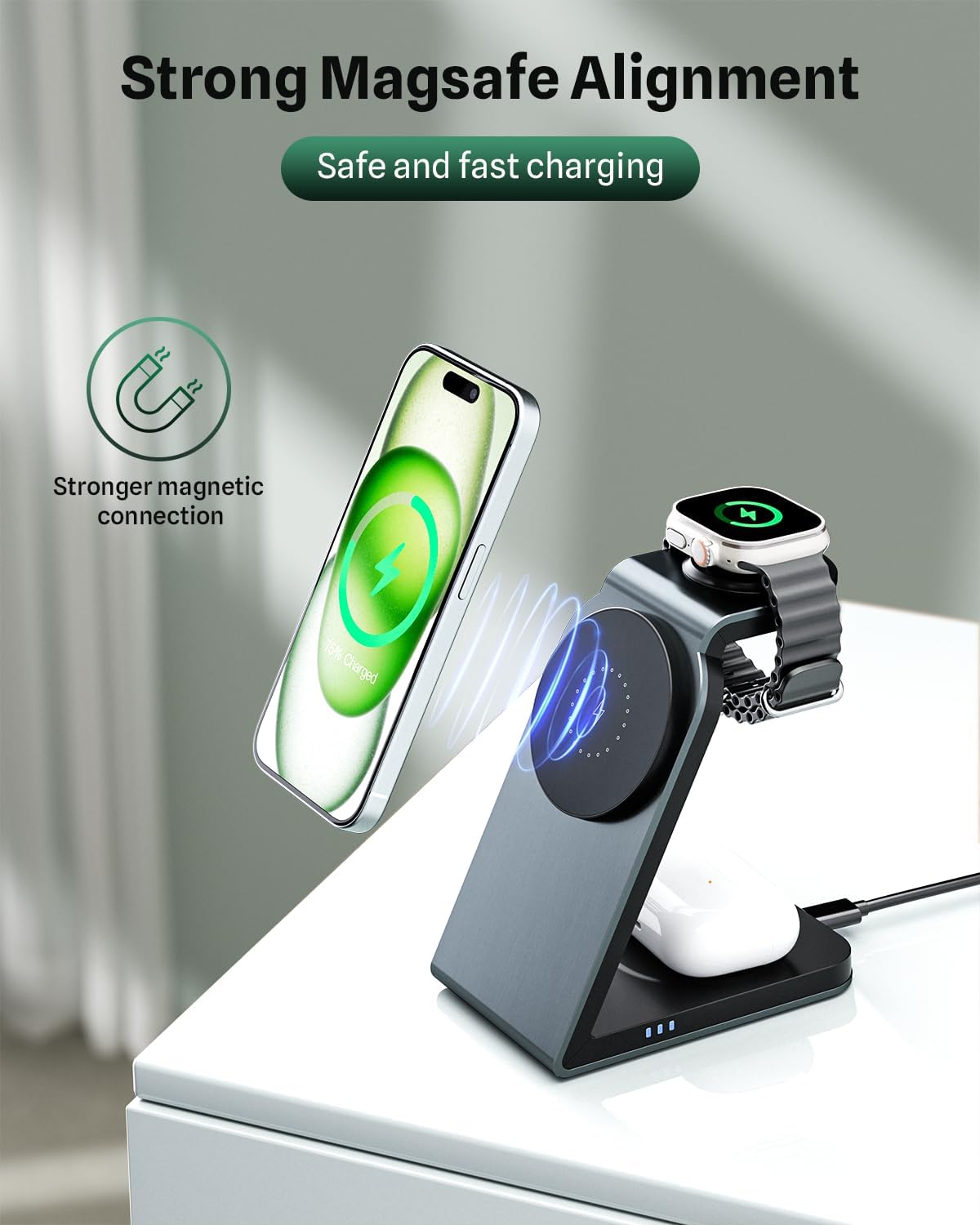
Figure 3: Strong MagSafe alignment ensures your iPhone is securely positioned for optimal and fast wireless charging.
5. Setup
- Unpack the charging dock and all accessories from the box.
- Connect the provided USB-C charging cable to the USB-C port on the back of the charging dock.
- Plug the other end of the USB-C cable into a compatible power adapter (e.g., 12V, 2A or higher recommended for optimal performance).
- Place the charging dock on a stable, flat surface. The LED indicators on the base will light up, indicating it is powered on and ready for use.
Video 1: This video demonstrates the setup and key features of the eazpower 3-in-1 Wireless Charging Dock, including its magnetic alignment and multi-device charging capabilities.
6. Operating Instructions
6.1 Charging Your iPhone
- Ensure your iPhone is MagSafe compatible (iPhone 12 series or newer) or has a MagSafe/magnetic case.
- Align the back of your iPhone with the magnetic charging pad on the upright stand. The magnets will snap your iPhone into place.
- The iPhone will begin charging automatically. You can rotate your iPhone 360 degrees to view it vertically or horizontally while charging.
6.2 Charging Your Apple Watch
- Place your Apple Watch onto the dedicated charging module located at the top of the stand.
- Ensure the watch is properly seated on the charging module. Charging will begin automatically.
6.3 Charging Your AirPods
- Place your AirPods (or other Qi-compatible earbuds) charging case onto the flat wireless charging pad at the base of the dock.
- Ensure the charging case is centered on the pad. Charging will begin automatically.

Figure 4: The compact design makes it ideal for use on a nightstand, keeping your devices charged and organized overnight.

Figure 5: The charging dock integrates seamlessly into a workspace, providing convenient charging for multiple devices.

Figure 6: Compatibility and charging speeds for various devices, including iPhones, AirPods, and Apple Watch.
7. Maintenance
- To clean the charging dock, disconnect it from the power source.
- Wipe the surface with a soft, dry cloth. Do not use abrasive cleaners or solvents.
- Keep the charging surfaces free from dust and debris to ensure optimal contact and charging efficiency.
- Store the device in a cool, dry place when not in use for extended periods.
8. Troubleshooting
| Problem | Possible Cause | Solution |
|---|---|---|
| Device not charging | Incorrect power adapter; Loose cable connection; Device not properly aligned; Non-magnetic case. | Ensure power adapter meets specifications (12V/2A); Check all cable connections; Realign device on charging pad; Use a MagSafe/magnetic case or metal ring. |
| Slow charging | Underpowered adapter; Background apps on device; Device overheating. | Use a higher wattage power adapter; Close unnecessary apps; Ensure proper ventilation. |
| LED indicators not lighting up | No power; Faulty cable/adapter. | Check power outlet; Try a different USB-C cable or power adapter. |
| Intermittent charging | Poor alignment; Foreign objects on charging surface; Device vibration. | Ensure precise alignment; Remove any foreign objects; Place on a stable surface. |
9. Specifications
- Model: SW18
- Product Dimensions: 4.5 x 4 x 2.5 inches
- Item Weight: 10.6 ounces
- Input Voltage: 12 Volts
- Amperage: 2 Amps
- Connectivity Technology: USB
- Connector Type: USB Type C
- Compatible Devices: iPhone 11, iPhone 12, iPhone 13, iPhone 14, iPhone 15 Pro Max, Apple Watch, AirPods
- Color: Blue
- Special Features: MagSafe Compatible, Charging Indicator, Wireless Charging
10. Warranty and Support
This eazpower product comes with a standard manufacturer's warranty. For detailed warranty information, technical support, or customer service inquiries, please refer to the contact information provided with your purchase or visit the official eazpower website. Please retain your proof of purchase for warranty claims.