
1. Introduction
This manual provides instructions for the installation and care of a compatible replacement knob for the Off-Choke-Run selector switch on Craftsman 3000i and 3300i inverter generators. Please read this manual carefully before proceeding with installation to ensure proper fit and function.
2. Compatibility Information
This replacement knob is specifically designed for use with Craftsman 3000i and Craftsman 3300i inverter generator models. It is crucial to verify your generator model before attempting installation.
This knob is NOT compatible with Craftsman model CMXGIAC3300 or any other generator brands or models.
Generator knobs often have subtle differences in length, connector shape, depth, rotation mechanism, and screw size. Using an incompatible knob can lead to improper function or damage to your generator's switch mechanism.

Image 2.1: Visual warning indicating incompatibility with model CMXGIAC3300.

Image 2.2: An assortment of generator knobs, illustrating the variations in design and why compatibility is specific to certain models.
3. Package Contents
Upon opening your package, please ensure all components are present:
- 1x Replacement Off-Choke-Run Switch Knob
- 1x Compatible Mounting Screw
The generator itself is not included with this product.

Image 3.1: The replacement knob and its accompanying compatible screw.
4. Installation Instructions
Follow these steps to replace the Off-Choke-Run switch knob on your Craftsman 3000i or 3300i inverter generator:
- Ensure Safety: Before beginning, ensure your generator is turned off, cooled down, and disconnected from any power sources or loads.
- Locate Existing Knob: Identify the Off-Choke-Run selector switch on your generator.
- Remove Old Knob: If an old knob is present, carefully remove any retaining screw (if applicable) and pull the knob straight off the shaft.
- Position New Knob: Align the new replacement knob with the metal shaft of the selector switch. Ensure the knob's internal shape matches the shaft's profile.
- Secure New Knob: Gently push the new knob onto the shaft. Once seated, insert the provided compatible screw into the center of the knob and tighten it securely with a screwdriver. Do not overtighten.
- Test Functionality: After installation, gently rotate the knob through its Off, Choke, and Run positions to ensure it moves smoothly and engages correctly.
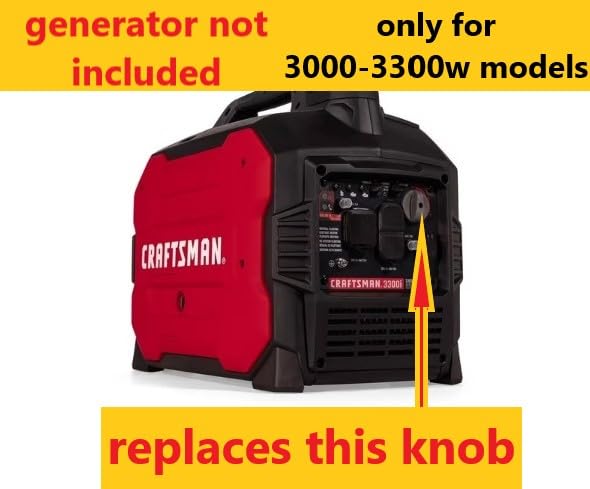
Image 4.1: Location of the Off-Choke-Run switch knob on a Craftsman 3000i inverter generator.

Image 4.2: Location of the Off-Choke-Run switch knob on a Craftsman 3300i inverter generator.
5. Care and Maintenance
This replacement knob is 3D printed from PETG material, known for its durability and strength, often exceeding that of standard PLA materials. Due to the nature of 3D printing, small residues from the manufacturing process may be present; these do not affect functionality.
- Cleaning: Wipe the knob with a damp cloth if it becomes dirty. Avoid harsh chemicals or abrasive cleaners.
- Storage: Store the generator in a clean, dry environment to prolong the life of all its components, including the knob.
6. Troubleshooting
If you encounter any issues during installation or if the knob does not fit correctly, please:
- Double-check that your generator model is indeed a Craftsman 3000i or 3300i.
- Ensure the knob is correctly aligned with the shaft before attempting to push it on or tighten the screw.
- If problems persist, refer to the 'Warranty and Support' section for assistance.
7. Specifications
| Feature | Detail |
|---|---|
| Product Type | Replacement Off-Choke-Run Switch Knob |
| Compatible Generators | Craftsman 3000i, Craftsman 3300i Inverter Generators |
| Material | 3D Printed PETG |
| Included Components | Knob, Compatible Screw |
| Package Dimensions | Approximately 7 x 5 x 3 inches |
| Package Weight | Approximately 2 ounces |
8. Warranty and Support
If you experience any issues with this replacement knob, or if it does not meet your expectations, please contact the seller directly. The seller is committed to working with you to resolve any problems you may encounter.
For support, please refer to your purchase documentation or the platform where the item was purchased to find the seller's contact information.