
Mammoth Lighting M400
Mammoth Lighting M400 Handheld PAR and Spectrometer User Manual
Model: M400
1. Introduction
This manual provides detailed instructions for the operation and maintenance of your Mammoth Lighting M400 Handheld PAR and Spectrometer. The M400 is designed for precise measurement and analysis of light, particularly for LED grow light testing, offering advanced optical technology and a user-friendly interface.
Please read this manual thoroughly before using the device to ensure proper function and to maximize its lifespan.
2. Key Features
- Advanced Optical Technology: Features a 2nm optical resolution and a wide wavelength range (380nm - 780nm) for comprehensive light analysis.
- Electronic Shutter Technology: Allows for a minimum integration time of 50us, suitable for detecting both strong and weak optical signals.
- Sleek and Portable Design: Constructed from aluminum alloy, offering a lightweight and compact form factor.
- Open Operating System: Upgradable system with an open source code for intelligent product applications.
- Intuitive User Interface: Equipped with a 3.5-inch high-definition IPS capacitive touch screen for enhanced usability.
- Quick and Convenient Operation: Features quick on/off functionality, one-click testing, and a large battery capacity for extended use (up to 24 hours).
- Data Analysis Software: Includes user-friendly software for downloading and analyzing measurement data on a computer.
- Measurement Capabilities: Measures PPFD (Photosynthetic Photon Flux Density), CCT (Correlated Color Temperature), Illuminance (Lux), Chromaticity coordinates (x,y), Peak Wavelength, Dominant Wavelength, Half-Width, Purity, SDCM, and Ra.
3. Package Contents
Upon unpacking, verify that all items listed below are present and in good condition:
- Mammoth Lighting M400 Handheld PAR and Spectrometer Unit
- Protective Carrying Case
- USB Charging Cable
- Power Adapter
- User Manual (this document)
- Wand/Extension Pole (optional accessory)
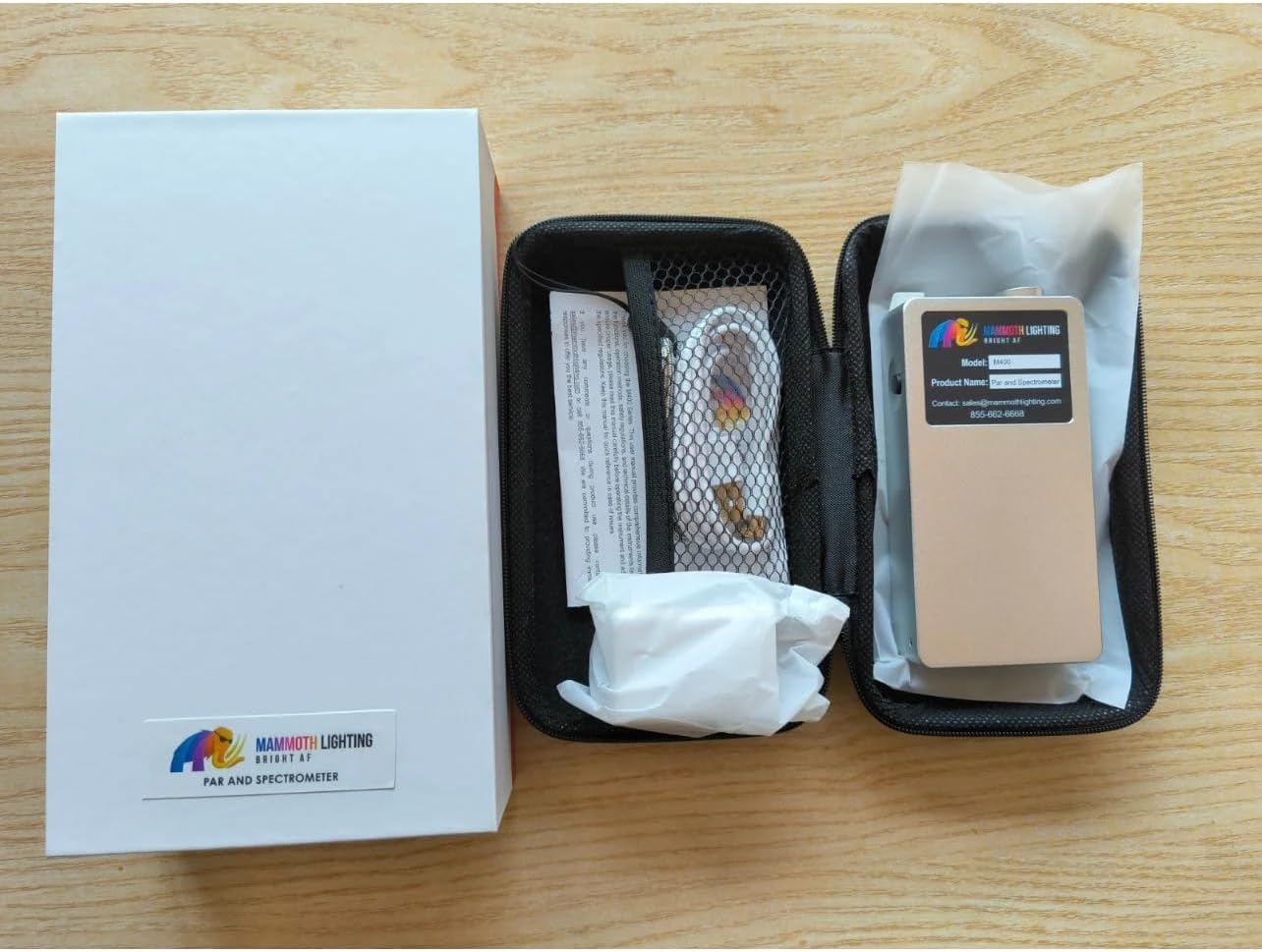
Figure 3.1: The M400 device, its carrying case, and included accessories.

Figure 3.2: The M400 device, charger, and cable stored within its protective carrying case.
4. Setup
4.1 Initial Charging
Before first use, fully charge the M400 device. Connect the provided USB charging cable to the device and the power adapter, then plug the adapter into a standard electrical outlet. The charging indicator on the device will show its status. A full charge can provide up to 24 hours of operation.
4.2 Powering On/Off
- To Power On: Press and hold the power button located on the device until the screen illuminates.
- To Power Off: Press and hold the power button until a power-off prompt appears on the screen, then confirm.
5. Operating Instructions
5.1 User Interface Overview
The M400 features a 3.5-inch IPS capacitive touch screen. Navigation is performed by tapping icons and swiping through menus. The main screen typically displays measurement modes (Spec, Data, Chro, Set) and current battery status.

Figure 5.1: Device screen showing spectral data and graph.

Figure 5.2: Device screen showing detailed measurement data.
5.2 Taking Measurements (One-Click Testing)
- Ensure the device is powered on and fully charged.
- Position the sensor of the M400 at the desired measurement point. For grow light applications, ensure the sensor is level and facing the light source. The optional wand can be used to extend reach.
- Tap the "Test" or "Measure" icon on the touch screen (often represented by a play button or similar symbol). The device will perform a quick measurement.
- The results, including PPFD (Photosynthetic Photon Flux Density), CCT (Correlated Color Temperature), and spectral data, will be displayed on the screen.

Figure 5.3: The M400 device in use, measuring light intensity.

Figure 5.4: The optional wand accessory for extended reach during measurements.
5.3 Data Management and Software
The M400 allows for data storage and transfer. Connect the device to a computer using the provided USB cable. Utilize the dedicated software program (available for download from the Mammoth Lighting website) to access, download, and analyze your measurement data. The software provides advanced graphing and reporting features.
6. Maintenance
6.1 Cleaning
Gently wipe the device's screen and body with a soft, dry, lint-free cloth. Do not use abrasive cleaners, solvents, or harsh chemicals, as these can damage the screen or casing. Keep the sensor clean and free from dust or debris to ensure accurate readings.
6.2 Storage
When not in use, store the M400 in its protective carrying case in a cool, dry place, away from direct sunlight and extreme temperatures. Avoid storing the device in environments with high humidity or corrosive gases.
6.3 Battery Care
To prolong battery life, avoid fully discharging the device frequently. If storing for an extended period, charge the battery to approximately 50% every few months.
7. Troubleshooting
| Problem | Possible Cause | Solution |
|---|---|---|
| Device does not power on. | Low battery; device malfunction. | Charge the device for at least 30 minutes. If it still doesn't power on, contact support. |
| Inaccurate readings. | Dirty sensor; incorrect positioning; environmental interference. | Clean the sensor. Ensure the sensor is correctly positioned and level. Minimize external light interference. |
| Screen unresponsive. | Software glitch; screen damage. | Restart the device. If the issue persists, contact support. |
| Cannot connect to computer. | Faulty USB cable; driver issues; software not installed. | Try a different USB port or cable. Ensure the Mammoth Lighting software is installed and updated. |
8. Specifications
| Feature | Detail |
|---|---|
| Model | M400 |
| Optical Resolution | 2nm |
| Wavelength Range | 380nm - 780nm |
| Minimum Integration Time | 50us |
| Display | 3.5-inch IPS Capacitive Touch Screen |
| Battery Life | Up to 24 hours (typical use) |
| Weight | 1.36 kg (approximately) |
| Manufacturer | Mammoth Lighting |
| ASIN | B0CTR4QCRX |

Figure 8.1: Rear view of the M400 device with product label.
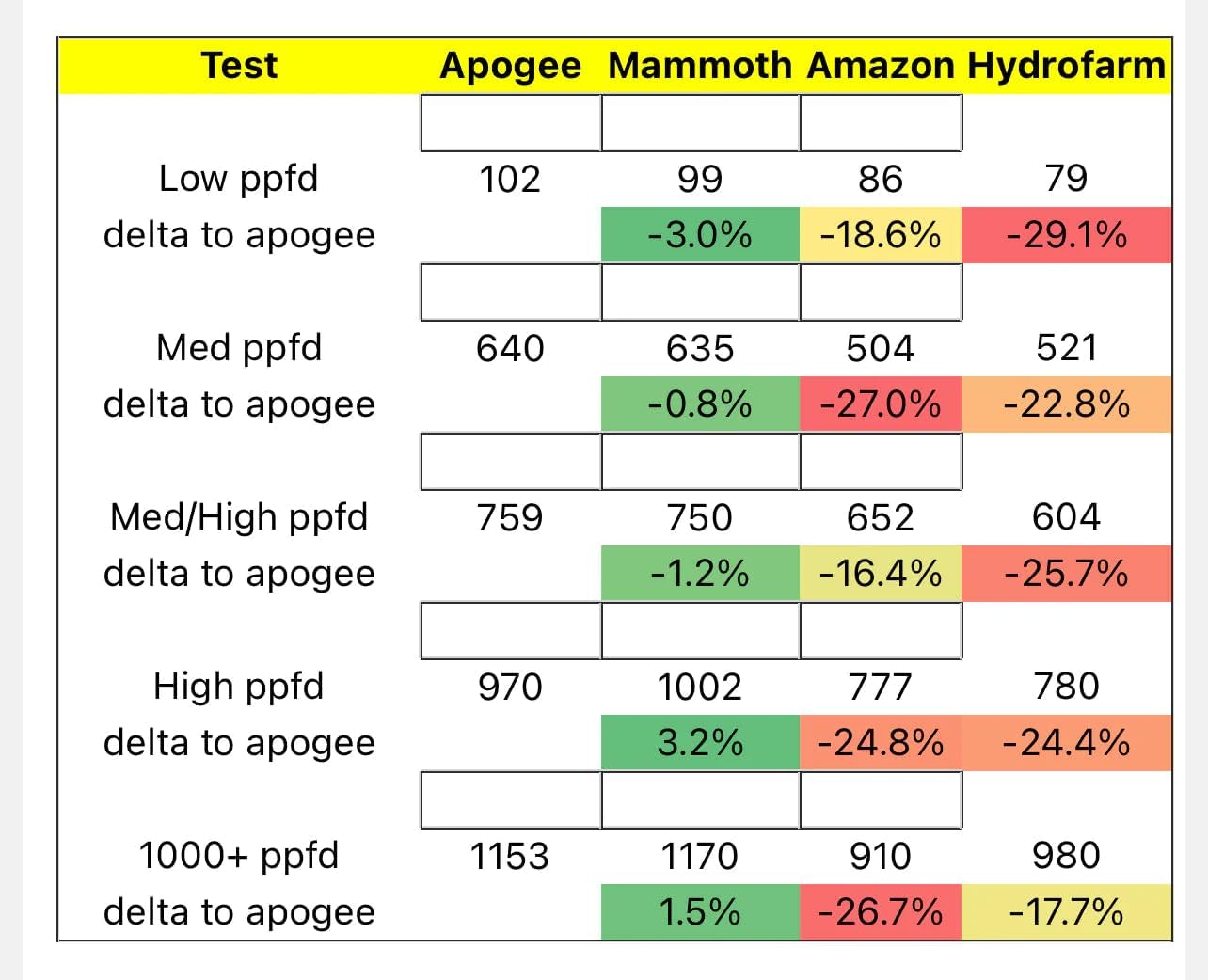
Figure 8.2: Performance comparison data for PPFD measurements.
9. Warranty and Support
9.1 Warranty Information
Mammoth Lighting products are manufactured to high-quality standards. For specific warranty terms and conditions, please refer to the warranty card included with your product or visit the official Mammoth Lighting website. Keep your proof of purchase for warranty claims.
9.2 Customer Support
If you encounter any issues or have questions regarding your Mammoth Lighting M400, please contact our customer support team. You can find contact information on our official website or on the product packaging. Please have your model number (M400) and purchase details ready when contacting support.
Contact: sales@mammothlighting.com
Phone: 855-662-6668
Related documentsM400

Ask a question about this manual
Ask about setup, troubleshooting, compatibility, parts, safety, or missing instructions. Manuals+ will review the question and use this page’s manual context to help answer it.