
Introduction
This manual provides detailed instructions for the setup, operation, and maintenance of your SECUHOME Hummingbird Feeder with Camera. This device combines a traditional hummingbird feeder with a smart, high-definition camera, allowing you to observe and record the activities of hummingbirds and other birds up close. It features real-time monitoring, motion detection, AI bird species recognition, and various storage options.
Please read this manual thoroughly before using the product to ensure proper functionality and longevity.
What's Included
Verify that all components listed below are present in your package:
- Hummingbird Feeder Body with Integrated Camera
- Feeder Base
- Ant Moat / Top Cover
- Hook for Hanging
- Cleaning Brush (Large)
- Cleaning Brush (Small)
- User Manual
- Antenna
- Feeding Ports (Flower-shaped)

Figure 1: Included components of the Hummingbird Feeder with Camera.
Key Features
- Smart High-Definition Camera: Equipped with a 1080P camera for clear video and image capture of bird activities. Features a 135-degree wide-angle lens and 5dBi antenna for stable 2.4Ghz Wi-Fi connection.
- Real-time Monitoring & Motion Detection: Remotely monitor activities and receive instant notifications on your phone when motion is detected.
- AI Recognition: Advanced artificial intelligence identifies hummingbird and other bird species from an extensive database, providing educational insights via the VicoHome app.
- Large Capacity Feeder: Features a 20-ounce (0.6L) transparent tank to reduce the frequency of nectar refills.
- Ant & Bee Proof Design: Includes an ant moat (fill with water) and bee-proof feeding ports to protect nectar.
- Rechargeable & Wire-Free: Built-in battery provides 1 to 3 months of use per charge. No power cords or network cables required for installation.
- IP65 Waterproof: Designed to withstand various weather conditions for outdoor use.
- Multiple Storage Options: Supports up to 128GB Micro SD card (not included) and cloud storage (with a free trial).
- Multi-User Sharing: Share camera access with up to 4 users simultaneously.
- Easy Setup & Cleaning: Detachable design for simple assembly, refilling, and cleaning with included accessories.

Figure 2: The SECUHOME Hummingbird Feeder with Camera in use.

Figure 3: High-definition camera capabilities.

Figure 4: Ant-proof and bee-proof design details.
Setup Guide
1. Assembly and Nectar Filling
Follow these steps to assemble your feeder and fill it with nectar:
- Rotate the base of the bird feeder counter-clockwise to open and detach it from the main body.
- Invert the bird feeder body. Carefully pour hummingbird nectar into the transparent tank.
- Align the base with the feeder body and rotate clockwise to securely tighten it. Ensure it is sealed properly to prevent leakage.
- Flip the feeder upright. If using the ant moat, fill the top cover with pure water to deter ants.

Figure 5: Nectar filling and assembly process.
2. Camera and App Setup
To utilize the smart camera features, you need to set up the VicoHome app:
- Download the VicoHome app from your smartphone's app store (available for iOS and Android).
- Ensure the camera is charged and powered on.
- Open the VicoHome app and follow the on-screen instructions to add a new device. You will typically scan a QR code on the camera or manually select the device type.
- Connect the camera to your 2.4GHz Wi-Fi network. Ensure your Wi-Fi signal is strong at the feeder's intended location.
- Once connected, you can view the live feed and configure camera settings within the app.
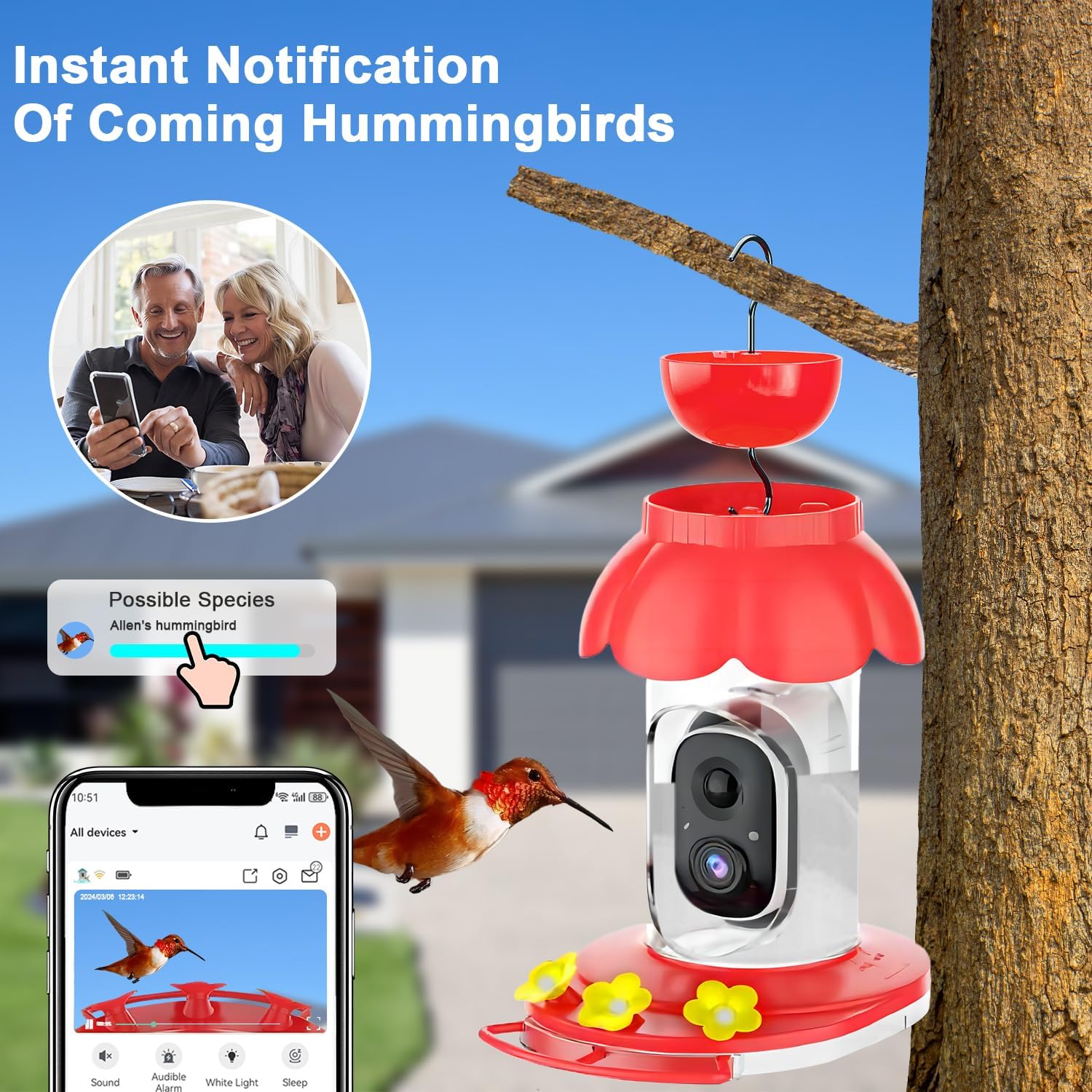
Figure 6: VicoHome app interface showing instant notifications.

Figure 7: VicoHome app displaying AI bird species recognition.
3. Mounting Options
The feeder offers flexible mounting options:
- Hanging Mount: Use the provided hook to hang the feeder from a tree branch, shepherd's hook, or other suitable outdoor structure.
- Pole Mount: The feeder can also be tied or secured to a pole (pole not included) for stable placement.
Choose a location that is easily accessible for refilling and cleaning, and where hummingbirds are likely to visit. Ensure the camera has a clear view of the feeding ports.

Figure 8: Mounting options for the feeder.
Operation
1. Real-time Monitoring and Notifications
Once the camera is set up and connected to the VicoHome app, you can:
- Live View: Open the app to access a real-time video feed from your feeder.
- Motion Detection: Enable motion detection in the app settings to receive instant push notifications on your phone whenever a bird approaches the feeder.
2. AI Recognition
The camera's AI capabilities allow for intelligent bird species identification:
- When a bird is detected, the AI will attempt to identify its species.
- View identification results and learn more about different bird species directly within the VicoHome app.
3. Video Recording and Storage
The camera automatically captures videos when motion is detected. You have two primary storage options:
- Micro SD Card: Insert a Micro SD card (up to 128GB, not included) into the camera's designated slot for local storage of recordings.
- Cloud Storage: Utilize the cloud storage service (a free trial is typically included) to save recordings securely online. Access your video history anytime from the app.

Figure 9: Storage options and sharing capabilities.
4. Sharing Functionality
Share the joy of bird watching with family and friends:
- The VicoHome app allows you to share access to your camera with multiple users.
- Up to four users can view the live feed and recordings simultaneously.
Maintenance
1. Cleaning the Feeder
Regular cleaning is crucial to prevent mold and bacteria growth, ensuring the health of hummingbirds:
- Disassemble the feeder by rotating the base and removing the top cover.
- Empty any remaining nectar.
- Use the provided cleaning brushes (large for the tank, small for feeding ports) and warm soapy water to thoroughly clean all parts.
- Rinse all components thoroughly with clean water to remove any soap residue.
- Allow all parts to air dry completely before reassembling.
2. Nectar Refilling
Refill the feeder with fresh hummingbird nectar as needed, typically every 2-3 days, or more frequently in hot weather. Refer to the "Assembly and Nectar Filling" section for detailed steps.
3. Battery Charging
The camera's battery provides extended use, but will require periodic recharging:
- When the battery level is low, you will receive a notification via the VicoHome app.
- Carefully remove the camera module from the feeder body.
- Connect the camera to a standard USB charger using the provided charging cable.
- A full charge can provide 1 to 3 months of operation, depending on usage and motion detection frequency.
Troubleshooting
| Issue | Possible Cause | Solution |
|---|---|---|
| Camera not turning on / No power | Low battery; Camera not properly seated. | Charge the camera battery fully. Ensure the camera module is correctly inserted into the feeder body. |
| Cannot connect to Wi-Fi | Incorrect Wi-Fi password; Weak signal; Router issues. | Double-check Wi-Fi password. Ensure the feeder is within range of your 2.4GHz Wi-Fi network. Restart your router. Re-pair the device in the VicoHome app. |
| Nectar leakage from feeder | Base not tightened properly; Damaged seal. | Ensure the feeder base is securely tightened clockwise after refilling. Inspect the seal for any damage. |
| No motion detection notifications | Motion detection disabled; Sensitivity too low; App permissions. | Enable motion detection in the VicoHome app settings. Adjust sensitivity to a higher level. Check app notification permissions on your phone. |
| Ants or bees at feeder | Ant moat empty; Bee-proof ports blocked. | Fill the ant moat with pure water. Ensure feeding ports are clear and not damaged. |
Product Specifications
| Specification | Detail |
|---|---|
| Brand | SECUHOME |
| Model Number | G01 |
| Target Species | Hummingbird |
| Material | Plastic |
| Product Dimensions | 6.3"L x 8"W x 9.3"H (160mm L x 203mm W x 237mm H for feeder body, 120mm for hook assembly) |
| Item Weight | 3.58 pounds |
| Power Source | Battery Powered (2 Lithium Ion batteries included) |
| Capacity | 20 ounces (0.6 Liters) |
| Camera Resolution | 1080P High-definition |
| Camera Angle | 135° Wide Angle |
| Wi-Fi Connectivity | 2.4GHz Wi-Fi |
| Storage Options | Micro SD (up to 128GB, not included), Cloud Storage |
| Waterproof Rating | IP65 |
| UPC | 795958987199 |
Safety Information
When using the Hummingbird Feeder with Camera, please adhere to the following safety guidelines:
- Use only appropriate nectar for hummingbirds. Do not use artificial sweeteners or honey, as these can be harmful to birds.
- Securely hang or mount the feeder to prevent it from falling, which could cause injury or damage.
- Maintain cleanliness of the feeder by regularly cleaning and refilling with fresh nectar to prevent the spread of disease among birds.
- Keep the feeder out of reach of pets and small children to prevent accidental ingestion of nectar or damage to the device.
- Do not expose the camera to extreme temperatures outside its operating range.
- Ensure the charging port is dry before connecting the charging cable.
Warranty and Support
For warranty information, technical support, or customer service inquiries, please refer to the contact information provided on the product packaging or the official SECUHOME website. Keep your purchase receipt for warranty claims.