
1. Introduction
This manual provides instructions for the ANYPLUS USB 3.0 Hub, a portable 4-port USB extender designed to expand the connectivity of your devices. It facilitates high-speed data transfer and is compatible with a wide range of computers and peripherals.
2. Product Overview
2.1 Features
- 4 USB 3.0 Ports: Expands one USB port into four, allowing multiple device connections.
- High-Speed Data Transfer: Supports up to 5Gbps data transfer rate, compatible with USB 3.0, USB 2.0, and USB 1.1.
- Durable and Portable Design: Constructed from aluminum alloy, featuring an ultra-slim (10mm) and lightweight body for easy transport.
- Plug and Play: No driver installation required for operation.
- LED Indicator: A blue LED light indicates the working status of the hub.
- Wide Compatibility: Works with various operating systems and devices including laptops, PCs, MacBooks, iMacs, Surface Pros, Mac Pros, flash drives, keyboards, mice, and printers.
2.2 Components
The ANYPLUS USB 3.0 Hub consists of the main hub unit with four USB 3.0 ports and an integrated USB-A connector cable for connecting to your host device.

Figure 1: The ANYPLUS USB 3.0 Hub features four USB 3.0 ports, enabling data transfer speeds up to 5Gbps, significantly faster than USB 2.0.
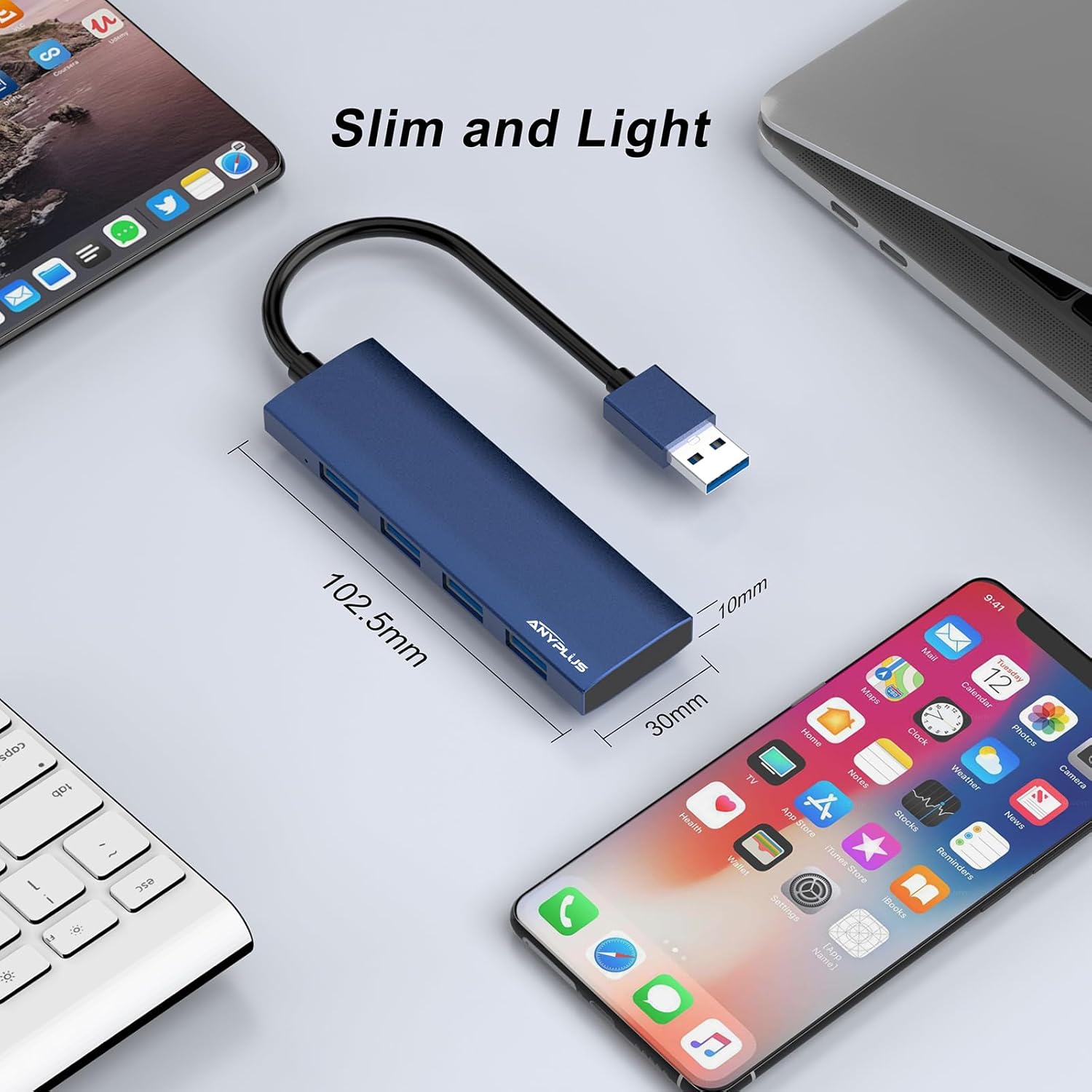
Figure 2: The ultra-slim design of the hub, measuring approximately 102.5mm in length, 30mm in width, and 10mm in thickness, makes it highly portable.
3. Setup
The ANYPLUS USB 3.0 Hub is designed for simple plug-and-play operation. No software or drivers are required for installation.
- Locate an available USB-A port on your computer (laptop, PC, MacBook, etc.).
- Connect the integrated USB-A cable of the ANYPLUS USB 3.0 Hub into your computer's USB-A port.
- The blue LED indicator on the hub will illuminate, signifying that the hub is powered on and ready for use.

Figure 3: The ANYPLUS USB Hub offers plug-and-play functionality, requiring no drivers for immediate use upon connection.
4. Operating Instructions
4.1 Connecting Devices
Once the hub is connected to your computer, you can connect up to four USB devices into the available USB 3.0 ports on the hub. These devices can include:
- USB Flash Drives
- External Hard Drives (self-powered recommended for optimal performance)
- Keyboards
- Mice
- Printers
- Cameras
4.2 Data Transfer
The hub supports USB 3.0 speeds, allowing for data transfer up to 5Gbps. For optimal performance, connect USB 3.0 compatible devices to the hub. The hub is backward compatible with USB 2.0 and USB 1.1 devices, but data transfer will occur at the speed of the connected device (e.g., USB 2.0 speeds for USB 2.0 devices).

Figure 4: Experience rapid data transfer with USB 3.0, allowing you to transfer large files like movies, music, and pictures in seconds.
4.3 LED Indicator
The blue LED indicator light on the hub confirms that the device is powered and operational.
Note: The maximum output current supported by this USB hub is 900mA. It is not designed for charging devices that require higher power input.
5. Maintenance
- Cleaning: Use a soft, dry cloth to clean the hub. Avoid liquid cleaners or abrasive materials.
- Storage: Store the hub in a cool, dry place away from direct sunlight and extreme temperatures.
- Handling: Avoid dropping the hub or subjecting it to strong impacts. Do not attempt to disassemble the device.
6. Troubleshooting
- Device Not Recognized:
- Ensure the hub is securely connected to your computer's USB port.
- Try connecting the device directly to your computer's USB port to verify the device itself is functional.
- Restart your computer.
- Slow Data Transfer Speed:
- Ensure both the hub and the connected device support USB 3.0 for maximum speed.
- Avoid connecting high-power consumption devices simultaneously, as this can affect performance.
- Disconnect and reconnect the hub.
- LED Indicator Not On:
- Verify the hub is properly connected to a functioning USB port on your computer.
- Try a different USB port on your computer.
7. Specifications
| Feature | Detail |
|---|---|
| Brand | ANYPLUS |
| Model Number | B0CTQRDLBJ |
| Hardware Interface | USB 3.0, USB 2.0, USB 1.1 |
| Total USB Ports | 4 |
| Data Transfer Rate | Up to 5 Gigabits Per Second (USB 3.0) |
| Compatible Devices | Macbook, iMac, Surface Pro, Mac Pro, XPS, Laptops, USB Flash Drives, Hard Disk Drives, Printers, Keyboards, Mice |
| Operating System Compatibility | Windows 7/8/8.1/XP, Mac OS, Chrome OS, iPadOS |
| Enclosure Material | Aluminum Alloy |
| Item Dimensions (L x W x H) | 1.18" x 0.39" x 4.01" (approx. 102.5mm x 30mm x 10mm) |
| Item Weight | 60 Grams |
| Special Features | Fast Data Transfer, Indicator Light, Lightweight, Plug and Play, Portable |
8. Warranty and Support
ANYPLUS is committed to providing quality products and customer satisfaction. For any questions or assistance regarding your USB hub, please contact our customer service team. We offer 24-hour friendly customer service to address your inquiries.