
1. Introduction
This document serves as an instruction manual for your new Generic replacement remote control. This remote is designed to function with specific Aiwa CD Compact Disc Stereo System models. Please review this manual carefully to ensure proper setup and operation.
Important Note: This is a replacement infrared remote control. It is crucial that your original remote control looks identical to this replacement for full compatibility and functionality. If your original remote differs, some functions may not operate as expected.
Compatible Models:
- Aiwa NSX-AV540
- Aiwa NSX-DP55
- Aiwa XH-DT7
- Aiwa XH-DT8
- Aiwa RC-TN400
- Aiwa RC-ZAS04
- Aiwa NSX-T7
- Aiwa CX-NHMT75
- Aiwa CX-NMA545
2. Setup
Battery Installation:
The remote control requires two (2) AAA batteries (not included). Follow these steps to install the batteries:
- Locate the battery compartment on the back of the remote control.
- Slide the battery compartment cover downwards or press the latch and lift to open.
- Insert two AAA batteries, ensuring the positive (+) and negative (-) terminals align correctly with the markings inside the compartment.
- Replace the battery compartment cover by sliding it back into place until it clicks securely.

Image: Rear view of the remote control with the battery cover detached, revealing the two AAA battery slots.
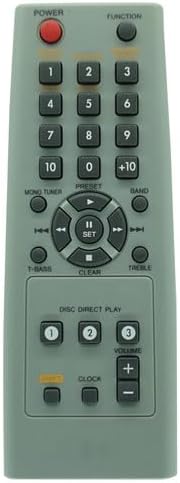
Image: Front view of the replacement remote control, displaying the layout of all buttons including power, function, numerical keys, volume, and navigation controls.
3. Operating Instructions
Once batteries are installed, point the remote control directly at your Aiwa stereo system's infrared receiver. Press the desired button to control your device.
Key Functions:
- POWER: Turns the stereo system on or off.
- FUNCTION: Cycles through input sources (e.g., CD, Tuner, Tape, Aux).
- Numerical Buttons (0-9, +10): Used for direct track selection on CD or radio station tuning.
- VOLUME (+/-): Increases or decreases the audio volume.
- Navigation Buttons (Up, Down, Left, Right, SET): Used for menu navigation or track/station skipping.
- PLAY/PAUSE (►/∥∥): Controls playback for CD or other media.
- STOP (■): Stops playback.
- T-BASS: Activates or deactivates the bass boost function.
- TREBLE: Adjusts the treble level.
- BAND: Switches between AM/FM bands on the tuner.
- PRESET: Accesses preset radio stations.
- CLOCK: Used for setting the system clock.
- DISC DIRECT PLAY (1, 2, 3): Directly selects a specific disc in a multi-disc changer.
4. Maintenance
Battery Replacement:
Replace batteries when the remote control's response becomes sluggish or stops working. Always replace both batteries at the same time with new AAA batteries. Do not mix old and new batteries, or different types of batteries.
Cleaning:
To clean the remote control, wipe it with a soft, dry cloth. Do not use liquid cleaners, sprays, or abrasive materials, as these can damage the remote's surface or internal components.
5. Troubleshooting
If your remote control is not functioning correctly, please try the following troubleshooting steps:
- Check Batteries: Ensure batteries are inserted correctly with the correct polarity (+/-) and are not depleted. Replace with fresh AAA batteries if necessary.
- Line of Sight: Make sure there are no obstructions between the remote control and the infrared receiver on your stereo system. The remote requires a clear line of sight to operate.
- Distance: Ensure you are within the effective operating range of the remote control (typically up to 20 feet or 6 meters).
- Compatibility: Double-check that your stereo system's model number is listed as compatible and that your original remote control was visually identical to this replacement. If not, full functionality cannot be guaranteed.
- System Power: Confirm that your Aiwa stereo system is powered on and not in standby mode.
6. Specifications
| Feature | Detail |
|---|---|
| Product Type | Infrared Replacement Remote Control |
| Power Source | 2 x AAA Batteries (not included) |
| Color | Black |
| Compatible Devices | Aiwa CD Compact Disc Stereo Systems (Home Theater) |
7. Warranty and Support
This is a generic replacement remote control. Specific warranty information from the original manufacturer of your stereo system does not apply to this replacement remote. For any issues or questions regarding this replacement remote, please contact the seller directly through your purchase platform.
No official product videos are available for this specific replacement remote control based on the provided information.