
SmartWhale Cleanslet-2
SmartWhale Cleanslet-2 Electric Bidet Toilet Seat User Manual
Model: Cleanslet-2
Product Overview
The SmartWhale Cleanslet-2 Electric Bidet Toilet Seat is designed to provide a superior personal hygiene experience with advanced features. This elongated bidet seat offers instant warm water, a warm air dryer, and multiple wash modes for comprehensive cleansing. It includes a wireless remote for convenient control and is built with hygienic, durable materials.
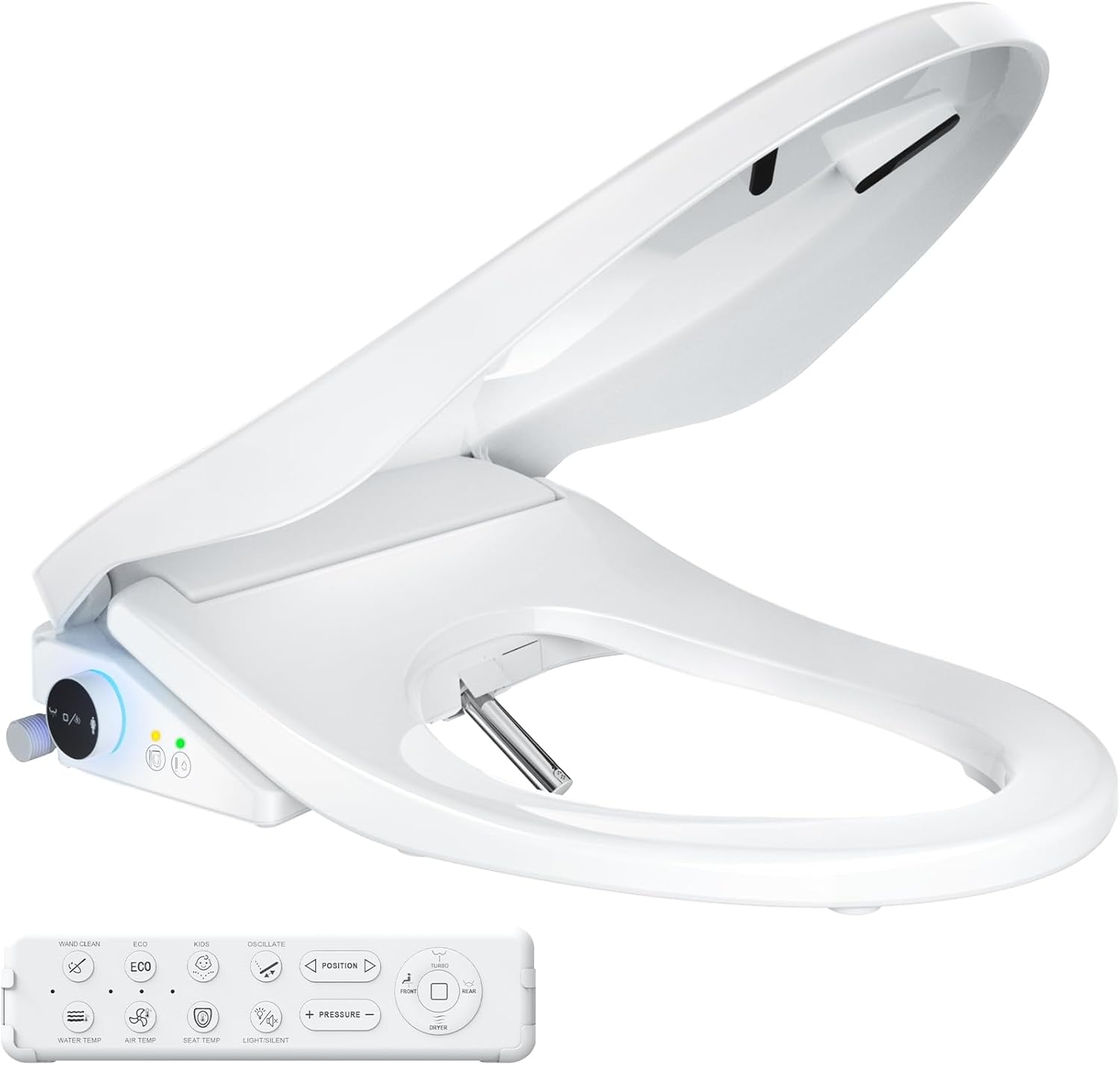
Figure 1: SmartWhale Cleanslet-2 Electric Bidet Toilet Seat and its wireless remote control.
Safety Information
Please read all instructions carefully before installation and use. Keep this manual for future reference.
- Ensure the bidet seat is connected to a properly grounded electrical outlet.
- Do not immerse the unit in water or spray water directly onto the electrical components.
- Unplug the unit before cleaning or performing any maintenance.
- This product is designed for use with elongated toilets only. Verify your toilet dimensions before installation.
- Keep out of reach of children unless under direct adult supervision, especially when using child mode.
- Avoid placing heavy objects on the bidet seat or lid. The seat supports up to 480 lbs.

Figure 2: Compatibility check for elongated toilets and power outlet requirement.
Package Contents
Verify that all components are present before beginning installation:
- SmartWhale Cleanslet-2 Bidet Toilet Seat
- Wireless Remote Control (with 2 AA batteries included)
- Mounting Plate and Hardware
- T-valve for water connection
- SmartWhale Hose
- Installation Template (cardboard)
- User Manual (this document)
Installation
The SmartWhale Cleanslet-2 bidet seat is designed for quick and easy installation. Follow these steps:
- Remove the Existing Toilet Seat: Unscrew and remove your current toilet seat and lid.
- Install the Mounting Plate: Use the provided cardboard template to align and secure the mounting plate onto the toilet bowl. Ensure it is positioned correctly for an elongated toilet.
- Attach the Bidet Seat: Slide the SmartWhale bidet seat onto the installed mounting plate until it clicks securely into place.
- Connect the T-valve to your Toilet Tank Interface: Turn off the water supply to your toilet. Disconnect the existing water supply line from the toilet tank. Install the provided 7/8 inch T-valve at the tank inlet.
- Connect bidet seat and T-valve with the SmartWhale hose: Connect one end of the SmartWhale hose to the T-valve and the other end to the bidet seat's water inlet. Turn the water supply back on and check for leaks.

Figure 3: Visual guide for the quick and easy installation process.
Operating Instructions
The Cleanslet-2 offers dual control options: a wireless remote and intuitive side controls.
Wireless Remote Control
The wireless remote provides full control over all bidet functions. It comes with 2 AA batteries for immediate use and can be wall-mounted for convenience.

Figure 4: Wireless remote control displaying buttons for various functions including wash modes, temperature, pressure, and special modes.
- Wash Modes:
- Rear Wash: Standard posterior cleansing.
- Front Wash (Feminine Wash): Gentle anterior cleansing.
- Turbo Wash: Stronger wash for effective defecation.
- Oscillating Wash: Nozzle moves back and forth for wider coverage.
- Water Temperature: Adjust water temperature with 3 levels (93.2°F, 96.8°F, 100°F).
- Water Pressure: Adjust water pressure with 3 levels.
- Nozzle Position: Adjust the nozzle's forward/backward position.
- Heated Seat: Adjust seat temperature with 3 levels (93.2°F, 96.8°F, 100°F).
- Warm Air Dryer: Activate the dryer and adjust air temperature with 3 levels (93.2°F, 96.8°F, 100°F).
- Self-Clean Nozzle: Initiates an automatic cleaning cycle for the nozzle.
- ECO Mode: Activates power-saving function, reducing energy consumption by up to 40%.
- Child Mode: Limits water temperature and pressure for a gentle, safe experience for children.
- Silent Mode: Reduces operational noise to below 25dB for quiet nighttime use.
- Night Light: Turn the night light ring on or off.
- Stop Button: Stops all active functions.
Intuitive Side Control
For quick adjustments, the bidet seat also features an intuitive side control knob and buttons.

Figure 5: Side control panel for basic adjustments of seat temperature, water temperature, and wash modes.
- Seat Temp: Adjusts the heated seat temperature.
- Water Temp: Adjusts the water temperature.
- Rear Wash/Water Pressure: Controls rear wash and water pressure.
- Front Wash/Water Pressure: Controls front wash and water pressure.
- Stop/Air: Stops current operation or activates the air dryer.

Figure 6: Illustration of the four smart wash modes available.

Figure 7: Instant heating technology provides 3 adjustable levels for seat, water, and warm air dryer.

Figure 8: Explanation of ECO mode for energy saving, Child mode for gentle wash, and Silent mode for quiet operation.
Maintenance
Regular maintenance ensures optimal performance and hygiene of your SmartWhale Cleanslet-2 bidet seat.
- Nozzle Self-Cleaning: The bidet features an automatic self-cleaning function for its full stainless steel nozzle. This ensures consistent hygiene after each use. You can also manually activate the self-clean cycle via the remote control.
- General Cleaning: Unplug the unit before cleaning. Use a soft, damp cloth and mild, non-abrasive cleaner to wipe down the exterior surfaces. Do not use harsh chemicals or abrasive materials as they may damage the finish.
- Filter Maintenance: Periodically check the water inlet filter for any debris and clean if necessary to maintain optimal water flow.

Figure 9: The bidet features a self-cleaning, full stainless steel nozzle for enhanced hygiene and durability.
Troubleshooting
If you encounter any issues, refer to the following common problems and solutions:
| Problem | Possible Cause | Solution |
|---|---|---|
| No water spray. | Water supply valve closed; filter clogged; power issue. | Ensure water supply valve is open. Check and clean the water inlet filter. Verify power connection. |
| No warm water. | Heater not activated; temperature setting too low. | Ensure the unit is powered on. Adjust water temperature setting higher using the remote or side control. |
| Seat not heating. | Heated seat function off; temperature setting too low. | Activate heated seat function. Adjust seat temperature setting higher. |
| Remote control not responding. | Batteries low or dead; remote out of range. | Replace AA batteries in the remote. Ensure remote is within effective range of the bidet seat. |
| Lid does not close softly. | Mechanism obstruction or damage. | Check for any obstructions. If issue persists, contact customer support. |
If the problem persists after trying these solutions, please contact SmartWhale Customer Support.
Specifications
| Feature | Detail |
|---|---|
| Brand | SmartWhale |
| Model Number | Cleanslet-2 |
| Color | White |
| Material | Acrylonitrile Butadiene Styrene (ABS) |
| Shape | Elongated |
| Product Dimensions | 20.5"L x 14"W |
| Item Weight | 11.68 pounds (5.31 Kilograms) |
| Operation Mode | Automatic |
| Water Heating | Instant Water Heating (3 adjustable temperatures) |
| Seat Heating | 3 adjustable temperatures |
| Air Dryer | Warm Air Dryer (3 adjustable temperatures) |
| Nozzle Material | Full Stainless Steel |
| Weight Capacity | Up to 480 lbs |
| Waterproof Rating | IPX4 |
| UPC | 631978856209 |
Warranty & Support
SmartWhale stands behind the quality of its products.
- 2-Year Full Warranty: All essential parts are covered with zero hassle.
- 24/7 Expert Support: Real people, real answers. Contact us anytime you need assistance.
- Quality Assurance: 100% Tested for Performance. Each unit is individually quality-checked before shipping.

Figure 10: SmartWhale's commitment to product quality, warranty, and customer support.
For further assistance or inquiries, please visit the SmartWhale Store on Amazon or refer to the official documents:
Ask a question about this manual
Ask about setup, troubleshooting, compatibility, parts, safety, or missing instructions. Manuals+ will review the question and use this page’s manual context to help answer it.