
Introduction
The G-Wolves HTX ACE Wireless Gaming Mouse is engineered for high-performance gaming, featuring an ultra-lightweight design and advanced sensor technology. This manual provides essential information for setting up, operating, maintaining, and troubleshooting your new gaming mouse to ensure an optimal experience.

Image: G-Wolves brand logo.
Features
- Ultra-Lightweight Design: Weighing approximately 39g (non-honeycomb) or 37g (honeycomb), designed for swift movements and reduced fatigue.
- High-Performance Sensor: Equipped with a PixArt 3395 optical sensor (or similar premium 3370 sensor in some variants) for precise tracking.
- Durable Switches: Features Kailh GM 8.0 switches for main clicks (M1/M2) with excellent tension and minimal pre/post-travel.
- Customizable Settings: Adjustable DPI, polling rate, lift-off distance (LOD), and debounce time via dedicated software.
- Wireless Connectivity: Stable 2.4GHz wireless connection via a discreet USB dongle.
- Ergonomic Shape: Designed for comfortable grip styles, particularly fingertip and claw grips.

Image: Top-down view of the G-Wolves HTX ACE Wireless Gaming Mouse in black, non-honeycomb design.
Package Contents
Your G-Wolves HTX ACE Wireless Gaming Mouse package typically includes:
- G-Wolves HTX ACE Wireless Gaming Mouse
- Flexible Micro USB Cable (for charging and wired use)
- USB Wireless Dongle
- USB Extender
- Grip Tapes (black, and potentially other colors depending on variant)
- Spare PTFE Skates
- User Guide
- Cleaning Brush
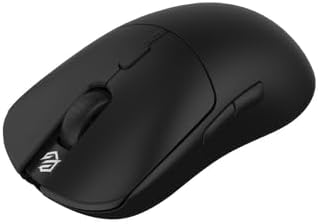
Image: The G-Wolves HTX ACE mouse shown with its included accessories, such as the USB cable and dongle.
Setup
- Charge the Mouse: Connect the flexible Micro USB cable to the mouse and a USB power source (e.g., computer USB port, wall adapter).
- Connect the Dongle: Plug the USB wireless dongle directly into an available USB port on your computer. For optimal signal, use the included USB extender to position the dongle closer to the mouse.
- Power On: Locate the power switch on the underside of the mouse and slide it to the 'ON' position.
- Install Software: Download the official G-Wolves software from the manufacturer's website (www.g-wolves.com) to customize settings and update firmware.
Operating Instructions
The G-Wolves HTX ACE offers extensive customization through its dedicated software. Below are key adjustable settings:
- Button Functions: Assign custom actions to the Left, Right, Middle, Forward, Back, and DPI Loop buttons.
- DPI Settings: Adjust DPI stages and values (e.g., 400, 800, 1600, 3200) up to 26,000 DPI.
- USB Polling Rate: Select from 125Hz, 250Hz, 500Hz, or 1000Hz for responsiveness.
- Lift-Off Distance (LOD): Choose between 1mm or 2mm LOD for precise control.
- Debounce Time: Customize debounce time from 0ms to 30ms to prevent accidental double-clicks.
- LED Settings: Configure LED effects, brightness, and speed (if applicable to your model).

Image: Screenshot of the G-Wolves software interface, showing options for key settings, DPI, polling rate, and LOD.
Charging and Battery
The G-Wolves HTX ACE is powered by a Lithium Polymer battery, offering extended usage on a single charge.
- Battery Type: 1 Lithium Polymer battery required.
- Charging: Use the provided Micro USB cable to charge the mouse. The mouse can be used while charging.
- Battery Life: With sensor improvements and an efficient 300mAh battery, expect approximately two weeks of typical use between charges.
Maintenance
- Cleaning: Use the included cleaning brush to remove dust and debris from the honeycomb shell (if applicable) and sensor area.
- Grip Tape Application: Apply the provided grip tapes to enhance handling and prevent fingerprints.
- Skate Replacement: Replace worn-out PTFE skates with the spare set included in the package for optimal glide.
Troubleshooting
- Sensor Disconnection: If the sensor randomly disconnects, ensure the firmware is updated via the G-Wolves software. Adjust the sleep timer feature in the software to prevent unintended sleep mode.
- Slam Click: Due to its ultra-lightweight design, some users may experience a 'slam click' with heavy taps. This is an inherent characteristic of the design and not typically a defect.
Specifications
| Product Dimensions | 4.7 x 2.5 x 0.1 inches |
| Item Weight | 1.34 ounces (approx. 38g) |
| Item Model Number | HARI HTX |
| Batteries | 1 Lithium Polymer battery required |
| Connectivity Technology | Radio Frequency, USB |
| Special Feature | LED Lights, Portable, Programmable Buttons, Rechargeable, Wireless |
| Movement Detection Technology | Optical |

Image: Top-down view of the G-Wolves HTX ACE mouse with length (4.7") and width (2.5") dimensions indicated.
Official Product Videos
Did G-Wolves just perfect the Hati-S wireless
Video: A detailed review and unboxing of the G-Wolves Hati-S ACE Edition wireless mouse, highlighting its features, build quality, and performance. The video discusses the translucent blue plastic, improved grip, weight, battery efficiency, Kailh GM 8.0 switches, and software customization options. It also compares the mouse to other popular gaming mice.
hts ace wireless red and purple
Video: A quick showcase of the G-Wolves Hati-S ACE wireless mouse in red and purple color variants, demonstrating its design and features.
Warranty and Support
The G-Wolves HTX ACE Wireless Gaming Mouse comes with a manufacturer's warranty. For specific warranty details, technical support, or service inquiries, please visit the official G-Wolves website or contact their customer support directly.
Official G-Wolves Website: www.g-wolves.com


