
1. Introduction
Thank you for choosing the Camii 4K Webcam. This manual provides detailed instructions for the proper setup, operation, and maintenance of your webcam. Please read this manual thoroughly before using the product to ensure optimal performance and longevity. Keep this manual for future reference.
2. Safety Information
- Do not expose the webcam to water or moisture.
- Avoid dropping or subjecting the webcam to strong impacts.
- Do not attempt to disassemble or modify the webcam. This will void the warranty.
- Use only the provided accessories or those approved by Camii.
- Keep the webcam away from extreme temperatures and direct sunlight.
- Clean the lens with a soft, dry cloth. Avoid abrasive cleaners.
3. Package Contents
Verify that all items are present in the package:
- Camii 4K Webcam
- Tripod
- Remote Control
- USB-A to USB-C Adapter (if applicable)
- User Manual
4. Product Overview
The Camii 4K Webcam features a high-resolution CMOS sensor, an integrated ring light, and dual noise-reduction microphones. It is designed for clear video and audio communication.

5. Setup
5.1 Connecting the Webcam
- Connect the webcam to your computer using the integrated USB cable.
- If your computer only has USB-C ports, use the provided USB-A to USB-C adapter.
- The webcam is Plug & Play and does not require additional drivers or software installation for basic functionality. Your operating system should automatically detect and install the necessary components.
5.2 Mounting Options
The webcam offers versatile mounting options:
- Monitor Clamp: Securely attach the webcam to the top of your computer monitor or laptop screen.
- Tripod: Use the included tripod for stable placement on a desk or flat surface.
- Desktop Stand: The webcam can also stand independently on a flat surface without the tripod.

6. Operating Instructions
6.1 Basic Operation
Once connected, the webcam is ready for use with compatible video conferencing or streaming applications. Select the Camii 4K Webcam as your preferred video and audio input device within your application's settings.
6.2 Autofocus
The webcam features intelligent autofocus, which automatically adjusts to maintain clear focus on the subject. This ensures a sharp image in various environments.
6.3 Digital Zoom
The webcam supports 3X digital zoom. This feature allows you to adjust the field of view to focus on specific areas. Note that the 3X digital zoom function is only supported when operating at resolutions lower than 4K (e.g., 1080p).

6.4 Dual Noise-Reduction Microphones
The integrated dual microphones are designed to reduce ambient noise, ensuring clear and stable audio during calls. This enhances the human voice experience by minimizing background distractions.
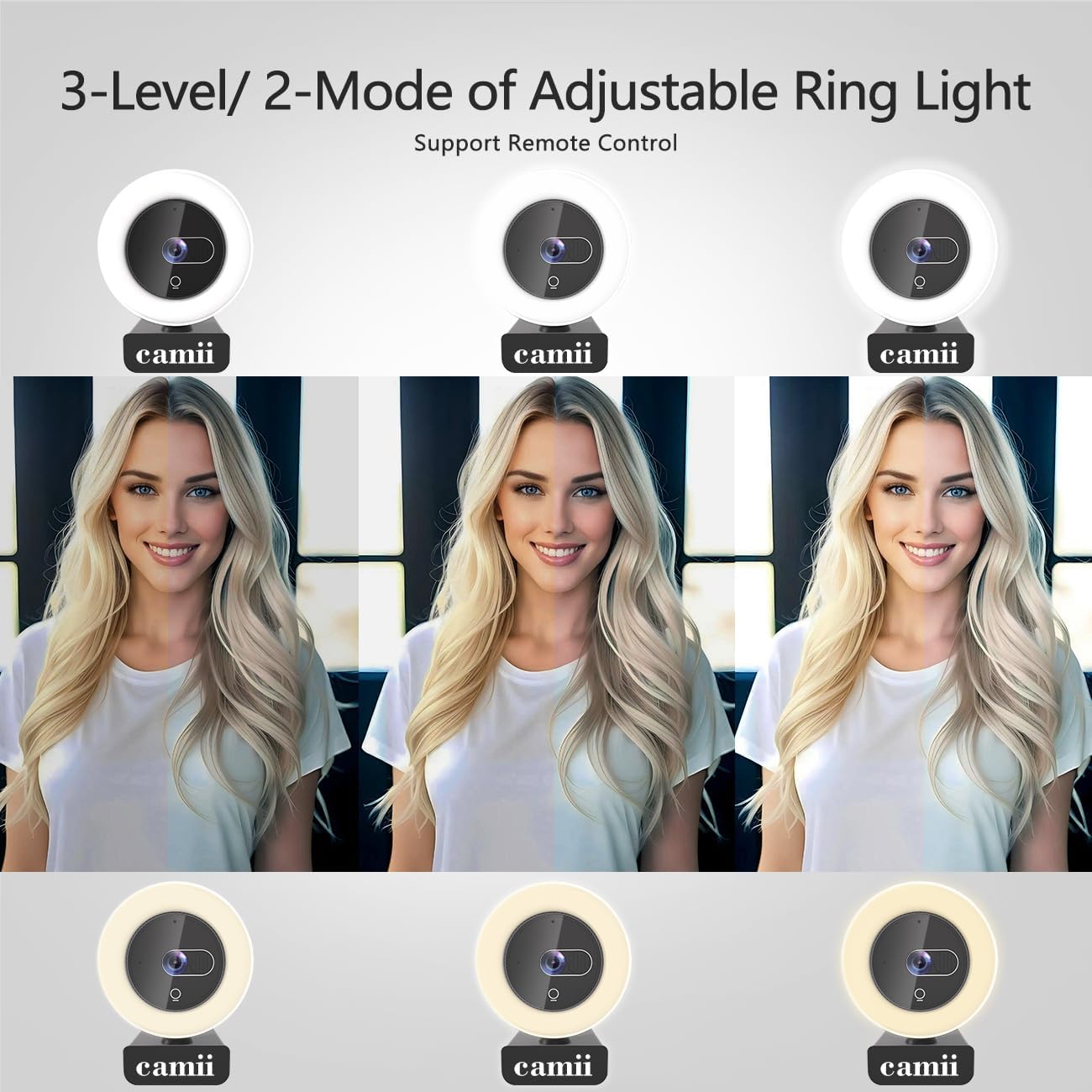
7. Adjustable Ring Light
The webcam features a built-in ring light with adjustable settings to improve lighting conditions for your video feed.
7.1 Light Settings
- Two Color Modes: Choose between different color temperatures to match your environment or preference.
- Three Brightness Levels: Adjust the intensity of the light to illuminate your scene without glare, even in low-light conditions.

7.2 Controlling the Light
The ring light can be controlled via:
- Touch Control: A touch-sensitive area on the webcam allows for quick adjustments.
- Remote Control: Use the provided remote to change color modes and brightness levels.
8. Privacy Features
The Camii 4K Webcam prioritizes your privacy with integrated features:
- Integrated Privacy Cover: A physical cover slides over the lens to block the camera feed when not in use, preventing unauthorized access.
- Remote Video Deactivation: The remote control allows you to quickly shut down the video feed, providing an additional layer of privacy protection.

9. Remote Control
The included remote control provides convenient access to various webcam functions:
- Adjusting ring light color and brightness.
- Controlling digital zoom (up to 3X at 1080p resolution).
- Activating video deactivation for privacy.
10. Compatibility
The Camii 4K Webcam is widely compatible with various operating systems and applications, making it suitable for live streaming, video conferencing, and online entertainment.
- Operating Systems: Windows XP/7/8/10/11, Mac OS, Linux, Chrome OS, Ubuntu, Android.
- Applications: Zoom, Skype, Twitch, Xsplit, YouTube, Facebook Live, Microsoft Teams, and other social/streaming platforms.

11. Maintenance
- Cleaning: Gently wipe the webcam lens and body with a soft, lint-free cloth. Do not use liquid cleaners or solvents.
- Storage: When not in use, store the webcam in a clean, dry place, preferably in its original packaging or a protective pouch. Ensure the privacy cover is closed.
12. Troubleshooting
12.1 No Image/Video
- Ensure the webcam is securely connected to a USB port.
- Check if the privacy cover is open.
- Verify that the webcam is selected as the video input device in your application's settings.
- Try connecting to a different USB port or another computer to rule out port or system issues.
12.2 No Sound/Audio
- Ensure the webcam's microphone is selected as the audio input device in your application's settings and operating system sound settings.
- Check the microphone volume levels in your system settings.
- Confirm that the application is not muted.
12.3 Ring Light Not Working
- Ensure the webcam is powered on and connected.
- Try activating the light using both the touch control and the remote control.
- Check if the remote control batteries need replacement (if applicable).
13. Specifications
| Model Name | Camii 4K Webcam |
| Model Number | C-4K-001 |
| Video Recording Resolution | 4K UHD (3840x2160) |
| Effective Capture Resolution | 8 Megapixels |
| Sensor Technology | CMOS |
| Frame Rate | 30 frames per second (fps) |
| Lens Type | Zoom, Wide-angle (90°) |
| Focus Type | Autofocus |
| Digital Zoom | 3X (supported at resolutions below 4K) |
| Microphone | Dual Noise-Reduction Microphones |
| Integrated Light | 2-Color, 3-Level Adjustable Ring Light |
| Connectivity | USB (USB-A, USB-C compatible with adapter) |
| Compatible Devices | PC, Laptop |
| Supported OS | Windows XP/7/8/10/11, Mac OS, Linux, Chrome OS, Ubuntu, Android |
| Dimensions (Package) | 18.39 x 9.19 x 6.4 cm |
| Weight | 340 grams |
| Color | Silver |
14. Warranty and Support
Camii products are designed for reliability and performance. For warranty information, technical support, or customer service inquiries, please refer to the contact information provided on the product packaging or the official Camii website. Please have your model number (C-4K-001) and purchase details ready when contacting support.