
iSpring WSP100SL-ARJ
iSpring WSP100SL-ARJ Whole House Spin Down Sediment Water Filter Instruction Manual
Brand: iSpring | Model: WSP100SL-ARJ
Introduction
The iSpring WSP100SL-ARJ is an advanced whole house spin-down sediment water filter designed to provide cleaner, safer water for your home. This system effectively removes large particulates such as sediment, dirt, rust, and sand, acting as a crucial first line of defense for your plumbing and appliances. It features an integrated Siliphos add-on to prevent scale buildup and corrosion, significantly extending the lifespan of your water-using equipment. The filter also includes a touch-screen auto-flushing module for convenient, scheduled maintenance, ensuring optimal performance with minimal effort.

Figure 1: The iSpring WSP100SL-ARJ whole house spin-down sediment water filter, showing the main unit, a filter wrench, and the Siliphos cartridge.
Safety Information
Please read all instructions and safety warnings carefully before installing or operating the iSpring WSP100SL-ARJ filter. Failure to follow these instructions could result in property damage, injury, or death.
- Ensure all local plumbing codes are followed during installation.
- Turn off the main water supply and relieve pressure before beginning installation or maintenance.
- Do not install the filter in direct sunlight or in areas where it may be exposed to freezing temperatures.
- The filter is designed for cold water applications only. Do not use with hot water.
- Maintain appropriate water pressure. The filter is tested to withstand pressures exceeding 500 psi, but typical household pressure should be within recommended limits (usually 20-100 psi).
- Use only genuine iSpring replacement parts and filters to ensure proper operation and maintain warranty.
Product Overview and Features
The WSP100SL-ARJ filter incorporates several key features for superior water filtration and ease of use:
NSF/ANSI 372 Certification
This filter is certified lead-free under NSF/ANSI 372 standards, ensuring the components meet strict health effects requirements for drinking water system components.

Figure 2: The iSpring WSP100SL-ARJ is NSF/ANSI 372 certified for lead-free components. For more details, visit the NSF website.
Siliphos Add-on for Scale and Corrosion Prevention
The integrated Siliphos media helps to sequester minerals like calcium and magnesium, preventing them from forming hard scale deposits on pipes and appliances. It also forms a protective film on metal surfaces to inhibit corrosion, extending the life of your plumbing fixtures and water heaters.

Figure 3: The filter's design allows for effective sediment removal and includes Siliphos for scale and corrosion prevention.

Figure 4: Siliphos beads are crucial for preventing scale buildup and corrosion in your water system.
Touch-Screen Auto Flushing Module
The WSP100SL-ARJ features an advanced touch-screen module that allows for automatic, semi-automatic, or manual flushing of accumulated sediment. This feature significantly reduces the need for manual cleaning and ensures consistent filter performance.

Figure 5: The intuitive touch-screen display for controlling the auto-flushing module.

Figure 6: The touch-screen interface simplifies operation and maintenance.
Jumbo Size and High Flow Rate
Designed for demanding well water situations, this jumbo-sized filter offers a 1-gallon capacity, which is 22 times larger than standard sediment filters. It supports a maximum flow rate of 25 GPM, ensuring minimal pressure drop for whole-house applications.
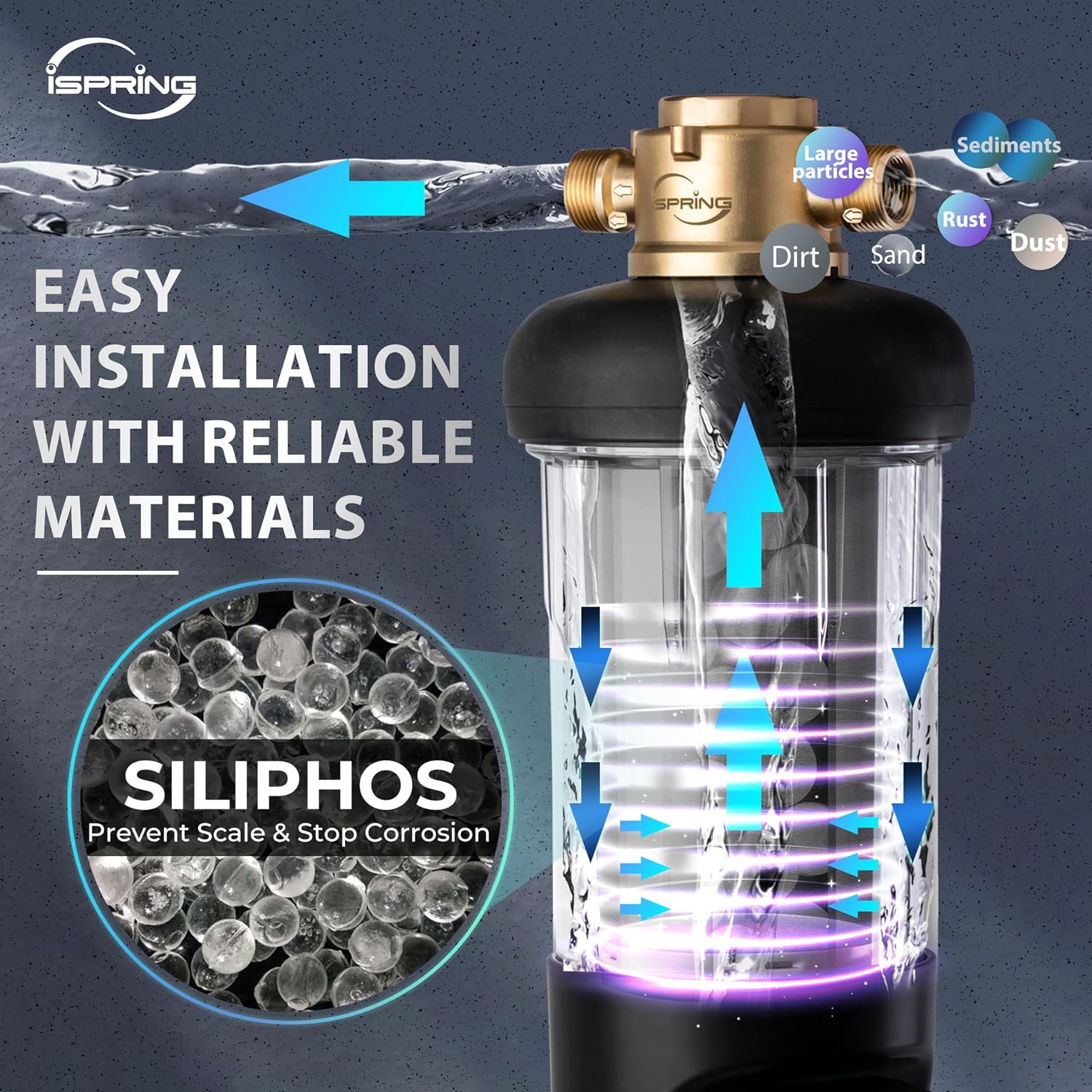
Figure 7: Size comparison highlighting the significantly larger capacity of the WSPSL-ARJ series.

Figure 8: The WSP100SL-ARJ offers 22 times the capacity of standard sediment filters.
Effective Sediment Removal and Appliance Protection
Utilizing a 100-micron filter screen, the WSP100SL-ARJ can filter up to 99% of large particulates, protecting downstream appliances such as washing machines, dishwashers, water heaters, and other water filtration systems from sediment damage.

Figure 9: The filter acts as a primary defense for your household appliances and other water treatment systems.

Figure 10: The WSP100SL-ARJ is an ideal pre-filter for various household water applications.
Pressure-resistant and Durable Materials
Crafted from 316L food-grade stainless steel for the filter mesh and an explosion-proof transparent housing, the WSP100SL-ARJ is built for exceptional durability. It has successfully passed rigorous tests, enduring pressures exceeding 500 psi and withstanding over 100,000 water hammer tests.

Figure 11: The robust housing is designed to withstand high pressure and water hammer effects.
Components and What's in the Box
The iSpring WSP100SL-ARJ package includes the following components:

Figure 12: Exploded view of the WSP100SL-ARJ filter components.
- Head Machine (Brass Head)
- Housing O-ring
- Housing (Clear Bowl)
- Ball Valve Cover
- Drain Cover
- Mesh Filter O-ring
- Mesh Filter (with Siliphos cartridge)
- Auto Flushing Module
- Clip
- Filter Wrench (not shown in diagram but included)
Setup and Installation
Proper installation is crucial for the optimal performance and longevity of your iSpring WSP100SL-ARJ filter. It is recommended that installation be performed by a qualified plumber.
Pre-Installation Checklist:
- Verify all components are present and undamaged.
- Choose an installation location that is protected from freezing temperatures and direct sunlight.
- Ensure there is sufficient space around the filter for future maintenance and filter replacement.
- Confirm your plumbing system uses 1-inch MNPT or 3/4-inch FNPT connections, as the filter includes universal fittings for both.
- Gather necessary tools: pipe wrench, thread sealant tape, pipe cutter, bucket for draining.
Installation Steps:
- Turn off Water Supply: Locate your main water shut-off valve and turn off the water supply to your home. Open a faucet to relieve pressure in the lines.
- Cut Pipe: Determine the desired installation point for the filter. Cut a section of the main water line to accommodate the filter. Ensure the cut is clean and straight.
- Install Fittings: Apply thread sealant tape to the male threads of your plumbing connections. Connect the filter's brass head to your main water line. The filter can be installed in either direction, but ensure the flow arrow on the brass head matches your water flow.
- Assemble Filter Housing: Ensure the housing O-ring is properly seated in the groove of the clear housing. Carefully screw the clear housing onto the brass head until hand-tight, then use the provided filter wrench for a snug fit. Do not overtighten.
- Install Auto Flushing Module: Attach the auto flushing module to the bottom of the filter housing. Secure it with the provided clip.
- Connect Drain Line: Connect a drain line (not included) to the drain port of the auto flushing module. Ensure the drain line leads to an appropriate drain (e.g., floor drain, utility sink) and has an air gap to prevent back-siphonage.
- Restore Water Supply: Slowly turn on the main water supply. Check for leaks around all connections. If leaks occur, turn off water, relieve pressure, and re-tighten connections.
- Flush System: Before initial use, flush the filter by manually activating the drain function on the auto flushing module for a few minutes to remove any air or carbon fines.

Figure 13: The WSP100SL-ARJ can be integrated into a comprehensive whole house water filtration solution.
Operating Instructions
The WSP100SL-ARJ features a user-friendly touch-screen interface for controlling the auto-flushing function.
Touch-Screen Controls:

Figure 14: Detailed view of the auto-flushing module's touch-screen controls.
- On/Off Button: Press to power the module on or off.
- Auto Button: Activates the automatic flushing mode based on the preset schedule.
- Drain Button: Initiates a manual flush cycle. Press and hold for continuous flushing.
- Set Button: Enters the setting mode to adjust flushing frequency and duration.
- Increase (+) / Decrease (-) Buttons: Used to adjust values (e.g., days, seconds) in setting mode.
- Display: Shows current timer status (e.g., days until next flush, flushing duration).
Setting the Auto-Flushing Schedule:
- Press the "Set" button to enter programming mode.
- Use the "+" and "-" buttons to adjust the flushing frequency (e.g., every X days).
- Press "Set" again to move to the flushing duration setting.
- Use the "+" and "-" buttons to adjust the duration of each flush cycle (in seconds).
- Press "Set" one more time to save the settings and exit programming mode.
- Ensure the "Auto" mode is activated for the schedule to take effect.
Maintenance
Regular maintenance ensures the continued efficiency and effectiveness of your iSpring WSP100SL-ARJ filter.
Siliphos Replacement:
It is recommended that the Siliphos media be replaced every 6 months to ensure optimal scale and corrosion prevention. The Siliphos is integrated into the mesh filter cartridge.
Filter Screen Cleaning/Replacement:
While the auto-flushing module reduces the need for manual cleaning, periodic inspection of the 100-micron filter screen is advisable, especially in areas with very high sediment. If the screen appears clogged or damaged, it should be cleaned or replaced.
- Turn off the main water supply and relieve pressure.
- Manually drain the filter by pressing the "Drain" button or opening the ball valve.
- Unscrew the clear housing using the filter wrench.
- Remove the mesh filter cartridge.
- Rinse the mesh filter thoroughly under running water to remove trapped sediment. For stubborn deposits, a soft brush may be used.
- Inspect the mesh for any tears or damage. If damaged, replace the entire mesh filter cartridge.
- Replace the mesh filter cartridge (and Siliphos if due for replacement) into the housing.
- Ensure the housing O-ring is clean and properly seated, then reattach the housing to the brass head. Tighten with the filter wrench.
- Slowly restore water supply and check for leaks.
Replacement filter cartridges are available in various micron sizes (50, 100, 200, 500 microns) for the WSPSL-ARJ series. Refer to your specific water conditions to choose the appropriate micron rating.
Troubleshooting
This section provides solutions to common issues you might encounter with your iSpring WSP100SL-ARJ filter.
| Problem | Possible Cause | Solution |
|---|---|---|
| No water flow or very low flow. |
|
|
| Filter is leaking. |
|
|
| Auto flushing module not working. |
|
|
| Scale buildup still occurring. |
|
|
Specifications
| Attribute | Detail |
|---|---|
| Model Number | WSP100SL-ARJ |
| Material | Plastic (Housing), 316L Food-Grade Stainless Steel (Mesh) |
| Product Dimensions (D x W x H) | 6"D x 8"W x 20"H |
| Item Weight | 15.3 Pounds |
| Filter Micron Rating | 100 Micron (standard, other sizes available) |
| Maximum Flow Rate | 25 GPM (Gallons Per Minute) |
| Connection Type | 1-inch MNPT and 3/4-inch FNPT (Universal Fittings) |
| Special Features | Touch-Screen, Auto Flushing, Includes Siliphos |
| Included Components | Filter Cartridge, Filter Wrench |
| Certification | NSF/ANSI 372 Certified (Lead-Free) |
| UPC | 810004174733 |
Warranty and Support
iSpring provides comprehensive support for its products. For detailed warranty information, product registration, or technical assistance, please visit the official iSpring website or contact their customer service directly.
Website: www.ispringfilter.com
Customer Service: Refer to the iSpring website for current contact methods (phone, email, chat).
Ask a question about this manual
Ask about setup, troubleshooting, compatibility, parts, safety, or missing instructions. Manuals+ will review the question and use this page’s manual context to help answer it.