
1. Introduction
This manual provides detailed instructions for the installation, operation, and maintenance of your BOSS Audio Systems BCPA12 12-Inch Single DIN Car Stereo. Please read this manual thoroughly before using the product to ensure proper functionality and safety. Keep this manual for future reference.

Figure 1: BOSS Audio Systems BCPA12 Car Stereo with Backup Camera
2. Product Overview
The BOSS Audio Systems BCPA12 is a versatile 12-inch single DIN car stereo designed to enhance your in-car entertainment and connectivity. Key features include:
- Apple CarPlay: Seamless integration with your iPhone for navigation, music, calls, and messages.
- Android Auto: Connect your Android smartphone for access to Google Maps, music, calls, and voice commands.
- 12-Inch Capacitive Touchscreen: Large, responsive display for easy interaction.
- Floating Display Design: Allows for adjustable positioning (rotate and tilt) to optimize viewing angles.
- Backup Camera: Includes a rear-view camera with a 170-degree wide-angle view and 640 x 480 resolution for enhanced safety.
- Bluetooth Connectivity: For hands-free calling and audio streaming.
- Single DIN Chassis: Designed to fit into standard single DIN openings.

Figure 2: BCPA12 display showcasing Apple CarPlay and Android Auto compatibility.
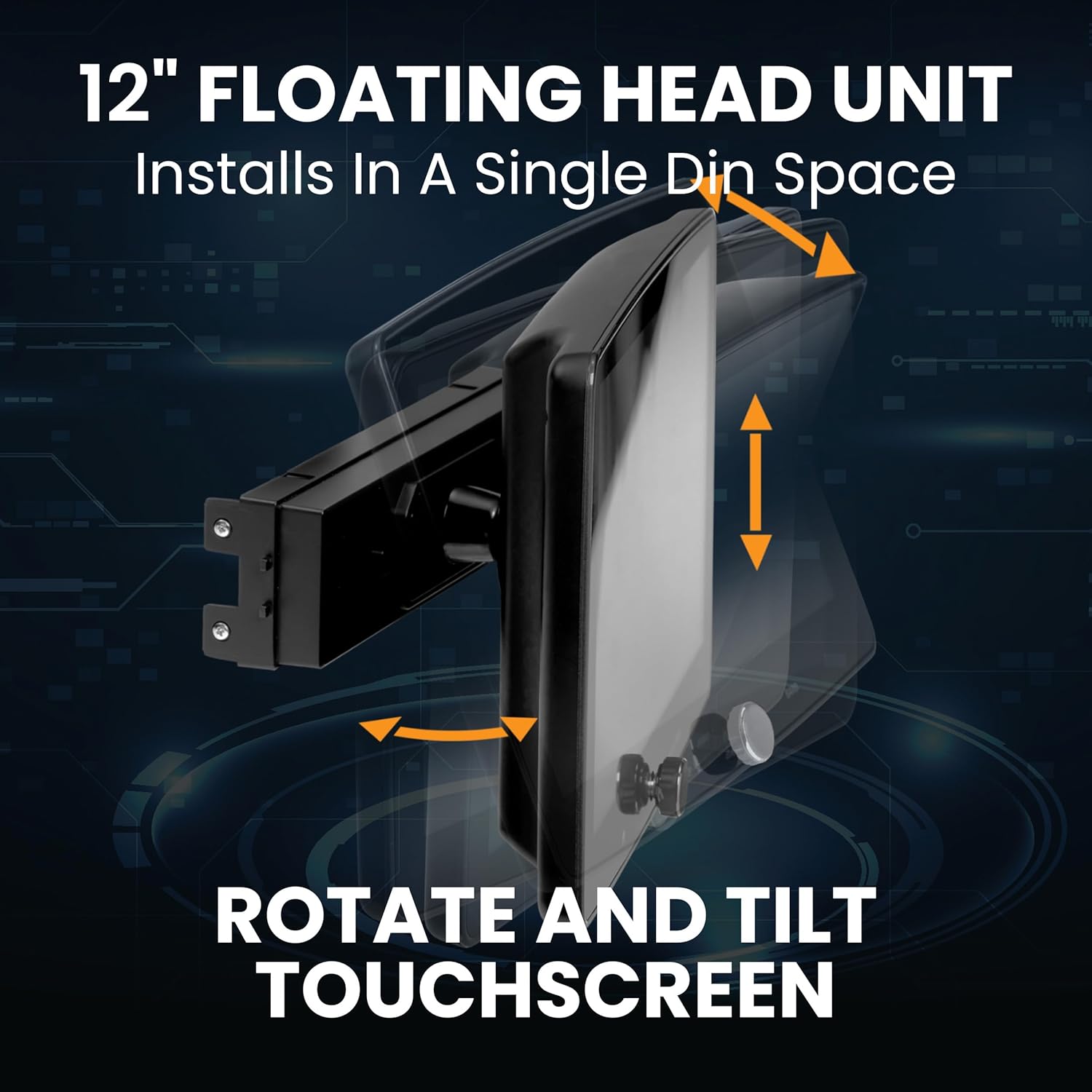
Figure 3: The 12-inch floating display can be rotated and tilted for optimal viewing.
3. Setup and Installation
Professional installation is recommended for this product. Ensure the vehicle's battery is disconnected before beginning installation.
3.1 Component Identification
Familiarize yourself with the main components and accessories:
- Main Head Unit (Single DIN chassis)
- 12-Inch Floating Touchscreen Display
- Backup Camera (LPCB40)
- Wiring Harnesses (Power, Speaker, RCA, USB)
- Mounting Hardware
3.2 Mounting the Head Unit
The single DIN chassis fits into a standard single DIN opening. The floating display attaches to the chassis and can be adjusted. Refer to the included installation guide for specific vehicle mounting instructions.
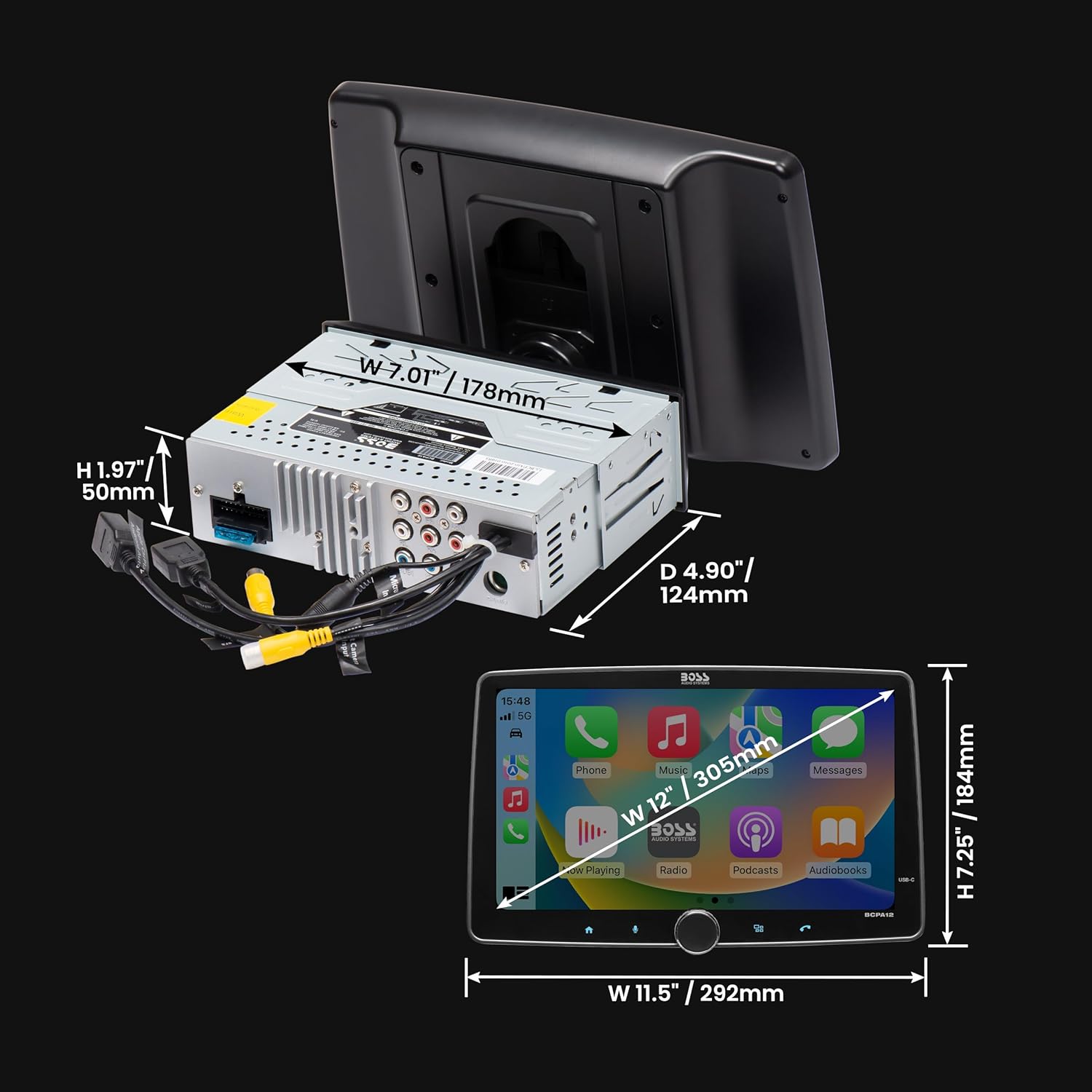
Figure 4: Dimensions of the BCPA12 head unit and display for installation planning.
3.3 Wiring Connections
Connect the wiring harnesses as follows:
- Power Harness: Connect to vehicle's constant 12V, accessory 12V, and ground.
- Speaker Harness: Connect to vehicle's speaker wires.
- RCA Connections: For external amplifiers (front, rear, subwoofer outputs) and video inputs/outputs.
- USB Ports: For Apple CarPlay, Android Auto, media playback, and fast charging.
- Backup Camera Input: Connect the included LPCB40 camera to the dedicated rear camera input.
- Steering Wheel Control: Connect to your vehicle's steering wheel control interface (if applicable).
3.4 Backup Camera Installation
The LPCB40 backup camera is designed for license plate mounting. Ensure it is securely fastened and wired to the head unit's rear camera input and the vehicle's reverse light circuit for automatic activation.

Figure 5: Dimensions of the LPCB40 backup camera for installation.
4. Operating Instructions
4.1 Power On/Off and Basic Controls
Press the power button on the unit or remote control to turn the stereo on or off. Use the volume knob for audio level adjustments. The touchscreen provides access to all functions and settings.
4.2 Apple CarPlay
Connect your iPhone via USB to activate Apple CarPlay. This allows you to access iPhone features such as Phone, Music, Maps, Text messages, Radio, Podcasts, and Audiobooks directly on the stereo's display. Siri voice controls can be used for hands-free operation.
Video 1: Overview of Apple CarPlay and Android Auto features on the BCPA12.
4.3 Android Auto
Connect your Android smartphone via USB to enable Android Auto. Use
Ask a question about this manual
Ask about setup, troubleshooting, compatibility, parts, safety, or missing instructions. Manuals+ will review the question and use this page’s manual context to help answer it.