
Archilight TB-GPL6PRO-D
Stella-Pro Piano Light Double Arm Clip On
User Manual
Brand: Archilight | Model: TB-GPL6PRO-D
Introduction
Thank you for choosing the Archilight Stella-Pro Piano Light. This professional-grade lamp is designed to provide optimal, eye-protective illumination for your piano and sheet music. Featuring an innovative asymmetric design, it minimizes glare and blue light exposure, ensuring a comfortable and focused practice or performance environment. Its broad illumination covers the entire piano, and intelligent touch controls allow for seamless adjustment of brightness and color temperature, along with a convenient 2-hour timer.
This manual provides detailed instructions for setting up, operating, maintaining, and troubleshooting your Stella-Pro Piano Light. Please read it carefully to ensure proper use and longevity of your product.

Figure 1: The Stella-Pro Piano Light elegantly installed on a grand piano, providing focused illumination.
Setup
Follow these steps to set up your Stella-Pro Piano Light:
- Unpack Components: Carefully remove all components from the packaging. Verify that you have the lamp unit, power adapter, and any included accessories.
- Assemble the Lamp: The Stella-Pro features a dual-axis swing arm. Extend the arm and position the lamp head as desired. Ensure all joints are securely fastened.
- Attach to Piano: The lamp is designed with a secure clip-on mechanism. Position the lamp on your piano's music stand or a suitable surface, ensuring the non-slip rubber base provides a stable grip. The arm can pivot up to 10 degrees for optimal angle adjustment.
- Connect Power: Plug the power adapter into the lamp's power input port. Then, plug the adapter into a standard electrical outlet (100-240V AC).
Video 1: Official Archilight Stella Pro Grand Piano Light assembly and setup demonstration.

Figure 2: The lamp's adjustable arm allows for precise positioning over the music stand and keys.
Operating Instructions
The Stella-Pro Piano Light features intuitive touch controls located on the lamp head. Refer to Figure 3 for control button locations.
- Power On/Off: Touch the ON/OFF button once to turn the lamp on or off.
- Brightness Adjustment (Dimming): Long touch the Dimming button to enter stepless dimming mode. Short touch to cycle through set brightness levels.
- Color Temperature (CCT) Change: Long touch the CCT Change button to enter stepless color temperature adjustment (3000K-6500K). Short touch to cycle through set CCT levels (e.g., 3000K, 4000K, 5000K, 6000K).
- Light Sensor (Automatic Dimming): Touch the Sensor Switch once to enable the automatic dimming function. The lamp will adjust its brightness based on ambient light conditions.
- 2-Hour Timer: To activate the 2-hour timer, hold down the ON/OFF button for three (3) seconds until you notice a visual confirmation (e.g., a blink or indicator light change). The lamp will automatically shut off after two hours.
- Power-Off Memory: The lamp retains your last brightness and color temperature settings when powered off and on again.

Figure 3: Detailed view of the touch control panel on the lamp head, showing buttons for dimming, CCT change, sensor, and power.

Figure 4: The lamp offers a wide range of color temperatures, from warm (3000K) to cool (6000K), to suit various preferences.
Maintenance
To ensure the longevity and optimal performance of your Stella-Pro Piano Light, follow these simple maintenance guidelines:
- Cleaning: Disconnect the power before cleaning. Use a soft, dry cloth to wipe the lamp's surface. For stubborn marks, a slightly damp cloth with mild soap can be used, followed by drying thoroughly. Avoid abrasive cleaners or solvents.
- Dust Removal: Regularly dust the lamp head and arm to prevent accumulation, which can affect light output and heat dissipation.
- Storage: If storing the lamp for an extended period, ensure it is clean and dry. Store it in its original packaging or a protective cover in a cool, dry place.
- Avoid Liquid Contact: This product is not waterproof. Avoid exposing it to water or other liquids.
Troubleshooting
If you encounter any issues with your Stella-Pro Piano Light, please refer to the following common troubleshooting steps:
- Lamp Does Not Turn On:
- Ensure the power adapter is securely plugged into both the lamp and a working electrical outlet.
- Check if the outlet is receiving power by plugging in another device.
- Verify that the power button is being pressed correctly.
- Light Flickers or is Dim:
- Check for loose connections at the power adapter.
- Ensure the lamp head is clean and free of dust or obstructions.
- If the automatic dimming function is enabled, ambient light conditions might be causing the dimming. Try disabling the sensor.
- Controls Are Unresponsive:
- Disconnect the power adapter, wait 10 seconds, and then reconnect it to reset the lamp.
- Ensure your fingers are clean and dry when using the touch controls.
If the issue persists after trying these steps, please contact Archilight customer support for further assistance.
Specifications
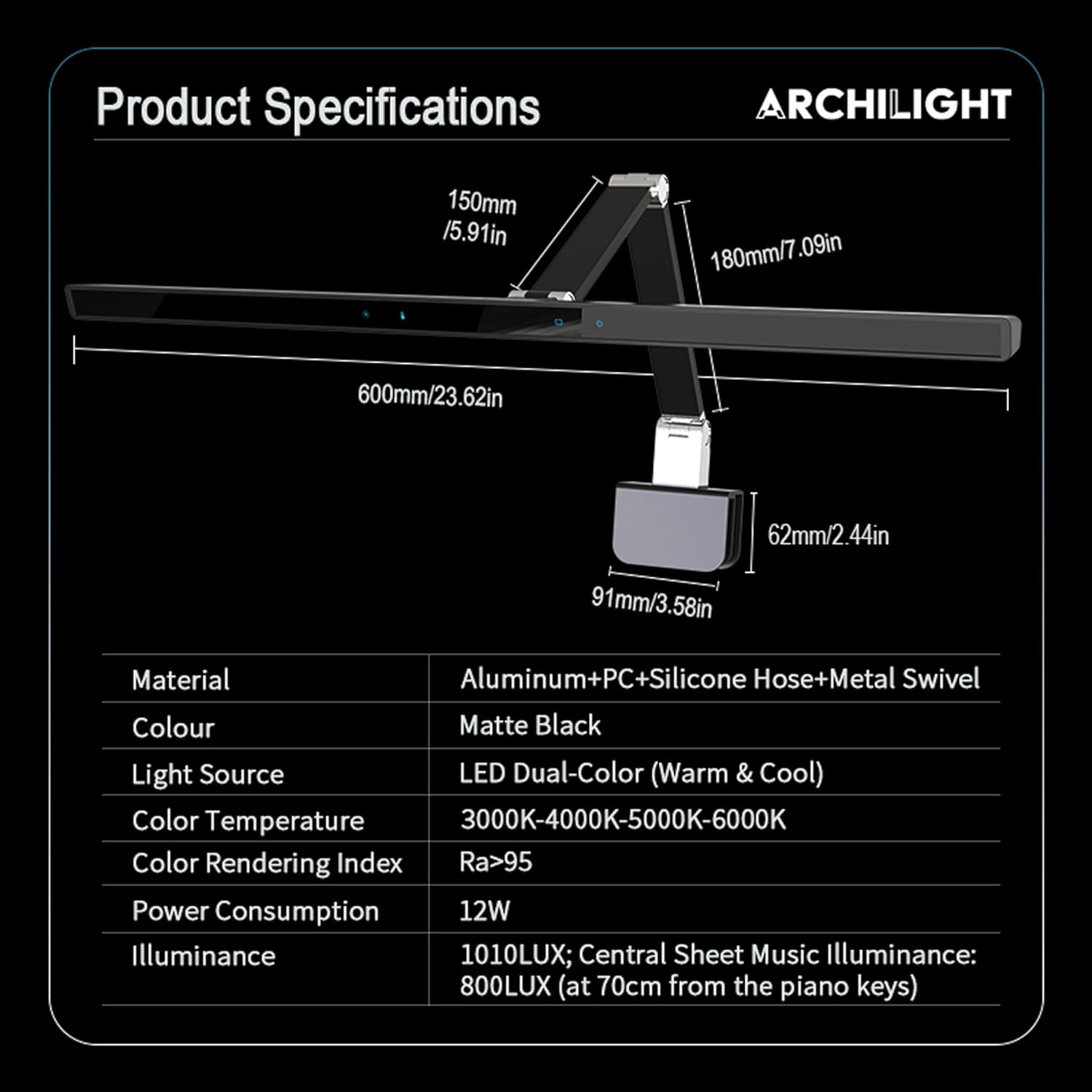
Figure 5: Visual representation of the Stella-Pro Piano Light's dimensions and core specifications.
| Feature | Detail |
|---|---|
| Brand | Archilight |
| Model Number | TB-GPL6PRO-D |
| Product Dimensions | 1.26"D x 23.62"W x 17.72"H |
| Item Weight | 3.79 pounds |
| Material | Aluminum+PC+Silicone Hose+Metal Swivel |
| Color | Black (Matte Finish) |
| Light Source Type | LED Dual-Color (Warm & Cool) |
| Wattage | 12 watts |
| Color Temperature | 3000K~6500K (Adjustable) |
| Color Rendering Index (CRI) | RA-97 (CRI>95) |
| Illuminance | 1010LUX; Central Sheet Music Illuminance: 800LUX (at 70cm from piano keys) |
| Control Method | Touch Button |
| Input Voltage | 100-240VAC |
| Cord Length | 4.8M |
| Special Features | Asymmetric light, Adjustable brightness, Light Sensor, 2-Hour Timer, Power-Off Memory |
Warranty and Support
Archilight stands behind the quality of its products. Your Stella-Pro Piano Light is covered by a manufacturer's warranty against defects in materials and workmanship under normal use. Please refer to the product packaging or the official Archilight website for specific warranty terms and duration.
For technical support, warranty claims, or any questions regarding your Stella-Pro Piano Light, please contact Archilight customer service through the following channels:
- Online Support: Visit the official Archilight website for FAQs, troubleshooting guides, and contact forms.
- Email Support: Refer to your product documentation for the customer support email address.
- Phone Support: Refer to your product documentation for the customer support phone number.
When contacting support, please have your product model number (TB-GPL6PRO-D) and purchase information readily available.
Related Documents - TB-GPL6PRO-D
 |
ARCHILIGHT Motion S Track 48V Installation Guide Comprehensive installation guide for the ARCHILIGHT Motion S Track 48V surface-mounted and suspended lighting system, covering components, safety, and electrical connections. |
 |
Stella Pro Grand Piano Lamp - TB-GPL6PRO-D Specifications Detailed specifications for the Stella Pro Grand Piano Lamp, model TB-GPL6PRO-D, including light source, power consumption, color temperature, CRI, luminous flux, LED lifetime, power input, cord length, dimmability, material, color, and warranty. |
 |
Archilight ZigZag LED Strip - Arbitrary Bending | Product Specification Detailed product specification for the Archilight ZigZag LED Strip, featuring arbitrary bending capabilities. Includes technical data, dimensions, and packing information for model ZZ2835-0601244SCX. |
 |
Panasonic LED TV Operating Instructions Comprehensive operating instructions for Panasonic LED TV models TB-43W63AE, TB-50W63AE, TB-55W63AE, and TB-65W63AE series, covering setup, safety, and features. |
 |
VEVOR Polyester Table Cloth User Manual and Specifications User manual and specifications for the VEVOR Polyester Table Cloth (Model Series RD-TB). Learn about product features, usage precautions, cleaning, and technical details. |
 |
VEVOR Polyester Table Cloth - Model RD-TB Series - Care and Specifications Official instructions and specifications for VEVOR Polyester Table Cloths, model series RD-TB. Learn about product features, parameters, usage precautions, and cleaning. |
Ask a question about this manual
Ask about setup, troubleshooting, compatibility, parts, safety, or missing instructions. Manuals+ will review the question and use this page’s manual context to help answer it.