
Introduction
This manual provides detailed instructions for the safe and effective use of your Philips Sonicare Power Flosser 3000 and Philips Sonicare 4100 Power Toothbrush. Please read all instructions carefully before use and retain this manual for future reference.
Product Overview
The Philips Sonicare Power Flosser 3000 (HX3711/20) features innovative Quad-Stream technology, creating an X-shaped stream of water for a gentle yet thorough clean deep between teeth. This technology covers more surface area for a faster, deeper clean compared to manual floss, improving gum health by 50% in just one minute per day.
The Philips Sonicare 4100 Power Toothbrush is designed to remove up to 7x more plaque than a manual toothbrush using Sonicare technology, which gently pulses water between your teeth. It includes a QuadPacer to guide optimal brushing time for each section of your mouth, a SmarTimer for the dentist-recommended 2-minute brushing duration, and a pressure sensor that flashes red to prevent excessive pressure and gum recession. It also offers two intensity settings for a comfortable clean.
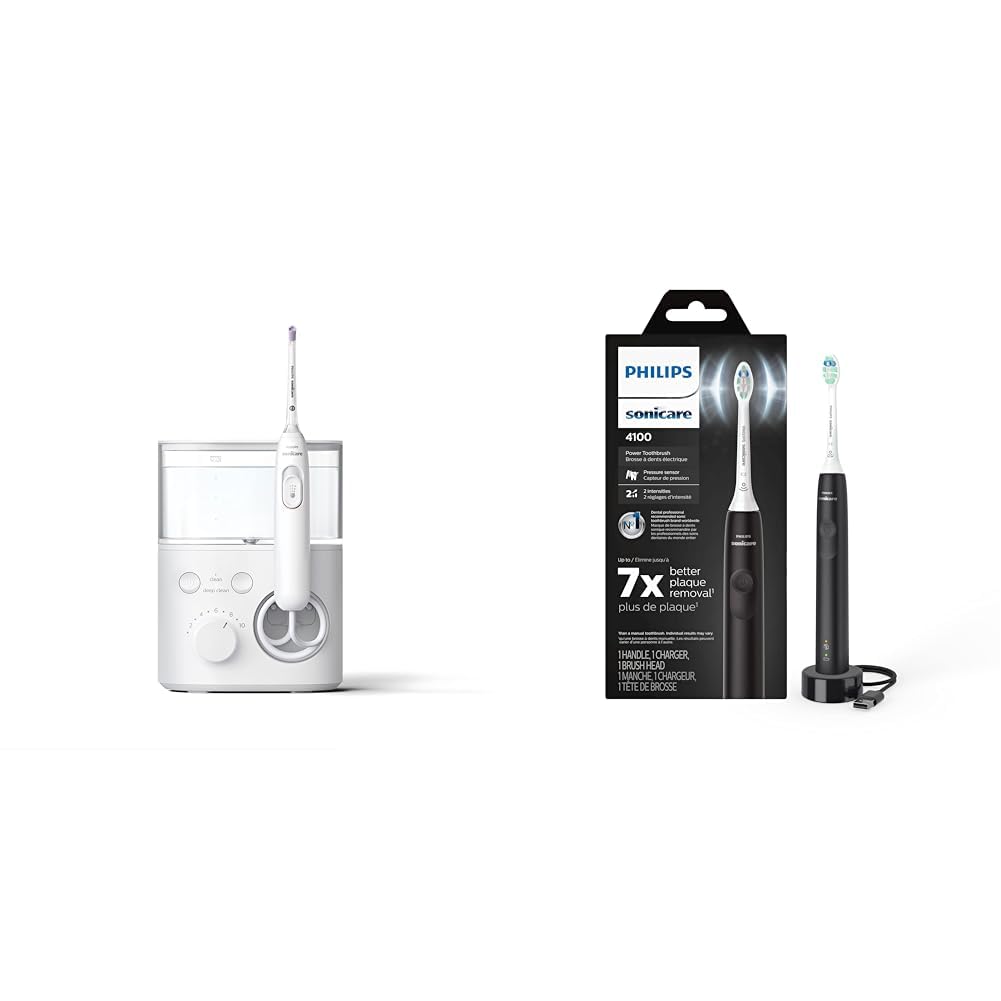
Image: Philips Sonicare Power Flosser 3000 and 4100 Power Toothbrush.
Key Features
- Power Flosser 3000: Up to 180% more effective than floss for healthier gums.
- Power Flosser 3000: Quad Stream Tip creates four wide streams of water for a thorough clean.
- Power Flosser 3000: Pulse Wave Technology guides you from tooth to tooth.
- Power Flosser 3000: Whisper Quiet Design for discreet use.
- Power Toothbrush 4100: Removes up to 7x more plaque vs. a manual toothbrush.
- Power Toothbrush 4100: 2-minute SmarTimer with QuadPacer ensures dentist-recommended brushing time.
- Power Toothbrush 4100: Pressure sensor protects teeth and gums.
- Power Toothbrush 4100: Two intensity settings for personalized comfort.
Setup
Initial Charging
Before first use, fully charge both your Philips Sonicare Power Flosser and 4100 Power Toothbrush. The Power Toothbrush charges quickly. The battery indicator light on the toothbrush will be solid green when fully charged and will blink green when it needs to be charged.

Image: Philips Sonicare 4100 Power Toothbrush with packaging.
Attaching Components
- For the Power Toothbrush: Gently pull off the existing brush head (if any) and push a fresh Optimal Plaque Control (C2) brush head onto the handle until it clicks into place.
- For the Power Flosser: Attach the Quad Stream Tip by pushing it firmly into the handle until it clicks.

Image: Close-up of the Philips Sonicare Power Flosser 3000.
Operating Instructions
Using the Philips Sonicare 4100 Power Toothbrush
- Wet the brush head and apply a small amount of toothpaste.
- Place the toothbrush bristles against your teeth at a slight angle towards the gumline.
- Press the power button to turn on the toothbrush.
- Gently move the brush head slowly across each tooth, allowing the Sonicare technology to do the work. Do not scrub.
- The QuadPacer will signal when to move to the next section of your mouth, and the SmarTimer will indicate when the 2-minute brushing cycle is complete.
- If you apply too much pressure, the pressure sensor will flash red, reminding you to ease off.
- To change intensity settings, press the mode button (if available, typically the same as power button or a separate one).

Image: Sonicare toothbrush bristles effectively cleaning teeth.
Using the Philips Sonicare Power Flosser 3000
- Fill the reservoir with lukewarm water.
- Wet the Power Flosser tip.
- Point the tip at a 90-degree angle to the gum line.
- Turn on the Power Flosser.
- Guide the Quad-Stream tip along the gum line and between teeth, allowing the X-shaped water stream to clean effectively.
- The Pulse Wave Technology will guide you through the cleaning process, ensuring you cover all areas.
- Adjust the intensity setting using the dial on the unit (10 intensities available).
- Select between 'Clean' and 'Deep Clean' flossing modes as desired.

Image: Visual representation of the innovative Quad Stream technology.

Image: Water flosser demonstrating effectiveness between teeth.
Maintenance
Cleaning Your Devices
- After each use, rinse the brush head/flosser tip thoroughly under running water.
- Wipe the handle of both devices with a damp cloth. Do not submerge the main unit of the Power Flosser or the Power Toothbrush handle in water.
- Empty and rinse the Power Flosser reservoir after each use to prevent mineral buildup.
Replacing Brush Heads and Flosser Tips
For optimal performance and hygiene, it is recommended to replace your Philips Sonicare brush head every 3 months, or sooner if the bristles are splayed or worn. The Power Toothbrush will indicate when the brush head needs to be changed by displaying an amber light.
Replace your Power Flosser Quad Stream Tip as needed, typically when the water stream appears weakened or the tip shows signs of wear.
Troubleshooting
| Problem | Possible Cause | Solution |
|---|---|---|
| Power Toothbrush not turning on or weak vibration. | Low battery. | Charge the toothbrush fully. The battery indicator light will blink green when charging is needed. |
| Power Toothbrush brush head indicator light is amber. | Brush head needs replacement. | Replace the brush head with a new Philips Sonicare Optimal Plaque Control (C2) brush head. |
| Power Flosser water stream is weak or inconsistent. | Low water in reservoir, clogged tip, or mineral buildup. | Ensure reservoir is full. Clean the tip or replace if necessary. Descale the unit if mineral buildup is suspected (refer to full product manual for descaling instructions). |
| Pressure sensor on Power Toothbrush frequently flashes red. | Applying too much pressure during brushing. | Reduce the pressure applied to your teeth and gums. Let the sonic vibrations do the work. |
Specifications
| Feature | Detail |
|---|---|
| Brand | Philips Sonicare |
| Manufacturer | Philips Sonicare |
| Models Included | Power Flosser 3000 (HX3711/20), 4100 Power Toothbrush |
| Power Source | Corded Electric (for charging base) |
| Special Features (Power Flosser) | Quad Stream Tip, Pulse Wave Technology, 2 Flossing Modes, 10 Intensities |
| Special Features (Power Toothbrush) | Pressure Sensor, Brushing Timer (SmarTimer & QuadPacer), 2 Intensity Settings |
| Color | White (Flosser), Black (Toothbrush) |
| Unit Count | 1 Count (referring to the combined product package) |
Warranty and Support
This product is manufactured by Philips Sonicare. For specific warranty details and support, please refer to the documentation included with your product packaging or visit the official Philips Sonicare website. A 30-day return policy is typically offered for new products purchased through authorized retailers.
For further assistance, contact Philips Sonicare customer service directly.