
1. Safety Guidelines
The WAINLUXPRO K10 Laser Engraving Machine is designed with multiple safety features to ensure user protection. Please read and understand all safety instructions before operating the device.
- Laser Class 1: The K10 3000mW is a Laser Class 1 engraver, indicating it is safe under all conditions of normal use.
- Micro-opening Induction Shield: The machine automatically stops operation when the protective shield is opened, preventing accidental laser exposure.
- Anti-Laser See-Through Window: Equipped with a blue light filter rate of 99.7%, this window allows visual monitoring of the engraving process without the need for additional goggles.
- Movement Protection: The machine is designed to stop if unexpected movement or tilting occurs.
- Overheating Monitoring: Built-in sensors monitor the machine's temperature to prevent overheating.
- Fireproof Engineering Plastic: Constructed with fireproof materials for enhanced safety.
- FDA Registered: This laser engraver meets specified regulatory safety requirements and is registered with the Food and Drug Administration (FDA). The FDA Accession Number is 2311241-004. It was tested according to IEC 60825-1.

Image: The WAINLUXPRO K10 Laser Engraving Machine showcasing its fully enclosed visual engraving design and safety features.

Image: Visual representation of the multiple security protections integrated into the WAINLUXPRO K10, including automatic stop on shield opening, anti-blue light filter, and anti-tilt protection.
2. Product Overview
The WAINLUXPRO K10 is a compact and powerful laser engraving machine designed for DIY enthusiasts and professionals. It offers high precision and versatility for various materials.
Key Features:
- High Accuracy: Features 0.01mm engraving accuracy for detailed results.
- Powerful Laser: Equipped with a 3000mW (3W) laser, upgradable to 5W.
- Connectivity: Supports WiFi connection for mobile devices (Android/iOS) and USB connection for computers (Windows/Mac).
- Offline Engraving: Capable of offline operation.
- Wide Material Compatibility: Engraves on cardboard, wood, leather, cloth, bamboo, plastic, acrylic, glass, cut paper, and other flammable materials. (Note: Cannot engrave stainless steel, metal aluminum, crystal, transparent, or reflective materials.)
- User-Friendly Software: Compatible with self-developed Cutlabx platform and third-party software like LaserGRBL (Free, Windows) and LightBurn (Paid, Windows/Mac OS/Linux).
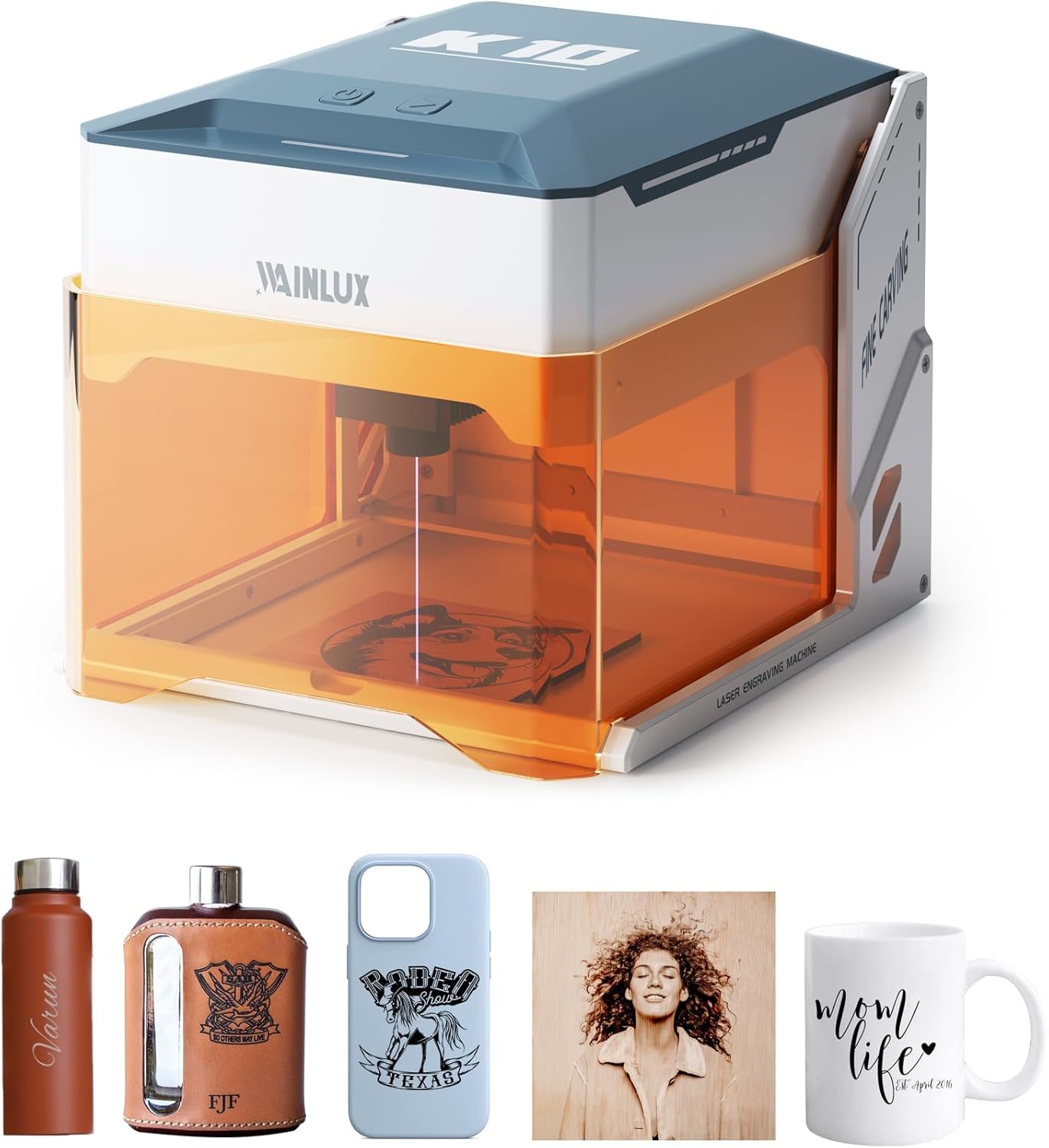
Image: The WAINLUXPRO K10 Laser Engraving Machine displayed with examples of engraved items such as a water bottle, flask, phone case, and wooden art.

Image: A visual comparison highlighting the K10's new compressed spot technology, allowing for more engraving possibilities by raising the stand and manual focus adjustment, unlike older models.

Image: The WAINLUXPRO K10 demonstrating its capability to engrave on a wide range of materials including acrylic, glass, wood, leather, food, bamboo, canvas, and paper.
Video: A demonstration of the WAINLUXPRO K10 laser engraver in action, showcasing its engraving capabilities on various materials and the precision of its laser.
3. Initial Setup
3.1. Unpacking
Carefully remove all components from the packaging. Verify that all parts listed in the packing list are present and undamaged. Keep the original packaging for future storage or transport.
3.2. Connecting the Device
- Place the K10 on a stable, level surface.
- Connect the power adapter to the machine and plug it into a suitable power outlet.
- For computer connection, use the provided USB cable to connect the K10 to your Windows or Mac computer.
- For mobile connection, ensure the machine is powered on and ready for WiFi pairing.
3.3. Software Installation
The WAINLUXPRO K10 is compatible with multiple software platforms:
- Cutlabx (Recommended): This is the self-developed platform by WAINLUX. It is available for Windows, macOS, Android, and iOS. Download the appropriate version from the official WAINLUXPRO website or your device's app store.
- LaserGRBL: A free and popular engraving software for Windows users.
- LightBurn: A paid, professional laser engraving software compatible with Windows, Mac OS, and Linux.
Follow the on-screen instructions for software installation. Ensure your software is up-to-date for optimal performance.
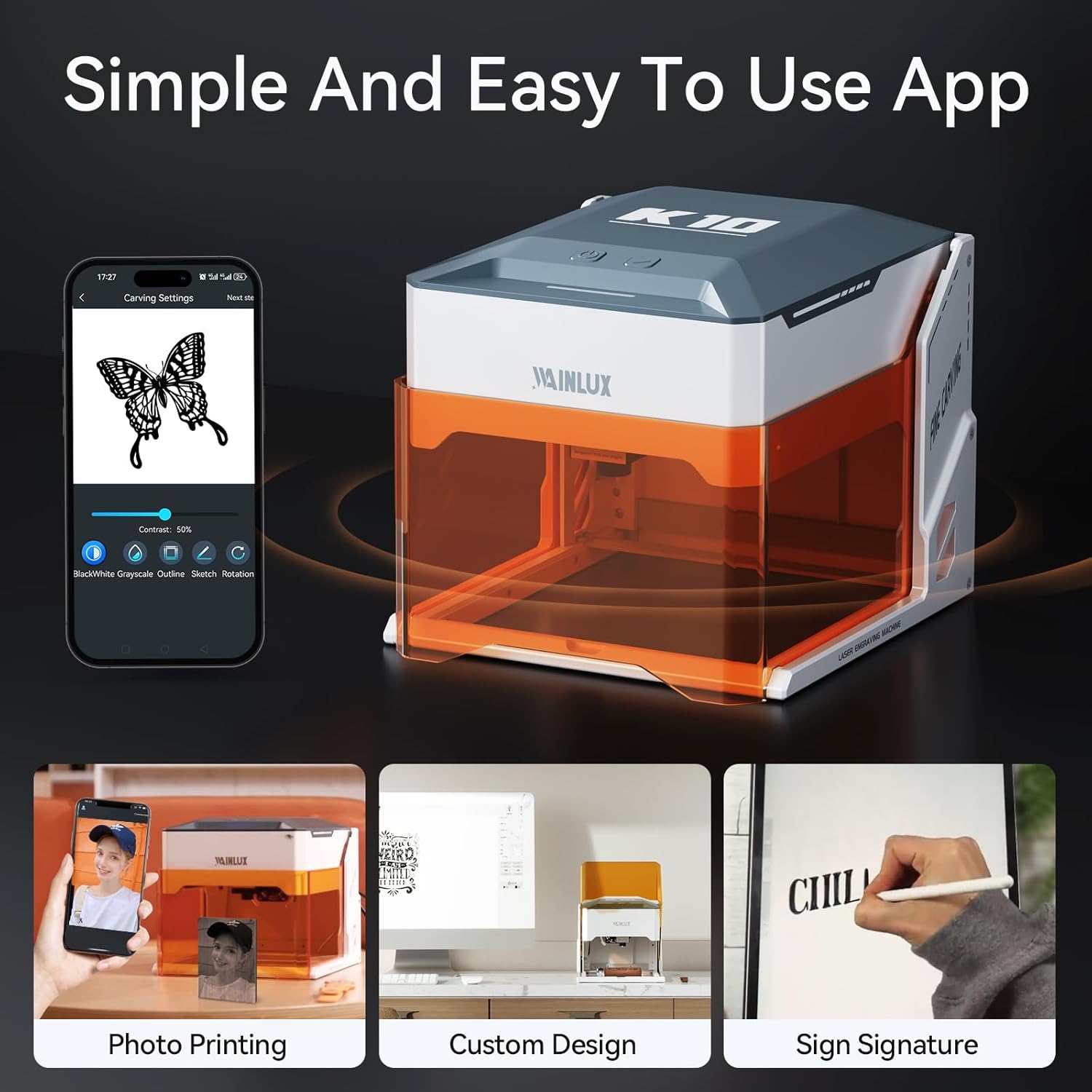
Image: The WAINLUXPRO K10 demonstrating its broad compatibility with various platforms and connectivity options, including WiFi, USB, TF-Card, and offline modes, supporting CutlabX, LightBurn, and LaserGRBL software.
4. Operating Instructions
4.1. Preparing Materials
Ensure your material is clean and properly positioned within the engraving area. For optimal results, ensure the material is flat. The K10 can engrave cylinders by adding rotary rollers (sold separately).
4.2. Using the Mobile App (Cutlabx)
- Download and open the Cutlabx app on your Android or iOS device.
- Connect your phone to the K10 via WiFi.
- Select or create your design within the app. The app supports image formats such as JPEG/JPG/GIF/BMP/PNG.
- Choose from four engraving modes: black and white, discrete, and outline.
- Adjust engraving parameters (e.g., power, speed) as needed for your material.
- Initiate the engraving process from the app.
4.3. Using Desktop Software (Windows/Mac)
- Connect the K10 to your computer via USB.
- Open your preferred engraving software (Cutlabx, LaserGRBL, or LightBurn).
- Import or create your design.
- Configure the engraving settings, including laser power, speed, and resolution (0.01mm accuracy is achievable).
- Preview the engraving path if available.
- Start the engraving process.
4.4. Engraving Process
During engraving, the laser will precisely follow your design. The fully enclosed design and anti-laser window allow you to safely observe the progress without protective eyewear. Ensure the shield remains closed during operation for safety.

Image: The WAINLUXPRO K10 demonstrating its simple and easy-to-use mobile application, featuring options for photo printing, custom design, and sign signature engraving.

Image: A diagram illustrating the compact size and dimensions (204mm x 187mm x 225mm) of the WAINLUXPRO K10 laser engraver, alongside various small items it can engrave.

Image: A collage showcasing a wide variety of customized items and materials that can be engraved or cut using the WAINLUXPRO K10, including wood, leather, fabric, and paper.

Image: A step-by-step guide demonstrating how to engrave on glass using the WAINLUXPRO K10, involving soaking colored paper, gluing it to the glass, designing in the mobile app, and then engraving.
5. Maintenance
Regular maintenance ensures the longevity and optimal performance of your WAINLUXPRO K10.
- Cleaning: Periodically clean the engraving area and the laser lens to remove dust and debris. Use a soft, lint-free cloth.
- Laser Head Replacement/Upgrade: The K10 features a safety seal design that facilitates easy replacement and updating of machine parts, including the laser head. The 3W laser head can be replaced and upgraded to a 5W laser for enhanced engraving effects.
- Software Updates: Keep your Cutlabx app and desktop software updated to the latest versions to benefit from new features and performance improvements.

Image: The WAINLUXPRO K10 3W Laser Engraver illustrating how better technologies enhance engraving effects, including the option to replace and upgrade the laser head to 5W for improved performance and a longer lifespan.
6. Troubleshooting
This section addresses common questions and issues you might encounter.
| Question | Solution |
|---|---|
| Can it be engraved on curved surface materials? | Yes, but the radian of the material and the engraved graphic area should not be too large, otherwise there will be slight deformation. |
| How to deal with a lot of smoke and dust on the cut material? | Please reduce the laser power and increase the speed appropriately. |
7. Technical Specifications
| Feature | Detail |
|---|---|
| Model | K10-3W-US |
| Laser Power | 3000mW (3W), upgradable to 5W |
| Engraving Accuracy | 0.01mm |
| Laser Class | Class 1 |
| Wavelength | 455nm ± 5nm |
| Connectivity | WiFi, USB |
| Supported OS | Windows, macOS, Android, iOS, Linux (via LightBurn) |
| Supported Image Formats | JPEG/JPG/GIF/BMP/PNG |
| Package Dimensions | 11 x 10.25 x 10.13 inches |
| Item Weight | 6.4 pounds |
| Manufacturer | WAINLUXPRO |
| Date First Available | February 4, 2024 |
8. Warranty and Customer Support
WAINLUXPRO is committed to providing high-quality products and comprehensive customer service.
- Warranty: The WAINLUXPRO K10 Laser Engraving Machine comes with a one-year warranty from the date of purchase.
- Customer Service: For any questions, technical assistance, or warranty claims during the warranty period, please contact WAINLUXPRO Official customer support. We are dedicated to providing the best quality pre-sales and after-sales services.
You can visit the official WAINLUXPRO Store for more information and support: WAINLUXPRO Official Store