
Introduction
This manual provides essential information for the safe and effective operation of your TPDL Mini Jet Blower. Please read this manual thoroughly before use and retain it for future reference.

Figure 1: TPDL Mini Jet Blower with included nozzle attachments.
Safety Instructions
- Always remove the battery when the blower is not in use or during maintenance.
- Do not operate the blower in wet conditions or near flammable liquids/gases.
- Keep hands, hair, and loose clothing away from air inlets and outlets during operation.
- Use only compatible Milwaukee 18V M18 batteries. Do not attempt to use 12V or 14.4V batteries.
- Store the blower in a dry, secure place out of reach of children.
- Wear appropriate personal protective equipment (PPE) such as safety glasses when operating.
Setup
- Attach a Nozzle: Select the appropriate nozzle for your task. Align the nozzle with the blower's air outlet and firmly push it into place.

Figure 2: Attaching a nozzle to the blower.
- Insert Battery: Ensure your Milwaukee 18V M18 battery is fully charged. Slide the battery into the base of the blower until it clicks securely into place.
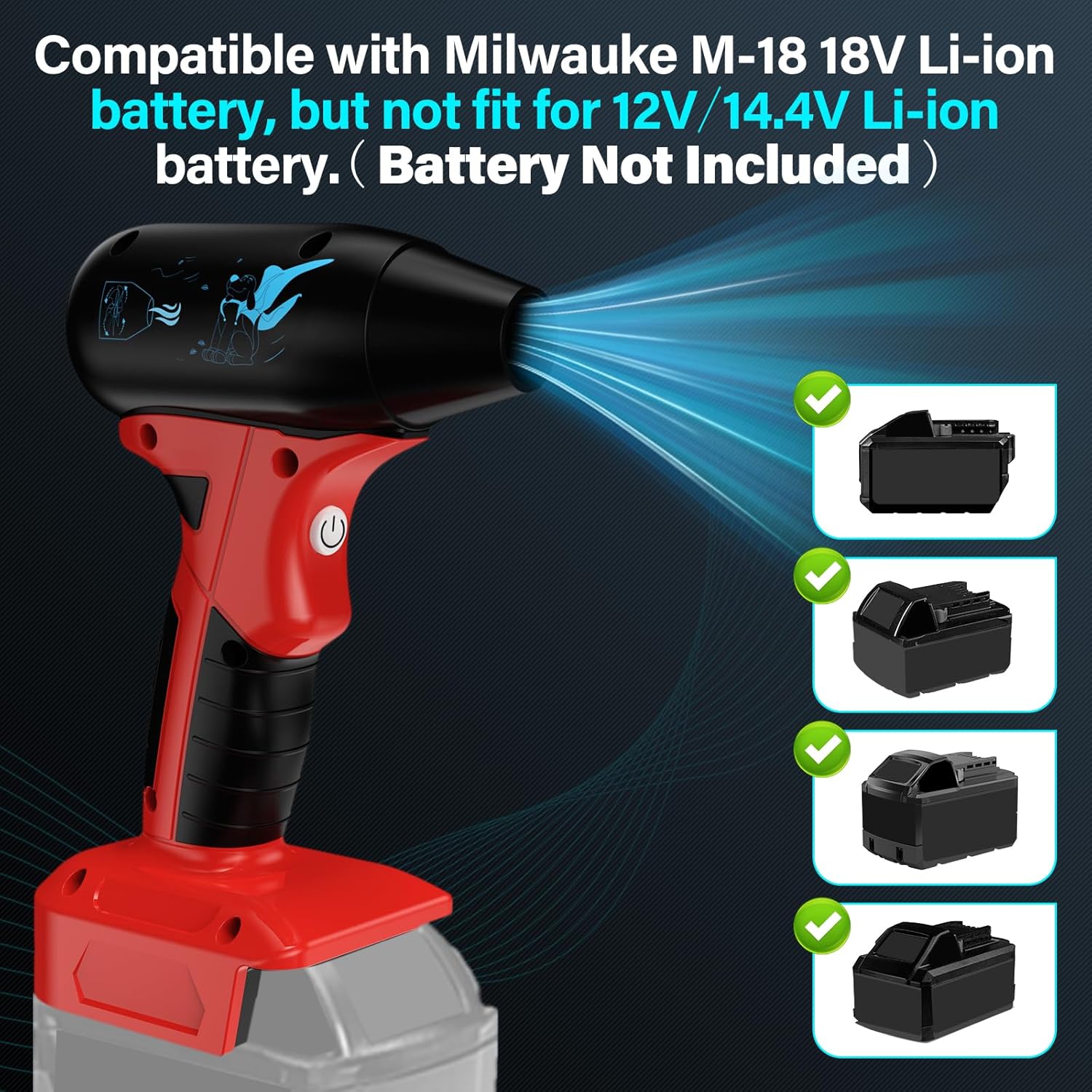
Figure 3: Compatible Milwaukee M18 18V Li-ion batteries.
Operating Instructions
- Power On/Off: Long press the On/Off button (power symbol) for 2 seconds to turn the blower on or off.
- Adjust Speed: Once powered on, short press the Gear Shift Button (fan symbol) to cycle through the 4 available wind speeds.
- 1st Gear: 8 m/s
- 2nd Gear: 18 m/s
- 3rd Gear: 25 m/s
- 4th Gear: 30 m/s (Max airflow 45 m/s, up to 130,000 RPM)

Figure 4: Blower speed settings.
- Usage Tips:
- For delicate tasks like keyboard cleaning, use lower speed settings.
- For heavier debris or drying, use higher speed settings.
- The compact size allows for easy access to tight spaces.

Figure 5: Compact and portable design.
Applications
The TPDL Mini Jet Blower is versatile and can be used for:
- Computer and keyboard cleaning
- Car and motorcycle cleaning (interior and exterior)
- Drying surfaces
- Blowing dust and debris from workshops or outdoor areas
- Assisting with carbon fire ignition
Video 1: Demonstration of the TPDL Mini Jet Blower's power and versatility in various cleaning tasks.
Video 2: Overview of the Cordless Air Duster Blower, highlighting its features and accessories.
Video 3: Demonstration of the Rozlchar Cordless Leaf Blower, showcasing its effectiveness in clearing debris.
Maintenance
- Keep the air inlet and outlet clear of obstructions. Regularly inspect for debris and clean as necessary.
- Wipe the exterior of the blower with a soft, damp cloth. Do not use harsh chemicals or abrasive cleaners.
- Ensure the battery contacts are clean and free of corrosion.
- Store the blower and accessories in a dry environment to prevent damage.
Troubleshooting
| Problem | Possible Cause | Solution |
|---|---|---|
| Blower does not turn on. | Battery not inserted correctly or discharged. | Ensure battery is fully charged and properly seated. |
| Weak airflow. | Air inlet/outlet obstructed; low battery charge. | Clear obstructions. Charge or replace battery. |
| Blower stops unexpectedly. | Overheating; battery protection activated. | Allow blower to cool down. Ensure proper ventilation. |
Specifications
| Feature | Detail |
|---|---|
| Brand | TPDL |
| Model Number | 01 |
| Color | Red |
| Power Source | Battery Powered (18 Volts DC) |
| Form Factor | Handheld |
| Special Feature | Portable |
| Max Airflow Capacity | 0.31 Cubic Feet Per Second (45 m/s) |
| Max RPM | 130,000 RPM |
| Item Weight | 0.38 Kilograms (13.4 ounces) |
| Material | Plastic |
| Dimensions | 8.19 x 5.35 x 3.5 inches |
| UPC | 707154831169 |
Warranty Information
Specific warranty details are not available in the provided product information. Please refer to the product packaging or contact the manufacturer directly for warranty terms and conditions.
Customer Support
For further assistance, technical support, or inquiries, please contact TPDL customer service. Contact information was not provided in the product data.