
1. Safety Information
Read and understand all safety warnings and instructions before operating this pneumatic engraving pen. Failure to follow the warnings and instructions may result in personal injury or property damage.
- Personal Protective Equipment: Always wear safety glasses or goggles, hearing protection, and gloves.
- Work Area: Keep the work area clean, well-lit, and free from obstructions. Do not operate in explosive environments.
- Air Supply: Ensure the air compressor provides clean, dry air at the recommended pressure (90 psi). Do not exceed maximum operating pressure.
- Tool Handling: Disconnect the air supply before making adjustments, changing accessories, or storing the tool. Do not force the tool; use it for its intended purpose.
- Vibration: Prolonged use can cause vibration-related injuries. Take breaks and consider anti-vibration gloves.
2. Product Overview
The PRO SOURCE Pneumatic Engraving Pen is a precision air-powered tool designed for detailed engraving and mini-chipping on materials such as metals, stone, and marble. It features a high-precision throttle for fine control and a rear exhaust system.

Figure 2.1: The PRO SOURCE Pneumatic Engraving Pen, showing the pen body, attached air hose, and inline oiler.
2.1 Components
- Engraving Pen Body: The main housing for the pneumatic motor and engraving stylus.
- High Precision Throttle: Provides variable control over the tool's speed and impact force.
- Rear Exhaust: Directs exhaust air away from the work area.
- Air Inlet (1/4" NPT): Connection point for the compressed air supply.
- Engraving Stylus: The replaceable tip that performs the engraving.
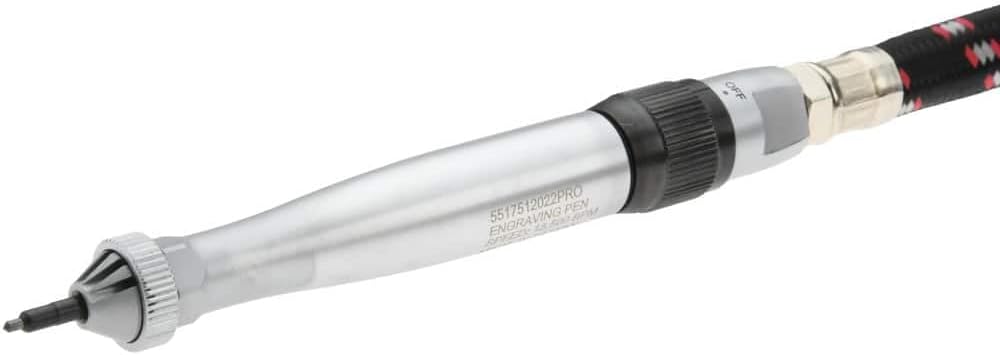
Figure 2.2: Close-up view of the engraving pen, detailing the throttle control and the model number (5517512022PRO) inscribed on the body.
3. Setup
Proper setup is crucial for safe and efficient operation.
- Air Supply Preparation:
- Ensure your air compressor can deliver a consistent 90 psi (6.2 bar).
- Install an air filter/regulator/lubricator (FRL unit) in your air line. This unit filters moisture, regulates pressure, and provides necessary lubrication.
- Fill the lubricator with appropriate pneumatic tool oil.
- Air Hose Connection:
- Connect a 1/4" NPT air hose to the tool's inlet. Verify all connections are tight and leak-free.
- For optimal airflow, use an air hose with an internal diameter of at least 3/8".
- Pressure Adjustment:
- With the air supply connected but the tool idle, adjust your air regulator to achieve the recommended operating pressure of 90 psi.
- Do not exceed 90 psi to prevent tool damage and maintain warranty validity.

Figure 3.1: The engraving pen with its coiled air hose attached, illustrating the connection point for the air supply.
4. Operation
Follow these instructions for effective use of your PRO SOURCE Pneumatic Engraving Pen.
- Secure Workpiece: Always ensure the material to be engraved is firmly secured to prevent movement.
- Grip: Hold the engraving pen comfortably, similar to a pencil, maintaining a firm grip.
- Start Engraving: Gently depress the high-precision throttle. The tool will activate, and the stylus will begin its reciprocating action.
- Control: The throttle allows for variable speed and impact force. Apply more pressure for a deeper or faster engraving.
- Technique: Guide the stylus smoothly over the workpiece. Practice on scrap materials to achieve desired results and control.
- Exhaust: Be mindful of the rear exhaust. Position yourself to avoid directing exhaust air towards your face or other sensitive areas.
- Stop: Release the throttle to cease operation. Disconnect the air supply when the tool is not in use or unattended.
4.1 Recommended Applications
- Marking serial numbers or identification on metal components.
- Adding decorative details to stone or marble surfaces.
- Performing light chipping or deburring tasks.
5. Maintenance
Consistent maintenance extends the life and ensures the performance of your engraving pen.
- Lubrication: If an inline lubricator is not used, apply a few drops of pneumatic tool oil into the air inlet before each use and after every hour of continuous operation.
- Cleaning: Keep the tool exterior clean. Regularly wipe down the pen body and clean the engraving stylus area to prevent material buildup.
- Air Filter: Periodically check and drain any accumulated moisture from your air filter/FRL unit.
- Storage: Store the tool in a clean, dry environment, disconnected from the air supply, and away from extreme temperatures.
- Inspection: Routinely inspect the air hose and connections for signs of wear, damage, or leaks. Replace any compromised components immediately.
6. Troubleshooting
Refer to this table for solutions to common operational issues.
| Problem | Possible Cause | Solution |
|---|---|---|
| Tool does not operate or has low power. |
|
|
| Excessive air leakage. |
|
|
| Engraving stylus not impacting effectively. |
|
|
7. Specifications
| Model Number | 5517512022PRO |
| Brand | PRO SOURCE |
| Power Source | Pneumatic |
| Maximum Blows Per Minute (BPM) | 13,500 BPM |
| Recommended Operating Pressure | 90 psi (6.2 bar) |
| Air Inlet Size | 1/4" NPT |
| Recommended Uses | Engraving metals, stone, and marble; mini-chipping |
| Special Features | High precision throttle, Rear exhaust |
| Style | Pencil |
8. Warranty and Support
For warranty information, technical support, or to order replacement parts, please contact PRO SOURCE customer service. Refer to your purchase documentation for specific warranty terms and contact details.
Manufacturer: MSC Industrial
Website: www.mscdirect.com (This link is provided as a general reference for the manufacturer; actual support contact may vary.)