
1. Introduction
This manual provides comprehensive instructions for the AudioOrigin Black Headshell Cartridge Mount, Stylus, Needle, and Oil Bundle. This kit is designed to enhance the audio performance and longevity of compatible turntables by providing high-quality components and essential maintenance supplies. Please read this manual thoroughly before installation and use.
2. Product Overview
The AudioOrigin Turntable Upgrade Kit includes the following components:
- Solid Aluminium Headshell: A robust and lightweight headshell for secure cartridge mounting.
- AT-VM95C Cartridge and Stylus: A high-quality Audio-Technica moving magnet cartridge with a conical stylus, pre-fitted for convenience.
- Silver Litz Cartridge Wires with Gold Tabs: Premium wiring for optimal signal transfer between the cartridge and tonearm.
- V2 Fully Synthetic Spindle and Motor Lubrication: A specialized lubricant designed to reduce friction and noise in turntable spindle bearings.

Image: The AudioOrigin Black Headshell with the pre-fitted AT-VM95C cartridge, alongside the V2 Turntable Spindle Oil bottle.
3. Setup and Installation
3.1 Headshell and Cartridge Installation
The AT-VM95C cartridge is pre-fitted to the headshell with silver Litz wires. Follow these steps to install the assembly onto your turntable:
- Preparation: Ensure your turntable is powered off and unplugged. If possible, secure the tonearm to prevent accidental movement.
- Unpack: Carefully remove the headshell and cartridge assembly from its packaging. Avoid touching the stylus.
- Insert Headshell: Gently insert the headshell into the front end of your turntable's tonearm. Ensure the pins align correctly.
- Secure: Rotate the locking ring on the tonearm collar clockwise until the headshell is firmly secured. Do not overtighten.
- Balance Tonearm: If not already done, balance your turntable's tonearm according to your turntable's manual. This typically involves adjusting the counterweight until the tonearm floats level.
- Set Tracking Force: Adjust the tracking force to the recommended setting for the AT-VM95C cartridge, which is typically between 1.8g and 2.2g. Refer to your turntable's manual for instructions on setting tracking force.
- Set Anti-Skate: Set the anti-skate control to match the tracking force you have set.
- Stylus Alignment (Optional but Recommended): For optimal performance, verify stylus alignment using a cartridge alignment protractor. This ensures the stylus tracks the record groove accurately.
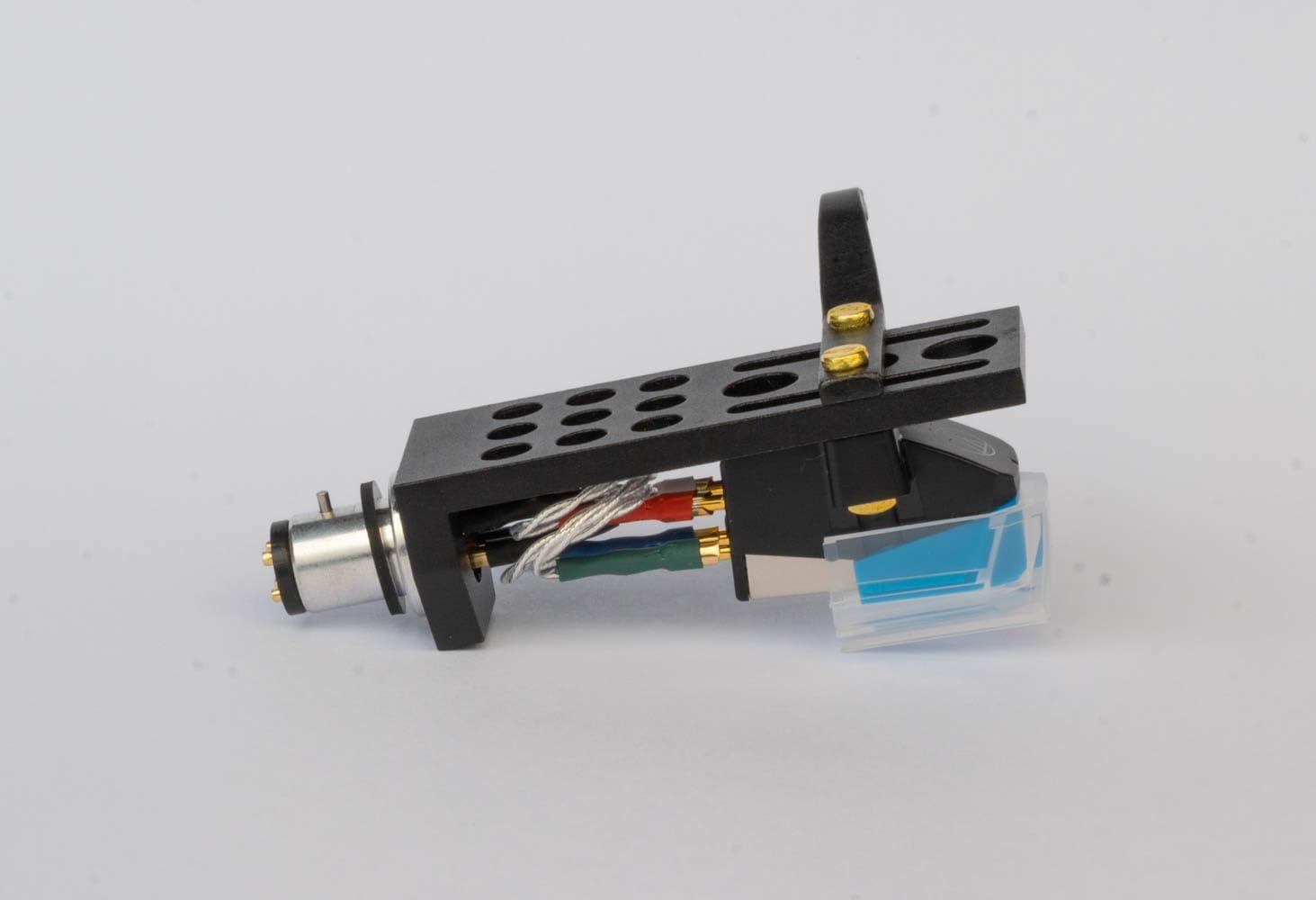
Image: Side view of the pre-assembled AudioOrigin Black Headshell with the AT-VM95C cartridge, showing the gold-tabbed wires.

Image: Top view of the AudioOrigin Black Headshell with the blue AT-VM95C cartridge, highlighting the robust aluminum construction.
3.2 V2 Lubricant Application
The V2 lubricant is designed for turntable spindle bearings to ensure smooth, quiet operation. This lubricant is suitable for all turntables except those with greased bearings.
- Access Spindle: Carefully remove the platter from your turntable to expose the spindle bearing well.
- Clean: If there is old lubricant or debris, gently clean the spindle well with a lint-free cloth.
- Apply Lubricant: Apply 2-3 drops of V2 lubricant directly into the spindle well. Avoid over-lubricating.
- Replace Platter: Carefully replace the platter, ensuring it seats correctly on the spindle. Rotate the platter a few times to distribute the lubricant.

Image: The AudioOrigin V2 Turntable Spindle Oil bottle, packaged with its small cardboard box.
4. Operating Instructions
Once the headshell and cartridge are installed and the lubricant applied, your turntable is ready for use. Follow these general operating guidelines:
- Power On: Turn on your turntable and connected audio equipment.
- Select Input: Ensure your amplifier or receiver is set to the correct 'Phono' input.
- Clean Records: Always ensure your records are clean before playing to prevent dust and debris from damaging the stylus and degrading sound quality.
- Lower Tonearm: Use the tonearm's cueing lever to gently lower the stylus onto the record groove. Avoid dropping the tonearm manually.
- Stylus Protection: Never touch the stylus with your fingers or any abrasive material.
5. Maintenance
Regular maintenance will ensure the longevity and optimal performance of your AudioOrigin Turntable Upgrade Kit components.
5.1 Stylus Care
- Cleaning: Regularly clean the stylus using a dedicated stylus cleaning brush. Always brush from the back of the stylus towards the front, never side-to-side or front-to-back.
- Inspection: Periodically inspect the stylus for accumulated dust, debris, or signs of wear/damage. A worn stylus can damage your records and significantly degrade sound quality. Replace the stylus if it appears worn or damaged.
5.2 Headshell and Cartridge Care
- Dusting: Keep the headshell and cartridge body free from dust using a soft, dry, lint-free cloth.
- Environment: Avoid exposing the cartridge to extreme temperatures, high humidity, or direct sunlight.
5.3 Turntable Lubrication
- Reapplication: Reapply the V2 lubricant every 1-2 years, or if you notice increased friction, noise, or reduced platter spin time from the spindle bearing.
6. Troubleshooting
If you encounter issues, refer to the following common troubleshooting steps:
| Problem | Possible Cause | Solution |
|---|---|---|
| No Sound or Weak Sound | Incorrect input selection; loose cartridge wires; stylus not seated. | Ensure amplifier/receiver is set to 'Phono' input. Check all four cartridge wire connections (Red, Green, White, Blue) are secure and correctly matched. Verify stylus is fully seated in the cartridge body. |
| Distorted Sound | Incorrect tracking force/anti-skate; dirty/worn stylus; dirty record. | Verify tracking force and anti-skate settings are correct. Clean the stylus. Clean the record. Inspect stylus for wear and replace if necessary. |
| Humming Noise | Grounding issue; electrical interference; loose connections. | Ensure the turntable's ground wire is securely connected to your amplifier/receiver. Move turntable away from other electronic devices. Check all audio cable connections. |
| Skipping or Jumping | Insufficient tracking force; unlevel turntable; damaged record/stylus. | Increase tracking force slightly (within recommended range). Ensure turntable is on a level, stable surface. Inspect record for scratches. Inspect stylus for damage and replace if necessary. |
7. Specifications
- Headshell Material: Solid Aluminium
- Cartridge Type: Audio-Technica AT-VM95C (Moving Magnet)
- Stylus Type: Conical
- Wiring: Silver Litz Cartridge Wires with Gold Tabs
- Lubricant: AudioOrigin V2 Fully Synthetic Spindle and Motor Lubrication
- Compatibility: Designed for turntables with standard SME-type tonearms, including Pioneer models such as PL-570, PL-990, PL-1150, P-L400X, PL-1800, PL-155A, PL-155E, PL-A505, SPL-40, PL-250, P-L3000, PL-S40.
8. Warranty and Support
For information regarding product warranty, please refer to the documentation included with your purchase or visit the official AudioOrigin website. For technical support or further assistance, please contact AudioOrigin customer service through their official channels.