
1. Introduction
Thank you for choosing the INNOVATIVE LIFE Portable Power Station. This device is a versatile and reliable power solution designed for various applications, including outdoor activities, emergency backup, and off-grid living. With its high capacity lithium battery and multiple output ports, it provides stable and clean power for your electronic devices and small appliances. Please read this manual thoroughly before operating the power station to ensure safe and optimal performance.
2. Safety Instructions
- Do not disassemble, repair, or modify the unit. Incorrect reassembly may cause fire or electric shock.
- Do not place the unit near fire or expose it to direct sunlight or high temperatures.
- Do not use or store the unit in a bathroom or in an area exposed to water or moisture.
- Do not drop, hit, or subject the unit to strong impacts.
- Use only the original or certified charging cables and adapters.
- Keep out of reach of children and pets.
- Ensure proper ventilation during use and charging to prevent overheating.
- If the unit emits a strange odor, generates heat, or shows any other abnormality, stop using it immediately and contact customer support.
3. Package Contents
Verify that all items are included in your package:
- INNOVATIVE LIFE Portable Power Station
- AC Power Adapter
- Car Charger Cable
- User Manual

Image: The package includes the INNOVATIVE LIFE Portable Power Station, an AC power adapter, a car charger cable, and the user manual. The power station dimensions are approximately 14.80 inches (L) x 9.21 inches (W) x 12.83 inches (H).
4. Product Overview
Familiarize yourself with the various components and ports of your power station.

Image: Front view of the power station, highlighting the central display, power button, AC output sockets, various DC output ports, and USB ports.
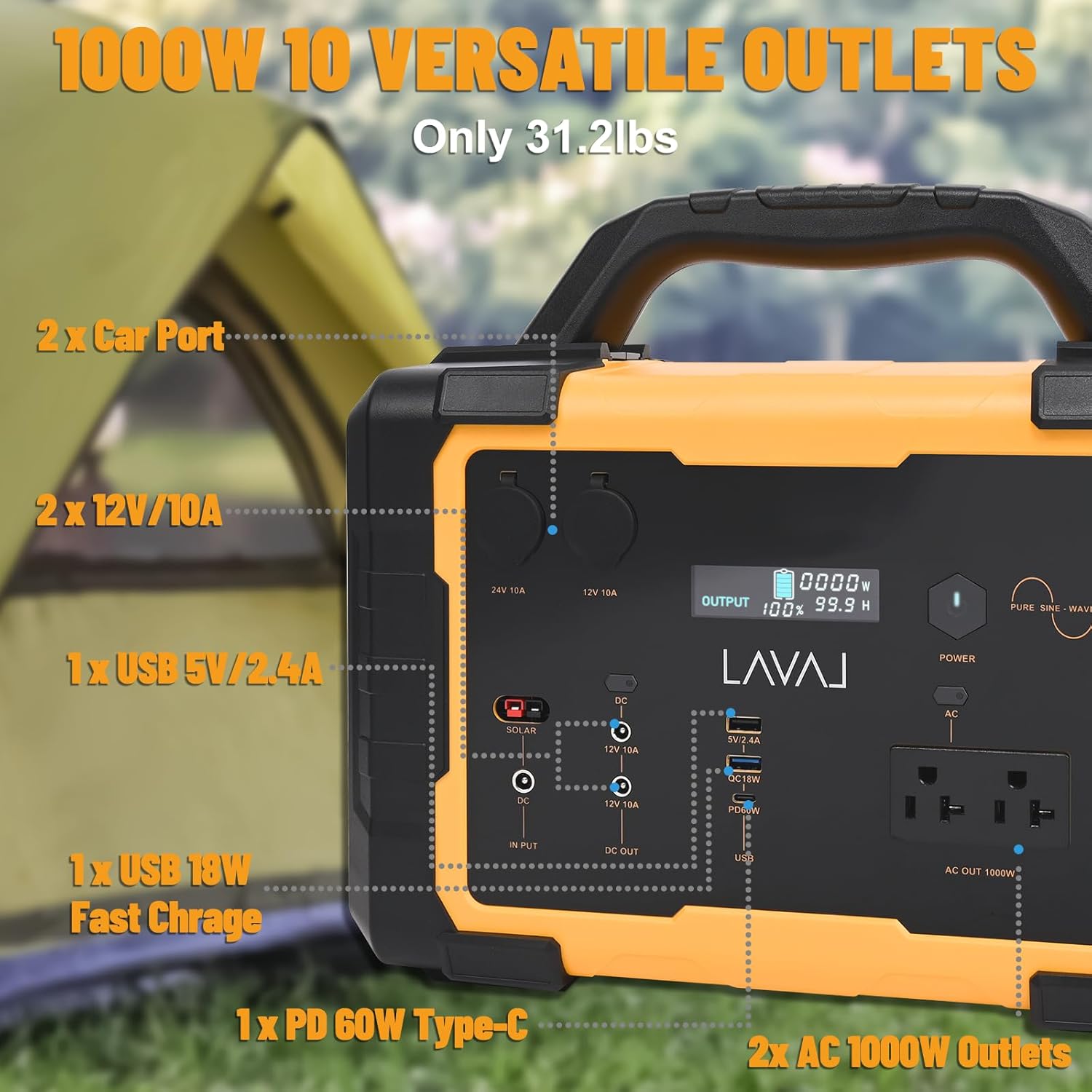
Image: A close-up showing the 10 versatile output ports: 2x Car Ports, 2x 12V/10A DC outputs, 1x USB 5V/2.4A, 1x USB 18W Fast Charge, 1x PD 60W Type-C, and 2x AC 1000W Outlets.
Display Indicators:
- Output: Shows current power output in Watts.
- Battery Level: Indicates remaining battery percentage.
- Remaining Time: Estimates time until full or empty based on current power usage.
5. Charging the Power Station
The INNOVATIVE LIFE Portable Power Station can be charged using three methods:

Image: Illustration of the three charging methods for the power station: via a standard wall outlet, a solar panel (not included), and a car charger.
- Wall Outlet (AC Charging): Connect the provided AC power adapter to the input port of the power station and plug it into a standard wall outlet. Charging time is approximately 5-9 hours.
- Solar Panel (Solar Charging): Connect a compatible solar panel (not included) to the DC input port. The power station features an MPPT controller for efficient solar charging. Charging time is approximately 6-7 hours, depending on sunlight intensity.
- Car Charger (Car Charging): Use the provided car charger cable to connect the power station to your vehicle's 12V cigarette lighter socket. Charging time is approximately 7-9 hours.
The display will show the charging status and current input wattage during charging.
6. Operating the Power Station
Turning On/Off:
- Press and hold the main power button for 3 seconds to turn the unit on or off.
Using Output Ports:
Once the unit is on, you can activate specific output sections:
- AC Output: Press the AC button to enable the 120V AC outlets. Plug in your devices (up to 1000W total). Press again to turn off.
- DC Output: Press the DC button to enable the 12V DC and Car Port outputs. Plug in your 12V devices. Press again to turn off.
- USB Output: The USB-A and USB-C ports are typically always active when the unit is on. Simply plug in your USB devices.
The power station can power various devices for extended periods:

Image: This graphic illustrates the approximate usage times for common devices with the 1000W power station. Examples include a Switch (15W) for 66 hours, a Laptop (60Wh) for 16 times, a Phone (11Wh) for 90 times, a Camera (15W) for 66 hours, a GoPro (15W) for 66 hours, a Drone (25W) for 40 hours, a Mini Fridge (60W) for 16 hours, and a Portable Coffee Machine (40W) for 25 hours.
7. Battery Management System (BMS)
The INNOVATIVE LIFE Portable Power Station is equipped with an advanced Battery Management System (BMS) to ensure safe and reliable operation. The BMS provides multiple layers of protection:

Image: Visual representation of the power station's secure BMS, highlighting its protective features: Overload protection, Short circuit protection, Over current protection, integrated Cooling fan, Pure sine wave output, and an MPPT controller for efficient solar charging.
- Overload Protection: Prevents damage from excessive power draw.
- Short Circuit Protection: Automatically shuts off power in case of a short circuit.
- Over Current Protection: Safeguards against current surges.
- Cooling Fan: Activates automatically to dissipate heat and maintain optimal operating temperature.
- Pure Sine Wave: Ensures clean and stable AC output, safe for sensitive electronics.
- MPPT Controller: Maximizes efficiency during solar charging.
8. Maintenance
- Storage: Store the power station in a cool, dry place away from direct sunlight and extreme temperatures. For long-term storage, charge the unit to 50-80% every 3-6 months to preserve battery life.
- Cleaning: Use a dry, soft cloth to clean the exterior of the unit. Do not use abrasive cleaners or solvents.
- Ventilation: Ensure the ventilation vents are clear of dust and debris to allow proper airflow.
9. Troubleshooting
- Unit not turning on: Ensure the battery is charged. If not, connect to a power source and charge.
- No output from ports: Ensure the specific output section (AC/DC) is activated. Check if the device connected exceeds the power station's output limit.
- Overload warning: Disconnect some devices to reduce the load. The unit will automatically reset once the load is within limits.
- Charging slowly: Ensure the charging cable and adapter are properly connected. For solar charging, ensure the solar panel is in direct sunlight and free from obstructions.
- Unusual noise or smell: Immediately turn off the unit and disconnect all devices. Contact customer support.
10. Specifications
| Parameter | Value |
|---|---|
| Model | PYS-PEI-E01000 |
| Battery Capacity | 1075Wh |
| AC Output | 1000W (Rated), 120V, Pure Sine Wave |
| DC Output | 2x 12V/10A, 2x Car Port |
| USB Output | 1x USB 5V/2.4A, 1x USB 18W Fast Charge, 1x PD 60W Type-C |
| Charging Input | AC Adapter, Solar Panel (MPPT), Car Charger |
| Dimensions (L x W x H) | 14.8" x 9.21" x 12.83" |
| Weight | 11 Pounds |
| Operating Temperature | 0°C to 40°C (32°F to 104°F) |
11. Warranty and Support
INNOVATIVE LIFE provides a standard warranty for this product. Please refer to the warranty card included in your package or visit the official INNOVATIVE LIFE website for detailed warranty terms and conditions. For technical support, troubleshooting assistance, or warranty claims, please contact INNOVATIVE LIFE customer service through the contact information provided on our website or your purchase platform.
Manufacturer: PYS High-Tech Co., Ltd.


