
1. Introduction
This user manual provides detailed instructions for the safe and efficient use of your ATEVENSEE Wireless Charging Station RYT-010-01. Please read this manual thoroughly before operating the device and retain it for future reference.
2. Package Contents
Verify that all items are present in your package:
- 1 x ATEVENSEE 7-in-1 Wireless Charging Station
- 1 x 30W Power Adapter
- 1 x Type-C Charging Cable
- 1 x User Manual (this document)

Image: The ATEVENSEE Wireless Charging Station shown with a smartphone, smartwatch, earbuds, and the power adapter.
3. Product Features
The ATEVENSEE Wireless Charging Station RYT-010-01 is a versatile charging solution designed to power multiple devices simultaneously while offering additional functionalities.
- 7-in-1 Functionality: Charges two iPhones, an Apple Watch, and AirPods simultaneously.
- Fast Charging: Supports 30W fast charging output with the included adapter.
- Adjustable Lighting: Features a touch-adjustable night light with warm, natural, and cold light options.
- Digital Display: Shows time, day of the week, and indoor temperature.
- Bluetooth Time Synchronization: Automatically synchronizes time via Bluetooth connection to your mobile phone.
- Safety Protection: Equipped with over-current, over-voltage, and over-temperature protection.

Image: Visual representation of the 7-in-1 features of the charging station, highlighting compatibility with iPhone, iWatch, AirPods, touch night light, and Bluetooth time synchronization.
4. Setup Instructions
4.1 Power Connection
- Connect the provided Type-C cable to the charging station's input port.
- Connect the other end of the Type-C cable to the included 30W power adapter.
- Plug the 30W power adapter into a standard wall outlet. The digital display on the charging station will illuminate.

Image: The charging station powered by the 30W adapter, showing the connection to a wall socket.
4.2 Bluetooth Time Synchronization
The charging station can automatically synchronize its time display with your mobile phone via Bluetooth.
- Ensure your mobile phone's Bluetooth is enabled.
- On your phone, search for Bluetooth devices and select "010" to connect.
- Once connected, the charging station's time display will automatically synchronize with your phone's time. The display will also show the current day of the week and indoor temperature.

Image: Step 1 of Bluetooth pairing, showing a hand enabling Bluetooth on a smartphone.

Image: Step 2 of Bluetooth pairing, illustrating the connection to the "010" device for time synchronization.
5. Operating Instructions
5.1 Charging Devices
The charging station supports wireless charging for compatible devices. Ensure your device is placed correctly on the designated charging areas.
- Dual iPhone Charging: Place two compatible iPhones on the designated wireless charging pads. The station supports up to 7.5W for iPhones.
- Apple Watch Charging: Place your Apple Watch (original only) on the magnetic charging module. The station provides 5W for Apple Watch.
- AirPods Charging: Place your wireless charging compatible AirPods (AirPods 4/3/2/Pro/Pro 2) on the designated earbud charging area. The station provides 3W for AirPods.

Image: The wireless charging station actively charging two smartphones, showcasing its dual charging capability.

Image: Illustration detailing 7.5W wireless charging support for various iPhone models.

Image: Illustration detailing 3W wireless charging support for various AirPods models.

Image: Illustration detailing 5W wireless charging support for Apple Watch models (original only).
5.2 Night Light and Display Adjustment
The charging station features an integrated night light and adjustable display brightness.
- Night Light: Touch the designated "Night Light Touch Point" to cycle through warm, natural, and cold light settings.
- Display Brightness: Touch the "Brightness of Screen Touch Point" to adjust the brightness of the digital time and temperature display from 0% to 100%.
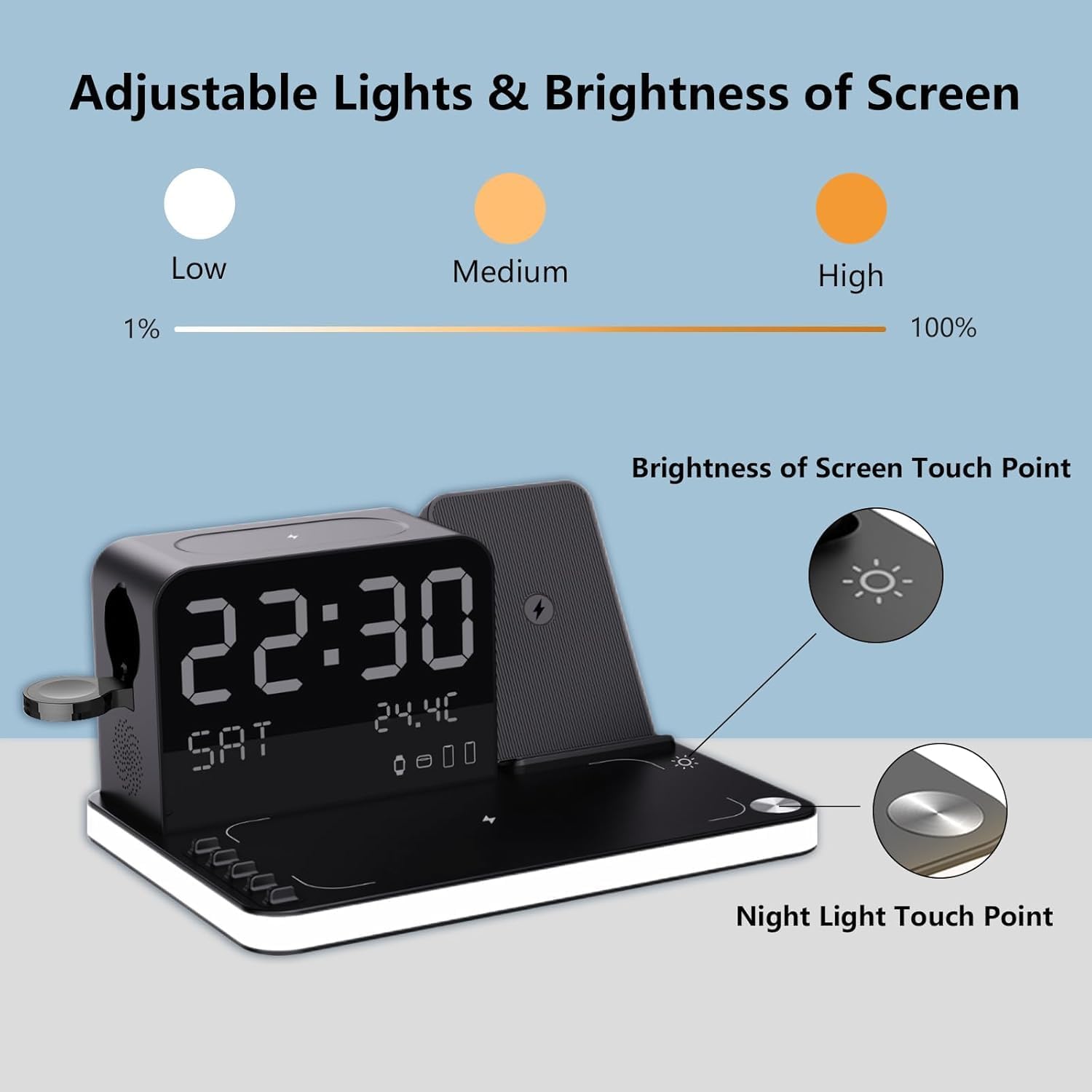
Image: Visual guide indicating the touch points for controlling the night light and adjusting the screen brightness.
5.3 Case Compatibility
For optimal wireless charging performance, ensure your phone case is compatible. Cases thicker than 2mm, or those containing metal or credit cards, may interfere with charging.

Image: A diagram illustrating which types of phone cases are compatible (e.g., thin, MagSafe) and incompatible (e.g., metal, credit card holders) with the wireless charging function.
6. Maintenance
To ensure the longevity and optimal performance of your charging station, follow these maintenance guidelines:
- Cleaning: Disconnect the power before cleaning. Use a soft, dry cloth to wipe the surface. Avoid using abrasive cleaners, solvents, or harsh chemicals.
- Storage: Store the device in a cool, dry place away from direct sunlight and extreme temperatures when not in use.
- Handling: Avoid dropping or subjecting the device to strong impacts. Do not disassemble the unit.
7. Troubleshooting
If you encounter issues with your ATEVENSEE Wireless Charging Station, refer to the following common problems and solutions:
| Problem | Possible Cause / Solution |
|---|---|
| Device not charging wirelessly. |
|
| Time display is incorrect. |
|
| Digital display brightness is too high/low. |
|
| Night light not functioning. |
|
8. Specifications
| Feature | Detail |
|---|---|
| Model Number | RYT-010-01 |
| Brand | ATEVENSEE |
| Package Dimensions | 9.65 x 7.17 x 4.45 inches |
| Item Weight | 1.13 pounds |
| Input Voltage | 25 Volts |
| Wattage | 30 watts |
| Connector Type | 2-Pin (for power adapter) |
| Total USB Ports | 1 (Type-C input) |
| Special Features | Display Temperature & Time & Week, Dual iPhone Charging, Touch Night Light, Bluetooth TimeSync, Wireless Charging |
| Compatible Devices | iPhone 16/15/14/13/12 all series (supports all wireless charging phones), Apple Watch all series (original only), AirPods 4/3/2/Pro/Pro 2 (supports all wireless charging earbuds) |
9. Safety Information
Your ATEVENSEE Wireless Charging Station is designed with multiple safety features to protect your devices and ensure safe operation:
- Over-Current Protection: Prevents damage from excessive current.
- Over-Voltage Protection: Safeguards against voltage surges.
- Over-Temperature Protection: Monitors and regulates internal temperature to prevent overheating.
- Certifications: The device has passed FCC, CE, ROHS, PSE, and CCC certifications.
Always use the provided power adapter and cable. Do not expose the device to water or extreme conditions. Avoid placing metal objects or magnetic cards on the charging pads.
10. Warranty and Support
For warranty information or technical support, please contact ATEVENSEE customer service through the retailer where the product was purchased or visit the official ATEVENSEE website. Please have your model number (RYT-010-01) and purchase details ready when contacting support.