
1. Introduction
Thank you for choosing the YiLaie 24W RGB Dimmable LED Ceiling Light. This modern ceiling light offers versatile illumination with adjustable color temperature (3000K-6500K), RGB backlight, dimmable brightness, and convenient remote control functions including a timer and sleep mode. Its IP44 waterproof rating makes it suitable for various indoor environments, including bathrooms. Please read this manual carefully before installation and use to ensure proper function and safety.
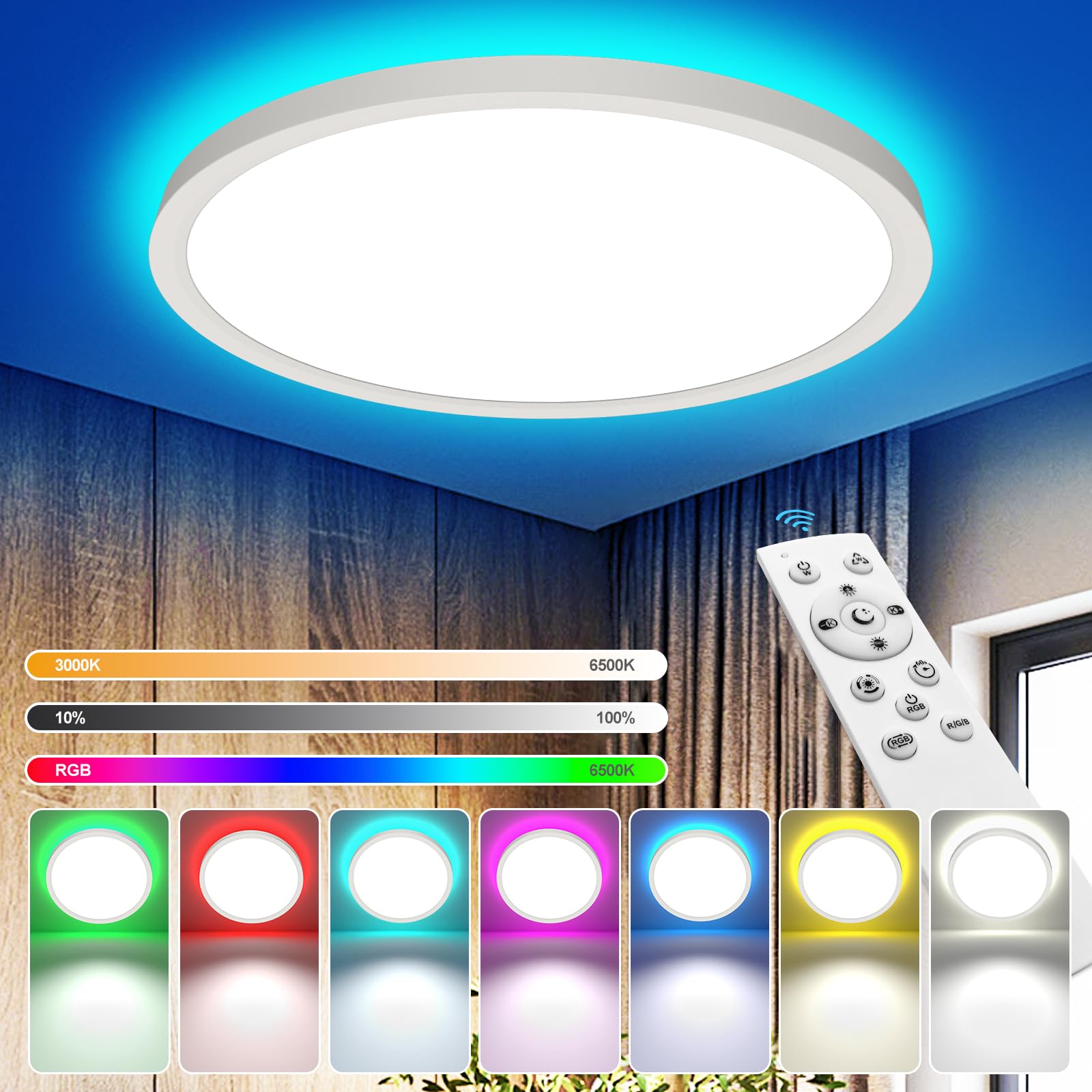
Image 1: YiLaie 24W RGB Dimmable LED Ceiling Light with remote control.
2. Safety Information
- Electrical Safety: Always turn off the main power supply at the circuit breaker before installation, maintenance, or cleaning.
- Qualified Installation: Installation should be performed by a qualified electrician or a person with sufficient knowledge of electrical wiring.
- Voltage: Ensure the power supply voltage matches the product's requirements (220 Volts AC).
- Mounting: Mount the light securely to a stable ceiling surface.
- Environment: Do not expose the light to excessive moisture or extreme temperatures beyond its IP44 rating.
- Cleaning: Use a soft, dry cloth for cleaning. Do not use abrasive cleaners or solvents.
3. Package Contents
Verify that all components are present in the package:
- Ceiling lamp x1
- Remote control x1
- Self-cutting screw x4
- Plastic Screw x4
- Cable connector x1
- Quick start manual x1

Image 2: Contents of the product package, including the ceiling lamp, remote control, and mounting hardware.
4. Specifications
| Brand | YiLaie |
| Model Number | EL-CLB-30 |
| Power Consumption | 24 Watts |
| Luminous Flux | 2700 Lumens |
| Color Temperature | 3000K (Warm White) - 6500K (Cool White) adjustable |
| Light Color | RGB + White |
| Dimensions (L x W x H) | 30L x 30W x 3.7H centimeters (Ø30CM) |
| Material | Polycarbonate (PC), Plastic |
| Control Method | 2.4G Wireless Remote Control |
| Connectivity Protocol | 2.4G |
| Ingress Protection (IP) Rating | IP44 (Splash-proof, dust-proof) |
| CRI | CRI80+ |
| Lifespan | Up to 50,000 hours |
| Voltage | 220 Volts (AC) |
5. Installation
Follow these steps for quick and easy installation:
- Prepare: Turn off the main power supply at the circuit breaker.
- Install Base: Secure the mounting base to the ceiling using the provided screws. Ensure the base is firmly attached.
- Connect Wires: Connect the household electrical wires to the light's wires using the cable connector. Ensure correct polarity (Live to Live, Neutral to Neutral).
- Attach Lamp: Align the LED ceiling lamp with the installed base and twist it into place until it is securely fastened.
- Restore Power: Turn on the main power supply.

Image 3: Diagram illustrating the four-step installation process: pivoting base, fixed support, wire connection, and quick installation.
6. Operating Instructions
6.1 Remote Control Functions
The ceiling light is controlled by a 2.4G wireless remote control, effective up to 10 meters. Multiple lights of the same model can be controlled simultaneously by pairing the remote.

Image 4: Detailed layout of the remote control buttons and their functions.
- ON/OFF: Power button to turn the light on or off.
- Brightness +/-: Adjust the main light brightness.
- Color Temperature +/-: Adjust the main light color temperature from warm to cool.
- 20%/50%/100% Brightness: Quick selection for main light brightness levels.
- Night Light Mode (Moon icon): Sets the light to 3000K warm light at 10% brightness, ideal for children or elderly.
- Timer Function (60s icon): Sets the light to turn off after 60 seconds. Press multiple times to extend the time.
- RGB Mode ON/OFF: Activates or deactivates the RGB backlight.
- Switch RGB Color Mode: Cycles through different RGB color modes (fixed, gradient, jump cycles).
6.2 Adjustable Color Temperature and Brightness
The main light offers continuous adjustment of color temperature from 3000K (warm white) to 6500K (cool white) and brightness from 10% to 100% using the remote control. Note that these adjustments are not compatible with wall switches.

Image 5: Visual representation of adjustable color temperature (3000K to 6500K) and brightness (0 to 2640LM).
6.3 RGB Backlight Mode
The light features a vibrant RGB backlight with 7 fixed colors and over 20 dynamic modes, including strobe, gradient, and beat loops. The main light and RGB backlight can operate individually or simultaneously to create various atmospheres.

Image 6: Display of 7 RGB multi-color light moods, including fixed colors, gradient cycles, and jump cycles.
6.4 Timer Function and Sleep Mode
Activate the timer function via the remote to automatically turn off the light after 60 seconds. The dedicated sleep mode button sets the light to a comfortable 3000K warm light at 10% brightness, providing a gentle illumination for nighttime.

Image 7: Illustration of the sleep mode (3000K warm light, 10% brightness) and timer function (60 seconds before bedtime).
7. Maintenance
- Cleaning: Ensure the power is off before cleaning. Wipe the light fixture with a soft, dry, or slightly damp cloth. Do not use harsh chemicals or abrasive materials.
- Dust Removal: Regularly dust the surface to maintain optimal light output and appearance.
- Inspection: Periodically check for any loose connections or damage. If any issues are found, consult a qualified electrician.
8. Troubleshooting
| Problem | Possible Cause | Solution |
|---|---|---|
| Light does not turn on. | No power supply, loose wiring, remote control battery low. | Check circuit breaker. Ensure wires are securely connected. Replace remote control batteries. |
| Remote control not working. | Remote control battery low or depleted, remote not paired. | Replace remote control batteries. Ensure remote is within range (up to 10m). Re-pair the remote if necessary (refer to quick start guide for pairing instructions). |
| Light flickers or dims unexpectedly. | Unstable power supply, faulty wiring, product defect. | Check household wiring. Ensure stable power. If problem persists, contact customer support. |
| Color temperature or brightness cannot be adjusted. | Using a wall switch for adjustment, remote control issue. | Adjustments are only possible via the remote control, not wall switches. Check remote control functionality. |
9. Warranty and Support
This YiLaie LED Ceiling Light comes with a limited warranty. For detailed warranty information or technical support, please refer to the quick start manual included in the package or contact YiLaie customer service directly. Our support team is available to assist you with any questions or issues regarding your product.