
Fosi Audio DS2
Fosi Audio DS2 USB-C Headphone Amp DAC Dongle User Manual
Model: DS2
Introduction
The Fosi Audio DS2 is a new generation portable USB-C headphone DAC and amplifier designed to deliver high-resolution audio. Featuring dual Cirrus Logic CS43131 DAC chips, it provides superior sound performance with ultra-low noise and distortion. This compact device is compatible with a wide range of mobile phones, tablets, and computers, offering both 3.5mm single-ended and 4.4mm balanced headphone outputs.

Image: The Fosi Audio DS2 DAC dongle shown with its included USB-C to USB-C cable.
Key Features
- Upgraded Version: Supports up to DSD256 and PCM 32bit/384kHz decoding for high-resolution sound. Delivers powerful drive up to 170mW@32Ω per channel.
- Flagship Chips: Equipped with two Cirrus Logic CS43131 DAC chips for superior audio performance, ultra-low 1µV noise floor, minimal 0.0001% THD, high 130dB SNR, and excellent 109dB SINAD.
- Easy to Use: Plug-and-play functionality with independent 60-step volume control buttons and volume memory function.
- High Compatibility: Works with iPhone 15 series, iPad Pro, Android phones, and can function as an external sound card for computers (Windows, Mac).
- Exquisite and Durable Design: Crafted from solid metal using CNC machining, shock-resistant with a sleek design for comfortable grip.

Image: Overview of Fosi Audio DS2 key specifications including DAC chip, sampling rate, compatibility, and power output.

Image: Close-up rendering of the dual CS43131 flagship DAC chips, highlighting their role in audio detail restoration.

Image: Visual representation of the DS2's high performance metrics: >130dB SNR, <0.0001% THD, and ≥109dB SINAD.
Package Contents
Upon opening the package, please verify that all the following items are included:
- Fosi Audio DS2 Portable USB-C DAC HiFi Headphone Amplifier x 1
- Type-C to Type-C Cable x 1
- USB-A to USB-C Adapter x 1
- User Manual x 1
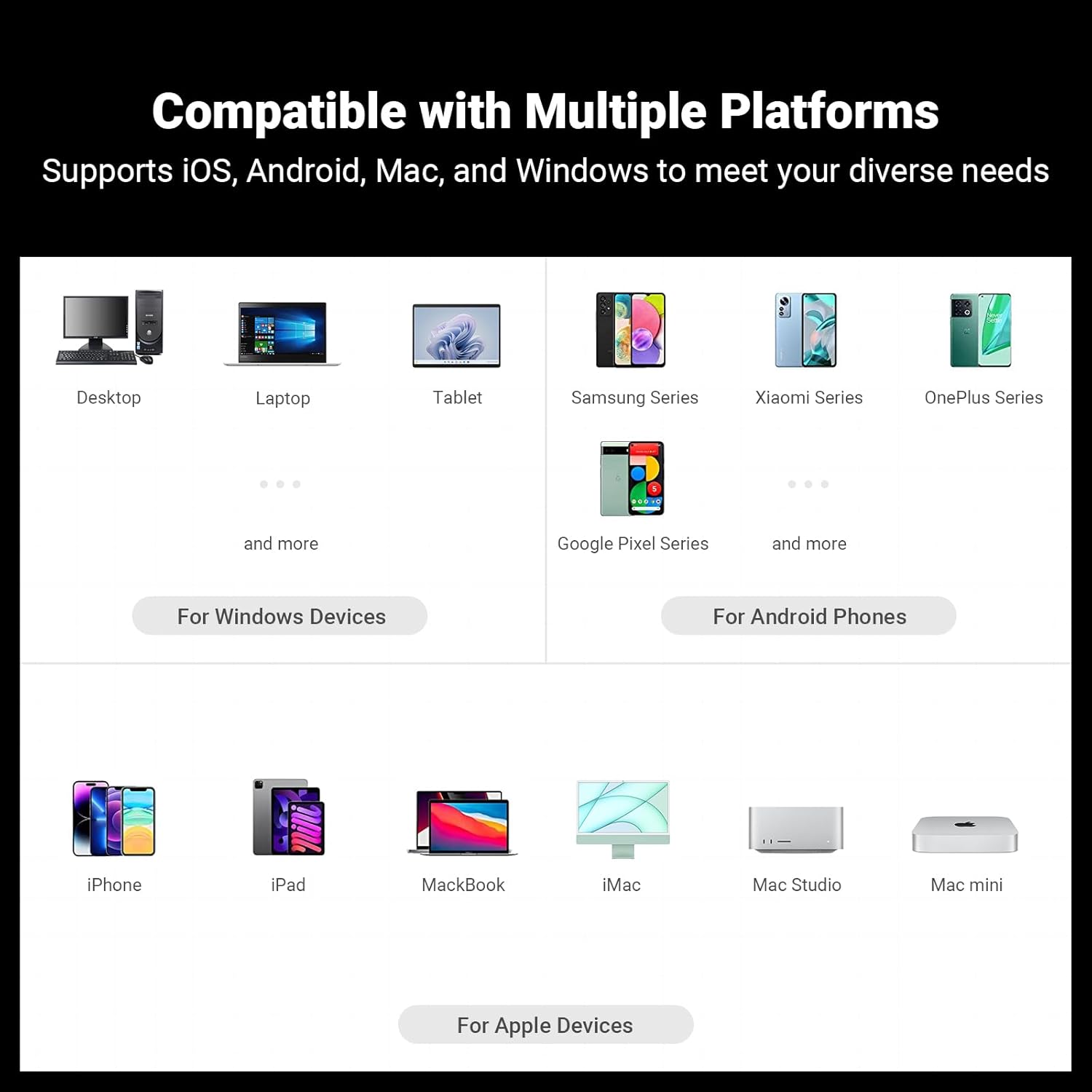
Image: Diagram showing the contents of the Fosi Audio DS2 package, including the DS2 unit, Type-C to Type-C cable, USB-A to USB-C adapter, and user manual.
Setup Instructions
- Connect to Source Device: Use the provided Type-C to Type-C cable to connect the Fosi Audio DS2 to your smartphone, tablet, or computer's USB-C port. If your device has a USB-A port, use the included USB-A to USB-C adapter.
- Connect Headphones: Plug your headphones into either the 3.5mm single-ended output or the 4.4mm balanced output on the Fosi Audio DS2.
- Power On: The DS2 will automatically power on when connected to a compatible source device. The red indicator light on the unit will illuminate.
- Volume Adjustment: Use the independent volume control buttons (+/-) on the side of the DS2 to adjust the audio output level. The device features a 60-step volume control and a volume memory function.

Image: The Fosi Audio DS2 connected to a smartphone via USB-C, demonstrating its use with mobile devices.

Image: The Fosi Audio DS2 connected to a tablet, illustrating its compatibility with larger portable devices for high-resolution audio playback.
Operating Instructions
The Fosi Audio DS2 is designed for simple plug-and-play operation. Once connected and powered, it will function as your device's external DAC and headphone amplifier.
- Audio Playback: Begin playing audio from your source device. The DS2 will automatically process the digital audio signal and output it to your connected headphones.
- Volume Control: Use the dedicated volume buttons on the side of the DS2 to fine-tune your listening level. These buttons provide precise 60-step control, independent of your source device's digital volume.
- Indicator Light: The red indicator light signifies that the DS2 is powered on and operational.

Image: A close-up view of the Fosi Audio DS2, highlighting its volume control buttons and sleek design.
Compatibility
The Fosi Audio DS2 offers broad compatibility with various operating systems and devices:
- Apple Devices: Fully supports iPhone 15, 15 Plus, 15 Pro, iPad Pro, MacBook, iMac, Mac Studio, Mac mini, and other Apple devices with USB-C ports.
- Android Phones: Compatible with a wide range of Android smartphones, including Samsung Series, Xiaomi Series, OnePlus Series, Google Pixel Series, and more.
- Windows Devices: Functions as an external sound card for desktop PCs and laptops running Windows.
- Other Devices: Also compatible with various tablets and other devices supporting USB audio output.

Image: A comprehensive chart illustrating the Fosi Audio DS2's compatibility with various platforms, including Windows, Android, and Apple devices.
Maintenance
To ensure the longevity and optimal performance of your Fosi Audio DS2, please follow these maintenance guidelines:
- Cleaning: Use a soft, dry cloth to wipe the exterior of the device. Avoid using liquid cleaners, aerosols, or abrasive solvents.
- Storage: Store the DS2 in a cool, dry place away from direct sunlight, extreme temperatures, and high humidity.
- Handling: Handle the device with care. Avoid dropping it or subjecting it to strong impacts, as this may damage internal components.
- Connections: Always insert and remove cables gently to prevent damage to the ports.
Troubleshooting
If you encounter any issues with your Fosi Audio DS2, please refer to the following common troubleshooting steps:
| Problem | Possible Cause | Solution |
|---|---|---|
| No sound output |
|
|
| Distorted or poor sound quality |
|
|
| Device not recognized by computer/phone |
|
|

Image: A technical graph displaying the instantaneous level and FFT (Fast Fourier Transform) of an audio signal, demonstrating the DS2's clean output.

Image: Technical measurements showing the RMS level, THD+N ratio, frequency response, and SINAD (Signal-to-Noise and Distortion) of the Fosi Audio DS2, indicating its high fidelity performance.
Specifications
| Attribute | Value |
|---|---|
| Model | DS2 |
| DAC Chip | Dual Cirrus Logic CS43131 |
| Max Decoding Capability | PCM 32bit/384kHz, DSD256 |
| Output Power (3.5mm Single-Ended) | 2x130mW (32Ω) |
| Output Power (4.4mm Balanced) | 2x510mW (32Ω) |
| Noise Floor | Ultra-low 1µV |
| THD (Total Harmonic Distortion) | Minimal 0.0001% |
| SNR (Signal-to-Noise Ratio) | High 130dB |
| SINAD | Excellent 109dB |
| Product Dimensions | 2.17 x 0.75 x 0.47 inches |
| Item Weight | 1.92 ounces |
| Connectivity | USB-C input, 3.5mm single-ended output, 4.4mm balanced output |
| Volume Control | Independent 60-step physical buttons |
Warranty and Support
Fosi Audio products typically come with a manufacturer's warranty. Please refer to the warranty card included in your product packaging or visit the official Fosi Audio website for detailed warranty terms and conditions.
For technical support, troubleshooting assistance, or any inquiries regarding your Fosi Audio DS2, please contact Fosi Audio customer service through their official channels. Contact information can usually be found on their website or in the product documentation.
Note: Keep your purchase receipt as proof of purchase for warranty claims.