
LVYUAN LY-MSW5000W
LVYUAN 5000 Watt Power Inverter
Model: LY-MSW5000W
Brand: LVYUAN
Introduction
This user manual provides detailed instructions for the safe and efficient operation of your LVYUAN 5000 Watt Power Inverter. This device converts 12V DC power from your vehicle or battery system into 110V/120V AC household power, making it ideal for various applications including RVs, solar systems, trucks, and off-grid camping. Please read this manual thoroughly before use to ensure proper installation and to maximize the lifespan of your inverter.

Image: The LVYUAN 5000 Watt Power Inverter, showcasing its main unit, wireless remote control, and included battery cables.
Safety Information
Always observe the following safety precautions to prevent injury or damage to the inverter and connected devices:
- Ensure proper ventilation around the inverter. Do not block cooling vents.
- Keep the inverter away from water, moisture, and flammable materials.
- Connect the inverter only to a 12V DC power source. Connecting to a different voltage may cause damage.
- Do not open the inverter casing. There are no user-serviceable parts inside.
- Always disconnect the inverter from the power source before performing any maintenance or cleaning.
- Ensure all connections are secure and properly insulated to prevent short circuits.
- Avoid overloading the inverter. Do not exceed the continuous power rating of 5000W.
- This inverter is designed for modified sine wave output. Verify compatibility with sensitive electronics.
What's in the Box
Upon unpacking, please verify that all items listed below are included:
- 1 x LVYUAN 5000W Power Inverter
- 1 x Wireless Remote Controller (Battery 12V 23A not included)
- 1 x Pair of Battery Cables (50 inch)
- 1 x Instruction Manual (This document)
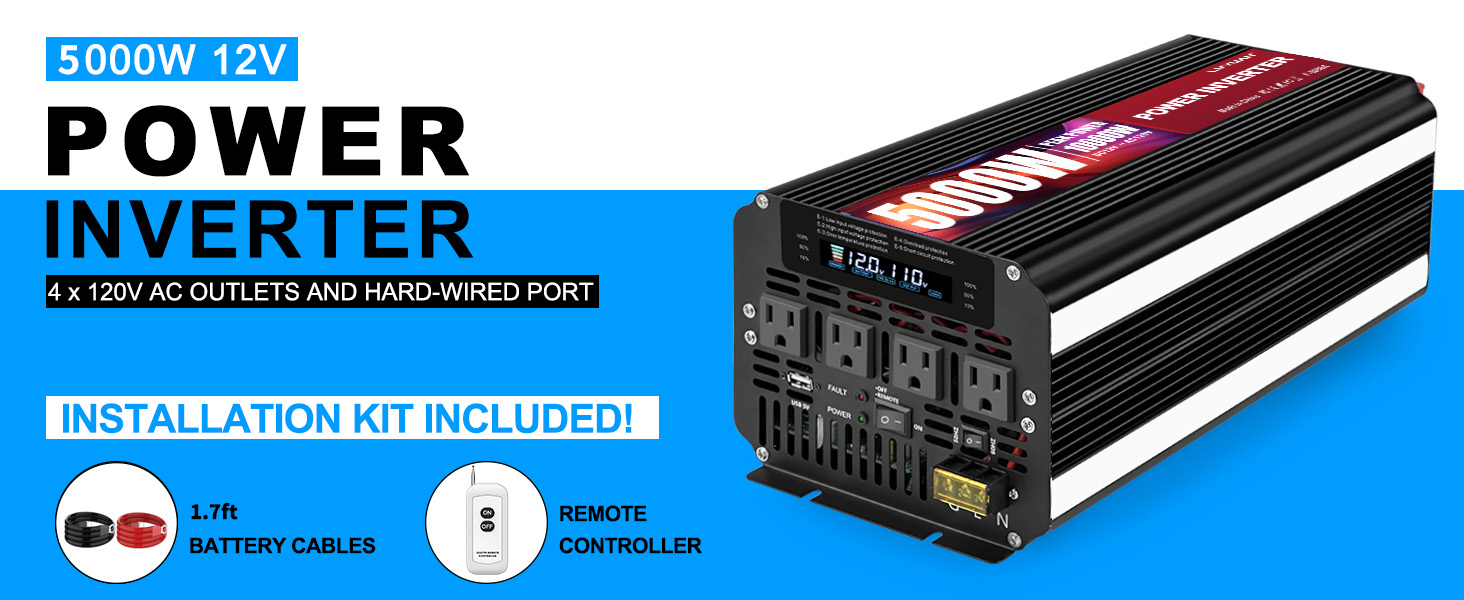
Image: The 5000W 12V Power Inverter along with its installation kit, including battery cables and the remote controller.
Product Overview
Front Panel Features

Image: Detailed view of the inverter's front and back panels, highlighting various ports and features.
- LCD Display: Shows real-time information such as battery capacity, battery voltage, output frequency, output voltage, and load capacity.
- AC Output (x4): Four standard 110V/120V AC outlets for connecting appliances.
- USB Ports: For charging USB-powered devices (5V).
- ON/OFF Switch: Main power switch for the inverter.
- Frequency Switching: Allows selection of output frequency (e.g., 50Hz/60Hz).
- LED Indicator: Provides status feedback.
- Hardwire Terminal: For direct connection of high-power appliances.
Rear Panel Features
- Positive (+) and Negative (-) Terminals: For connecting to the 12V DC battery source.
- Cooling Fans (x2): Intelligent cooling fans activate when internal temperature exceeds 104°F (40°C) or load exceeds 45% to ensure optimal heat dissipation.
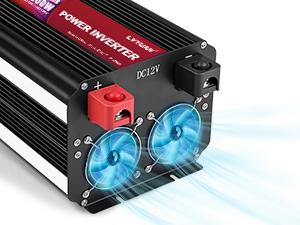
Image: A close-up view of the inverter's cooling fans, showing their design for efficient heat dissipation.
LCD Display Details

Image: The inverter's LCD display, clearly indicating Battery Capacity, Battery Voltage, Output Frequency, Output Voltage, and Load Capacity.
The smart LCD display provides critical operational data at a glance:
- Battery Capacity: Indicates the remaining battery charge.
- Battery Voltage: Displays the input DC voltage from the battery.
- Output Frequency: Shows the AC output frequency (e.g., 60Hz).
- Output Voltage: Displays the AC output voltage (e.g., 110V/120V).
- Load Capacity: Indicates the percentage of the inverter's capacity currently being used.
Wireless Remote Control
The included wireless remote control allows you to power the inverter on or off from a distance, which is particularly useful when the inverter is installed in hard-to-reach locations like RV cabinets or truck beds. The remote control distance is approximately 160 feet without obstruction.

Image: A hand holding the wireless remote control, demonstrating its use to operate the inverter from a distance, with a caravan in the background.
Safety Protections
The LVYUAN 5000W Power Inverter is equipped with multiple safety features to protect both the inverter and your connected devices:
- Overload Protection: Prevents damage from excessive load.
- Short Circuit Protection: Safeguards against short circuits.
- Input Under Voltage Protection: Shuts down if input voltage is too low.
- Over Voltage Protection: Protects against excessively high input voltage.
- Overtemp Protection: Activates cooling fans and shuts down if overheating occurs.
- Reverse Polarity Protection: Prevents damage from incorrect battery connection.
- Low Voltage Protection: Alerts and shuts down to prevent battery over-discharge.
- Sound Alert Protection: Provides audible warnings for certain fault conditions.

Image: An illustration detailing the eight safety protection features of the inverter, including overload, short circuit, input under voltage, over voltage, overtemp, reverse polarity, low voltage, and sound alert protection.
Setup and Installation
Follow these steps for proper setup and installation of your power inverter:
- Choose a Location: Select a dry, well-ventilated area for the inverter. Ensure it is away from direct sunlight, heat sources, and flammable materials. The inverter can be mounted horizontally or vertically.
- Prepare the Battery: Ensure your 12V DC battery is fully charged and in good condition. For optimal performance, use a deep cycle battery.
- Connect Battery Cables:
- Connect the red (positive) battery cable to the positive (+) terminal on the inverter.
- Connect the black (negative) battery cable to the negative (-) terminal on the inverter.
- Connect the other end of the red cable to the positive (+) terminal of your 12V battery.
- Connect the other end of the black cable to the negative (-) terminal of your 12V battery.
Important: Ensure connections are tight and secure. Loose connections can cause overheating and damage.
- Grounding: For safety, connect the inverter's grounding terminal to a proper earth ground or vehicle chassis ground using a suitable gauge wire.
- Hardwire Terminal (Optional): If using the hardwire terminal for high-power appliances, ensure proper wiring according to electrical codes and appliance requirements. Consult a qualified electrician if unsure.
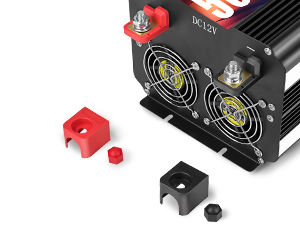
Image: A detailed view of the positive (red) and negative (black) battery terminals on the inverter, showing where to connect the battery cables.
Operating Instructions
- Power On: Once all connections are secure, press the ON/OFF switch on the inverter or the "ON" button on the wireless remote control. The LCD display will illuminate, and the inverter will begin converting DC to AC power.
- Monitor LCD Display: Regularly check the LCD display for battery voltage, output voltage, and load capacity to ensure stable operation and prevent battery over-discharge or inverter overload.
- Connect Appliances: Plug your AC appliances into the 4 AC outlets or connect them via the hardwire terminal. Ensure the total wattage of all connected appliances does not exceed the inverter's continuous power rating (5000W).
- Power Off: When finished using the inverter, first turn off all connected appliances, then press the ON/OFF switch on the inverter or the "OFF" button on the wireless remote control.

Image: The LVYUAN 5000W Power Inverter in a workshop environment, demonstrating its versatile application by powering various tools.
Maintenance
Regular maintenance ensures optimal performance and longevity of your inverter:
- Cleaning: Periodically clean the exterior of the inverter with a dry, soft cloth. Do not use liquid cleaners or solvents. Ensure cooling vents are free from dust and debris.
- Connections: Regularly check all electrical connections (battery terminals, AC outlets, hardwire terminal) to ensure they are tight and free from corrosion.
- Storage: If storing the inverter for an extended period, disconnect it from the battery and store it in a cool, dry place.
- Battery Health: Maintain your 12V battery according to its manufacturer's recommendations. A healthy battery is crucial for inverter performance.
Troubleshooting
If you encounter issues with your inverter, refer to the table below for common problems and solutions:
| Problem | Possible Cause | Solution |
|---|---|---|
| Inverter does not turn on. | No input voltage; Loose battery connections; Blown fuse; Low battery voltage. | Check battery connections; Ensure battery is charged; Check and replace internal fuses if necessary (consult professional). |
| No AC output. | Overload; Over-temperature; Low/High input voltage; Faulty appliance. | Reduce load; Allow inverter to cool; Check battery voltage; Test appliance on another power source. |
| Audible alarm/Error code on LCD. | Indicates a protection mode (e.g., overload, low voltage, over-temperature). | Refer to LCD display for specific error code (E-1 to E-5); Address the underlying issue (reduce load, charge battery, allow cooling). |
| Fans not running. | Normal operation if load is low or temperature is below 104°F (40°C). | Fans activate only when needed. If inverter is hot and fans are not running, contact support. |
Specifications
| Feature | Detail |
|---|---|
| Model Number | LY-MSW5000W |
| Continuous Power | 5000 Watts |
| Peak Power | 10000 Watts |
| Input DC Voltage | 12V DC |
| Output AC Voltage | 110V / 120V AC |
| Output Waveform | Modified Sine Wave |
| AC Outlets | 4 |
| USB Ports | Yes (5V) |
| Remote Control | Wireless (approx. 160 ft range) |
| Cooling | Intelligent Cooling Fan |
| Product Dimensions | 16.3 x 7.04 x 5.51 inches |
| Item Weight | 12.51 pounds |
| Manufacturer | Guangzhou LVYUAN Technology Co., Ltd. |

Image: A diagram illustrating the physical dimensions of the LVYUAN 5000W Power Inverter.
Warranty and Support
For warranty information and technical support, please contact LVYUAN customer service. Details can typically be found on the product packaging or the official LVYUAN website. Please have your model number (LY-MSW5000W) and purchase date ready when contacting support.
You can also visit the LVYUAN Store on Amazon for more product information and support resources.
Ask a question about this manual
Ask about setup, troubleshooting, compatibility, parts, safety, or missing instructions. Manuals+ will review the question and use this page’s manual context to help answer it.