
Introduction
This manual provides essential instructions for the safe and efficient use of your Azmuth 10000mAh Magnetic Power Bank. Please read this manual thoroughly before operating the device and retain it for future reference. This portable power bank offers versatile charging solutions with magnetic wireless charging, multiple wired outputs, and a convenient foldable stand.
Package Contents
- Azmuth 10000mAh Magnetic Power Bank
- USB-C Cable
- User Manual
Product Features
- Strong Magnetic & Wide Device Compatibility: The power bank features magnetic technology for direct attachment to iPhone 12, 13, 14, 15, 16, and 17 series (including mini, Plus, Pro, and Pro Max models).
- 10000mAh Capacity & Smart LED Display: A large 10000mAh capacity provides extended power. The integrated LED screen displays the exact remaining power percentage, wireless charging status, and fast charging indicator.
- 5 Devices Charging Simultaneously: Supports up to 15W wireless charging, up to 20W USB-C PD output, up to 22.5W USB PD output, up to 12W Lightning input, and up to 20W USB-C input. This allows for simultaneous charging of up to five devices.
- Superior Safety: Equipped with a high-density lithium polymer battery and 8 low-temperature ice cores. The multi-protect safety system includes temperature control, overcharge protection, and short circuit protection to ensure device safety.
- Built-in Two Cables & Foldable Stand: Features built-in USB-C and Lightning charging cables for convenience. A versatile foldable kickstand allows for comfortable viewing angles.

Image: Azmuth 10000mAh Magnetic Power Bank with built-in cables and foldable stand.

Image: Close-up view of the power bank's USB output port, digital display screen, Type-C output/input port, and cable input port for iPhone.

Image: Illustration showing the power bank's compatibility with iPhone 16, 15, 14, 13, and 12 series, highlighting use with caseless iPhones or magnetic cases.

Image: A hand holding an iPhone with the power bank magnetically attached, demonstrating strong magnetic connection and 15W fast wireless charging.
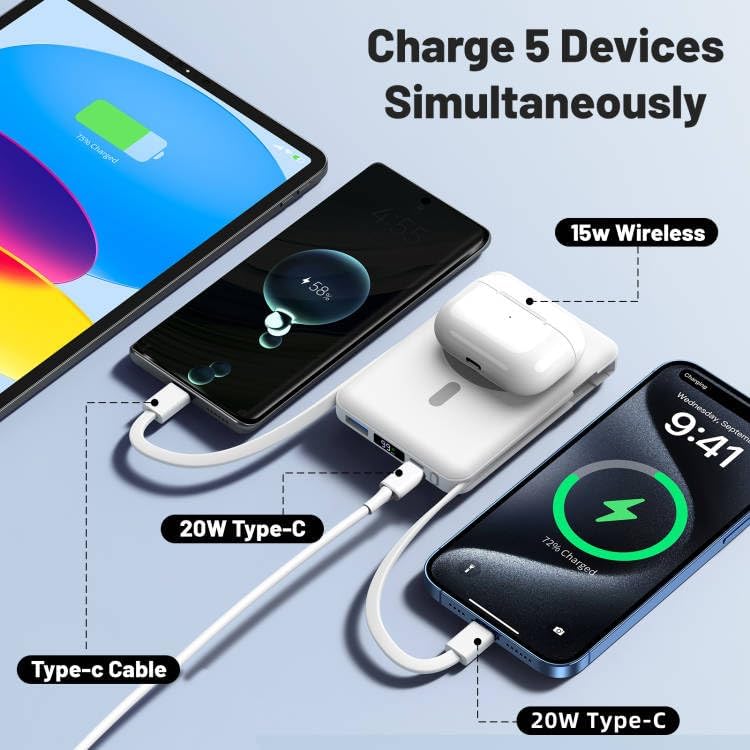
Image: The power bank simultaneously charging an iPad, two smartphones via USB-C, and AirPods wirelessly, illustrating its multi-device charging capability.

Image: A smartphone propped up by the power bank's foldable stand, with icons indicating flight-friendly design, overcharge protection, and short circuit protection.

Image: A person holding an iPhone with the power bank attached, demonstrating its compact 'card design' that does not overlap the camera, emphasizing portability.
Setup
Initial Charging of the Power Bank
- Before first use, fully charge your Azmuth Power Bank.
- Connect the provided USB-C cable to the power bank's USB-C input port and to a compatible USB wall adapter (not included).
- The LED display will show the charging progress. Once it reaches 100%, the power bank is fully charged.
Device Compatibility
This power bank is designed for MagSafe-compatible iPhones (iPhone 12 series and newer). For optimal magnetic attachment, use an iPhone without a case or with a MagSafe-compatible case. It also supports wired charging for a wide range of USB-C and Lightning devices.
Operating Instructions
Wireless Charging
- Ensure your power bank is sufficiently charged.
- Align your MagSafe-compatible iPhone with the magnetic charging area on the power bank. The magnets will snap into place.
- The LED display will indicate wireless charging is active.
Wired Charging
- For devices with a USB-C port, use the built-in USB-C cable or an external USB-C cable connected to the USB-C output port.
- For devices with a Lightning port, use the built-in Lightning cable.
- For other USB-compatible devices, use an appropriate cable connected to the standard USB output port.
- The LED display will show charging status.
Using the Foldable Stand
- Gently pull out the foldable panel on the back of the power bank.
- Adjust the stand to your desired viewing angle.
- Place your phone (with or without the power bank attached) onto the stand.
LED Display Indicators
- Percentage: Shows the remaining battery level of the power bank.
- Wireless Charging Symbol: Illuminates when a device is being charged wirelessly.
- Green PD Fast Charging Symbol: Illuminates when Power Delivery (PD) fast charging is active via USB-C.
Safety Information
- Charge your device only when it has fully cooled down to prevent heat buildup.
- Strictly follow this user manual.
- Avoid using the device in high-temperature or high-pressure environments.
- Keep away from direct sunlight.
- Do not use high-power adapters that do not meet safety standards.
- Use the original charging cable to charge the power bank.
Maintenance
- Clean the power bank with a soft, dry cloth. Do not use harsh chemicals or abrasive materials.
- Store the device in a cool, dry place away from extreme temperatures and direct sunlight.
- Avoid dropping or subjecting the power bank to strong impacts.
- If not used for extended periods, charge the power bank at least once every three months to maintain battery health.
Troubleshooting
Device Not Charging
- Ensure the power bank is sufficiently charged. Check the LED display.
- Verify that the charging cables are securely connected to both the power bank and your device.
- For wireless charging, ensure your device is MagSafe compatible and properly aligned with the magnetic area. Remove any non-magnetic cases.
- Try using a different charging cable or port on the power bank.
Slow Charging
- Ensure you are using a fast-charging compatible cable and adapter for the power bank itself.
- For device charging, ensure your device supports fast charging and that the power bank's output port (e.g., USB-C PD) is being utilized correctly.
- Charging multiple devices simultaneously may reduce individual charging speeds.
Power Bank Overheating
- Stop charging immediately if the power bank becomes excessively hot.
- Ensure the device is not covered or in an enclosed space during charging.
- Allow the power bank to cool down before resuming use. If overheating persists, discontinue use and contact support.
Specifications
| Feature | Detail |
|---|---|
| Model Number | KT-D020 |
| Product Dimensions | 5.51 x 3.15 x 0.98 inches |
| Item Weight | 8.4 ounces |
| Battery Capacity | 10000 Milliamp Hours (2 Lithium Polymer batteries) |
| Wireless Charging Output | Up to 15W |
| USB-C PD Output | Up to 20W |
| USB PD Output | Up to 22.5W |
| Lightning Input | Up to 12W |
| USB-C Input | Up to 20W |
| Connectivity Technologies | USB |
| Special Features | Wireless Charging, Built-in Stand, Built-in Cables |
| Color | White |
| Manufacturer | Shenzhen Zhilianxintong Electronics Co., Ltd |
Warranty and Support
Azmuth offers a 1-year return after-sales guarantee and a 2-year warranty for this product. For any questions or support needs, please contact Azmuth customer service. We aim to provide a satisfactory response within 24 hours.
Product Videos
Origami MagSafe Charger - 10,000 mAh 22.4W capacity
Video: A detailed review of the Azmuth MagSafe Power Bank, highlighting its 10,000 mAh capacity, 22.4W output, and the versatile origami-style stand. The video demonstrates the product's features and functionality.
Very cool, stylish, functional charger!!
Video: A user review showcasing the stylish design and functional aspects of the Azmuth Power Bank, emphasizing its cool appearance and practical utility for charging devices.
Convenient and well-made power bank
Video: A brief preview demonstrating the convenience and quality construction of the Azmuth Power Bank, highlighting its ease of use and robust build.


