
Introduction
This manual provides instructions for the PRYME® NoiseMaster™ SPM-NM50-20 Remote Push-To-Talk (PTT) Speaker Microphone. This device is designed to enhance communication clarity in noisy environments by utilizing advanced intelligent active noise-canceling technology. It is specifically compatible with newer model ICOM multipin radios.

Image: Front view of the PRYME NoiseMaster SPM-NM50-20 speaker microphone, showing the speaker grille and PRYME logo.
Product Features
The PRYME NoiseMaster SPM-NM50-20 incorporates several key features for effective two-way radio communication:
- Advanced Intelligent Active Noise-Canceling: This technology actively filters out unwanted ambient background noise, ensuring clear voice transmission even in high-noise environments.
- Electret Microphone: A high-sensitivity electret microphone captures voice audio, which is then processed by the intelligent active noise-canceling system to remove background interference.
- Front-Facing Speaker: Incoming radio transmissions are audible through this integrated speaker. The speaker's volume is controlled directly by the connected radio.
- Push-To-Talk (PTT) Button: Located on the side of the microphone, this button activates the radio's transmit function for communication.
- Compatibility: Designed specifically for ICOM newer model multipin radios.
- Weather Resistant: The unit is designed to withstand various weather conditions, enhancing durability and reliability in outdoor or challenging environments.

Image: Side view of the speaker microphone, highlighting the prominent orange Push-To-Talk (PTT) button.
Setup
- Inspect the Microphone: Before connecting, visually inspect the speaker microphone for any signs of damage to the cable or connector.
- Identify Radio Connector: Ensure your ICOM radio has the correct multipin connector compatible with the SPM-NM50-20.
- Connect to Radio: Align the multipin connector of the speaker microphone with the accessory port on your ICOM radio. Gently push until it is securely seated. Do not force the connection.
- Secure the Microphone: Use the integrated swivel clip on the back of the microphone to attach it to your clothing, such as a lapel, collar, or pocket, for convenient access.
- Power On Radio: Turn on your ICOM radio. The speaker microphone should now be active.
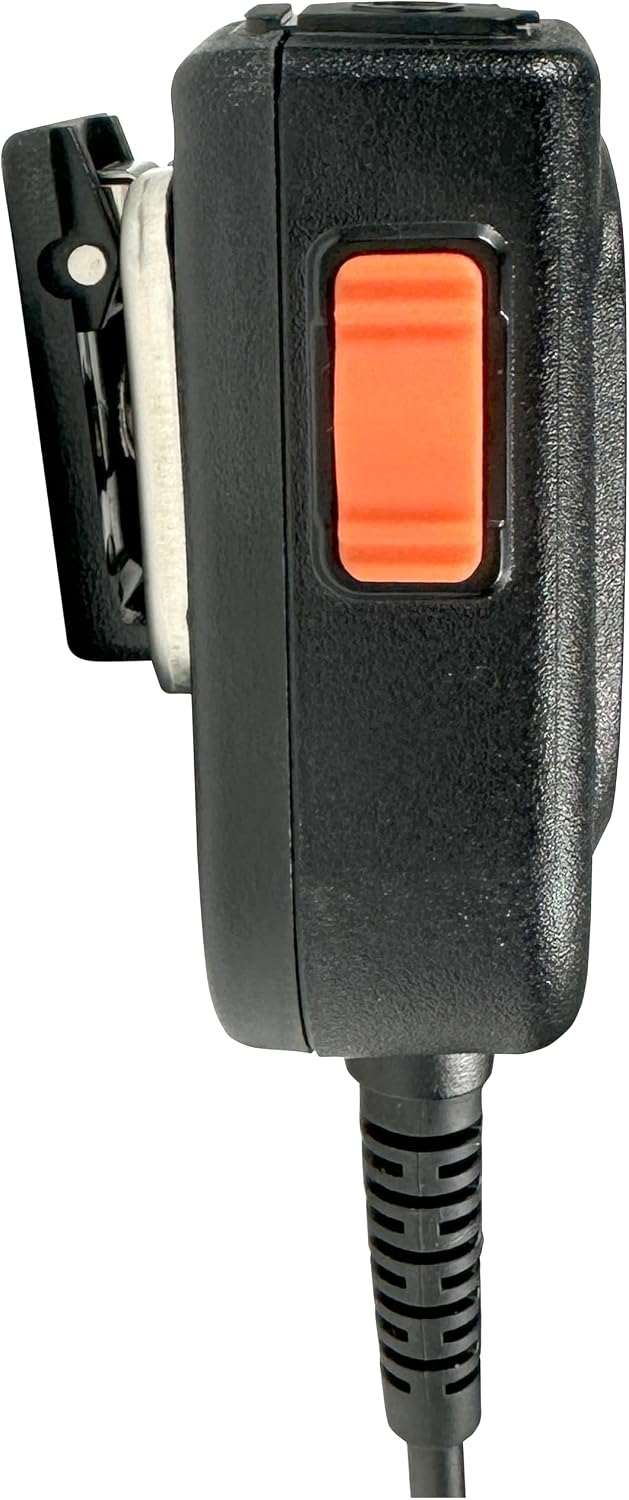
Image: Side view of the speaker microphone, illustrating the robust swivel clip for attachment to clothing.
Operating Instructions
- Receiving Transmissions: Audio from incoming radio transmissions will be heard through the front-facing speaker of the NoiseMaster microphone. Adjust the volume using your ICOM radio's volume control.
- Transmitting (Push-To-Talk):
- To speak, press and hold the orange PTT button located on the side of the microphone.
- Speak clearly into the microphone, ensuring it is positioned appropriately to capture your voice. The intelligent active noise-canceling will work to reduce background noise.
- Release the PTT button when you have finished speaking to return to receive mode.
- Accessory Jack (if applicable): The top of the microphone may feature an accessory jack (e.g., 3.5mm) for connecting an external listen-only earpiece. Insert the earpiece plug firmly into the jack.

Image: Top view of the speaker microphone, showing the accessory jack for an earpiece and the ANC button.
- Active Noise Canceling (ANC) Button: If present, the ANC button (often labeled "ANC") on the top of the microphone activates or deactivates the advanced noise-canceling feature. Press this button to toggle the function as needed for optimal clarity in varying noise environments.
Maintenance
- Cleaning: Wipe the exterior of the microphone with a soft, damp cloth. Do not use harsh chemicals or abrasive cleaners. Ensure the microphone is dry before use.
- Storage: Store the microphone in a cool, dry place away from direct sunlight and extreme temperatures when not in use.
- Cable Care: Avoid sharp bends or kinks in the cable. Do not pull on the cable to disconnect the microphone from the radio; always grasp the connector itself.
- Connector Inspection: Periodically check the multipin connector for dirt, debris, or corrosion. Clean gently with a soft brush if necessary.
Troubleshooting
| Problem | Possible Cause | Solution |
|---|---|---|
| No audio from speaker microphone. |
|
|
| Cannot transmit (PTT button unresponsive). |
|
|
| Poor audio quality / excessive background noise. |
|
|
Specifications
| Model Number | SPM-NM50-20 |
| Brand | PRYME® |
| Model Name | NoiseMaster Advanced Intelligent Active Noise-Canceling |
| Compatibility | ICOM Newer Model Multipin Radios |
| Microphone Form Factor | Lavalier (Remote Speaker Microphone) |
| Microphone Type | Electret, Unidirectional |
| Noise Canceling | Advanced Intelligent Active Noise-Canceling |
| Connectivity Technology | Auxiliary (Multipin Connector for Radio) |
| Connector Type | Multipin (for ICOM radios), 3.5 mm Jack (for earpiece) |
| Power Source | Corded Electric (Powered by Radio) |
| Special Features | Noise Reduction, Weather Resistant |
| Color | Black |
| Included Components | Speaker Microphone Unit |
| Manufacturer | Premier Communications |
| UPC | 638615158689 |
Warranty Information
The PRYME® NoiseMaster™ SPM-NM50-20 Remote PTT Speaker Microphone comes with a 1-year warranty from the date of purchase. This warranty covers defects in materials and workmanship under normal use. For warranty claims or detailed terms and conditions, please refer to the official PRYME® website or contact customer support.
Support
For technical assistance, troubleshooting beyond this manual, or warranty inquiries, please contact PRYME® customer support:
- Website: Visit the official PRYME® website for FAQs, support resources, and contact information.
- Contact: Refer to the packaging or the PRYME® website for specific customer service contact details (phone number, email).
Always provide your product model number (SPM-NM50-20) and a detailed description of the issue when seeking support.