
1. Introduction
Thank you for purchasing the No Brand TEC-SITAZID-C Digital Wall Scanner. This device is designed to detect studs (wood), metal objects (such as pipes or rebar), and live AC electrical wires hidden behind walls, ceilings, and floors. It is an essential tool for DIY projects, home renovations, and professional installations, helping to prevent damage and ensure safety during drilling, cutting, or mounting tasks. Please read this manual thoroughly before use to ensure proper operation and to maximize the device's performance.
2. Safety Precautions
- Always exercise caution when working near electrical wiring. The AC live wire detection feature is an aid, but it does not replace professional electrical safety practices.
- Do not rely solely on this device to locate live electrical wires. Always turn off power to the area you are working on if there is any doubt.
- Keep the device dry and clean. Do not expose it to moisture or extreme temperatures.
- Do not attempt to open or modify the device. Repairs should only be performed by qualified personnel.
- Remove the battery if the device will not be used for an extended period to prevent leakage.
- Keep out of reach of children.
3. Package Contents
- TEC-SITAZID-C Digital Wall Scanner (x1)
- Instruction Manual (x1)
Note: A 9V (6F22 type) battery is required for operation and is not included in the package.
4. Product Overview

This image displays the TEC-SITAZID-C digital wall scanner, highlighting its ability to detect metal, wood, and live AC wires. The device has an orange and dark gray casing with a digital display and a 'SELECT' button.
The TEC-SITAZID-C features a compact, ergonomic design with a non-slip grip for comfortable handling. It includes a digital display that provides visual indications of detected objects and a 'SELECT' button to switch between detection modes. An audible beep sound notifies the user upon detection.
Key Features:
- Multi-Mode Detection: Detects wood studs, metal (ferrous and non-ferrous), and live AC wires.
- Digital Display: Provides clear visual feedback on object location and signal strength.
- Audible Alert: Emits a beep sound when an object is detected.
- Easy Operation: Simple one-button mode selection and scanning process.
5. Setup
5.1 Battery Installation
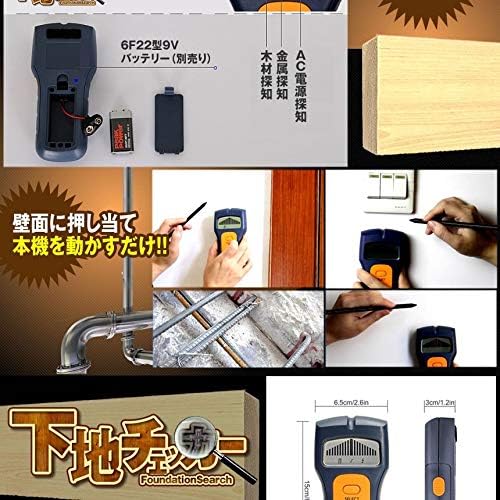
The image displays the battery compartment of the TEC-SITAZID-C wall scanner, indicating it requires a 6F22 type 9V battery (not included). It also shows various scenarios where the device can be used, such as detecting pipes, rebar, and electrical wires.
- Locate the battery compartment cover on the back of the device.
- Slide or unclip the cover to open the compartment.
- Insert one 9V (6F22 type) battery, ensuring the polarity (+/-) matches the diagram inside the compartment.
- Close the battery compartment cover securely.
Note: Always use a fresh, high-quality 9V battery for optimal performance. Replace the battery when the low battery indicator appears on the display.
6. Operating Instructions
6.1 Powering On and Mode Selection
- Press and hold the 'SELECT' button to power on the device.
- Briefly press the 'SELECT' button to cycle through the detection modes:
- Wood Stud Detection: For locating wooden studs.
- Metal Detection: For detecting metal pipes, rebar, and other metallic objects.
- AC Live Wire Detection: For identifying live electrical wires.
- The selected mode will be indicated on the digital display.
6.2 Scanning Procedure

This image shows a hand holding the TEC-SITAZID-C wall scanner against a wall, indicating the process of locating studs. It highlights the simple operation of pressing the device against the wall and activating the switch for detection.
- Place the device flat against the wall surface where you intend to scan. Ensure the entire sensor area is in contact with the wall.
- Press and hold the 'SELECT' button to activate the scanning function. The device will typically calibrate automatically when first placed on the wall. Keep it still for a few seconds during initial placement.
- Slowly slide the device horizontally across the wall surface. Maintain constant contact and pressure.
- Observe the digital display. As the device approaches a hidden object, the signal strength indicator will increase.
- When the device is directly over an object, the display will show a peak reading, and an audible beep will sound. Mark this location.
- Continue scanning past the object and then scan back from the opposite direction to confirm the edges of the object. Mark both edges to determine the center.
- Release the 'SELECT' button to turn off the scanning function.
6.3 Interpreting Results
- Wood Stud Detection: The display will indicate the presence of wood. The signal strength will peak over the center of the stud.
- Metal Detection: The display will show a metal icon and signal strength. This mode can detect both ferrous (magnetic) and non-ferrous metals.
- AC Live Wire Detection: The display will show an AC icon and signal strength. This mode is sensitive to unshielded live AC wires.

The image illustrates the TEC-SITAZID-C wall scanner in use, demonstrating its ability to detect objects behind a wall. It emphasizes the three detection modes: metal, wood, and AC live wire.
7. Maintenance
- Cleaning: Wipe the device with a soft, dry cloth. Do not use abrasive cleaners or solvents.
- Storage: Store the device in a cool, dry place away from direct sunlight and extreme temperatures.
- Battery: Remove the battery if the device is not used for extended periods to prevent corrosion from battery leakage.
8. Troubleshooting
| Problem | Possible Cause | Solution |
|---|---|---|
| Device does not power on. | Dead or incorrectly installed battery. | Check battery polarity. Replace with a new 9V (6F22 type) battery. |
| Inaccurate or inconsistent readings. | Improper calibration, uneven surface, or presence of multiple objects. | Ensure the device is calibrated correctly by placing it on a clear section of the wall before scanning. Scan slowly and consistently. Try scanning from different angles. |
| No detection of objects. | Object too deep, incorrect mode selected, or device not in full contact with wall. | Verify the correct detection mode is selected. Ensure the device is flat against the wall. Check specifications for maximum detection depths. |
| False positives for AC wires. | Static electricity, nearby electrical fields, or shielded wires. | Move away from other electrical devices. Note that AC detection can be sensitive and may pick up ambient electrical fields. Always verify with other methods if possible. |
9. Specifications
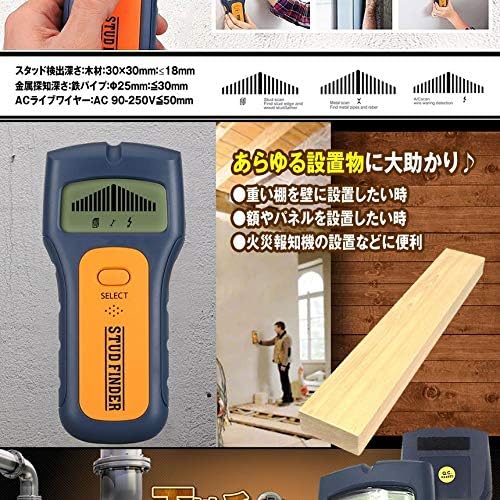
The image details the detection capabilities of the TEC-SITAZID-C wall scanner, specifying depths for wood (up to 18mm), metal pipes (up to 30mm), and live AC wires (up to 50mm). It also suggests applications like installing shelves or fire alarms.
- Model: TEC-SITAZID-C
- Display Type: Digital
- Power Source: 9V (6F22 type) battery (not included)
- Wood Stud Detection Depth: Up to 18 mm (for wood 30x30mm)
- Metal Detection Depth: Up to 30 mm (for iron pipe Φ25mm)
- AC Live Wire Detection Depth: Up to 50 mm (for AC 90-250V)
- Operating Temperature: Not specified (typical range for electronics is 0°C to 40°C)
- Storage Temperature: Not specified (typical range for electronics is -10°C to 50°C)
10. Warranty and Support
This product is sold by a third-party seller. For warranty information, returns, or technical support, please refer to the seller's policies on the platform where the purchase was made. Keep your purchase receipt as proof of purchase. If you have any questions regarding the operation of this device, please contact the seller directly for assistance.