1. Introduction
Thank you for purchasing the Aiwa AWPOK6L Bluetooth DJ Top Speaker System. This active speaker system is designed to provide powerful and clear audio with versatile connectivity options, including Bluetooth, AUX, and radio. It features integrated LED lights and a karaoke function, making it suitable for various indoor entertainment settings. This manual provides essential information for the safe and efficient operation of your device.
2. Safety Information
- Read all instructions before operating the device.
- Keep the speaker away from water, moisture, and direct heat sources.
- Do not block any ventilation openings.
- Use only attachments/accessories specified by the manufacturer.
- Unplug the speaker during lightning storms or when unused for long periods.
- Refer all servicing to qualified service personnel.
- Do not expose batteries to excessive heat such as sunshine, fire, or the like.
3. Package Contents
Please check that all items listed below are included in your package:
- Aiwa AWPOK6L Speaker System
- Power Cable
- Microphone
- User Manual (this document)
4. Product Overview
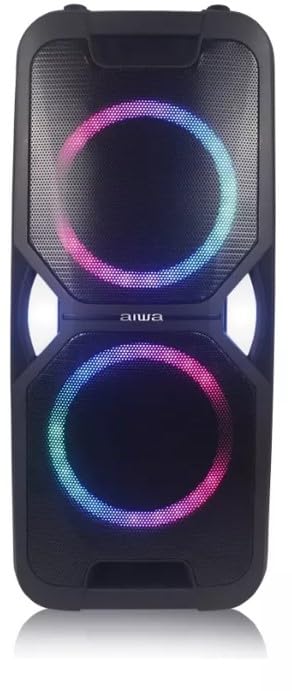
4.1. Speaker Front View
4.2. Control Panel
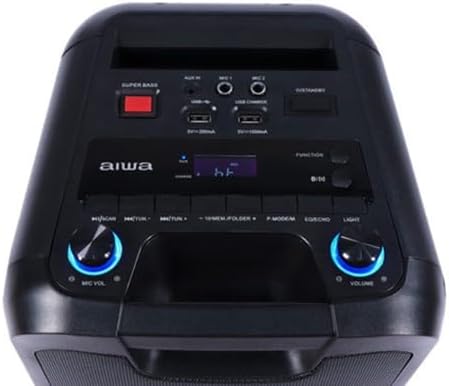
Familiarize yourself with the control panel components:
- Power Button: Turns the speaker on/off.
- Function Button: Cycles through input modes (Bluetooth, AUX, Radio, USB).
- Play/Pause Button: Controls media playback.
- Skip Buttons (Previous/Next): Navigates tracks or radio stations.
- Volume Knob: Adjusts the master volume.
- MIC VOL Knob: Adjusts microphone volume.
- MIC 1 / MIC 2 Inputs: Connect microphones for karaoke.
- AUX IN: 3.5mm input for external audio devices.
- USB Ports: For USB media playback and charging (5V/200mA).
- Super Bass Button: Enhances bass output.
- Light Button: Controls the LED lighting effects.
- Display Screen: Shows current mode, track information, or radio frequency.
5. Setup
5.1. Charging the Speaker
- Connect the provided power cable to the speaker's power input and a standard electrical outlet.
- The charging indicator on the display will illuminate.
- Allow the speaker to charge fully before first use for optimal battery life. A full charge provides up to 6 hours of autonomy, depending on usage.
5.2. Powering On/Off
- Press and hold the Power button on the control panel to turn the speaker ON or OFF.
- The display will light up when the speaker is powered on.
6. Operating Instructions
6.1. Bluetooth Pairing
- Turn on the speaker. The speaker will automatically enter Bluetooth pairing mode, indicated by a flashing Bluetooth icon on the display.
- On your smartphone or other Bluetooth-enabled device, enable Bluetooth and search for available devices.
- Select "AWPOK6L" from the list of devices.
- Once paired, the speaker will emit a confirmation sound, and the Bluetooth icon will stop flashing.
- You can now play audio from your device through the speaker.
6.2. AUX Input
- Connect one end of a 3.5mm audio cable (not included) to the AUX IN port on the speaker.
- Connect the other end of the cable to the audio output of your external device (e.g., MP3 player, laptop).
- Press the Function button on the speaker until "AUX" appears on the display.
- Adjust the volume on both the speaker and your external device.
6.3. USB Playback
- Insert a USB flash drive containing audio files into one of the USB ports.
- The speaker will automatically switch to USB mode and begin playing audio. If not, press the Function button until "USB" appears.
- Use the Play/Pause and Skip buttons to control playback.
6.4. Radio Function
- Press the Function button until "FM" or "Radio" appears on the display.
- Press the Play/Pause button to initiate an automatic scan for available radio stations. The speaker will save detected stations.
- Use the Skip buttons to navigate between saved radio stations.
6.5. Karaoke Function
- Connect the provided microphone to either the MIC 1 or MIC 2 input.
- Play your desired background music via Bluetooth, AUX, or USB.
- Adjust the microphone volume using the MIC VOL knob.
- Adjust the master volume using the main Volume knob.
6.6. LED Lights
Press the Light button on the control panel to cycle through different LED lighting modes or to turn the lights off.
7. Maintenance
- Cleaning: Use a soft, dry cloth to clean the exterior of the speaker. Do not use liquid cleaners or abrasive materials.
- Storage: When not in use for extended periods, store the speaker in a cool, dry place, away from direct sunlight and extreme temperatures.
- Battery Care: To maintain battery health, fully charge the speaker at least once every three months, even if not in regular use.
8. Troubleshooting
| Problem | Possible Cause | Solution |
|---|---|---|
| No power | Battery is depleted; Power cable not connected; Speaker is off. | Charge the speaker; Ensure power cable is securely connected; Press and hold the Power button to turn on. |
| No sound | Volume is too low; Incorrect input mode selected; Device not playing audio; Loose cable connection. | Increase speaker and source device volume; Press Function button to select correct mode; Ensure audio is playing on source device; Check all cable connections. |
| Bluetooth not connecting | Speaker not in pairing mode; Bluetooth disabled on source device; Speaker already connected to another device; Too far from speaker. | Ensure speaker is in Bluetooth mode (flashing icon); Enable Bluetooth on your device; Disconnect from other devices; Move source device closer to speaker (within 10 meters). |
| Microphone not working | Microphone not connected; MIC VOL too low; Microphone switch off. | Ensure microphone is securely plugged into MIC 1 or MIC 2; Increase MIC VOL knob; Check if microphone has an on/off switch and it's in the 'on' position. |
9. Specifications
- Model: AWPOK6L
- Brand: Aiwa
- Output Power: 600W PMPO (Peak Music Power Output), 50W RMS (Root Mean Square)
- Speaker Type: Active, Woofer
- Number of Speakers: 2 (Woofer and Tweeter)
- Connectivity: Bluetooth, AUX (3.5mm), USB
- Audio Input: Auxiliary
- Power Source: Integrated Rechargeable Battery, AC Power
- Battery Life: Up to 6 hours (varies with usage)
- Special Features: LED Lights, Karaoke Function, Radio, Super Bass
- Compatible Devices: Laptop, Smartphone
- Color: Black
- Dimensions (approx.): 65 x 33.5 x 32 cm
- Weight (approx.): 10 kg
- Recommended Uses: Parties, meetings, music listening, presentations, karaoke
10. Warranty and Support
For warranty information or technical support, please refer to the warranty card included with your product or contact Aiwa customer service through their official website or the retailer where the product was purchased. Please have your model number (AWPOK6L) and proof of purchase ready when contacting support.