
1. Introduction
This manual provides essential information for the safe and effective use of your Waaiyawa ET-LAV300 Projector Lamp Assembly. This product is designed as a replacement lamp for various Panasonic projector models, ensuring high-quality light output and reliable performance. Please read this manual thoroughly before installation and operation.
2. About the Product
2.1 Key Features
- Genuine OEM Bulb: Utilizes original bulbs from OEM manufacturers (UHP, P-VIP, NSH, SHP, HS, UHE, UHM) for optimal performance.
- Durable Housing: Constructed with robust materials to ensure proper fit and longevity within your projector.
- Extended Lifespan: Designed to provide a stable light output for 3000-5000 hours, offering a significantly longer lifespan compared to economic lamps.
- Rigorous Testing: Each lamp undergoes thorough testing to meet OEM quality, function, and performance standards before dispatch.
- Superior Brightness: Delivers high illumination for clear and vibrant projections.
2.2 Product Overview
The Waaiyawa ET-LAV300 lamp assembly is a complete unit, ready for installation. Below are various views of the product.

Figure 2.2.1: Front view of the Waaiyawa ET-LAV300 projector lamp assembly, showing the bulb and housing.

Figure 2.2.2: Side view of the Waaiyawa ET-LAV300 projector lamp assembly, highlighting the bulb's connection points.
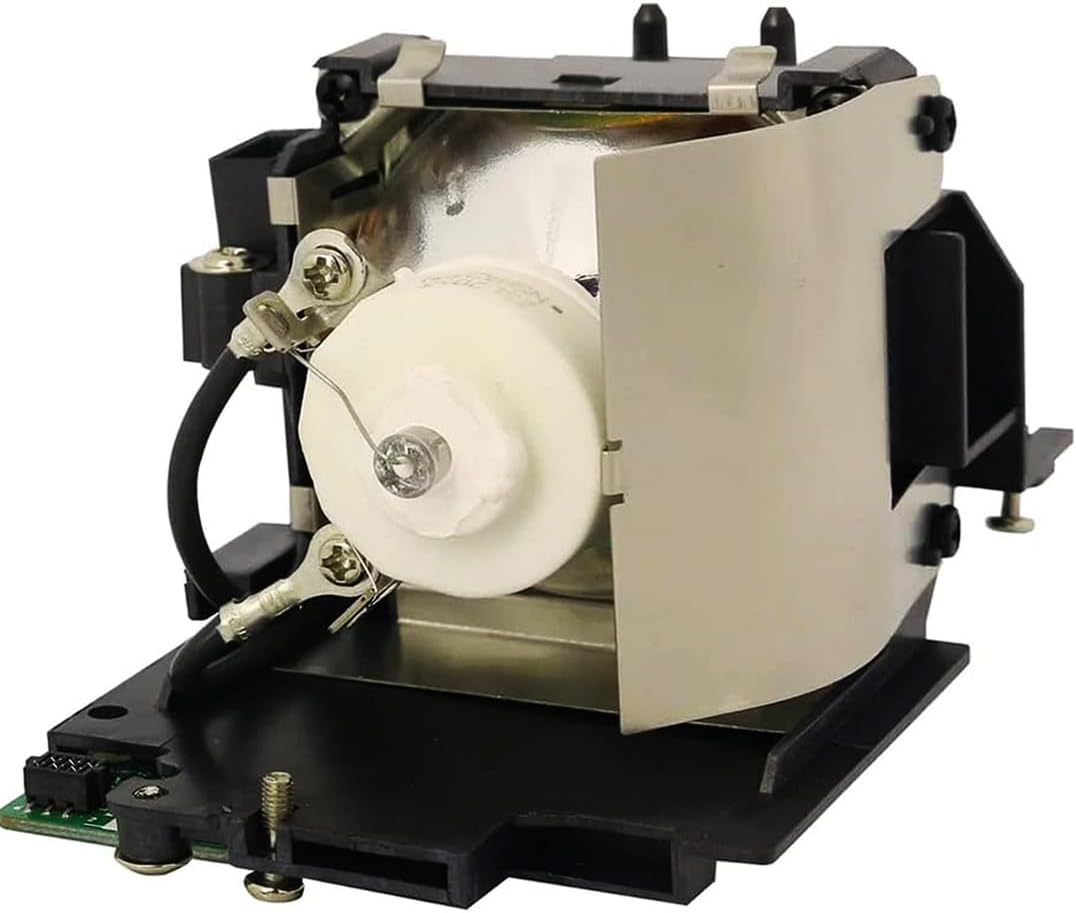
Figure 2.2.3: Rear view of the Waaiyawa ET-LAV300 projector lamp assembly, showing the electrical connectors and mounting screws.

Figure 2.2.4: Brightness Stability Test illustrating the consistent light output of the Waaiyawa Professional Bulb compared to various economy bulbs over 2500 hours.

Figure 2.2.5: Visual comparison demonstrating the superior clarity, brightness, and overall picture quality achieved with Waaiyawa lamps versus other alternatives.
3. Compatibility
The Waaiyawa ET-LAV300 Projector Lamp Assembly is compatible with the following Panasonic projector models:
- Panasonic PT-VW355N
- Panasonic PT-VW355NE
- Panasonic PT-VW355NJ
- Panasonic PT-VW355NEJ
- Panasonic PT-VW355NU
Please verify your projector model before installation to ensure proper fit and function.
4. Safety Information
- Power Off: Always ensure the projector is completely powered off and unplugged from the electrical outlet before attempting any installation or maintenance.
- Cool Down: Projector lamps operate at high temperatures. Allow the projector to cool down for at least 30 minutes after use before handling the lamp.
- Handle with Care: Avoid touching the glass part of the bulb directly with bare hands, as oils can reduce lamp life. Use gloves or a clean cloth if necessary.
- Explosion Risk: Projector bulbs are consumables and can explode if mishandled or if used beyond their recommended lifespan. Always replace lamps according to manufacturer guidelines.
- Ventilation: Ensure the projector's ventilation system is clear and unobstructed to prevent overheating, which can shorten lamp life.
- Disposal: Dispose of old lamps according to local environmental regulations, as they may contain mercury.
5. Installation Instructions
Follow these steps carefully to replace the projector lamp assembly. Refer to your projector's specific user manual for additional details if needed.
Important Notes Before Installation:
- Ensure the projector is powered off and unplugged.
- Allow the projector to cool down completely before proceeding.
- Locate the Lamp Compartment: Identify the bulb installation location on your projector. This is typically on the side or top, secured by a cover.
- Loosen Lamp Cover Screws: Use a suitable screwdriver to loosen the screws securing the lamp cover. Do not remove the screws completely if they are captive.
- Remove Lamp Cover: Carefully slide off or open the lamp cover.
- Loosen Lamp Securing Screws: Loosen the screws that secure the lamp assembly to the projector. These screws may not come all the way out.
- Remove Old Lamp: Gently pull the old lamp assembly out of the projector. It may slide along a guide rail.
- Insert New Lamp: Carefully insert the new Waaiyawa ET-LAV300 lamp assembly into the projector along the guide rail. Ensure it fits easily and is facing the correct way. Do not force it.
- Secure New Lamp: Tighten the screws to secure the new lamp assembly in place.
- Replace Lamp Cover: Reattach the lamp cover and tighten its securing screws.
- Power On: Plug in the projector and power it on. Reset the lamp timer if your projector model requires it.

Figure 5.1: Illustrated guide for replacing the projector lamp assembly.
6. Operation Guidelines
- Initial Power-Up: After installing a new lamp, some projectors may require a lamp timer reset. Consult your projector's manual for specific instructions.
- Cool-Down Cycle: Always allow the projector to complete its cool-down cycle after turning it off. Interrupting this cycle can significantly reduce lamp life.
- Environmental Conditions: Operate the projector in a well-ventilated area with stable temperature and humidity to optimize lamp performance and lifespan.
7. Maintenance
- Air Filter Cleaning: Regularly clean or replace the projector's air filter to ensure proper airflow and prevent dust buildup, which can lead to overheating and reduced lamp life.
- Lamp Life Monitoring: Keep track of the lamp's operating hours. Most projectors have an internal counter. Replace the lamp when it approaches its recommended lifespan or when brightness noticeably diminishes.
- Gentle Handling: When handling the lamp assembly, avoid sudden impacts or excessive force.
8. Troubleshooting
| Problem | Possible Cause | Solution |
|---|---|---|
| Lamp does not turn on | Lamp not installed correctly; Projector not receiving power; Lamp cover not secured; Lamp reached end of life. | Ensure lamp is fully seated and secured. Check power connections. Verify lamp cover is closed and screwed in. Replace lamp if it has exceeded its lifespan. |
| Dim or faded image | Lamp nearing end of life; Projector settings; Dirty lens/filter. | Replace the lamp. Adjust brightness/contrast settings on the projector. Clean the projector lens and air filter. |
| Projector shuts down unexpectedly | Overheating due to poor ventilation or dirty filter; Lamp issue. | Clean air filters and ensure proper ventilation. Allow projector to cool. If problem persists, consult projector's manual or contact support. |
If you encounter issues not listed here, please refer to your projector's original user manual or contact Waaiyawa customer support.
9. Specifications
| Feature | Detail |
|---|---|
| Brand | Waaiyawa |
| Model Name | ET-LAV300 Original Genuine Lamp Bulb with OEM Housing |
| Part Number | ET-LAV300 |
| Compatible Projectors | Panasonic PT-VW355N, PT-VW355NE, PT-VW355NJ, PT-VW355NEJ, PT-VW355NU |
| Light Source Type | Mercury vapor (NSH 230W Bulb) |
| Wattage | 230 Watts |
| Bulb Shape Size | ER30 |
| Special Feature | Genuine Projector Lamp with OEM Bulb Inside |
| Material | Glass, Metal, Plastic |
| Product Dimensions | 6 x 4 x 5 inches (L x W x H) |
| Item Weight | 9.6 ounces |
| Included Components | Original OEM Bulb included |
| Estimated Lamp Lifespan | 3000-5000 hours |
10. Warranty and Customer Support
10.1 Warranty Information
Your Waaiyawa ET-LAV300 Projector Lamp Assembly comes with a 1-Year Warranty from the date of purchase. This warranty covers manufacturing defects and ensures the lamp meets its stated quality and performance standards.
Additionally, we offer a 30-Day Money-Back Guarantee, allowing you to return the product for a full refund if you are not satisfied within 30 days of purchase.
10.2 Customer Support
For any questions, concerns, or assistance with your product, please contact Waaiyawa customer service. Our support team is available 24/7 and aims to respond within 12 hours.
For support, please visit our official website or contact us through the platform where you purchased the product.