
BAT120000200
Teltonika BAT120 Uninterrupted Power Supply User Manual
Model: BAT120000200
1. Introduction
The Teltonika BAT120 is an Uninterrupted Power Supply (UPS) designed to provide continuous power to compatible Teltonika networking devices. It ensures that your devices remain operational during power outages or fluctuations, offering up to 6 hours of backup power. The BAT120 features two 4-pin DC ports for power input and output, and includes essential protections such as reverse polarity and overvoltage protection.
Important Note: This unit is designed for use with a UK Power Supply Unit (PSU) and is not intended for use in the USA.
2. Safety Information
Please read and understand all safety instructions before operating the BAT120. Failure to do so may result in injury or damage to the device.
- UK PSU Only: This device is designed for use with a UK Power Supply Unit. Do not attempt to use it with power supplies from other regions, especially the USA, as this may cause damage or safety hazards.
- Indoor Use Only: The BAT120 is intended for indoor use in a dry environment. Do not expose it to water, moisture, or extreme temperatures.
- Ventilation: Ensure adequate ventilation around the unit to prevent overheating. Do not block ventilation openings.
- Power Connections: Connect the power input and output cables correctly. The BAT120 includes reverse polarity and overvoltage protection, but incorrect wiring can still lead to issues.
- Battery Handling: The device contains Lithium-Ion cells. Do not attempt to open, disassemble, or replace the battery cells yourself. Refer to qualified service personnel for any battery-related issues.
- Cleaning: Disconnect power before cleaning. Use a dry, soft cloth. Do not use liquid or aerosol cleaners.
3. Product Overview and Features
The Teltonika BAT120 is a compact and robust UPS solution. Its key features include:
- UK PSU Compatibility: Specifically designed for use with UK power supply units.
- Extended Backup: Provides up to 6 hours of uninterrupted power.
- Wide Compatibility: Compatible with a range of Teltonika devices including RUT2XX, RUT95X, RUT360, RUT300, TCR100, RUTX series, TRB14X series, TRB2, and TSW110.
- Flexible Mounting: Supports both DIN rail and surface mounting options.
- Custom Alerts: I/O functionality can be configured with a router for custom alerts.
- Robust Protection: Features reverse polarity and overvoltage protection for enhanced device safety.
- Durable Design: Housed in a rugged aluminum casing.
- Dual DC Ports: Equipped with two 4-pin DC ports for power input and output.
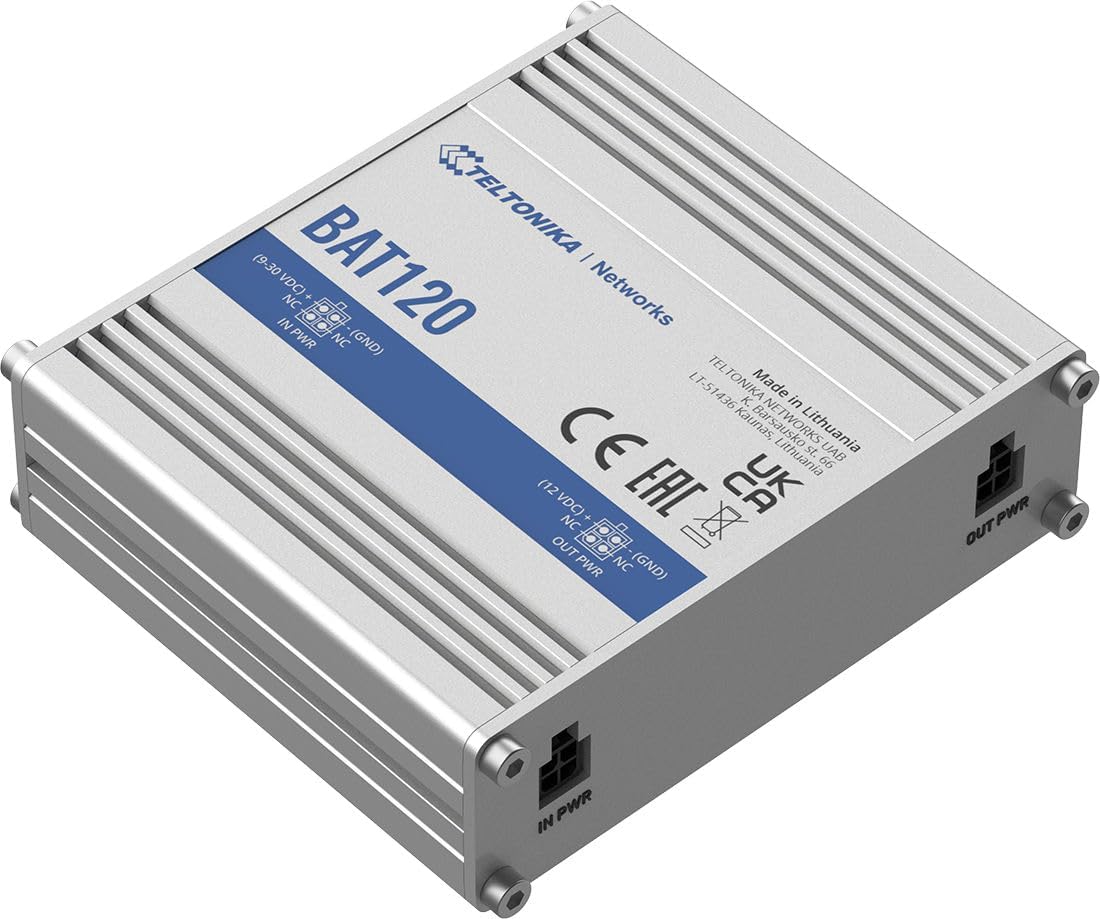
Figure 3.1: Angled view of the Teltonika BAT120 UPS, showing the "BAT120" model name and "TELTONIKA | Networks" branding, along with "IN PWR" and "OUT PWR" labels on the ports.
4. Package Contents
The standard package for the Teltonika BAT120 includes:
- Teltonika BAT120 Uninterrupted Power Supply Unit
- Mounting hardware (e.g., screws for surface mounting, clips for DIN rail mounting - exact items may vary)
- Quick Start Guide (not included in this manual, but typically provided with the product)
5. Setup and Installation
Follow these steps to set up your Teltonika BAT120 UPS:
- Choose Mounting Location: Select a suitable location for the BAT120. It can be mounted on a DIN rail or directly on a surface using appropriate screws. Ensure the location is dry, well-ventilated, and within reach of power sources and the device it will power.
- Connect Power Input: Connect your UK PSU (9-30VDC) to the IN PWR 4-pin DC connector on the BAT120. Ensure the connection is secure.
- Connect Power Output: Connect the device you wish to power (e.g., Teltonika router) to the OUT PWR 4-pin DC connector on the BAT120. The output voltage will be 12VDC when operating from the battery.
- Power On: Locate the On/Off slider switch on the unit and slide it to the 'On' position.
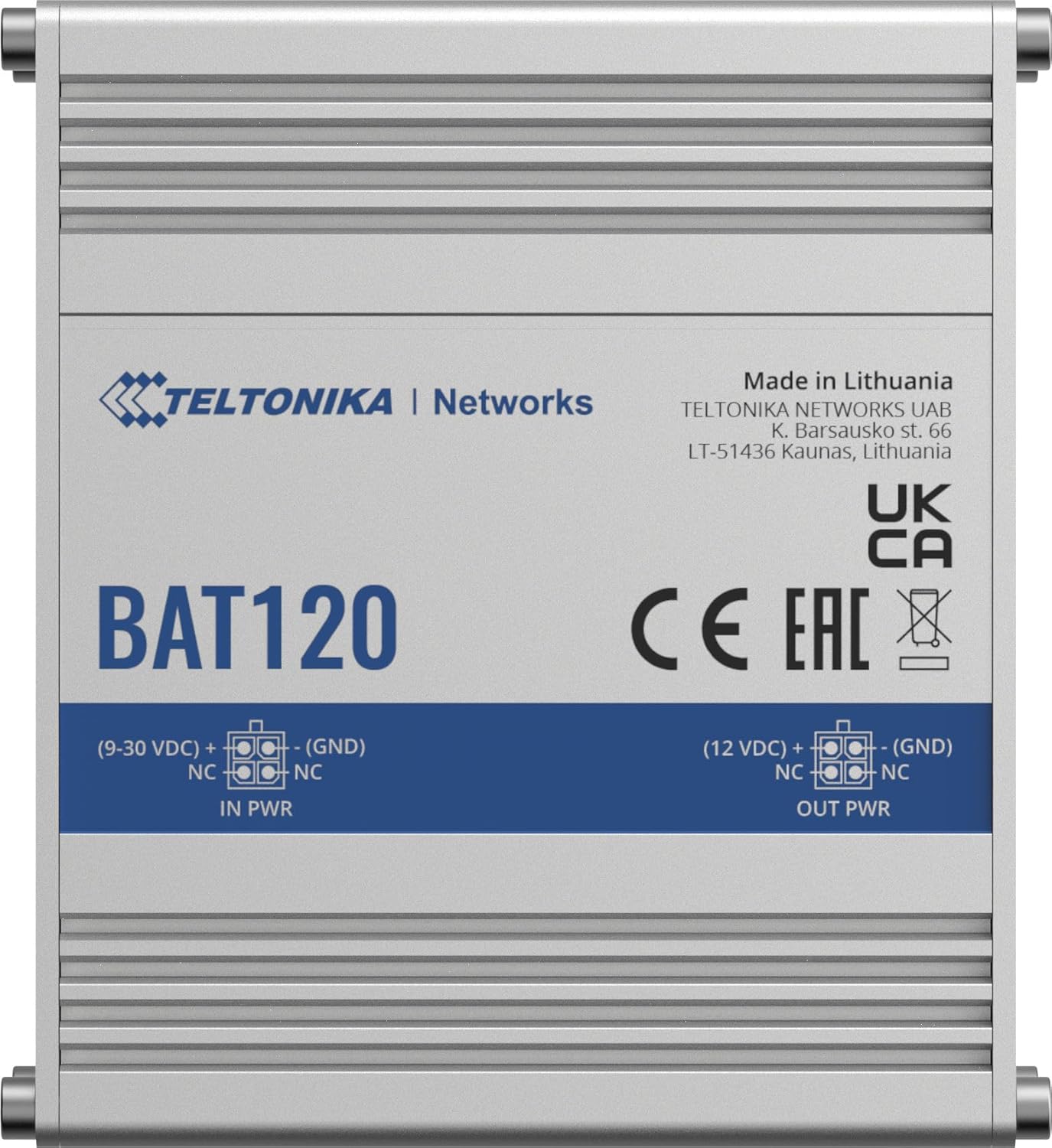
Figure 5.1: Top-down view of the BAT120, clearly showing the "IN PWR" and "OUT PWR" 4-pin DC connectors with their respective pin configurations.

Figure 5.2: Detailed view of the 4-pin DC "IN PWR" and "OUT PWR" ports, highlighting their physical appearance.
6. Operation
Once connected and powered on, the Teltonika BAT120 operates automatically to provide uninterrupted power.
6.1. Power Modes
- Passthrough Mode: When external power is supplied to the IN PWR port, the BAT120 passes through the input voltage (9-30 VDC) to the OUT PWR port and simultaneously charges its internal battery.
- Battery Mode: In the event of a power outage or if the input power is disconnected, the BAT120 automatically switches to battery mode, providing a stable 12VDC output to the connected device for up to 6 hours, depending on the load.
6.2. LED Indicators
The BAT120 features several LED indicators to show its status:
- IN PWR LED: Indicates the status of the input power.
- OUT PWR LED: Indicates the status of the output power.
- 4 x Power Status LEDs: These LEDs indicate the charge level of the internal battery.

Figure 6.1: Close-up view of the BAT120's status LEDs ("IN PWR", "OUT PWR", "POWER" indicators) and the "ON/OFF" slider switch.
6.3. Alarm Output
The BAT120 includes an alarm output (1 x Active HIGH output, max 12 V, 2.5 mA) that can be configured with a compatible Teltonika router to trigger custom alerts, such as notifications for power outages.
7. Maintenance
The Teltonika BAT120 is designed for minimal maintenance. Follow these guidelines to ensure its longevity:
- Cleaning: Periodically clean the exterior of the unit with a dry, soft cloth. Do not use abrasive cleaners or solvents. Ensure the unit is disconnected from power before cleaning.
- Ventilation: Regularly check that the ventilation openings are clear of dust and debris to prevent overheating.
- Battery Life: The internal Lithium-Ion battery has a finite lifespan. Over time, its capacity may decrease. If you notice a significant reduction in backup time, the unit may need servicing by qualified personnel.
- Storage: If storing the unit for an extended period, ensure it is fully charged and stored in a cool, dry place. Recharge periodically to maintain battery health.
8. Troubleshooting
If you encounter issues with your BAT120, refer to the following common problems and solutions:
| Problem | Possible Cause | Solution | |
|---|---|---|---|
| No power output from BAT120. | Unit is off; Input power issue; Battery depleted; Overcurrent protection triggered. |
| |
| Battery does not charge. | Input power issue; Faulty unit. |
| |
| Shorter than expected backup time. | High load on output; Battery degradation. |
| |
For further assistance, please refer to the official Teltonika Networks documentation or contact their technical support.
9. Technical Specifications
| Power | |
|---|---|
| Connector | 4-pin industrial DC power socket |
| Input power/max charging current | Charger: max 4 W / 300 mA (max battery charging current) |
| Input protection | Reverse polarity protection, Overvoltage protection |
| Output voltage in passthrough mode | 9 - 30 VDC |
| Output voltage in battery mode | 12VDC |
| Output protection | 3A overcurrent protection |
| Max output power/current in battery mode | 22 W / 1.8 A |
| Battery capacity | 2300 mAh (17 Wh) |
| Physical Interfaces (Ports, LEDs, Buttons) | |
| Power IN | 1 x 4 pin DC connector |
| Power OUT | 1 x 4 pin DC connector |
| Status LEDs | 1 x IN PWR LED, 1 x OUT PWR LED, 4 x Power status LEDs |
| Switch | On/Off slider switch |
| Alarm Output | |
| Alarm Output | 1 x Active HIGH output, max output 12 V, 2.5 mA |
| General Specifications | |
| Lithium cells | 2 x 18650 Li-Ion cells |
| Casing material | Aluminum housing |
| Overall Dimensions (WxHxD) | 3.93 x 1.18 x 3.34 inches |
| Weight | 0.69 pounds (unit only) / 1.2 pounds (shipping weight) |
10. Compatibility
The Teltonika BAT120 is designed to be compatible with a wide range of Teltonika networking devices, including but not limited to:
- RUT2XX series
- RUT95X series
- RUT360
- RUT300
- TCR100
- RUTX series
- TRB14X series
- TRB2
- TSW110
Ensure your Teltonika device requires a 12VDC input and has a compatible 4-pin DC power connector.
11. Warranty and Support
For information regarding warranty coverage, technical support, and service for your Teltonika BAT120, please refer to the official Teltonika Networks website or contact your authorized Teltonika distributor or reseller. Keep your proof of purchase for warranty claims.
Manufacturer: Teltonika