1. Introduction
This manual provides essential information for the safe and efficient operation of your Sunny Boy Smart Energy (SBSE-US) Hybrid Inverter. This device integrates photovoltaic (PV) and battery inverter functionalities into a single unit, designed for residential solar energy systems. It delivers up to 1900 W of power, ensuring energy supply to essential home loads.
The SBSE-US inverter features a 208/240 VAC single-phase output and a 60 Hz AC grid frequency range, enabling seamless integration with solar panels and battery storage. Key features include ShadeFix optimization, SunSpec RSD transmitter, and SMA Arc Fix, all contributing to optimized system performance.
2. Safety Information
Important Safety Instructions: Read all instructions carefully before installation and operation. Failure to follow these instructions may result in electric shock, fire, or severe injury.
- Installation and maintenance must be performed by qualified personnel only.
- Do not attempt to open or repair the inverter yourself. Refer all servicing to qualified service personnel.
- Ensure the inverter is disconnected from all power sources (PV array, battery, and grid) before performing any service or maintenance.
- Wear appropriate personal protective equipment (PPE) when working with electrical systems.
- Keep children and unauthorized persons away from the inverter.
- Do not install the inverter in areas with flammable materials or explosive gases.
This inverter contains high voltage components. Always exercise extreme caution.
3. Product Overview
The Sunny Boy Smart Energy inverter is designed for high efficiency and ease of use. Its modern design features a curved, easy-open cover for accessibility.
3.1 Key Features
- Hybrid Technology: Combines PV and battery inverter functions.
- High Efficiency: Up to 97.5% maximum efficiency.
- ShadeFix Optimization: Maximizes energy yield even with partial shading, utilizing 3 MPPTs.
- Integrated System Manager: For streamlined monitoring and control.
- Rapid Commissioning: Via the SMA 360° app.
- SunSpec Certified RSD Transmitter: For rapid shutdown compliance.
- Expandability: 200% DC/AC design capability, hybrid and AC coupling options.
3.2 Inverter Components

Figure 1: Front view of the Sunny Boy Smart Energy Hybrid Inverter. This image shows the inverter's clean, white casing with the SMA logo prominently displayed in the center, indicating its operational status and brand.

Figure 2: Side view of the Sunny Boy Smart Energy Hybrid Inverter. This perspective highlights the ventilation grilles and connection points on the side of the unit, essential for heat dissipation and system integration.
The inverter unit typically includes: connection terminals for PV input, battery connection, AC grid output, communication interfaces, and status indicators. Refer to the detailed wiring diagrams provided with the product packaging for specific terminal locations.
4. Setup and Installation
Installation of the Sunny Boy Smart Energy inverter requires specialized knowledge and should only be performed by a certified electrician or qualified solar installer. Incorrect installation can lead to equipment damage, injury, or void the warranty.
4.1 Pre-Installation Checks
- Verify the inverter model (SBSE-US) matches your system requirements.
- Ensure the installation site meets environmental requirements (temperature, humidity, ventilation).
- Confirm all necessary tools and safety equipment are available.
- Review local electrical codes and regulations.
4.2 Mounting the Inverter

Figure 3: The Sunny Boy Smart Energy-US inverter mounted on a wall, showcasing its compact design and integration into a residential setting. This image illustrates the inverter's aesthetic appeal and how it appears when installed.
- Select a suitable wall location, ensuring adequate clearance for ventilation and access.
- Mount the inverter securely using the provided mounting bracket and hardware.
- Ensure the mounting surface can support the inverter's weight (Product Dimensions: 19.7 x 23.1 x 9.3 inches).
4.3 Electrical Connections
- Connect the DC input from the PV array to the designated terminals.
- Connect the battery storage system to the battery terminals (if applicable).
- Connect the AC output to the main electrical panel or designated load center.
- Ensure all connections are tight and properly insulated.
- Ground the inverter according to local electrical codes.
4.4 Commissioning with SMA 360° App
The inverter features rapid commissioning via the SMA 360° app. Download the app on your smartphone or tablet and follow the on-screen instructions to configure the inverter, connect to your network, and activate the system. This process includes setting up monitoring and enabling features like ShadeFix optimization.
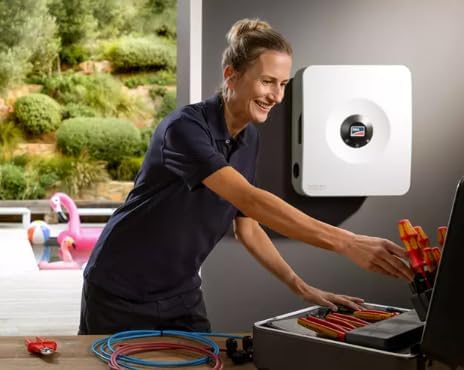
Figure 4: A qualified installer performing setup or maintenance on the Sunny Boy Smart Energy inverter. This image emphasizes the professional nature of the installation process and the ease of access to the inverter's components.
5. Operating Instructions
Once commissioned, the Sunny Boy Smart Energy inverter operates largely automatically, converting solar DC power to AC power for your home and managing battery charging/discharging.
5.1 System Monitoring
Monitor your system's performance using the SMA 360° app or other compatible SMA monitoring platforms. The app provides real-time data on energy production, consumption, battery status, and grid interaction. It also allows for quick adjustments and diagnostics.
5.2 Power Flow Management
The inverter intelligently manages power flow:
- Prioritizes powering home loads directly from solar PV.
- Charges the connected battery with excess solar energy.
- Discharges the battery to power loads when solar production is low or during grid outages (Backup Secure function, if enabled).
- Draws power from the grid if solar and battery are insufficient.
In the event of a grid outage, the inverter can provide up to 1900 W of power to essential loads, ensuring uninterrupted energy supply.
6. Maintenance
Regular maintenance ensures the longevity and optimal performance of your inverter. Always disconnect all power sources before performing any maintenance.
6.1 Routine Checks
- Visual Inspection (Quarterly): Check for any visible damage, loose connections, or signs of corrosion. Ensure ventilation openings are clear of dust and debris.
- Performance Monitoring (Monthly): Regularly check the system's performance via the SMA 360° app to identify any anomalies.
- Cleaning (Annually): Gently clean the exterior of the inverter with a soft, damp cloth. Do not use abrasive cleaners or solvents.
6.2 Professional Servicing
It is recommended to have a qualified technician perform a comprehensive system check annually. This includes verifying electrical connections, checking firmware updates, and assessing overall system health.
7. Troubleshooting
If your inverter is not operating as expected, refer to the following troubleshooting guide. For persistent issues, contact technical support.
| Problem | Possible Cause | Solution |
|---|
| Inverter not producing power | No solar input, grid outage, DC/AC disconnect open, internal fault. | Check PV array connections, verify grid status, ensure disconnects are closed. Check error codes on the inverter or via the SMA 360° app. |
| Low power output | Partial shading, dirty PV panels, system fault, high temperature derating. | Check for shading, clean PV panels, monitor temperatures. The ShadeFix optimization should mitigate most shading issues. |
| Error message on display/app | Specific system fault. | Note the error code and consult the detailed error code list in the full technical manual or contact support with the code. |
| Communication issues with app | Network connectivity problems, app outdated. | Check Wi-Fi/Ethernet connection, restart router, update SMA 360° app. |
For advanced diagnostics, utilize the SMA 360° app which provides detailed system insights and troubleshooting assistance.
8. Specifications
| Parameter | Value |
|---|
| Model Name | SBSE-US |
| Wattage | 3.8 KW |
| Power Source | Solar and Battery Powered |
| Recommended Uses | Home, Office |
| Brand | Generic (Manufacturer: SMA US) |
| Product Dimensions (L x W x H) | 19.7 x 23.1 x 9.3 inches |
| Max Efficiency | 97.5% |
| AC Output | 208/240 VAC Single-Phase, 60 Hz |
| MPPT Channels | 3 |
| DC/AC Design Capability | 200% |
9. Warranty and Support
9.1 Warranty Information
The Sunny Boy Smart Energy inverter comes with a 10-year warranty, which is extendable to 25 years. Please refer to the official warranty document included with your product for full terms and conditions, including registration requirements for warranty extension.
9.2 Technical Support
For technical assistance, troubleshooting, or warranty claims, please contact SMA US customer support. Utilize the SMA 360° app for initial diagnostics and to access support resources. Ensure you have your inverter's model number (SBSE-US) and serial number ready when contacting support.
Additional resources may be available on the official SMA US website.


