
GOODSCITY GC-171
GOODSCITY GC-171 Portable USB Rechargeable Blender User Manual
Model: GC-171
Introduction
Thank you for choosing the GOODSCITY GC-171 Portable USB Rechargeable Blender. This manual provides essential information for the safe and efficient operation, maintenance, and care of your new blender. Please read it thoroughly before first use and keep it for future reference.
The GC-171 is designed for preparing smoothies, juices, protein shakes, and other blended beverages. Its compact, lightweight, and USB-rechargeable design makes it suitable for use at home, in the office, at the gym, or while traveling.
Important Safety Precautions
- Read all instructions before using the appliance.
- Keep the blender out of reach of children.
- Do not immerse the motor base in water or any other liquid. Clean only with a damp cloth.
- Ensure the jar is properly installed and sealed onto the base before operation. The blender features a safety sensor that prevents operation if not assembled correctly.
- Avoid touching moving parts. Keep hands and utensils out of the blending jar while operating to prevent injury.
- Do not blend hot liquids, as pressure buildup can cause injury.
- Do not overfill the blending jar.
- Use only the charging cable provided or a compatible Type-C charger.
- Unplug the blender when not in use, before assembling or disassembling parts, and before cleaning.
- Do not operate the blender with a damaged cord or plug, or after the appliance malfunctions or has been dropped or damaged in any manner.
Product Components
The GOODSCITY GC-171 blender consists of the following main parts:
- Blender Motor Base (contains motor, battery, and controls)
- Blending Jar (450ml capacity)
- Lid with integrated handle
- USB Type-C Charging Cable

Image: Overview of the Goodscity GC-171 Portable Blender, showing its main parts.
Setup and Charging
Initial Charge
Before first use, fully charge the blender. Connect the provided USB Type-C charging cable to the charging port on the motor base and plug the other end into a compatible USB power source (e.g., car charger, power bank, laptop, or wall adapter).

Image: The blender connected to a USB-C charger, illustrating versatile charging options.
A full charge typically takes a few hours. The indicator light will show charging status (e.g., red for charging, blue/green for fully charged, refer to specific light indicators if available in product details, otherwise keep general).
Assembly
Ensure the blending jar is securely twisted onto the motor base. The blender features a safety sensor that prevents operation if the jug is not properly installed or separated from the base. If not assembled correctly, the red light will flash five times.
Operating Instructions
Preparing Ingredients
- Cut desired fruits or vegetables into small pieces (approximately 1.5-2 cm). Remove any hard skins or seeds.
- Pour water, milk, or other liquid into the container. Ensure the total volume does not exceed the maximum fill line.
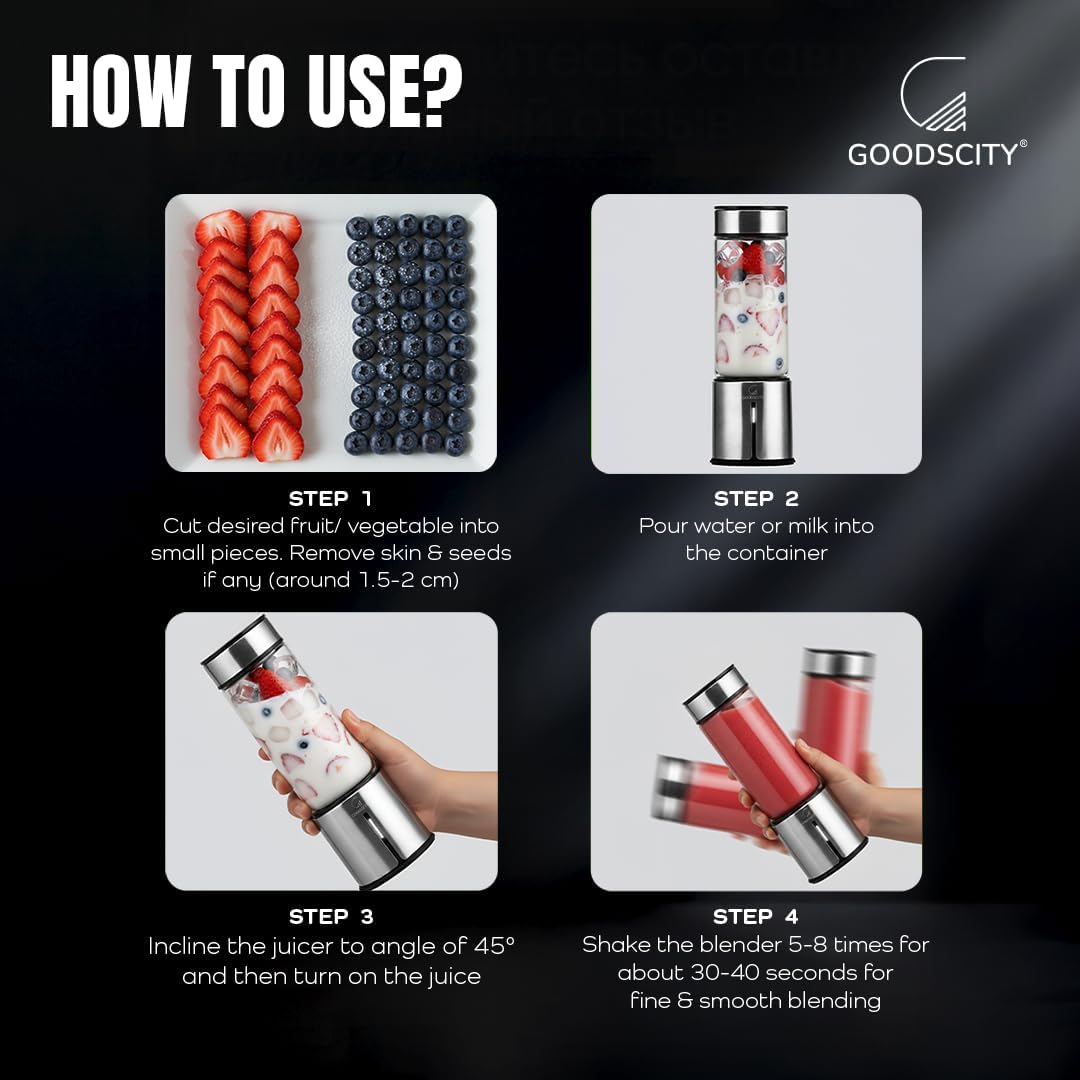
Image: Step-by-step guide on how to prepare ingredients and fill the blender jar.
Blending
- After adding ingredients and liquid, securely attach the lid.
- Incline the blender to an angle of approximately 45 degrees. This helps prevent ingredients from getting stuck and ensures better blending.
- Press and hold the power switch for 2 seconds to start blending. The 6 sharp stainless steel blades will activate.
- Shake the blender gently 5-8 times during the blending cycle for 30-40 seconds to achieve a fine and smooth consistency.
- The blender is designed to prepare your desired juice and smoothies in approximately 30 seconds.
- To stop blending, press the power switch once.
The GC-171 is versatile and can be used for smoothies, icy drinks, milkshakes, salsa, pesto, and protein shakes.

Image: Examples of various beverages and food items that can be prepared with the blender.
Care and Maintenance
Cleaning
The blender features a quick self-cleaning function:
- After use, add water to the blending jar, filling it approximately 2/3 full.
- Securely seal the lid.
- Long press the power switch for 2 seconds to start a cleaning cycle. Allow it to blend for 45 seconds.
- Pour out the water and rinse the jar.

Image: Illustration of the quick self-cleaning method for the blender jar.
Important: Do not wash the blender motor base under running water or immerse it. Wipe the motor base with a damp cloth only. The blending jar and lid are dishwasher safe.

Image: Visual guide on how to clean the blender, emphasizing not to wash the motor base under water.
Storage
Store the blender in a cool, dry place when not in use. Ensure it is clean and dry before storing.
Troubleshooting
| Problem | Possible Cause | Solution |
|---|---|---|
| Blender does not start. |
|
|
| Ingredients are not blending smoothly. |
|
|
| Blender stops unexpectedly. |
|
|
Specifications
| Feature | Detail |
|---|---|
| Model | GC-171 |
| Brand | GOODSCITY |
| Capacity | 450 Milliliters |
| Blade Material | 6-edge Stainless Steel |
| Motor Speed | 16500 RPM |
| Battery Capacity | 3000mAh |
| Power Source | Battery Powered (USB Type-C rechargeable) |
| Voltage | 7.4V (Motor), 220 Volts (Input compatibility for charger) |
| Dimensions (D x W x H) | 25D x 8W x 8H centimetres |
| Item Weight | 750 Grams |
| Material Type Free | BPA Free |
| Dishwasher Safe | Yes (Jar and Lid only) |
| Special Features | Auto Shut Off, Ice Crushing capability, High speed, Portable design, Safety Sensor |

Image: Visual representation of the blender's 450ml capacity and the 6-edge stainless steel blade design.
Warranty Information
GOODSCITY provides a 12-month service warranty on manufacturing defects. This warranty is valid outside Goodscity India and guarantees on-time service with free pick-up and drop-off to the customer's address for eligible manufacturing defects.
Please retain your proof of purchase for warranty claims.
Customer Support
For any inquiries, assistance, or warranty claims, please contact GOODSCITY customer service. Support is available 365 days a year.
- Customer Care: 8908901290
- Email: help@goodscity.in
- Additional contact options may include WhatsApp, Instagram, or the official website.
Manufacturer: DB BRANDS PVT LTD, PUNE.
Ask a question about this manual
Ask about setup, troubleshooting, compatibility, parts, safety, or missing instructions. Manuals+ will review the question and use this page’s manual context to help answer it.