1. Introduction and Compatibility
This manual provides detailed instructions for the installation and operation of your new Rimoody Android 15 Car Stereo. This unit is specifically designed for Mercedes Benz C-Class models C180, C200, C230, C250, C300, C350, W204, and S204 manufactured between 2006 and 2011.
Before purchasing or installing, please verify the year, dimensions, and shape of your vehicle's center console to ensure compatibility. If you have any questions regarding compatibility, please contact customer support with messages or pictures of your vehicle's dashboard.

Image: Important compatibility note regarding original vehicle buttons.
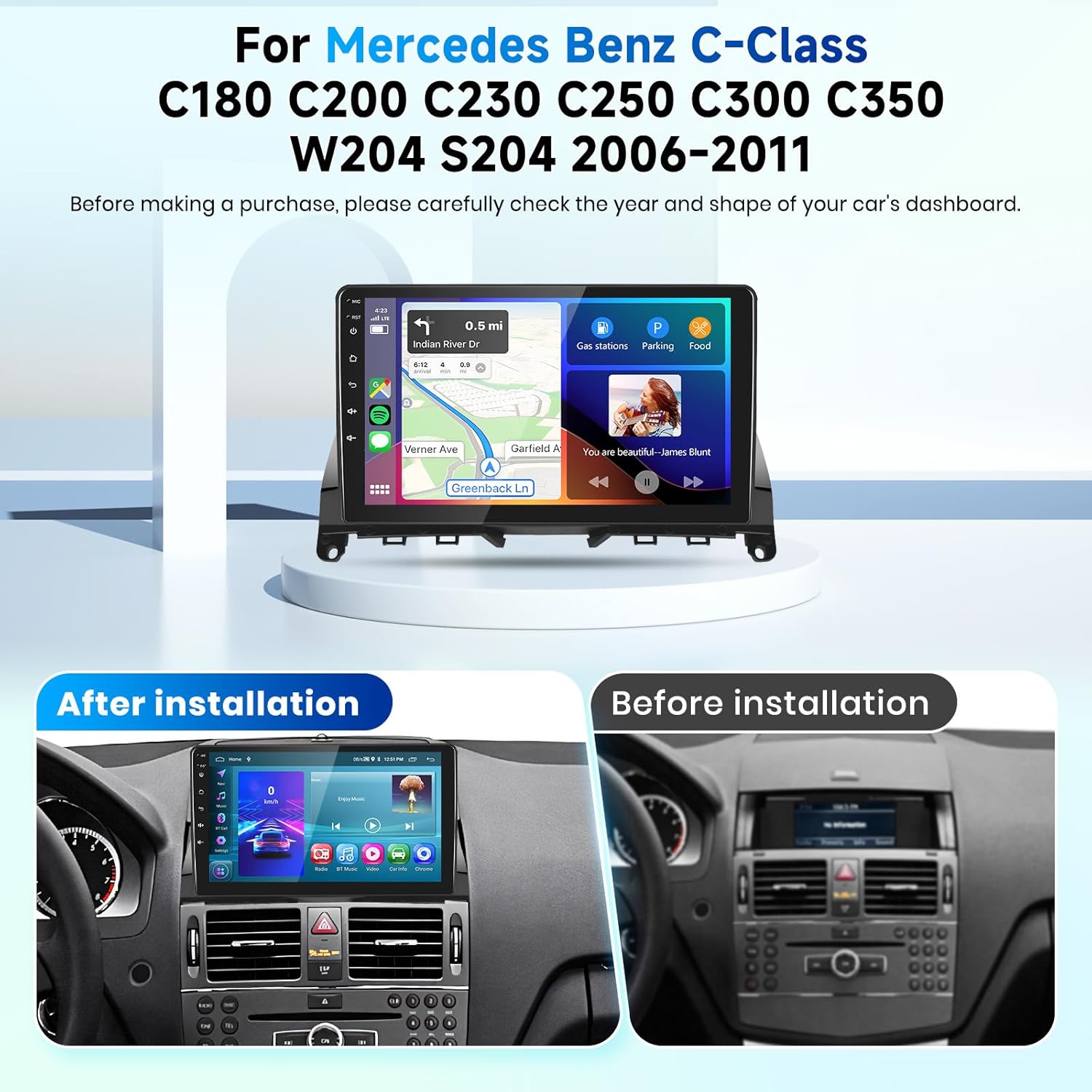
Image: Visual comparison of the car's dashboard before and after the stereo installation.
2. Setup and Installation
The package includes the car radio, power cable, and installation tools. Please ensure all components are present before beginning installation.
2.1 Package Contents

Image: Detailed view of the car stereo dimensions and included accessories in the packaging list.
2.2 Wiring Instructions
Follow the wiring diagrams carefully for proper connection. Incorrect wiring can damage the unit or vehicle electronics.

Image: Step-by-step wiring instructions for connecting the reverse camera to the car stereo.

Image: Comprehensive wiring diagram illustrating connections for power, RCA cables, USB, camera input, GPS, and Bluetooth antennas.
Important Note:
If your vehicle is equipped with a fiber optic system, a separate fiber optic box may be required. Please contact customer support prior to ordering to confirm wiring harness suitability.
3. Operating Instructions
3.1 Core System Features
The car stereo is powered by a robust 4-core processor with 64GB of internal storage, running on Android 15. This configuration ensures smooth operation even with multiple applications running simultaneously. Built-in WiFi connectivity allows for online access, app updates, and content streaming, transforming your vehicle into a mobile smart hub.
3.2 Wireless CarPlay and Android Auto
Enjoy seamless, cable-free integration with wireless CarPlay and Android Auto. Mirror your smartphone's essential functions directly onto the 9-inch HD touchscreen. This includes hands-free calling, navigation, music streaming, and voice-activated messaging, enhancing driving safety and connectivity.
Video: Demonstration of wireless CarPlay and Android Auto connection and basic functions.

Image: User interface showing CarPlay, Android Auto, and voice control features for navigation, calls, and music.
3.3 Mirror Link Functionality
The Mirror Link feature allows you to display your smartphone's screen directly on the car stereo. For iOS devices, a WiFi connection is used. For Android devices, both WiFi and a USB connection are supported.

Image: Diagram illustrating wireless Mirror Link setup for iOS (WiFi) and Android (WiFi & USB).
3.4 GPS Navigation and WiFi
The unit features a dual navigation system supporting both offline and online maps, ensuring reliable guidance even in areas with limited or no cell reception. WiFi connectivity provides access to various online functions directly from the car stereo.

Image: Display showing GPS navigation with both offline and online map capabilities, alongside WiFi internet access.
3.5 Bluetooth Connectivity
Connect your smartphone via Bluetooth for hands-free calling and audio streaming. Manage calls and play music directly from the car stereo interface.

Image: Interface demonstrating Bluetooth call management and music playback from a connected smartphone.
3.6 FM/RDS Radio and DSP
Tune into your favorite FM stations with RDS support for station information. The built-in Digital Sound Processor (DSP) allows for advanced audio customization, including equalizer settings and sound balance adjustments.

Image: Display showing the FM/RDS radio tuner and the graphical interface for the Digital Sound Processor (DSP) with equalizer controls.
3.7 AHD Backup Camera
The car stereo is equipped to integrate with a rear view camera. When the vehicle is in reverse, the display automatically switches to the rear view image, providing a clear view for safer parking and maneuvering.

Image: Screen capture of the AHD backup camera display, showing wide-angle, waterproof, HD image, and night vision capabilities.
3.8 Steering Wheel Control
Utilize your vehicle's existing steering wheel controls for convenient and safe operation of the car radio. This allows you to manage audio, calls, and other functions without taking your hands off the wheel.

Image: Interface for programming steering wheel controls and examples of common functions like call, skip, and volume.
3.9 Multiple UI Styles and Split Screen
Customize your user experience with various UI themes. The split-screen function allows you to run two applications simultaneously, such as navigation and music, for enhanced multitasking.

Image: Visual representation of different user interface themes and the split-screen feature displaying two apps concurrently.
Video: A detailed demonstration of various features and functionalities of the car stereo.
4. Maintenance
To ensure the longevity and optimal performance of your Rimoody car stereo, follow these general maintenance guidelines:
- Keep the screen clean using a soft, lint-free cloth. Avoid abrasive cleaners.
- Ensure proper ventilation around the unit to prevent overheating.
- Regularly check all cable connections to ensure they are secure.
- Avoid exposing the unit to extreme temperatures or direct sunlight for extended periods.
5. Troubleshooting
If you encounter any issues with your car stereo, please refer to the following common solutions:
- No Power: Check all power connections and ensure the vehicle's ignition is on. Verify the fuse.
- No Sound: Check speaker connections, volume levels, and audio source selection. Ensure the DSP settings are correctly configured.
- Bluetooth Connection Issues: Ensure Bluetooth is enabled on both the stereo and your phone. Try unpairing and re-pairing the devices.
- Navigation Not Working: Ensure GPS antenna is properly connected and has a clear view of the sky. Check internet connection for online maps.
- Fiber Optic System: As noted in the installation section, if your vehicle has a fiber optic system, a specific fiber optic box is required for proper functionality. Issues related to audio or control may stem from this.
For persistent issues or complex problems, please contact Rimoody customer service for technical support.
6. Specifications
| Feature | Specification |
|---|---|
| Item Weight | 2.36 pounds |
| Product Dimensions | 9 x 9 x 9 inches |
| Display Size | 9 Inches |
| Voice Command | Touchscreen |
| Screen Size | 9 Inches |
| Special Feature | Bluetooth, Touchscreen |
| Connectivity Technology | Bluetooth, USB, Wi-Fi |
| Map Type | Worldwide |
| Included Components | Installation Tool, Power Cable, car radio |
| Audio Output Mode | Stereo |
| Mounting Type | Dashboard Mount or Panel Mount |
| Resolution | 720 x 1280 |
7. Warranty and Support
Rimoody is committed to providing excellent customer service and technical support. Your product comes with the following:
- 30-Day Money-Back Guarantee: If you are not satisfied, you can return the product within 30 days for a full refund.
- 12-Month Replacement: The product is eligible for a free replacement within 12 months of purchase for manufacturing defects.
- Life-Time Technical Support: Access to professional technical assistance for the lifetime of the product.
Additionally, protection plans are available for extended coverage:
- 2-Year Protection Plan
- 3-Year Protection Plan
- Complete Protect: A monthly plan covering eligible past and future purchases.
If you have any questions regarding installation or usage, please contact our customer service team. We aim to respond to your inquiries within 24 hours.

Image: Guide on how to reach Rimoody Tech customer service through the seller page.

Image: Overview of customer support benefits: 24 months free replacement, 30-day no reason refund, lifetime technical support, and 24-hour quick response.