
Introduction
This manual provides essential instructions for the safe and effective installation, operation, and maintenance of your SWARK NE50 rechargeable battery. This battery is specifically designed for compatibility with Motorola Moto G, Moto G52, and XT2221 smartphone models. Please read this manual thoroughly before proceeding with battery replacement.
Safety Information
Your safety is paramount. Lithium-ion batteries can pose risks if not handled correctly. Adhere to the following safety guidelines:
- Handle with Care: A charged lithium-ion battery can catch fire or explode if it is accidentally damaged. Exercise extreme caution during installation.
- Power Off Device: Always turn off your phone completely before attempting any battery replacement.
- Avoid Punctures or Damage: Do not puncture, drop, crush, or expose the battery to excessive heat.
- Keep Dry: Do not immerse the battery in water or expose it to moisture.
- Proper Disposal: Do not dispose of the battery in household waste. Follow local regulations for proper recycling of lithium-ion batteries. The battery features a crossed-out wheeled bin symbol, indicating it should not be disposed of with general waste.
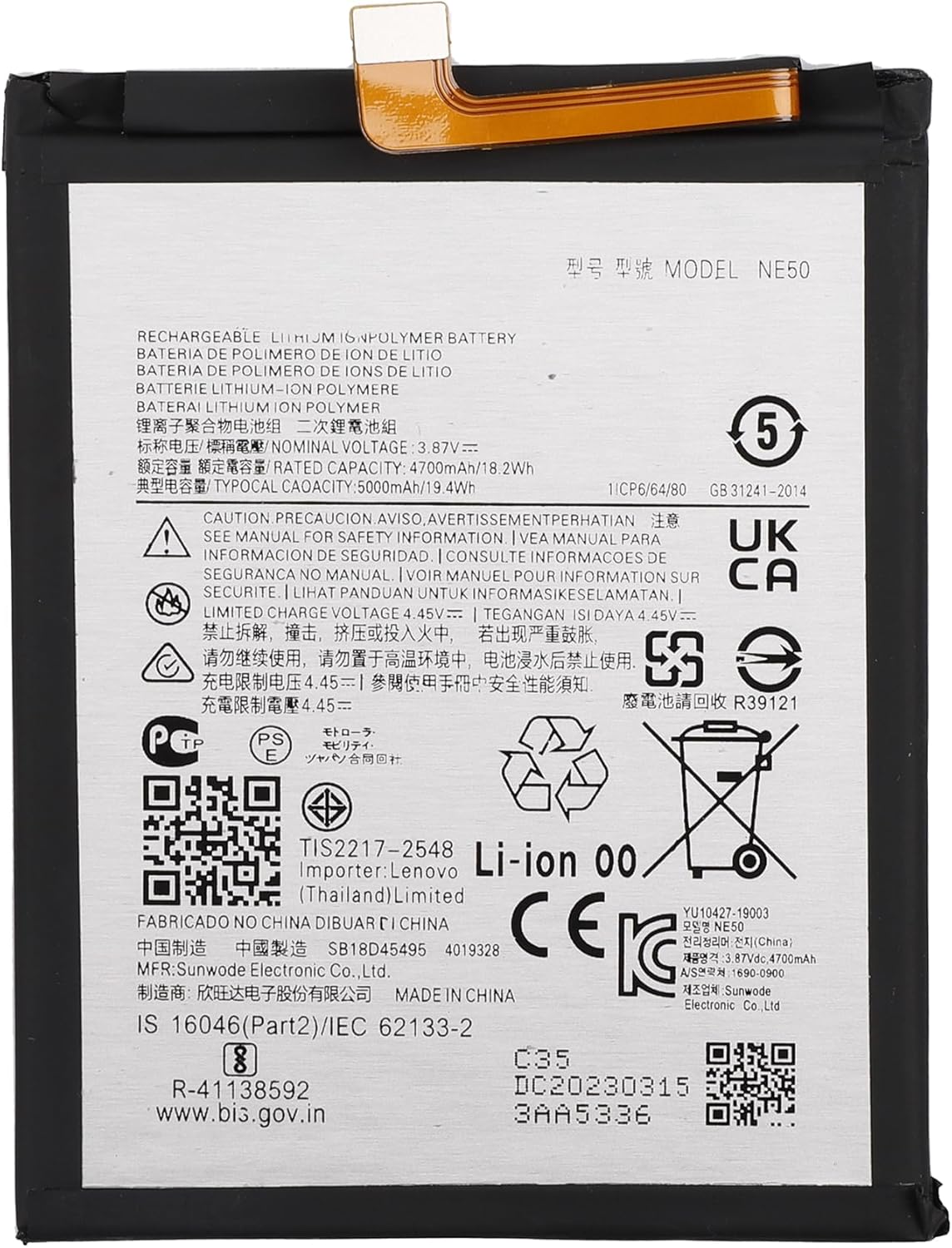
Image: Front view of the SWARK NE50 rechargeable battery, displaying its model number NE50, voltage (3.85V), rated capacity (3700mAh/18.2Wh), and various international safety certifications and warnings. This side also shows the flexible connector ribbon.
Package Contents
The package includes:
- 1 x SWARK NE50 Rechargeable Battery
- Essential tools for battery replacement (specific tools may vary)
Installation Guide (Setup)
Follow these steps carefully to replace your phone's battery:
- Prepare Your Device: Ensure your Motorola Moto G, Moto G52, or XT2221 phone is completely powered off.
- Open the Phone: Using the provided tools, carefully open your phone's casing to access the internal components. Refer to specific device disassembly guides if needed.
- Disconnect Old Battery: Locate the old battery and its ribbon cable connector. Gently and carefully disconnect the old battery's ribbon cable from the mainboard. Avoid pulling on the wires.
- Remove Old Battery: Carefully remove the old battery from its compartment. It may be secured with adhesive; use appropriate tools to gently pry it out without bending or puncturing it.
- Connect New Battery: Place the new SWARK NE50 battery into the compartment. Connect the new battery's ribbon cable securely to the mainboard. Ensure the connection is firm and properly seated.
- Reassemble Phone: Carefully reassemble your phone's casing, ensuring all components are correctly aligned and secured.
- Initial Check: Attempt to power on your phone to confirm the battery is correctly installed and functioning.

Image: The SWARK NE50 battery positioned alongside a Motorola Moto G22 smartphone, illustrating the product's compatibility and its intended use as a replacement battery for compatible Motorola models.
First Use and Charging (Operating)
To optimize the performance and lifespan of your new battery:
- Initial Cycles: It is highly recommended to fully drain and then fully charge the battery during the first 3 charging and discharging cycles. This process can significantly improve the overall life and calibration of the battery.
- Regular Charging: Use a certified charger compatible with your Motorola phone. Avoid using damaged or non-standard chargers.
Maintenance
Proper maintenance can extend your battery's life:
- Avoid Extreme Temperatures: Do not expose the battery or phone to very high or very low temperatures, as this can degrade battery performance and lifespan.
- Moderate Charging: While full cycles are good initially, for daily use, avoid consistently draining the battery to 0% or charging it to 100% for extended periods. Aim to keep the charge between 20% and 80% for optimal long-term health.
- Store Properly: If storing the battery for an extended period, ensure it is charged to about 50% and stored in a cool, dry place.
Troubleshooting
If you encounter issues after battery replacement, consider the following:
- Phone Restarts/Logo Flashes/Not Charging: If your phone constantly restarts, the logo flashes, or it fails to charge, the most common cause is a poor connection of the battery's ribbon cable. Power off your phone, reopen it, and carefully re-insert the ribbon cable. Ensure the connector is properly seated and clamped firmly.
- Battery Drains Quickly: Ensure you have completed the recommended 3 full drain/charge cycles. If the issue persists, check for background apps consuming excessive power or consider recalibrating the battery by performing a few more full cycles.
- Battery Not Detected: Double-check that the battery's ribbon cable is correctly and firmly connected to the mainboard. A loose connection can prevent the phone from recognizing the battery.

Image: A visual representation of common issues users face with aging or faulty batteries, including a battery at 1% charge, sudden power-offs, the need for frequent charging, rapid percentage drops, and overall short battery life. These are indicators that a battery replacement may be necessary.
Specifications
| Model Number | NE50 |
| Battery Type | Lithium Polymer |
| Compatibility | Motorola Moto G, Moto G52, XT2221 |
| Rated Capacity | 3700mAh / 18.2Wh |
| Voltage | 3.85V |
| Item Weight | 5.3 ounces |
| Package Dimensions | 7.48 x 3.98 x 0.67 inches |
| Manufacturer | shenzhen thinkmap innovative energy co., ltd |
Warranty and Support
SWARK is committed to providing excellent customer service. If you have any questions, concerns, or are not satisfied with your purchase, please do not hesitate to contact our support team. We offer 24-hour friendly customer service and will make every effort to assist you and ensure your satisfaction.
For support, please refer to the contact information provided with your purchase or on the SWARK official website.