
1. Introduction
The Lunarlipes HD08 is a versatile 3-in-1 plug-in carbon monoxide (CO) detector designed to enhance home safety by continuously monitoring carbon monoxide levels, ambient temperature, and humidity. Equipped with a highly sensitive electrochemical sensor, this device provides real-time data and alerts to potential hazards, ensuring a safer living environment.

Figure 1: Front and side view of the Lunarlipes HD08 Carbon Monoxide Detector.
2. Key Features
- 3-in-1 Monitoring: Detects Carbon Monoxide (CO), Temperature (14~122℉ / -10~50℃), and Humidity (5~95%RH).
- High Reliability Sensor: Features an advanced electrochemical sensor with a 5-year lifespan for accurate CO detection (0~999PPM ±5%).
- Real-Time Data: Data refreshes every 2 seconds for immediate environmental monitoring.
- 3-Stage Audible & Visual Alarm: Provides clear indications (Green=Safe, Yellow=Warning, Red=Dangerous) and an 85dB audible alarm at 51PPM CO concentration.
- Easy Installation: Plug-and-play design suitable for standard 110-220V outlets.
- 2.1-inch Colorful Screen: Displays CO, temperature, and humidity for easy reading, with adjustable brightness.
- User-Friendly Controls: Dedicated buttons for self-test, temperature unit switching, buzzer control, and screen brightness adjustment.

Figure 2: The detector monitors Carbon Monoxide, Temperature, and Humidity.
3. Safety Information
Read all instructions carefully before installation and use. This device is designed to detect carbon monoxide gas from any source of combustion. It is not designed to detect smoke, fire, or other gases. For optimal safety, ensure proper placement and regular testing.
Important Considerations:
- Do not paint the detector. Paint can clog the openings and interfere with the sensor's operation.
- Do not block the air inlets or outlets of the device.
- This device should not be used as a substitute for proper installation, use, and maintenance of fuel-burning appliances, including appropriate ventilation and exhaust systems.
- The detector is for indoor use only.
4. Setup and Installation
The Lunarlipes HD08 is designed for simple plug-and-play installation.
- Choose a Location: Select a standard electrical outlet (110-220V) in an area where CO is likely to be present, such as near fuel-burning appliances, but not directly above them. Avoid placing it in direct sunlight, near vents, or in extremely dusty/humid areas. Ideal locations include living rooms, kitchens, bedrooms, and basements.
- Plug In: Insert the detector directly into the chosen electrical outlet. Ensure it is securely plugged in.
- Warm-up Period: After plugging in, the device will undergo a warm-up period, typically around 28 seconds. During this time, the display may show various readings or a countdown.
- Initial Self-Test: Once the warm-up is complete, the device will perform an automatic self-test. The green indicator light should flash 3 times, and 3 beeps will be emitted, indicating normal operation.

Figure 3: The detector is designed for easy plug-in installation.
5. Operating Instructions
The Lunarlipes HD08 features intuitive controls for easy operation.

Figure 4: Overview of the detector's display and buttons.
- "O" Button (Self-Test / Temperature Unit Switch):
- Short press the "O" button to initiate a self-test. If the green indicator light flashes 3 times and 3 beeps are emitted, the device is functioning normally.
- Long press the "O" button to switch between temperature units (℃ / ℉).
- "D" Button (Buzzer On/Off):
- Short press the "D" button to turn the audible alarm (buzzer) on or off. This is useful for silencing the alarm temporarily after a warning, but the visual alert will remain.
- "H" Button (Screen Brightness Adjustment):
- Short press the "H" button to cycle through screen brightness levels: High, Low, and Turn Off Backlight. When the backlight is off, the green indicator light will flash once every 5 seconds to confirm the device is still working.

Figure 5: Detailed functions of the control buttons.
6. Understanding the Display and Alarms
The 2.1-inch colorful screen provides clear, real-time information about your environment.
CO Concentration Display:
- 0-50 PPM (Green = Safe): The green indicator icon will blink. No audible alarm.
- 51-200 PPM (Yellow = Warning): The yellow indicator icon will blink. An audible alarm of 85dB will sound, cycling every 2 minutes.
- 201-999 PPM (Red = Dangerous): The red indicator icon will blink. A continuous 85dB audible alarm will sound.
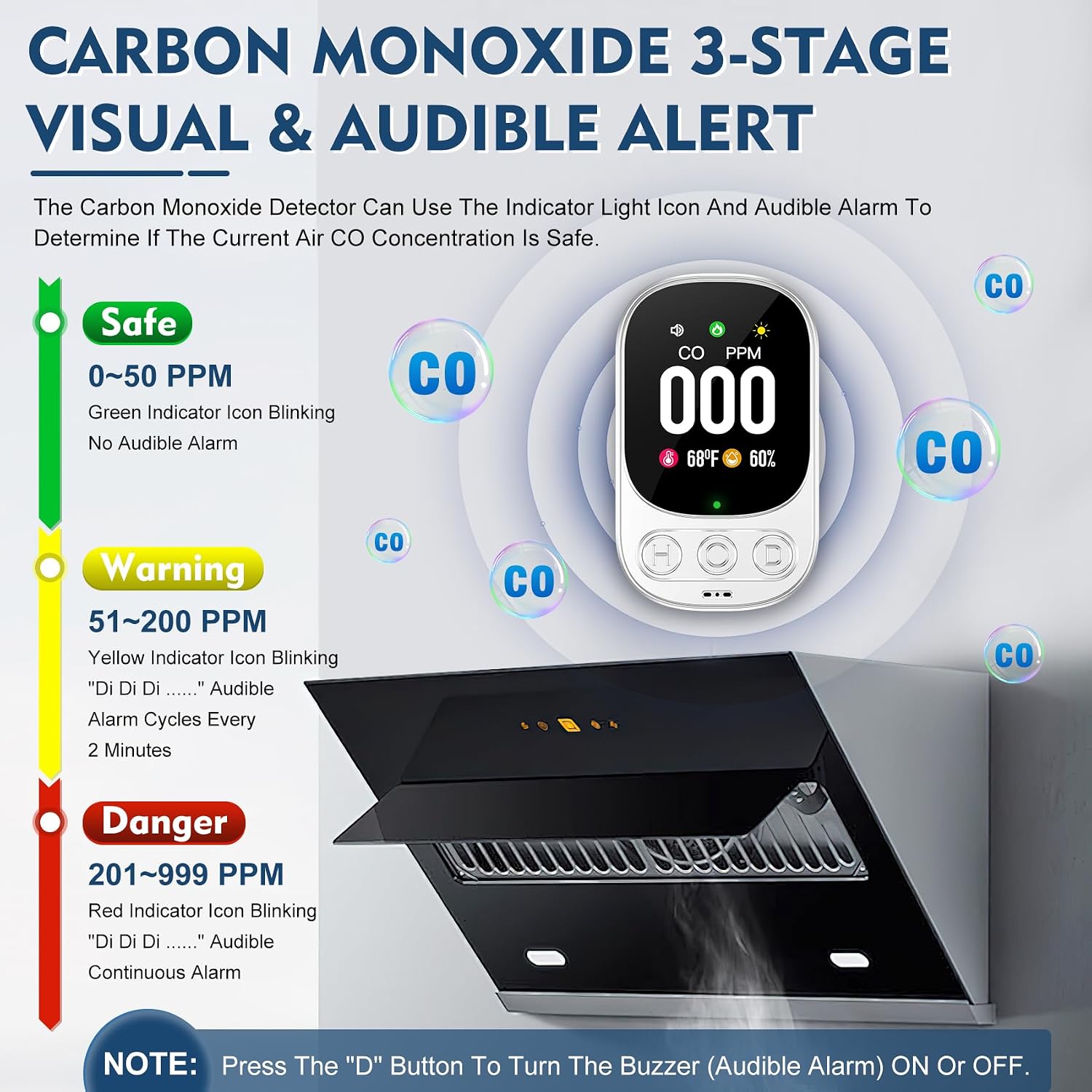
Figure 6: Visual representation of the 3-stage CO alert system.
Other Display Information:
- Temperature: Displays current ambient temperature in ℃ or ℉.
- Humidity: Displays current ambient humidity in %RH.
- Buzzer Status Icon: Indicates if the audible alarm is enabled or disabled.
- Screen Brightness Icon: Indicates the current screen brightness setting.
7. Maintenance
Regular maintenance ensures the longevity and accuracy of your CO detector.
- Regular Cleaning: Gently wipe the exterior of the detector with a soft, damp cloth. Do not use harsh chemicals, cleaning solvents, or abrasive cleaners.
- Keep Vents Clear: Ensure that the air inlets and outlets on the device are not obstructed by dust, dirt, or other debris.
- Avoid Painting: Never paint the detector, as this can block the sensor and prevent proper operation.
- Self-Test: Perform the self-test function regularly (e.g., monthly) to confirm the device is working correctly.
8. Troubleshooting
If your Lunarlipes HD08 detector exhibits unusual behavior, refer to the following common issues and solutions.
| Problem | Possible Cause | Solution |
|---|---|---|
| Audible alarm sounds (85dB) and Red/Yellow icon blinks. | High CO concentration detected. |
|
| No display or device not turning on. | No power or faulty outlet. |
|
| Inaccurate temperature/humidity readings. | Improper placement or environmental factors. |
|
| Green indicator light not flashing every 5 seconds when backlight is off. | Device malfunction. |
|

Figure 7: Testing the CO detector by exposing it to a small amount of CO (e.g., from a lit cigarette). Note: The display should read 000 PPM when no CO is present.
9. Specifications
| Specification | Detail |
|---|---|
| Brand | Lunarlipes |
| Model Number | HD08 |
| Power Source | AC (110-220V) |
| CO Detection Range | 0~999 PPM (±5%) |
| Temperature Range | 14~122℉ / -10~50℃ (±3%) |
| Humidity Range | 5~95% RH (±5%RH) |
| Sensor Type | Electrochemical |
| Sensor Lifespan | 5 years |
| Alarm Loudness | 85dB |
| Product Dimensions | 1.3"D x 2"W x 3.5"H (33mm D x 51mm W x 85mm H) |
| Item Weight | 0.13 Pounds (2.08 ounces) |
| Material | ABS |
| Installation Method | Wall-Mounted (Plug-in) |
10. Product Usage Environments
The Lunarlipes HD08 is suitable for a wide range of indoor environments where carbon monoxide monitoring is beneficial.
- Homes and Apartments
- Living rooms with fireplaces or wood-burning stoves
- Kitchens
- Bedrooms and Children's rooms
- Guest rooms
- Cellars and Garages (ensure proper ventilation)
- RVs and Travel Trailers
- Hotels (portable for travel)

Figure 8: Examples of suitable locations for the Lunarlipes HD08 detector.
11. Official Product Video
Video 1: An official product video demonstrating the features and benefits of the Lunarlipes Plug-in 3-in-1 Carbon Monoxide Detector HD08. This video provides a visual guide to the product's functionality, including its 3-in-1 monitoring capabilities for CO, temperature, and humidity, as well as its alarm system and ease of use.
12. Warranty and Support
The Lunarlipes HD08 Carbon Monoxide Detector comes with a 36 Months After-Sales Service and Lifetime Technical Support.
If you encounter any problems or have questions regarding your device, please contact Lunarlipes Customer Service through the platform where you purchased the product. Your satisfaction is our top priority.