
1. Introduction
Welcome to your new Dibea Handheld Mattress Vacuum, Model US-UV30. This appliance is designed to provide deep cleaning for mattresses, upholstery, and various fabric surfaces, effectively removing dust, debris, and allergens. Please read this manual thoroughly before first use to ensure safe operation, proper maintenance, and optimal performance.
2. Important Safety Instructions
- Always unplug the vacuum cleaner from the power outlet before cleaning or performing any maintenance.
- Do not use the appliance on wet surfaces or to pick up liquids. This vacuum is designed for dry fabric surfaces only.
- Keep the appliance away from children and pets. Supervise children to ensure they do not play with the appliance.
- Do not operate the vacuum cleaner with a damaged cord or plug. If the cord or plug is damaged, contact customer support.
- Do not block ventilation openings. Keep openings free of dust, lint, hair, and anything that may reduce airflow.
- Do not pick up hard or sharp objects such as glass, nails, screws, or coins, as these can damage the vacuum.
- Avoid exposing the UV-C light directly to skin or eyes. The intelligent distance sensor is designed to prevent light leakage, but caution is advised.
- Use only manufacturer-recommended attachments and replacement parts.
3. Product Components
Familiarize yourself with the main parts of your Dibea Handheld Mattress Vacuum:
- Main Unit: Contains the motor, handle, and controls.
- Dust Cup: Collects dust and debris. Features dual cyclone filtration.
- HEPA Filter: Filters fine particles and allergens. Washable.
- Brush Roller: Anti-tangle design with rubber and bristles for effective cleaning.
- UV-C Light: Emits 254nm UV-C light for sterilization.
- Smart Dust Sensor: LED indicators show cleaning status (red for debris detected, green for cleared).
- Power Cord: Provides continuous power during operation.

Figure 3.1: Main unit of the Dibea Handheld Mattress Vacuum.

Figure 3.2: Top view showing the dust cup and control panel.
4. Setup and First Use
The Dibea Handheld Mattress Vacuum comes pre-assembled. For first use, simply uncoil the power cord and plug it into a suitable power outlet. Ensure the dust cup and HEPA filter are correctly installed before powering on.
5. Operating Instructions
Follow these steps to operate your mattress vacuum:
- Power On: Plug the power cord into an electrical outlet. Press the power button located on the handle to turn on the vacuum.
- Smart Dust Sensor: The integrated smart dust sensor will indicate the level of debris on the surface. A red LED indicates significant debris, while a green LED indicates the area is clean.
- Cleaning Motion: Glide the vacuum slowly and evenly across the surface you wish to clean. For best results, use overlapping strokes.
- UV-C Light and Ultrasonic Function: The vacuum automatically activates its UV-C light and 3.6KHz ultrasonic technology during operation to target harmful microorganisms. An intelligent distance sensor prevents UV-C light exposure when lifted from the surface.
- Heating Function: The vacuum heats to 140°F (60°C) within 5 seconds to help vaporize moisture and enhance cleaning.
- Negative Ion Technology: Advanced negative ion technology purifies the air during cleaning, reducing airborne irritants.
- Power Off: Once cleaning is complete, press the power button again to turn off the vacuum, then unplug it from the outlet.
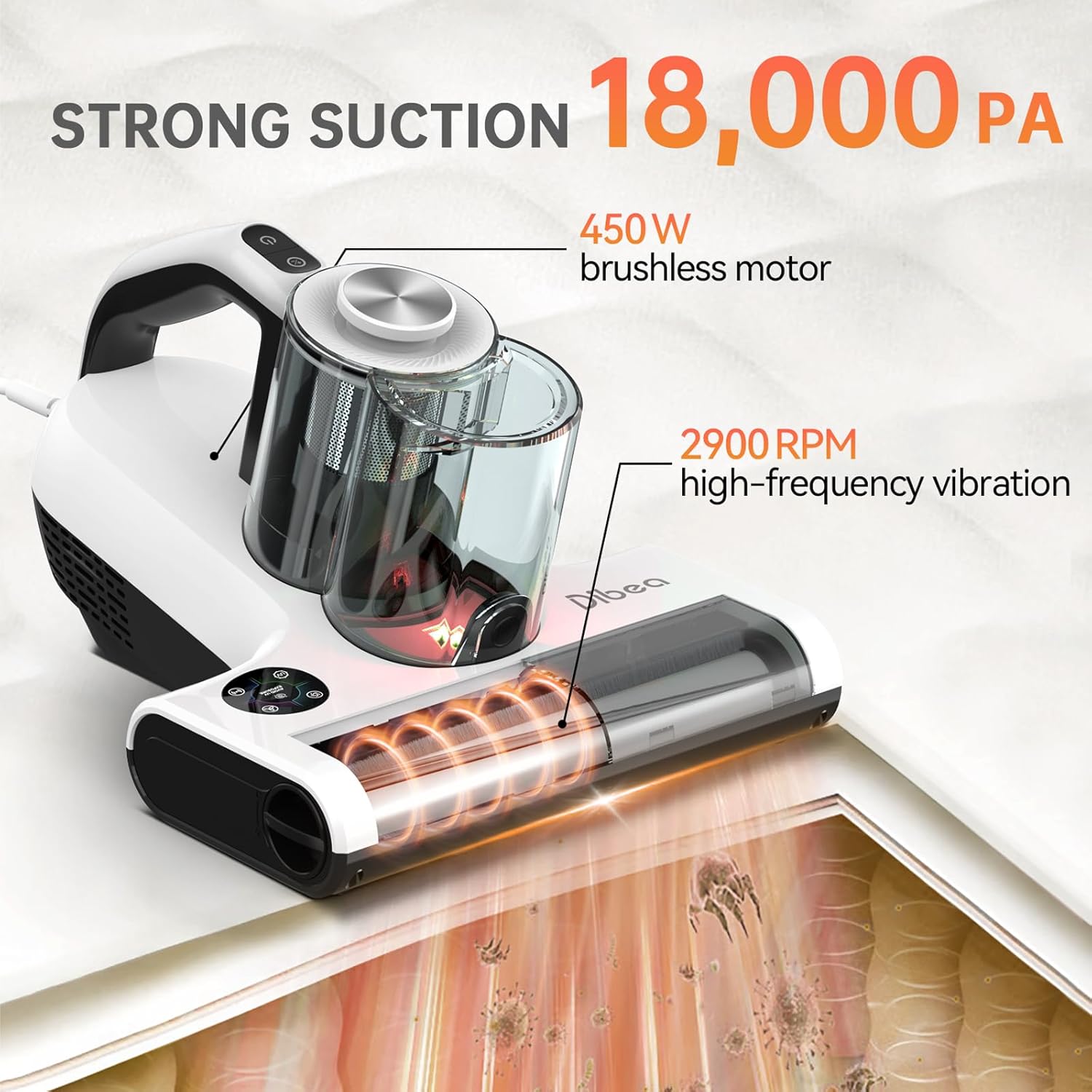
Figure 5.1: The vacuum's 140°F heating function helps to dehumidify and clean surfaces.

Figure 5.2: The smart dust sensor provides real-time feedback on cleaning progress with color-coded LED indicators.
Video 5.1: Demonstration of the Dibea Handheld Mattress Vacuum's features and operation.
6. Maintenance and Cleaning
Regular maintenance ensures the longevity and efficiency of your vacuum cleaner.
6.1 Emptying the Dust Cups
After each use, or when the dust cup is full, empty its contents into a trash bin. The dual dust cup design separates dust and hair effectively.
6.2 Cleaning and Replacing the HEPA Filter
The washable HEPA filter should be cleaned at least once a month and replaced every three to six months to maintain optimal suction power.
- Remove the dust cup from the main unit.
- Lift the dust cup lid and remove the metal mesh filter.
- Rotate the red ring at the bottom of the metal mesh filter counter-clockwise to detach the HEPA filter.
- Gently wash the HEPA filter under cool, clean tap water until clean.
- Allow the HEPA filter to air dry completely for at least 24 hours before re-installation. Ensure it is absolutely dry to prevent damage to the motor.
- Reassemble the HEPA filter and metal mesh filter, then place them back into the dust cup.
- Reattach the dust cup to the main unit.
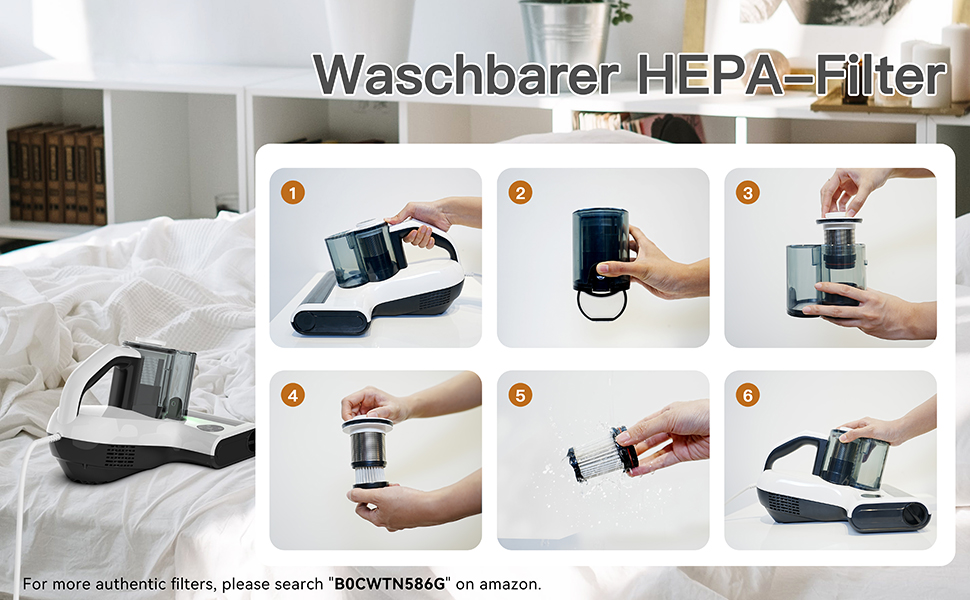
Figure 6.1: The washable HEPA filter is crucial for trapping fine particles.
Video 6.1: Instructions on how to remove, clean, and install the HEPA filter for your mattress vacuum.
6.3 Cleaning the Brush Roller
The anti-tangle brush roller should be checked periodically for entangled hair or debris.
- Ensure the vacuum is unplugged.
- Locate the brush roller release mechanism on the side of the vacuum head. Rotate it counter-clockwise until you hear a 'click' sound.
- Gently pull the brush roller outwards to remove it.
- Use the provided cleaning tool or scissors to remove any tangled hair or fibers from the brush roller.
- Wipe the brush roller and its housing with a clean, dry cloth.
- Reinsert the brush roller and rotate the release mechanism clockwise until it clicks into place.
7. Troubleshooting
If you encounter issues with your Dibea Handheld Mattress Vacuum, refer to the table below for common problems and solutions.
| Problem | Possible Cause | Solution |
|---|---|---|
| Vacuum does not turn on | Not plugged in; Power button not pressed; Power outage. | Ensure power cord is securely plugged in; Press power button firmly; Check household circuit breaker. |
| Low suction power | Dust cup full; HEPA filter clogged; Brush roller tangled; Suction inlet blocked. | Empty dust cup; Clean/replace HEPA filter; Clean brush roller; Check and clear any blockages in the suction inlet. |
| UV-C light not working | Vacuum not on a surface; UV-C lamp damaged. | Ensure the vacuum head is pressed against the cleaning surface to activate the safety sensor; Contact customer support for lamp replacement. |
| Unusual noise | Foreign object in brush roller or suction path; Motor issue. | Turn off and unplug the vacuum, then inspect and remove any foreign objects; If noise persists, contact customer support. |
8. Specifications
- Model Name: US-UV30-WHJ
- Brand: Dibea
- Special Features: 18KPa Suction, 450W brushless BLDC motor, 140°F Heating, Smart Dust Sensor, Washable HEPA Filter, Anti-tangle brushroller, dual dust cups, UV-C Light, Ultrasonic, Negative Ions.
- Filter Type: Washable HEPA Filter
- Included Components: Handheld vacuum cleaner, cleaning tools.
- Is Cordless?: No (Corded Electric)
- Capacity: 0.3 Liters (Dust Cup)
- Wattage: 450 watts
- Maximum Suction: 18000 Picometer (18KPa)
- Recommended Uses: Indoor use only, for all kinds of DRY fabric surfaces (bed, mattress, sofa, couch, carpet, etc.).
- Product Dimensions: 12.6"L x 9.8"W x 7.29"H
- Noise Level: 70 Decibels
- Item Weight: 4.85 pounds
9. Warranty and Support
This Dibea mattress vacuum cleaner is FCC/CE/CCC listed and undergoes 100% inspection before shipping. We offer a 30-day money-back guarantee for new purchases, a one-year warranty replacement service, and lifetime online technical support within 24 hours.
If you encounter any difficulties during the disassembly, assembly, or operation process, or require assistance with replacement parts, please reach out to our customer service via Amazon message for assistance at any time.