
Introduction
Welcome to the user manual for your Curaprox Samba Robotic Toothbrush. This manual provides essential information for the proper setup, operation, and maintenance of your device. The Curaprox Samba is designed to offer a gentle yet effective cleaning experience for all tooth surfaces, featuring 12,900 soft bristles and a user-friendly design.
Product Overview
The Curaprox Samba Robotic Toothbrush is an advanced oral hygiene device designed for comprehensive teeth cleaning. It features a U-shaped brush head with 12,900 soft bristles, ensuring thorough coverage and gentle pressure. The device is equipped with rechargeable lithium batteries, offering extended use on a single charge, and boasts a waterproof design for convenient use. Its flexible head adapts to various mouth shapes, providing an efficient cleaning process.
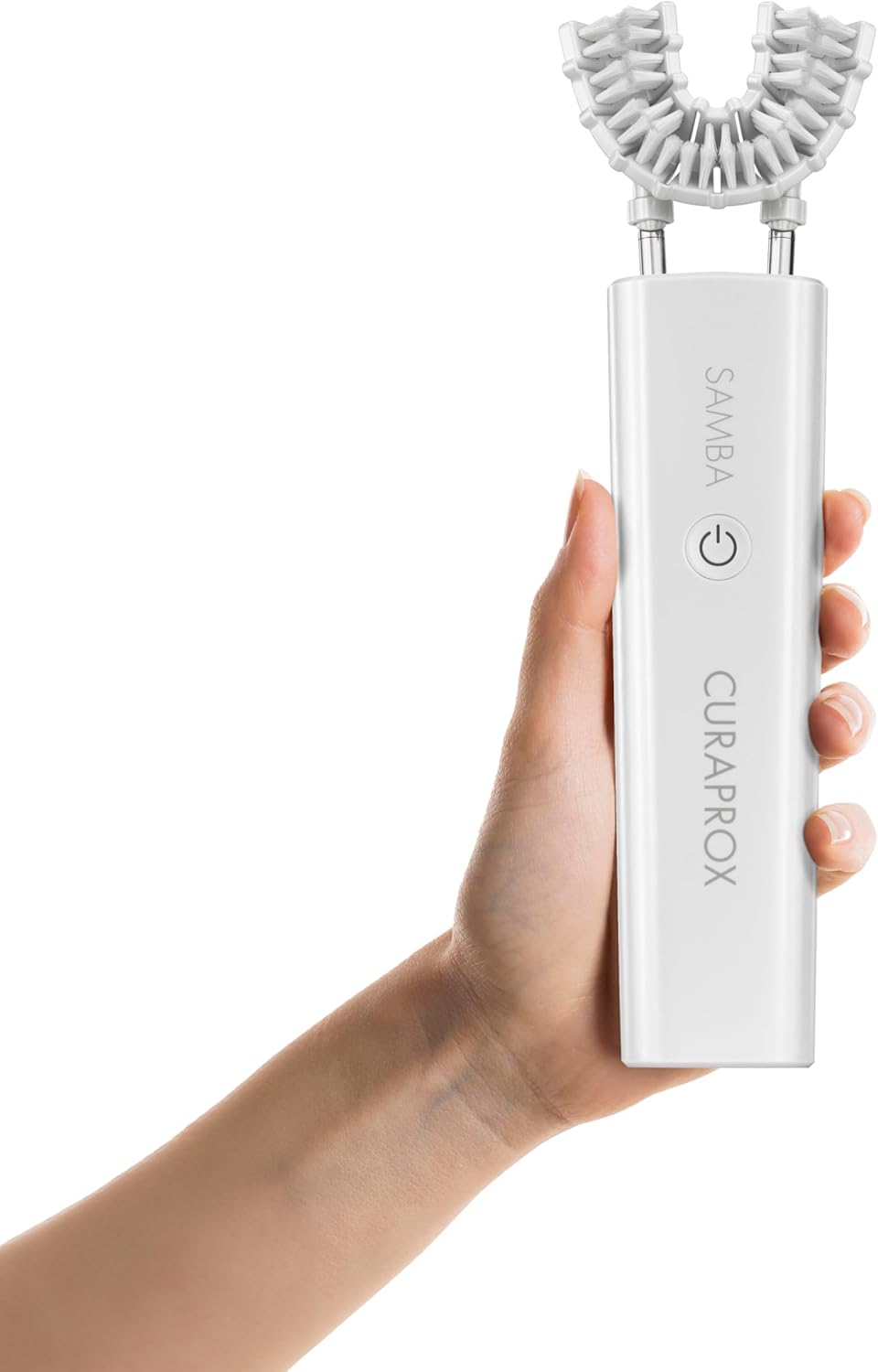
Figure 1: Curaprox Samba Robotic Toothbrush main unit.
Setup
1. Initial Charge
Before first use, fully charge the Curaprox Samba. The device uses rechargeable lithium batteries. A full charge can last up to 25 days.

Figure 2: Curaprox Samba in charging base.
2. Attaching the Brush Head
Ensure the U-shaped brush head is securely attached to the main unit. The flexible design allows for easy attachment and removal.

Figure 3: Close-up of the U-shaped brush head.
Operating Instructions
- Prepare the Brush: Apply a small amount of toothpaste to the U-shaped brush head.
- Position for Upper Teeth: Insert the flexible U-shaped head into your mouth, aligning it with your upper teeth.
- Start Cleaning (Upper): Press the start button on the handle. Hold the handle with both hands while the toothbrush cleans. The device will operate for 30 seconds and then automatically stop.
- Position for Lower Teeth: Remove the brush head from your mouth. Realign it with your lower teeth.
- Start Cleaning (Lower): Press the start button again to clean your lower teeth. The device will operate for another 30 seconds and then stop.
- Completion: Your cleaning cycle is now complete.

Figure 4: Bristles designed for effective cleaning.
Maintenance
1. Cleaning the Device
The Curaprox Samba features a waterproof design. After each use, rinse the brush head thoroughly under running water. You may also gently wipe the main unit with a damp cloth. Do not use abrasive cleaners or immerse the main unit in water for extended periods.
2. Brush Head Replacement
For optimal oral hygiene, it is recommended to replace the U-shaped brush head regularly, typically every three months, or sooner if the bristles appear worn. Replacement heads are available separately.

Figure 5: Device on a bathroom counter, illustrating typical placement.
Troubleshooting
| Issue | Possible Cause | Solution |
|---|---|---|
| Device does not turn on. | Low battery or not charged. | Ensure the device is fully charged. Connect it to the charging base and allow sufficient time for charging. |
| Brush head not moving effectively. | Brush head not properly attached or worn out. | Check if the brush head is securely attached. If bristles are worn, replace the brush head. |
| Device stops unexpectedly during use. | Battery low or automatic cycle completion. | Recharge the device. Note that each cleaning cycle is 30 seconds long and will stop automatically. |
Specifications
- Brand: Curaprox
- Model: Samba
- Power Source: Battery Powered (Rechargeable Lithium Batteries)
- Item Firmness Description: Soft
- Material Feature: Reusable
- Number of Items: 1 (main unit with brush head)
- Manufacturer: CURADEN
- Package Dimensions: 9.65 x 7.13 x 1.93 inches
- Item Weight: 1.68 Pounds
- Date First Available: January 7, 2025

Figure 6: Curaprox Samba on its charging base, ready for use.
Warranty and Support
For warranty information or technical support, please contact the manufacturer, CURADEN. Refer to your purchase documentation for specific warranty terms and conditions.
Manufacturer: CURADEN


