
1. Product Overview
The Osmofilter MIDEA ECO4000 is a water filtration system designed to provide cleaner, better-tasting water by effectively removing impurities and contaminants. This manual provides detailed instructions for the proper installation, operation, and maintenance of your water filter to ensure optimal performance and longevity.
Key benefits include:
- Eliminates impurities and contaminants for cleaner, better-tasting water.
- Compact design suitable for various home environments.
2. Safety Information
Please read all safety instructions before installing or operating the Osmofilter MIDEA ECO4000 water filter. Failure to follow these instructions may result in property damage or injury.
- Use only with potable (drinkable) water.
- Ensure all connections are secure to prevent leaks.
- Do not expose the unit to freezing temperatures or direct sunlight.
- Keep out of reach of children.
- Refer to local plumbing codes for installation requirements.
3. Package Contents
Verify that all components are present before beginning installation:
- Osmofilter MIDEA ECO4000 Water Filter Unit
- Filter Cartridge(s) (pre-installed or separate)
- User Manual
- Installation Accessories (e.g., tubing, connectors, faucet - may vary by package)
4. Setup and Installation
Follow these steps for initial setup and installation of your water filter.
- Unpacking: Carefully remove all components from the packaging.
- Placement: Choose a suitable location for the filter unit, ensuring it is level and has adequate space for maintenance.
- Filter Cartridge Installation/Access: If cartridges are not pre-installed, or for future replacement, access the filter compartment.
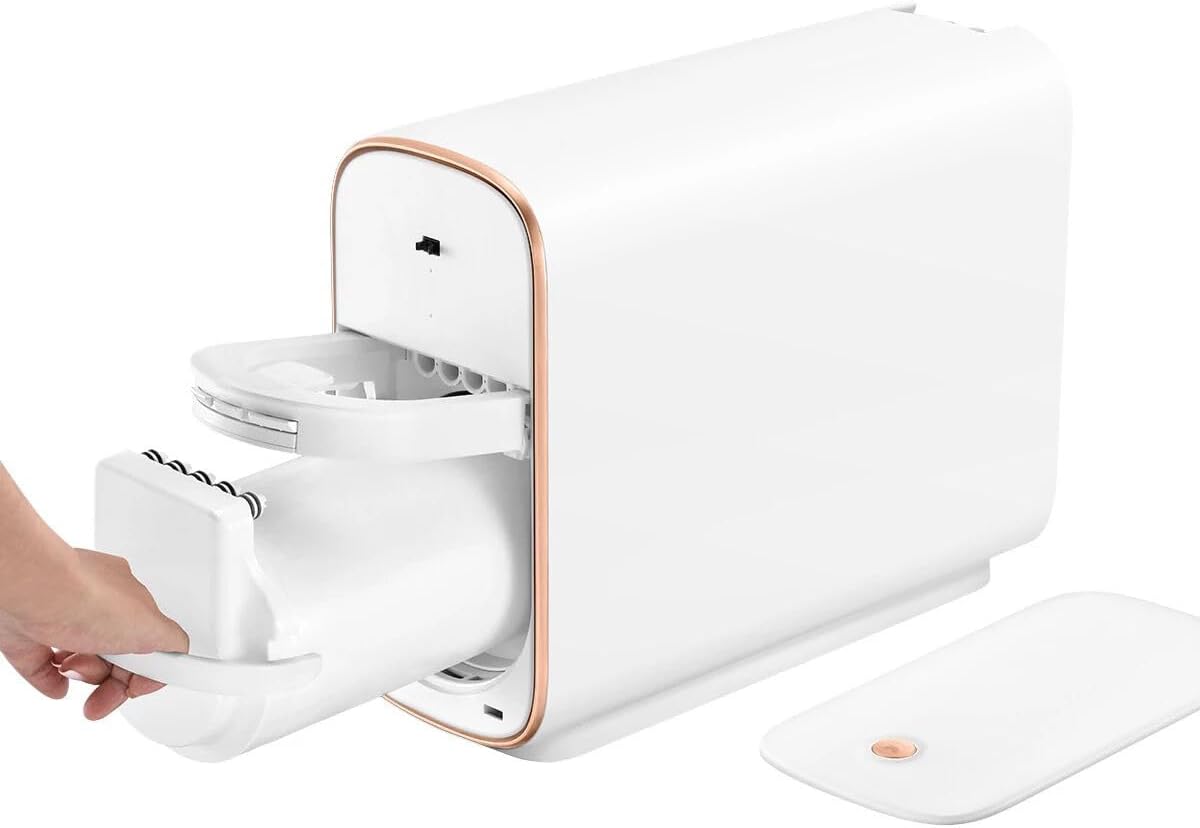
Image 4.1: A hand is shown interacting with the filter compartment of the Osmofilter MIDEA ECO4000. The hand is gently pulling a handle to slide out a cylindrical filter housing from the main white unit, which has copper-colored trim. This illustrates the process of accessing the filter cartridge for installation or replacement.
- Water Connection: Connect the water inlet and outlet lines according to the provided diagrams (not included in this manual, refer to product-specific diagrams). Ensure all connections are tight to prevent leaks.
- Initial Flush: Before first use, flush the system with water for 5-10 minutes to remove any carbon fines or air.
5. Operating Instructions
Once installed, the Osmofilter MIDEA ECO4000 operates automatically to filter your water. Ensure a continuous water supply to the unit.
- Daily Use: The filter will continuously purify water as it passes through the system.
- Water Flow: A slight reduction in water flow is normal due to the filtration process. Significant reduction may indicate a clogged filter.
6. Maintenance
Regular maintenance ensures the efficiency and longevity of your water filter.
- Filter Replacement: Filter cartridges should be replaced every 6-12 months, or sooner if water flow significantly decreases or water quality diminishes. Refer to the image in Section 4 for accessing the filter compartment.
- Cleaning: Periodically wipe the exterior of the unit with a soft, damp cloth. Do not use harsh chemicals or abrasive cleaners.
- Leak Check: Regularly inspect all connections for any signs of leaks.
7. Troubleshooting
If you encounter issues with your Osmofilter MIDEA ECO4000, refer to the following common problems and solutions:
| Problem | Possible Cause | Solution |
|---|---|---|
| Slow Water Flow | Clogged filter cartridge | Replace the filter cartridge. |
| Unusual Taste/Odor | Expired filter cartridge or initial flush incomplete | Replace filter cartridge or flush the system for a longer period. |
| Water Leakage | Loose connections or damaged O-rings | Check and tighten all connections. Inspect and replace O-rings if damaged. |
8. Specifications
| Brand | Osmofilter |
| Model Number | S0440075 |
| Dimensions (L x W x H) | 13.93 x 19.43 x 18.03 cm |
| Weight | 15 kg |
| Material | Plastic |
| Color | Multicolor |
| Certification | CE |
| Product Benefits | Eliminates impurities and contaminants for a cleaner and better-tasting water. |
9. Warranty and Support
For warranty information or technical support, please contact your retailer or the manufacturer directly. Keep your purchase receipt as proof of purchase.
For further assistance, please visit the official Osmofilter website or contact their customer service department.