
Introduction
This manual provides comprehensive instructions for setting up, operating, maintaining, and troubleshooting your Vibox I-46 Gaming PC. This entry-level gaming PC is designed for casual gamers and features an integrated graphics card capable of handling less demanding and indie games. It is an ideal system for beginners or those seeking an affordable system with upgrade potential.
The system includes an AMD Ryzen 3 3200G processor, Radeon Vega 8 integrated graphics, 16GB of 3200MHz DDR4 RAM, and a 500GB SSD. The package also comes with a 22-inch monitor, gaming keyboard and mouse, headset, LED mouse pad, 300 Mbps Wi-Fi adapter, and Windows 11.

Image: Vibox I-46 Gaming PC with included 22-inch monitor, keyboard, mouse, and headset.
Setup Instructions
Follow these steps to set up your Vibox I-46 Gaming PC:
- Unpack Components: Carefully remove the PC tower, 22-inch monitor, keyboard, mouse, headset, LED mouse pad, Wi-Fi adapter, and all cables from their packaging.
- Connect Monitor: Connect the 22-inch monitor to the PC's graphics output (HDMI is recommended) using the provided cable. Ensure the monitor's power cable is connected to a power outlet.
- Connect Peripherals: Plug the gaming keyboard and mouse into available USB ports on the PC. Connect the headset to the appropriate audio jacks (or USB, if applicable).
- Connect Wi-Fi Adapter: Insert the Wi-Fi adapter into an available USB port.
- Power Connection: Connect the PC's power cable to the power supply unit (PSU) at the back of the PC, then plug it into a power outlet.
- Network Connection (Optional): For a wired connection, connect an Ethernet cable from your router to the Ethernet port on the PC.

Image: Versatile Connectivity Ports. This image shows the front panel ports including USB 2.0, USB 3.0, headphone jack, microphone jack, power button, reset button, and RGB change button.
Operating Instructions
Once all components are connected, you can power on your Vibox I-46 PC:
- First Boot: Press the power button on the front of the PC. The system will boot up, and the monitor should display the Windows 11 setup screen.
- Windows 11 Setup: Follow the on-screen prompts to complete the Windows 11 Home setup, including language, region, network connection (if not wired), and user account creation.
- Driver Installation: Windows 11 typically installs most drivers automatically. However, it is recommended to check the manufacturer's website for the latest graphics drivers for the AMD Radeon Vega 8 to ensure optimal performance.
- Using Peripherals: The included gaming keyboard and mouse are plug-and-play. The headset can be used for audio input and output.
- Wi-Fi Connection: If using the Wi-Fi adapter, Windows 11 will detect it. Go to Network & Internet settings to connect to your wireless network.

Image: Windows 11 Home Features. This image highlights key features of Windows 11 for gaming, including faster loading times with DirectStorage, AutoHDR for improved graphics, seamless Xbox Game Pass integration, and optimized CPU performance.
Maintenance
Regular maintenance ensures the longevity and optimal performance of your Vibox I-46 Gaming PC:
- Dust Cleaning: Periodically clean the PC's interior and fan vents to prevent dust buildup, which can hinder cooling. Use compressed air for best results.
- Software Updates: Keep your Windows 11 operating system and all drivers updated to ensure security and performance.
- Cooling System: The PC features an inverse airflow design and Hex RGB Infinity 120mm fans for efficient cooling. Ensure these fans are not obstructed.
- Cable Management: Organize cables at the back of your PC to improve airflow and prevent accidental disconnections.

Image: Inverse Airflow Diagram. This diagram visually explains the next-generation cooling system, showing air intake from the bottom and front, and exhaust from the top and rear for efficient heat dissipation.

Image: Hex RGB Infinity 120mm Fans. This image displays the customizable RGB fans, highlighting multiple colors and RGB modes for personalizing your setup.
Troubleshooting
If you encounter issues with your Vibox I-46 PC, refer to the following common solutions:
- No Power:
- Ensure the power cable is securely connected to both the PC and the power outlet.
- Check if the power switch on the PSU at the back of the PC is in the 'ON' position.
- Test the power outlet with another device.
- No Display on Monitor:
- Verify that the monitor's power cable is connected and the monitor is turned on.
- Check the video cable (HDMI) connection between the PC and the monitor. Try reseating it.
- Ensure the monitor's input source is set correctly (e.g., HDMI 1).
- System Slowdown:
- Close unnecessary background applications.
- Check for and install any pending Windows updates.
- Ensure there is sufficient free space on the 500GB SSD.
- Monitor CPU and RAM usage in Task Manager to identify resource-intensive processes.
- Peripherals Not Responding:
- Try plugging the keyboard or mouse into a different USB port.
- Restart the PC.
- Check for updated drivers for the specific peripheral if the issue persists.
For more complex issues, please refer to the Support section.
Specifications
Key technical specifications for the Vibox I-46 Gaming PC:
| Feature | Detail |
|---|---|
| Model Name | VTX-4 |
| Item Model Number | I-46 |
| Manufacturer | Vibox |
| Product Type | Complete Gaming PC Pack |
| Operating System | Windows 11 Home |
| Processor Brand | AMD |
| CPU Model | Ryzen 3 3200G |
| CPU Speed | 3.6 GHz (Max 4.0 GHz) |
| Number of Processors | 4 |
| Processor Socket | Socket AM4 |
| Graphics Coprocessor | AMD Radeon Vega 8 |
| Graphics Card Description | Integrated |
| Graphics Card RAM | 2 GB (Shared) |
| Installed RAM | 16 GB DDR4 |
| Memory Speed | 3200 MHz |
| Maximum RAM Size | 128 GB |
| Available Memory Slots | Possibly 2 |
| Storage Capacity | 500 GB SSD |
| Hard Drive Technology | SSD |
| Optical Storage Device | None |
| Cooling Method | Air |
| Connectivity Technology | Ethernet, HDMI, USB, Wi-Fi |
| Wireless Technology | Wi-Fi |
| Total USB Ports | 2 |
| Total HDMI Ports | 1 |
| Video Output Interface | HDMI |
| Power Plug Type | Type C/EF – 2 pins (European/Hybrid FR-DE plug) |
| Included Monitor Size | 22 Inches |
| Maximum Display Resolution | 1920x1080 |
| Display Type | LED |
| Aspect Ratio | 16:9 |
| Speaker Description | Integrated Speakers |
| Keyboard Layout | AZERTY |
| Product Dimensions (L x W x H) | 36 x 20 x 41 cm; 15.22 kg |
| Specific Product Uses | Gaming, Photo Editing, Video Editing |
| Energy Specifications Met | CE, RoHS |
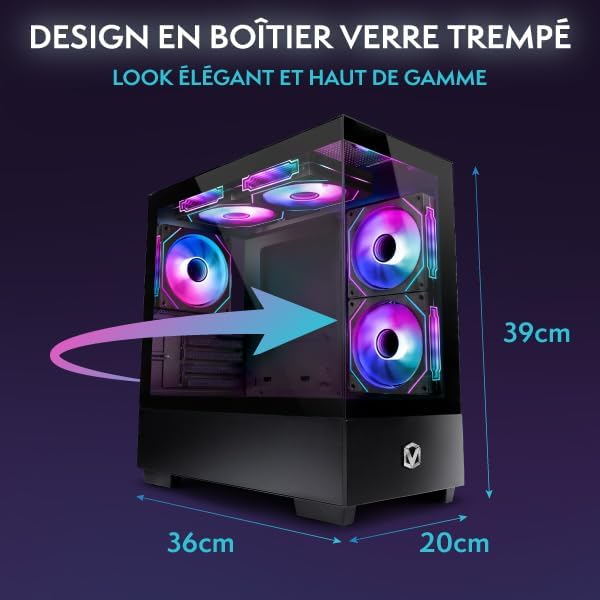
Image: Tempered Glass Case Design and Dimensions. This image shows the PC tower with its tempered glass side panel and labels its approximate dimensions: 36cm (length), 20cm (width), and 39cm (height).
Warranty Information
The Vibox I-46 Gaming PC comes with the following warranty:
- Parts: 2 Years
- Labor: Lifetime
- Spare Parts Availability: 2 Years
Please retain your proof of purchase for warranty claims.
Support
For technical assistance, warranty claims, or further inquiries regarding your Vibox I-46 Gaming PC, please contact Vibox customer support. Refer to the contact information provided with your product packaging or visit the official Vibox website for support details.


