
PHILIPS DST8041/80
Philips Azur 8000 Series Steam Iron DST8041/80 User Manual
Model: DST8041/80
Introduction
Thank you for purchasing the Philips Azur 8000 Series Steam Iron DST8041/80. This manual provides essential information for the safe and efficient operation, maintenance, and troubleshooting of your new steam iron. Please read this manual thoroughly before first use and keep it for future reference.
Important Safety Information
Always follow basic safety precautions when using electrical appliances to reduce the risk of fire, electric shock, and personal injury.
- Read all instructions before use.
- Do not leave the iron unattended while it is connected to the mains or standing on an ironing board.
- Always unplug the iron from the electrical outlet when filling with water, emptying, or when not in use.
- Keep the iron and its cord out of reach of children.
- Do not immerse the iron in water or any other liquid.
- Use the iron only for its intended purpose as described in this manual.
- Do not operate the iron with a damaged cord or plug, or if the iron has been dropped or damaged.
- Place the iron on a stable, level, heat-resistant surface when resting.
- The soleplate of the iron can become extremely hot and may cause burns. Avoid direct contact.
Product Overview
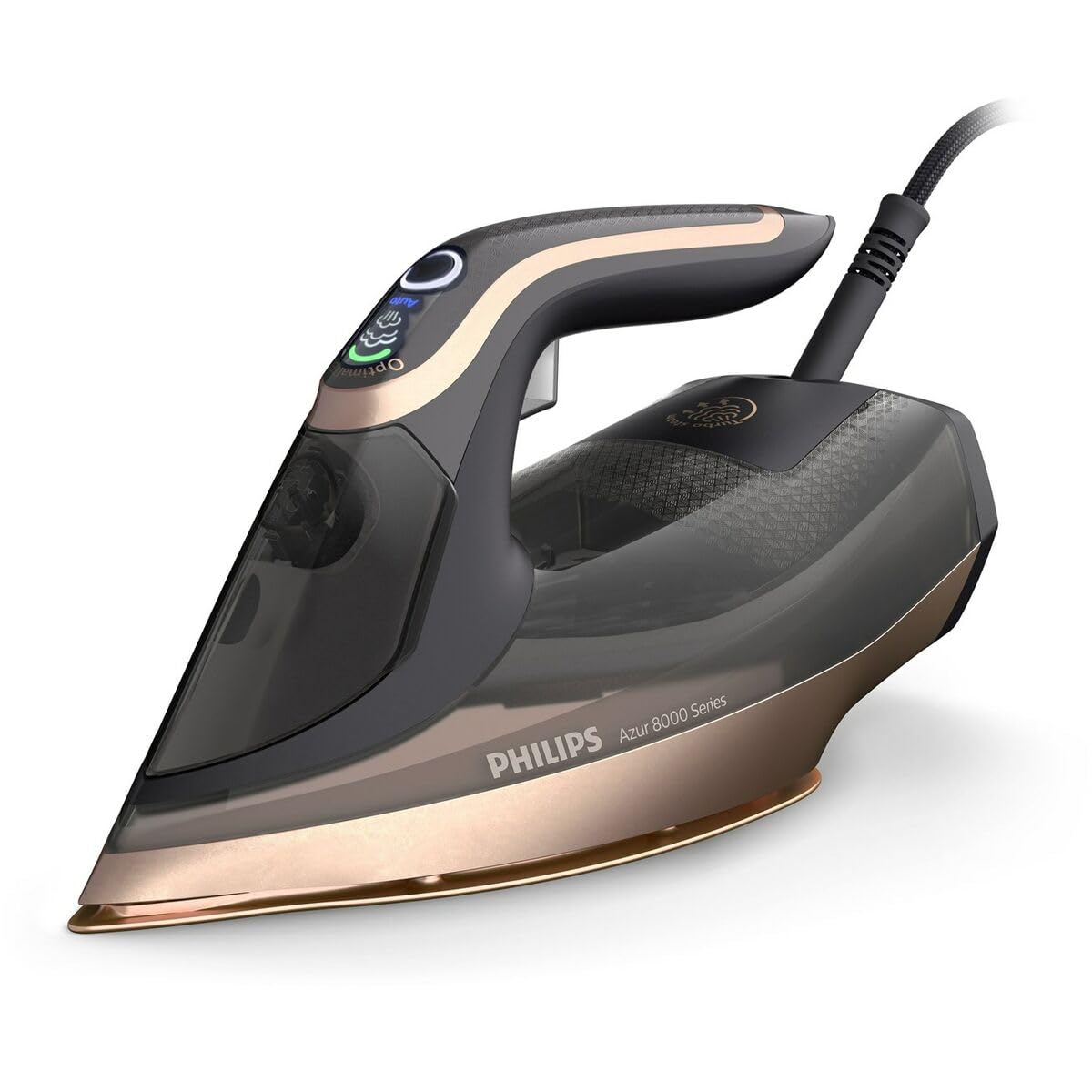
Image: Philips Azur 8000 Series Steam Iron DST8041/80, showcasing its black and bronze design with the SteamGlide Elite soleplate.
The Philips Azur 8000 Series Steam Iron DST8041/80 is designed for efficient and powerful ironing. Key components include:
- Water filling hole: For adding water to the reservoir.
- Steam trigger/button: Activates steam boost.
- Temperature control dial/button: Adjusts heat settings (if applicable, or automatic).
- Spray nozzle: For misting fabric.
- SteamGlide Elite Soleplate: High-quality soleplate for smooth gliding.
- Water tank: Transparent tank to monitor water level.
- Power cord: Connects the iron to the electrical outlet.
- Calc-clean button/function: For descaling the iron.
Setup and First Use
Before using your iron for the first time, please follow these steps:
- Unpacking: Remove all packaging materials and labels from the iron.
- Filling the Water Tank:
- Ensure the iron is unplugged.
- Open the water filling hole cover.
- Fill the water tank with tap water up to the 'MAX' indication. For optimal performance and to prolong the life of your iron, Philips recommends using demineralized water, especially in areas with hard water.
- Close the water filling hole cover securely.
- Initial Heating:
- Place the iron on its heel on a stable, heat-resistant surface.
- Plug the iron into a grounded wall socket.
- Allow the iron to heat up. The indicator light will turn off when the desired temperature is reached.
- First Ironing: Iron an old piece of fabric (e.g., a cotton cloth) for a few minutes to remove any manufacturing residues from the soleplate. Some vapor or small flakes may be emitted during this process; this is normal.
Operating Instructions
Ironing with Steam
- Ensure the water tank is filled.
- Plug in the iron and allow it to heat up.
- Select the appropriate temperature setting for your fabric. The Azur 8000 Series often features OptimalTEMP technology, which allows you to iron all ironable fabrics without adjusting the temperature. Refer to your iron's specific markings for guidance.
- Press the steam trigger/button to release steam as you iron. For a powerful steam boost, press the button multiple times.
Dry Ironing
For dry ironing, ensure the water tank is empty or the steam function is turned off (if applicable). Set the temperature according to the fabric type and iron without activating steam.
Vertical Steaming
The iron can be used for vertical steaming of hanging garments, curtains, etc.
- Fill the water tank and heat the iron to the maximum temperature setting.
- Hold the iron vertically, a few centimeters away from the fabric.
- Press the steam trigger/button to release steam.
Maintenance
Cleaning the Iron
- Always unplug the iron and allow it to cool down completely before cleaning.
- Wipe the soleplate with a damp cloth and a non-abrasive cleaner if necessary. Do not use abrasive scouring pads or harsh cleaners.
- Clean the exterior of the iron with a damp cloth.
Calc-Clean Function (Descaling)
Regularly use the Calc-Clean function to remove scale particles from the iron and maintain optimal steam performance. The frequency depends on the hardness of your water and how often you iron.
- Fill the water tank to the 'MAX' level.
- Plug in the iron and set the temperature to maximum.
- Once the iron is hot, unplug it.
- Hold the iron over a sink, press and hold the Calc-Clean button (if present, or follow specific model instructions for descaling). Shake the iron gently back and forth. Boiling water, steam, and scale particles will come out of the soleplate.
- Continue until the water tank is empty.
- Plug in the iron again and let it heat up to dry the soleplate.
- Unplug and store the iron once cooled.
Storage
- Always unplug the iron and allow it to cool down completely before storing.
- Empty the water tank after each use to prevent scale build-up.
- Store the iron on its heel in a dry, safe place.
Troubleshooting
| Problem | Possible Cause | Solution |
|---|---|---|
| Iron does not heat up. | Not plugged in, power outlet fault, or iron malfunction. | Check if the plug is securely inserted. Test the outlet with another appliance. If still no heat, contact customer support. |
| No steam or insufficient steam. | Water tank empty, temperature too low, or scale build-up. | Fill the water tank. Set the temperature to a steam-appropriate setting (usually max). Perform Calc-Clean. |
| Water leaks from the soleplate. | Temperature too low for steam, overfilled water tank, or scale build-up. | Increase temperature. Do not overfill the tank. Perform Calc-Clean. |
| Brown stains on fabric. | Scale particles, residues from previous ironing, or using scented water. | Perform Calc-Clean. Clean the soleplate. Use only plain tap water or demineralized water. |
Specifications
| Feature | Detail |
|---|---|
| Model Name | DST8041/80 |
| Item Model Number | S9141986 |
| Brand | PHILIPS |
| Wattage | 3000 watts |
| Soleplate Type | SteamGlide Elite |
| Product Dimensions | 24.64 x 17.74 x 16.83 cm |
| Item Weight | 2.06 Kilograms |
| Recommended Use | Ironing and steaming clothes |
Disposal
Do not dispose of the product with normal household waste at the end of its life cycle. Hand it over to an official collection point for recycling. By doing this, you help preserve the environment.
Customer Support
For further assistance, product registration, or warranty information, please visit the official Philips website or contact Philips customer support in your region. Keep your purchase receipt as proof of purchase.
Official Philips Store: Philips Store on Amazon.ae
Ask a question about this manual
Ask about setup, troubleshooting, compatibility, parts, safety, or missing instructions. Manuals+ will review the question and use this page’s manual context to help answer it.