
1. Introduction
Thank you for choosing the BlueBay 13-inch Sand Filter Pump. This manual provides essential information for the safe operation, installation, maintenance, and troubleshooting of your new pool filtration system. Please read these instructions thoroughly before installation and use to ensure optimal performance and longevity of the product.
This sand filter pump is designed for above-ground pools up to 8000 gallons, featuring a pre-filtering strainer basket, a durable 13-inch molded tank, and a convenient 7-way multi-port valve. The built-in timer allows for automated daily cycling, enhancing ease of use.
2. Safety Information
WARNING: To reduce the risk of injury, do not permit children to use this product unless they are closely supervised at all times.
- Always disconnect the power supply before performing any service or maintenance on the pump.
- Ensure the pump is installed on a solid, level surface to prevent tipping.
- Do not operate the pump if the power cord or plug is damaged. Contact qualified service personnel for repair.
- This pump is designed for use with above-ground pools only. Do not use for other purposes.
- Maintain proper water chemistry in your pool to prevent damage to the pump and filter media.
- Never run the pump dry. Ensure the pump is primed with water before starting.
- When switching the multi-port valve, always power off the pump first to prevent damage to the valve's internal components.
3. Package Contents
Verify that all components listed below are included in your package. If any parts are missing or damaged, please contact customer support.

Figure 3.1: All components included in the package.
- Vessel Tank Body (1)
- 1/3HP Pool Pump (1)
- Multi-Port Valve (1)
- Filter Base (1)
- Pressure Gauge (1)
- Drain Plug (1)
- Standpipe (1)
- Filter Fingers (6)
- Centralizer (for standpipe) (1)
- Pump Connectors (2)
- O-rings (various sizes)
- Transparent Cover (for pump strainer) (1)
- Fitting Screws (2)
- Allen Wrench (1)
- Big O-ring for valve (1)
- Teflon Tape (1)
- Pressure Hose (1)
4. Setup and Installation
Follow these steps for proper assembly and installation of your sand filter pump.
- Assemble the Filter Base: Attach the filter tank to the base using the provided fitting screws and allen wrench. Ensure it is stable and secure.
- Install Filter Fingers and Standpipe: Insert the filter fingers into the bottom of the standpipe. Place the assembled standpipe into the center of the filter tank. Ensure the centralizer is properly seated to hold the standpipe upright.
- Add Filter Media: Fill the filter tank with the appropriate amount of filter media (sand or filter balls). Refer to Section 6 for details on filter media compatibility and quantity. Ensure the standpipe remains centered during this process.
- Attach Multi-Port Valve: Carefully place the multi-port valve onto the top of the filter tank, aligning the standpipe with the opening in the valve. Secure the valve to the tank using the large O-ring and clamp (if applicable, not explicitly listed but implied by diagram). Ensure a tight seal.
- Connect Pump to Filter: Attach the pump to the multi-port valve using the provided connectors and O-rings. Ensure all connections are tight and sealed with Teflon tape where necessary.
- Connect Hoses to Pool: Refer to the schematic diagram below for hose connections.
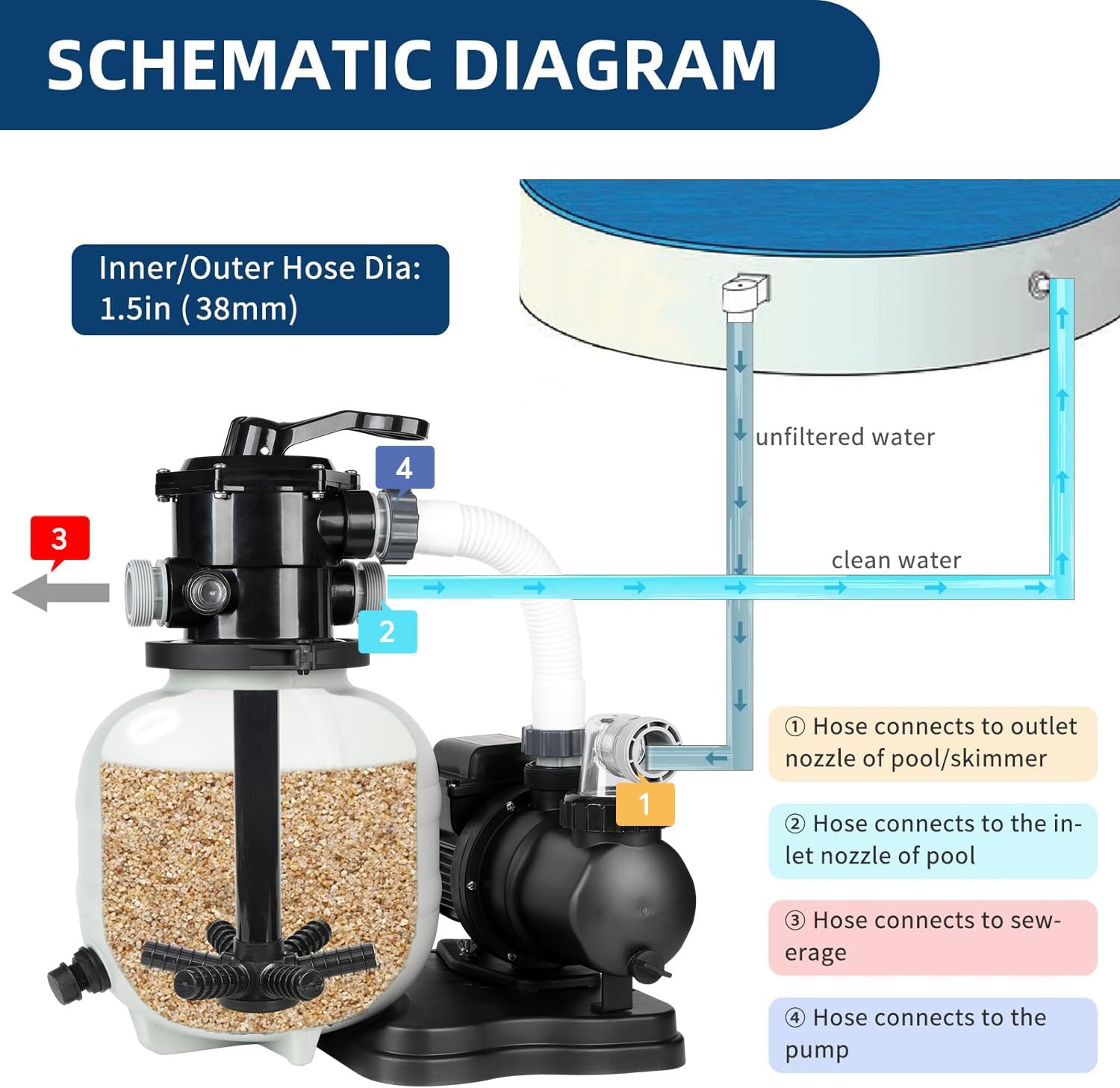
Figure 4.1: Schematic Diagram for Hose Connections.
- Hose 1: Connects to the outlet nozzle of the pool/skimmer.
- Hose 2: Connects to the inlet nozzle of the pool.
- Hose 3: Connects to sewerage (for waste/backwash).
- Hose 4: Connects to the pump.
Ensure all hose connections are secure and leak-free. The inner/outer hose diameter is 1.5 inches (38mm).
5. Operating Instructions
Your BlueBay Sand Filter Pump features a 7-way multi-port valve and a built-in timer for convenient operation.
5.1 Multi-Port Valve Functions
Important: Always turn off the pump before changing the multi-port valve position.

Figure 5.1: 7-Way Multi-Port Valve.
- Filter: Main function for regular pool water filtration.
- Backwash: Used to self-clean the sand filter (recommended once a week or when pressure gauge indicates high pressure).
- Rinse: Used after backwashing to clean the filter and settle the sand.
- Re-Circulate: Circulates water without passing through the filter media, useful for chemical treatment.
- Waste/Drain: Used to vacuum impurities directly to waste (e.g., algae) or to drain the pool.
- Open/Winter: For winterizing and safe storage (valves kept open).
- Closed: Stops all flow of water into the pump or filter.
5.2 Built-in Timer
The built-in timer allows you to set programmed working hours from 2 to 24 hours. The pump will run a daily cycle according to the first set time. You can easily turn the pump on or off by pressing the "on/off" switch without repeatedly plugging and unplugging it.

Figure 5.2: Timer Control Panel.
To set the timer, press the "TIMER" button repeatedly until the desired operating duration (e.g., 8 hours) is selected. The pump will then run for that duration daily at the time it was initially activated.
6. Maintenance
Regular maintenance ensures the efficiency and longevity of your sand filter pump.
6.1 Filter Media Compatibility
Your BlueBay sand filter is compatible with both traditional filter sand (#20 Quartz sand) and polyester pool filter balls.
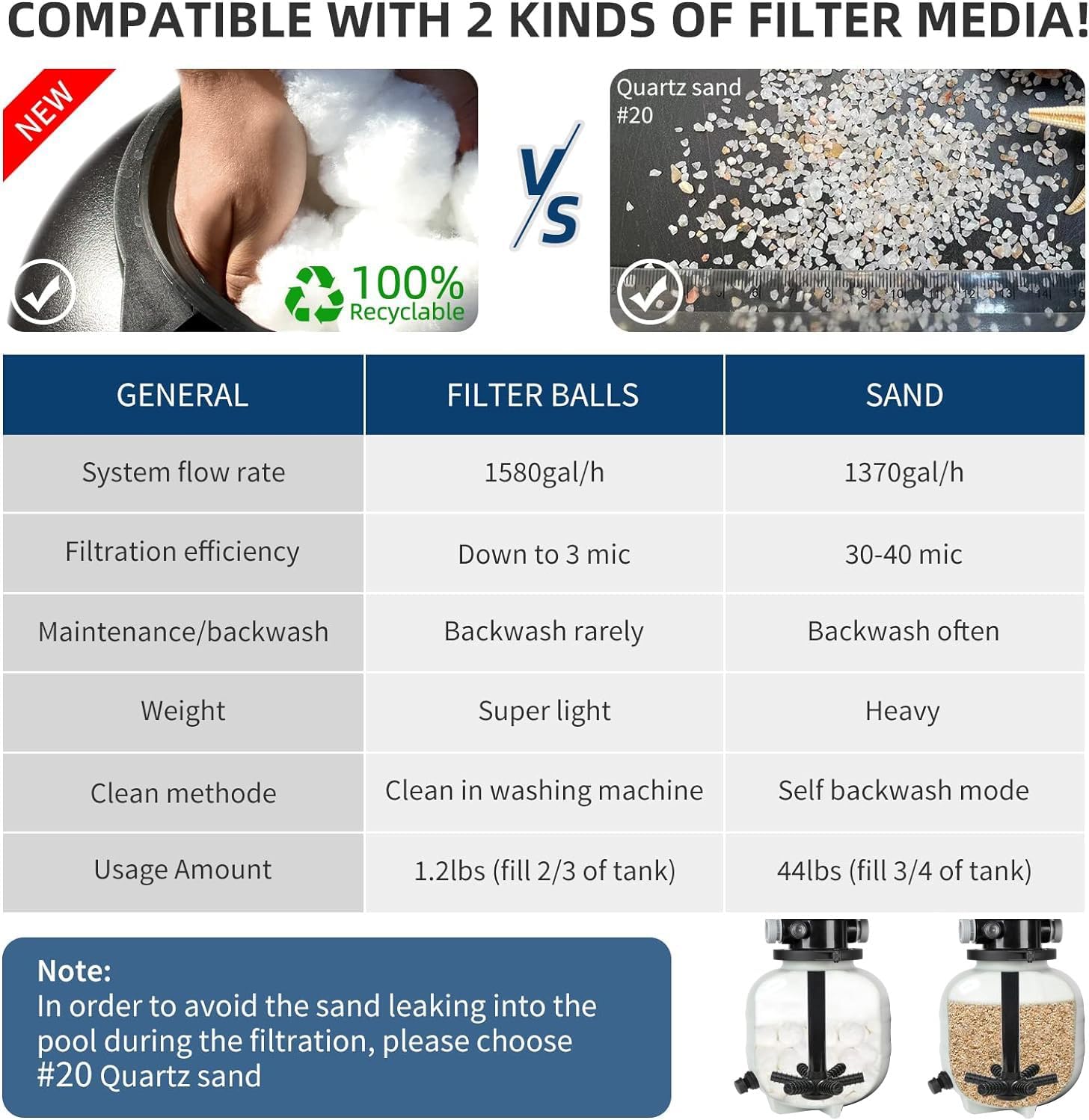
Figure 6.1: Filter Media Comparison.
| Characteristic | Filter Balls | Sand (#20 Quartz) |
|---|---|---|
| System Flow Rate | 1580 gal/h | 1370 gal/h |
| Filtration Efficiency | Down to 3 mic | 30-40 mic |
| Maintenance/Backwash | Backwash rarely | Backwash often |
| Weight | Super light | Heavy |
| Cleaning Method | Clean in washing machine | Self backwash mode |
| Usage Amount | 1.2 lbs (fill 2/3 of tank) | 44 lbs (fill 3/4 of tank) |
Note:
- Sand/filter balls are not included in the package.
- To avoid sand leaking into the pool during filtration, please choose #20 Quartz sand.
6.2 Backwashing and Rinsing
Backwashing is crucial for maintaining filter efficiency. The pressure gauge indicates when backwashing is needed. When the pressure rises significantly above its clean operating pressure, it's time to backwash.

Figure 6.2: Pressure Gauge.
- Turn off the pump.
- Set the multi-port valve to "Backwash".
- Turn on the pump and run until the water from the waste port runs clear (typically 1-2 minutes).
- Turn off the pump.
- Set the multi-port valve to "Rinse".
- Turn on the pump and run for 30-60 seconds to settle the filter media.
- Turn off the pump.
- Set the multi-port valve back to "Filter" for normal operation.
6.3 Winterizing
For safe storage during winter, ensure the pump and filter are completely drained of water. Set the multi-port valve to "Open/Winter" to allow any remaining water to drain and prevent freezing damage.

Figure 6.3: Drain Plug.
Remove the drain plug at the bottom of the filter tank to ensure all water is expelled.
7. Troubleshooting
This section addresses common issues you might encounter with your sand filter pump.
| Problem | Possible Cause | Solution |
|---|---|---|
| Pump not starting | No power; tripped breaker; motor issue | Check power connection, reset breaker. If issue persists, contact support. |
| Low water flow/pressure | Clogged filter media; clogged skimmer/pump basket; air in system; restricted hoses | Backwash/rinse filter. Clean skimmer/pump basket. Check for air leaks in connections. Ensure hoses are not kinked. |
| Water not clearing | Insufficient filtration time; incorrect filter media; poor water chemistry | Increase run time. Ensure correct filter media type and quantity. Test and adjust pool chemistry. |
| Leaking at connections | Loose connections; worn O-rings; improper sealing | Tighten all connections. Inspect and replace O-rings if damaged. Apply Teflon tape to threaded connections. |
| Pump is noisy | Air in system; cavitation; motor bearing wear | Check for air leaks. Ensure adequate water supply to pump. If noise persists, contact support. |
| Sand returning to pool | Broken lateral/standpipe; incorrect sand type/size | Inspect filter fingers and standpipe for damage. Ensure #20 Quartz sand is used. |
8. Specifications
Detailed technical specifications for the BlueBay 13-inch Sand Filter Pump (Model: BSF5200T).
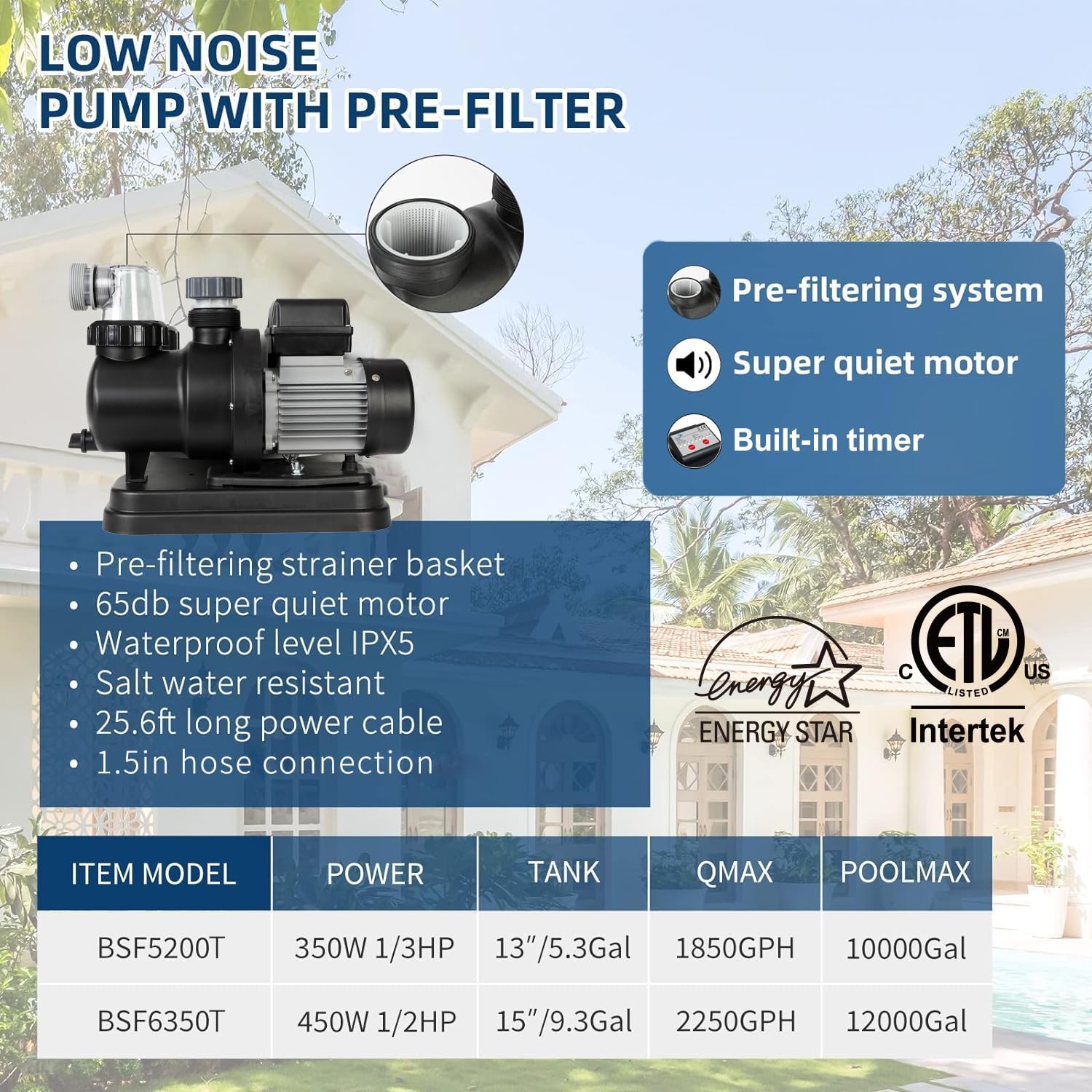
Figure 8.1: Product Features and Model Comparison.
| Feature | Specification |
|---|---|
| Model Number | BSF5200T |
| Size | 13 inch |
| Horsepower (HP) | 1/3 HP |
| Pump Flow Rate (GPH) | 1850 GPH |
| System Flow Rate (with 44lbs sand) | 1370 GPH |
| System Flow Rate (with 1.2lbs filter balls) | 1580 GPH |
| Recommended Pool Size | Up to 7890 Gallons |
| Voltage | 115 Volts |
| Wattage | 350 Watts |
| Noise Level | 65 dB |
| Material | Polypropylene (PP) |
| Product Dimensions | 15 x 15 x 23 inches |
| Item Weight | 26.7 pounds |
| Hose Connection | 1.5 inches |
| Certifications | Energy Star, ETL, CE, GS, TÜV |
The pump is designed with a pre-filtering strainer basket and is salt water resistant. It includes a 25.6 ft long power cable.
9. Warranty and Support
BlueBay products are manufactured to high-quality standards. For warranty information, technical support, or replacement parts, please contact BlueBay customer service directly. Keep your purchase receipt as proof of purchase for any warranty claims.
You may also find additional support and product information by visiting the official BlueBay store on Amazon: BlueBay Amazon Store.