
1. Introduction
Thank you for choosing the Mcbazel 2 Zone Water Timer. This device is designed to automate your garden and lawn watering, providing efficient and customizable irrigation for two separate zones. Please read this manual carefully before use to ensure proper installation, operation, and maintenance.
Key Features:
- Dual-Zone Control: Manage two independent watering zones with separate scheduling.
- Flexible Scheduling: Set specific start times, frequencies (hourly, daily, weekly), and durations (1 minute to 4 hours).
- Manual Watering Modes: Provides immediate watering for Zone 1, Zone 2, or both.
- Rain Delay Function: Pause watering for 24, 48, or 72 hours to prevent overwatering.
- Durable Design: IP54 rated high-impact plastic construction with a metal filter for longevity.
- User-Friendly Interface: 2.5-inch LED display for clear information and low-battery indicator.

Figure 1: Mcbazel 2 Zone Water Timer overview.
2. Package Contents
Verify that all items listed below are included in your package. If any items are missing or damaged, please contact customer support.
- 1 x 2 Zone Water Timer
- 1 x Accessory Set (includes additional connectors/washers)
- 1 x User Manual (this document)

Figure 2: Package contents of the water timer.
3. Specifications
| Feature | Specification |
|---|---|
| Working Water Pressure | 7.25-116 PSI (0.5-8 Bar) |
| Maximum Flow | 35 L/Min (10 Gal/Min) |
| Waterproof Grade | IP54 |
| Working Temperature | 3°C-50°C (37.4°F-122°F) |
| Irrigation Frequency | 1-12 hours or 1-7 days |
| Irrigation Duration | 1-240 minutes (4 hours) |
| Water Inlet | NH (US) for 3/4" thread, BSP (EU) for 3/4" or 1" thread |
| Water Outlet | For 3/4" standard pipe |
| Battery | 2 x AA (1.5V) alkaline batteries (not included) |
4. Setup
Follow these steps to set up your Mcbazel 2 Zone Water Timer:
- Install Batteries: Open the battery compartment on the back of the timer. Insert two (2) new 1.5V AA alkaline batteries, ensuring correct polarity. Close the compartment securely to maintain the IP54 waterproof rating.
- Attach to Faucet: Screw the water timer onto your outdoor water faucet. Ensure a tight fit to prevent leaks. The inlet fits 3/4" or 1" standard faucets.
- Connect Hoses: Screw your garden hoses onto the Zone 1 and Zone 2 outlets at the bottom of the timer. These outlets fit 3/4" standard pipes.
- Turn on Faucet: Once the timer is installed and hoses are connected, fully open your water faucet. The timer will control the water flow.

Figure 3: Step-by-step installation guide.
5. Operating Instructions
5.1 Controls Overview
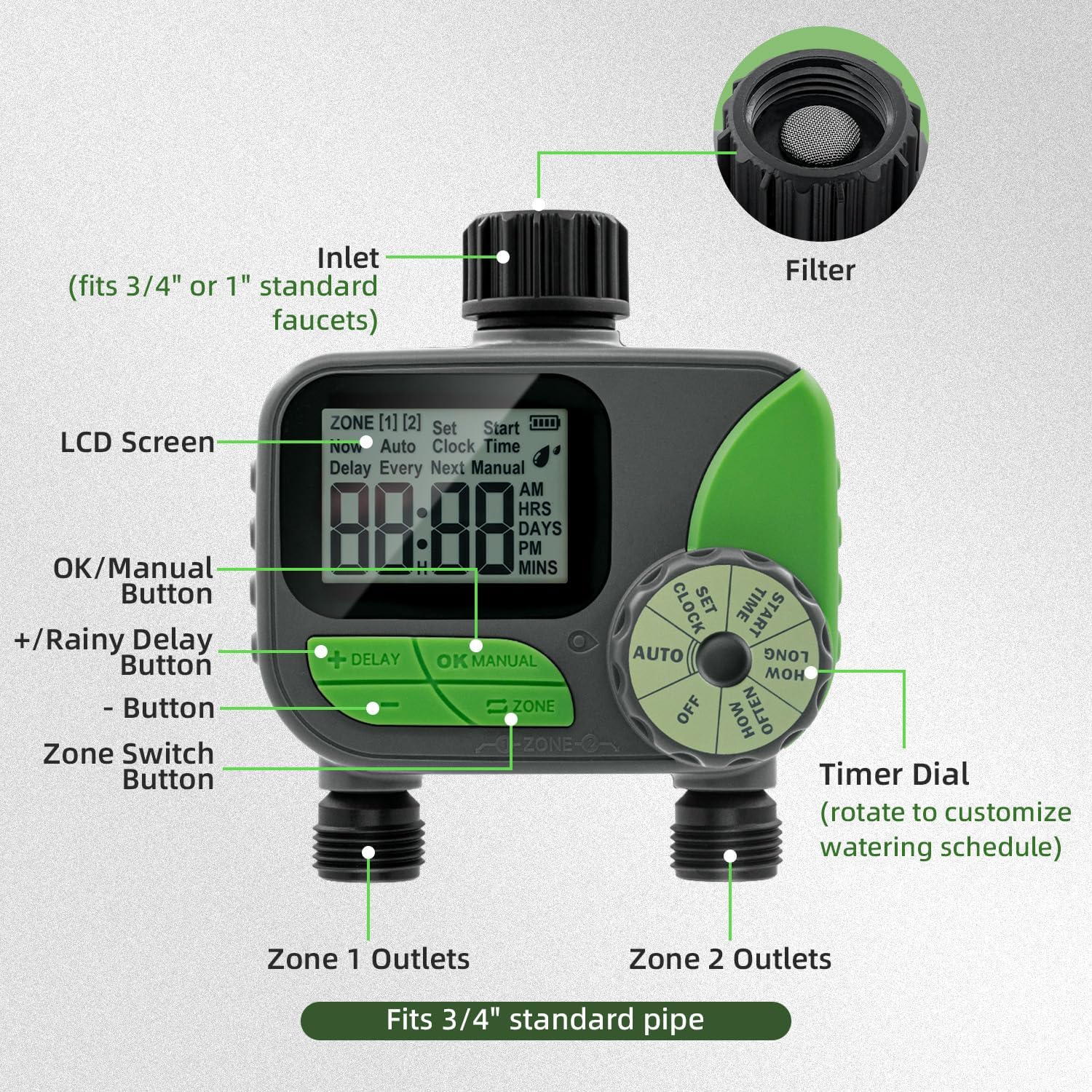
Figure 4: Labeled components of the water timer.
- LCD Screen: Displays current time, watering schedule, battery status, and other information.
- Timer Dial: Rotate to select different modes: OFF, AUTO, SET CLOCK, START TIME, HOW LONG, HOW OFTEN.
- +/- Buttons: Adjust values (time, duration, frequency).
- OK/MANUAL Button: Confirm settings or initiate manual watering.
- DELAY Button: Activates or deactivates the rain delay function.
- ZONE Button: Switches between Zone 1 and Zone 2 for programming.
5.2 Setting the Clock
- Rotate the Timer Dial to SET CLOCK.
- Use the +/- buttons to set the current time (AM/PM).
- Press OK/MANUAL to confirm and move to the next setting (e.g., minutes).
- Repeat until the current time is set.
5.3 Programming Automatic Watering (AUTO Mode)
The timer allows independent programming for two zones.
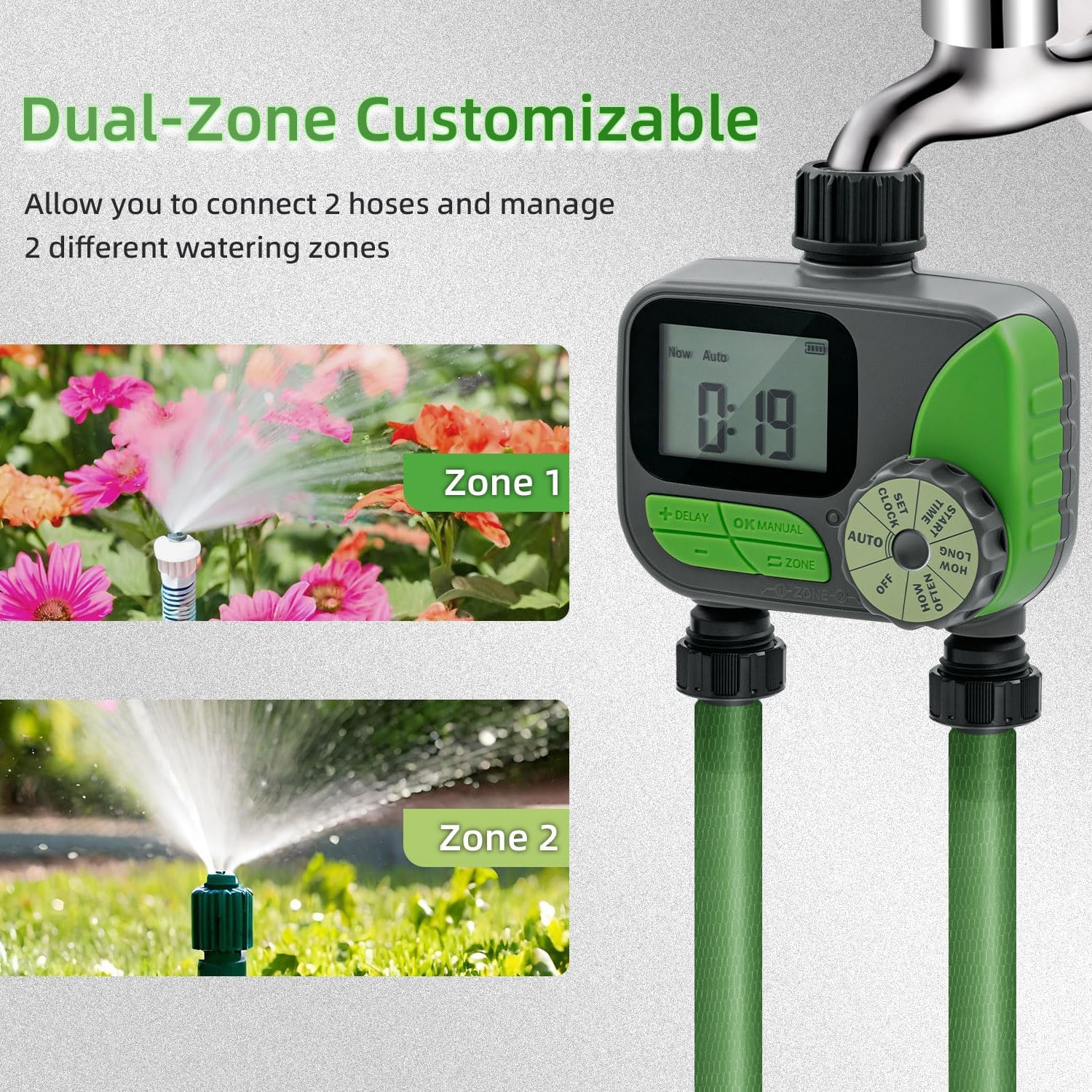
Figure 5: Dual-zone customizable control in action.
- Select Zone: Press the ZONE button to select either Zone 1 or Zone 2. The selected zone will be indicated on the LCD screen.
- Set START TIME:
- Rotate the Timer Dial to START TIME.
- Use +/- buttons to set the desired watering start time.
- Press OK/MANUAL to confirm.
- Set HOW LONG (Duration):
- Rotate the Timer Dial to HOW LONG.
- Use +/- buttons to set the watering duration (1 minute to 240 minutes).
- Press OK/MANUAL to confirm.
- Set HOW OFTEN (Frequency):
- Rotate the Timer Dial to HOW OFTEN.
- Use +/- buttons to set the watering frequency (e.g., every 12 hours, every day, every 2 days, up to 7 days).
- Press OK/MANUAL to confirm.
- Activate AUTO Mode: After setting all parameters for both zones, rotate the Timer Dial to AUTO. The timer will now operate according to your programmed schedule.

Figure 6: Example of automatic watering schedules for two zones.
5.4 Manual Watering
Manual watering allows you to water immediately without affecting your programmed schedule.
- Ensure the Timer Dial is in AUTO mode.
- Press the OK/MANUAL button.
- Use the ZONE button to select Zone 1, Zone 2, or both.
- Use the +/- buttons to set the desired manual watering duration (1 to 240 minutes).
- Press OK/MANUAL again to start manual watering.
- To stop manual watering, press OK/MANUAL again or rotate the dial to OFF and then back to AUTO.
5.5 Rain Delay Function
The rain delay function temporarily pauses your watering schedule to prevent overwatering during rainy periods.
- Ensure the Timer Dial is in AUTO mode.
- Press and hold the DELAY button for a few seconds.
- Use the +/- buttons to select the desired delay duration: 24 hours, 48 hours, or 72 hours.
- Press OK/MANUAL to confirm the rain delay. The display will show the remaining delay time.
- To cancel the rain delay, press and hold the DELAY button again until the delay indicator disappears.

Figure 7: Activating the rain delay mode.
6. Maintenance
6.1 Cleaning the Filter
The water timer includes a built-in metal filter at the inlet to prevent debris from entering and blocking the water pipes. Regularly check and clean this filter to ensure optimal performance.
- Turn off the water faucet and remove the timer.
- Unscrew the inlet connection and carefully remove the metal filter.
- Rinse the filter under running water to remove any accumulated debris.
- Reinsert the clean filter and reattach the timer to the faucet, ensuring a secure fit.

Figure 8: Built-in metal filter and battery compartment.
6.2 Battery Replacement
The timer features a low-battery indicator on the LCD screen. When the battery icon flashes or is low, replace the batteries promptly to avoid interruption of watering schedules. The timer will automatically shut off valves to prevent water wastage if batteries are critically low.
- Turn off the water faucet.
- Open the battery compartment on the back of the timer.
- Remove the old AA batteries and insert two new 1.5V AA alkaline batteries, observing correct polarity.
- Close the battery compartment securely.
6.3 Winter Storage
To prevent damage from freezing temperatures, remove the water timer from the faucet before the first frost. Drain any remaining water from the timer and store it indoors in a dry, protected location. Remove batteries if storing for extended periods.
7. Troubleshooting
| Problem | Possible Cause | Solution |
|---|---|---|
| Timer does not turn on/LCD is blank. | Dead or incorrectly installed batteries. | Replace batteries with new 1.5V AA alkaline batteries, ensuring correct polarity. |
| No water flow. |
|
|
| Water leaks from connections. | Loose connections or worn washers. | Tighten all connections. Check and replace rubber washers if necessary. |
| Timer not watering at scheduled times. |
|
|
8. Warranty and Support
Mcbazel products are designed for reliability and performance. For specific warranty information, please refer to the warranty card included with your purchase or visit the official Mcbazel website. If you encounter any issues or have questions not covered in this manual, please contact Mcbazel customer support for assistance.
Customer Support: Please refer to your purchase documentation or the Mcbazel website for contact details.
9. Important Safety Information
- Do not immerse the timer in water. It is IP54 rated for splash resistance, not submersion.
- Use only 1.5V AA alkaline batteries. Do not mix old and new batteries or different types of batteries.
- Remove batteries if the timer will not be used for an extended period.
- Do not expose the timer to extreme temperatures outside its operating range (3°C-50°C / 37.4°F-122°F).
- Keep out of reach of children.
- Do not attempt to disassemble or repair the unit yourself. This will void the warranty.