
1. Introduction
Thank you for choosing the Vowtop C26-Blue Smart Watch. This device is designed to enhance your daily life with advanced features for communication, fitness tracking, and health monitoring. It boasts a rugged military-grade design, a vibrant 1.96-inch HD AMOLED display, and an extra-long battery life. This manual provides essential information for setting up, operating, and maintaining your smart watch.
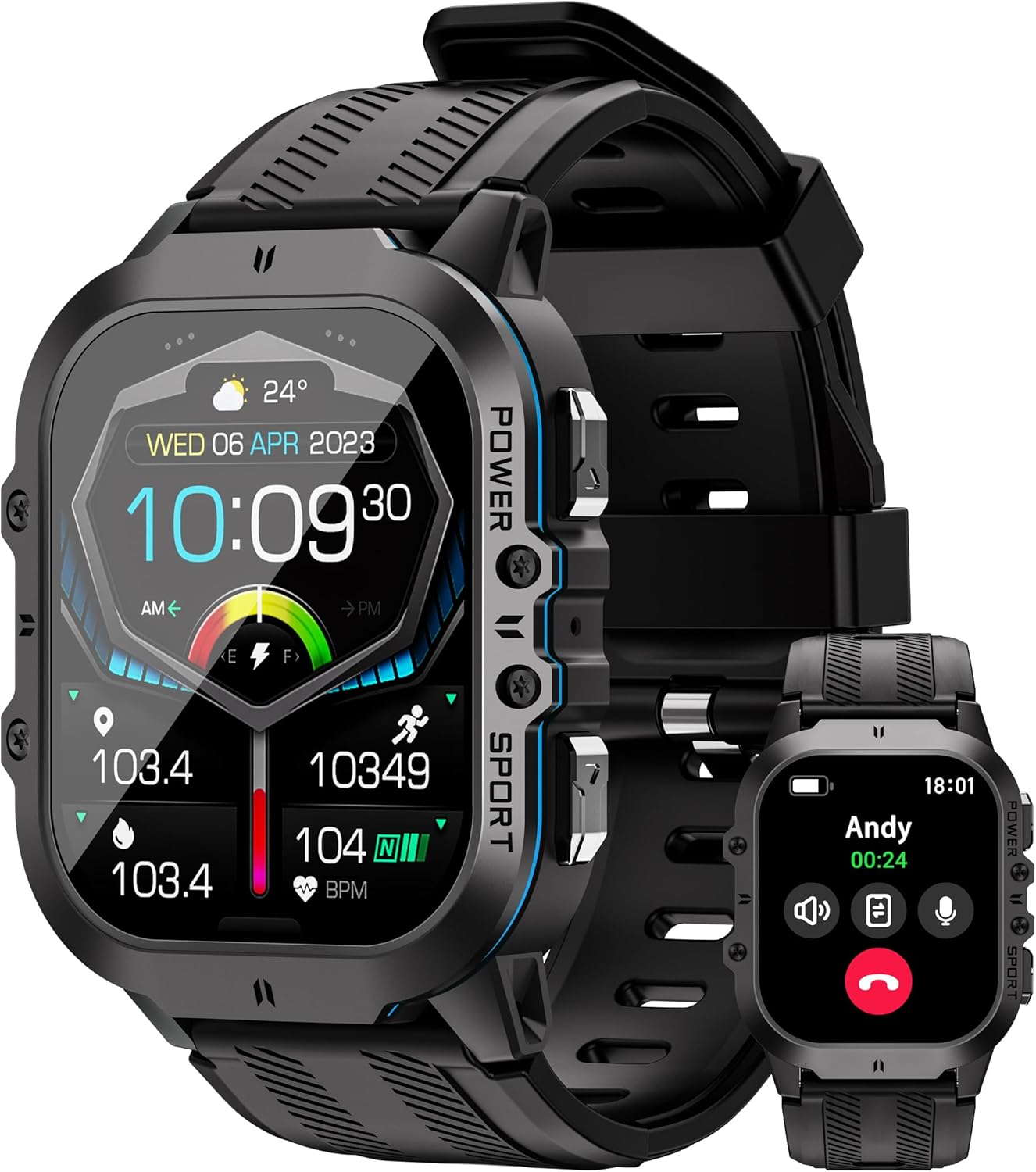
Image: Front view of the Vowtop C26-Blue Smart Watch, displaying various metrics like time, date, weather, steps, and heart rate.
2. What's in the Box
Please check the package contents to ensure all items are present:
- 1 × Vowtop C26-Blue Smart Watch
- 1 × User Manual (this document)
- 1 × Charging Cable
3. Setup Guide
3.1 Charging the Device
Before first use, fully charge your smart watch. Connect the magnetic charging cable to the charging contacts on the back of the watch and plug the USB end into a compatible power adapter (not included) or a computer's USB port. The watch features a 350mAh battery.

Image: The smart watch displaying a charging icon, highlighting its 350mAh battery capacity and intelligent protection features.
3.2 Powering On/Off
- Power On: Press and hold the 'POWER' button (usually the top right button) until the screen lights up.
- Power Off: Press and hold the 'POWER' button, then select 'Power Off' on the screen.
3.3 App Installation and Pairing
To unlock the full potential of your Vowtop Smart Watch, download and install the companion app on your smartphone. The app is typically named 'FitCloudPro' or similar, and can be found on the App Store (iOS) or Google Play Store (Android).
- Download and install the app on your smartphone.
- Ensure Bluetooth is enabled on your smartphone.
- Open the app and follow the on-screen instructions to create an account or log in.
- In the app, navigate to the device pairing section and search for your smart watch (e.g., 'C26-Blue').
- Confirm the pairing request on both your phone and the watch.
4. Operating Your Smart Watch
4.1 Display and Navigation
The watch features a 1.96-inch HD AMOLED display with 410x502 pixel resolution, protected by Panda Glass. Navigation is primarily touch-based with additional physical buttons.
- Swipe Down: Access quick settings menu.
- Swipe Right: View a half-screen menu with recently used functions.
- Swipe Left: Access activity, heart rate, weather, sleep, and other data screens.
- Main Side Button (POWER): Press to display the main menu list.
- Secondary Side Button (SPORT): Can be assigned two functions (click and press) for quick access, e.g., AI assistant.

Image: The smart watch showcasing four distinct menu interface styles, allowing users to choose their preferred layout for accessing various functions.
4.2 AI Voice Assistant and Bluetooth Calling
The watch is equipped with an AI Voice Assistant for hands-free operation and supports Bluetooth calls directly from your wrist.
- AI Voice Assistant: Activate by raising your hand or using the assigned secondary button. Use voice commands for tasks like checking weather, playing music, setting alarms, or making calls.
- Bluetooth Calling: Once paired with your phone, you can answer, make, and dial calls directly from the watch.

Image: The smart watch illustrating its AI voice wake-up and Bluetooth calling capabilities, showing examples of voice commands and an incoming call screen.
4.3 Notifications
Receive notifications from various apps, including SMS, WeChat, and WhatsApp, directly on your watch. Note that notifications are primarily delivered via vibrations.
4.4 Watch Faces
Personalize your watch with over 200 visual watch faces. You can choose from super watch faces, custom options, or IP watch faces through the companion app.

Image: The smart watch showcasing a selection of over 200 customizable watch faces, including digital, analog, and data-rich designs.
4.5 Sport Modes
The watch supports over 100+ sports modes for customized workout tracking, providing intimate private guidance for various activities.

Image: The smart watch interface showing a selection of over 100 sport modes, including walking, running, climbing, and cycling, with real-time tracking data.
4.6 Health Monitoring
Equipped with high-precision biometric tracking sensors, the watch continuously measures and analyzes key health metrics.
- Heart Rate: Continuous monitoring and analysis of your heart rate.
- Blood Pressure: Measures and tracks blood pressure levels.
- SpO2 (Blood Oxygen): Monitors blood oxygen saturation levels.
- Sleep Quality: Records and analyzes your sleep patterns to provide a comprehensive sleep assessment.

Image: The smart watch displaying detailed graphs and readings for heart rate, blood pressure, and blood oxygen monitoring, indicating live body recognition for accurate tracking.

Image: The smart watch interface showing scientific monitoring of sleep mode, with a graph of sleep duration over 7 days.
5. Maintenance
5.1 Cleaning Your Smart Watch
To maintain accuracy and prevent skin irritation, regularly clean your smart watch. Use a soft, lint-free cloth to wipe the screen and watch body. For the sensors on the back, gently wipe with a slightly damp cloth. Avoid using harsh chemicals or abrasive materials.
5.2 Durability Features
The Vowtop C26-Blue Smart Watch is built with an aviation-grade metal casing and Zinc alloy keys, designed for noise reduction and shock absorption. It is weatherproof, dust-resistant, drop-resistant, and scratch-resistant, meeting military standards for endurance in extreme conditions.
- Water Resistance: 10M / 1ATM water resistance. Suitable for splashes, rain, and shallow-water activities, but not for diving or high-pressure water activities.
- Temperature Tolerance: Operational capability at temperatures as low as -40°C and resistant to high temperatures.

Image: The smart watch depicted in challenging environments (underwater, desert, fire, ice), emphasizing its military-grade quality, anti-impact, 1ATM & IP68 waterproof, dust-proof, and -40°C to 70°C temperature test ratings.
6. Troubleshooting
6.1 Connectivity Issues
If your watch fails to connect or pair with your smartphone:
- Ensure Bluetooth is enabled on both devices.
- Make sure the watch is sufficiently charged.
- Restart both your smartphone and the smart watch.
- Try unpairing and re-pairing the device through the app.
- Ensure the companion app is up to date.
6.2 Notifications Not Appearing
If you are not receiving notifications:
- Check notification settings within the companion app to ensure app alerts are enabled.
- Verify that your phone's notification settings allow the companion app to send notifications.
- Ensure the watch is connected via Bluetooth.
- Note that notifications are primarily vibration-based and may not be audible.
6.3 Inaccurate Health Data
For best results with health monitoring:
- Ensure the watch is worn snugly on your wrist, but not too tight.
- Keep the sensor area on the back of the watch clean.
- Avoid excessive movement during measurements.
7. Specifications
| Feature | Detail |
|---|---|
| Model Name | C26-Blue |
| Brand | Vowtop |
| Screen Size | 1.96 Inches |
| Screen Resolution | 410x502 pixels |
| Display Type | AMOLED |
| Shape | Square |
| Battery Capacity | 350 mAh |
| Battery Type | Lithium Ion |
| Connectivity Technology | Bluetooth 5.2 |
| Water Resistance | 1ATM (10 meters) |
| Memory Storage Capacity | 128 MB |
| Special Features | Activity Tracker, 100+ Sport Modes, Voice Control, Phone Call, Notifications, Health Monitoring (HR, SpO2, BP, Sleep) |
| Item Weight | 52 Grams (1.83 ounces) |
| Package Dimensions | 8.74 x 3.78 x 0.75 inches |
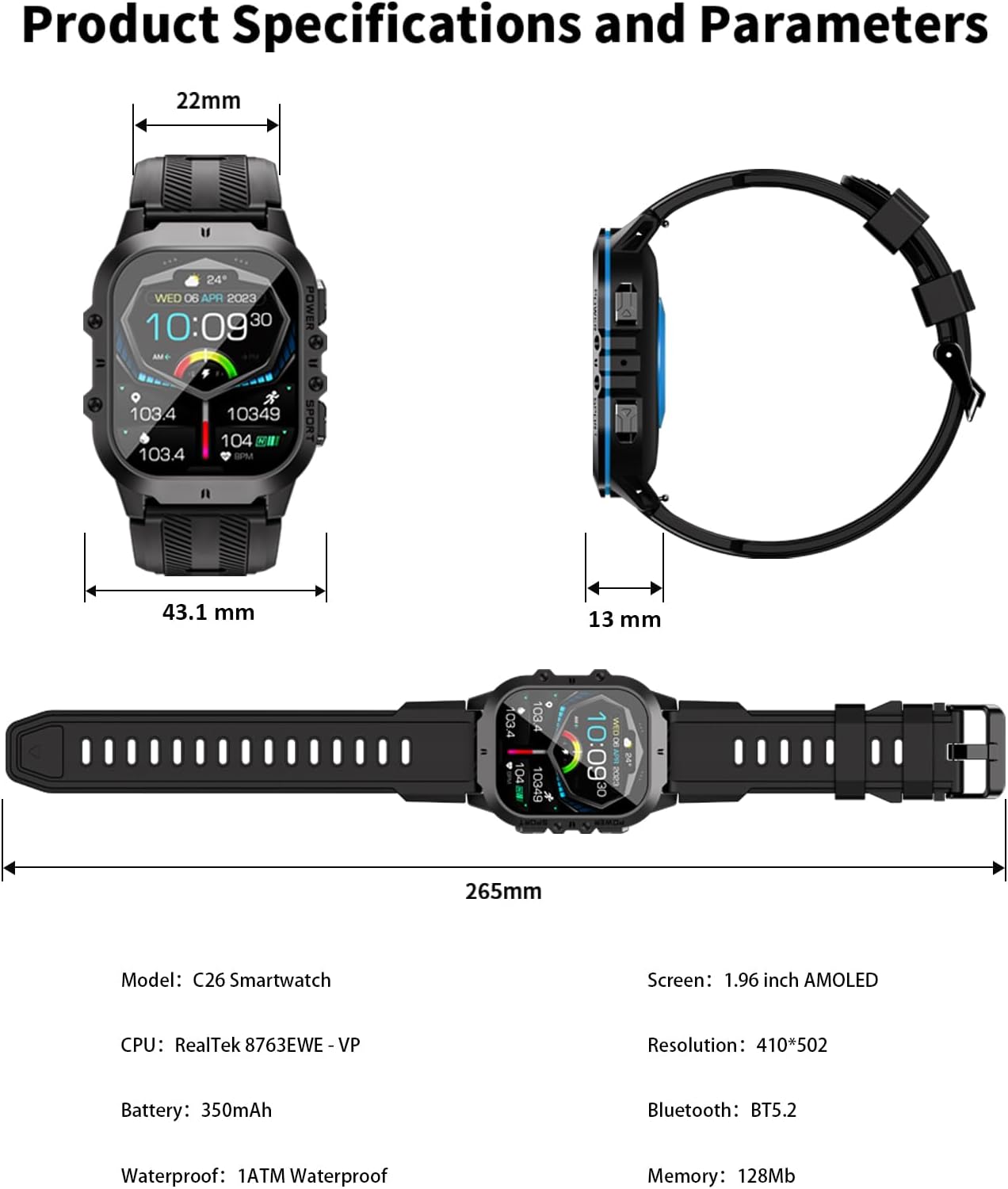
Image: A technical diagram illustrating the physical dimensions (22mm band width, 43.1mm watch width, 13mm thickness, 265mm total length) and key specifications of the C26 Smartwatch, including CPU, screen type, resolution, battery, Bluetooth, waterproof rating, and memory.
8. Warranty and Support
8.1 Warranty Information
The Vowtop C26-Blue Smart Watch comes with a 1 Year Warranty from the date of purchase. This warranty covers manufacturing defects and ensures the product meets its specified performance standards under normal use. Please retain your proof of purchase for warranty claims.

Image: A graphic indicating a '1 Year Warranty' for Vowtop products, ensuring customer confidence.
8.2 Customer Support
For any questions, technical assistance, or warranty claims, please contact Vowtop Customer Service. We offer 24 Hours Customer Service to assist you.
- Refer to the contact information provided in your product packaging or on the official Vowtop website.
- For online support, visit the Vowtop Store on Amazon.

Image: A graphic highlighting '24 Hours Customer Service' for Vowtop, emphasizing continuous support.